The Best Free AI Tools Online in 2026: What You Need to Know
Scr0ll d0wn to D0VVNL0AD
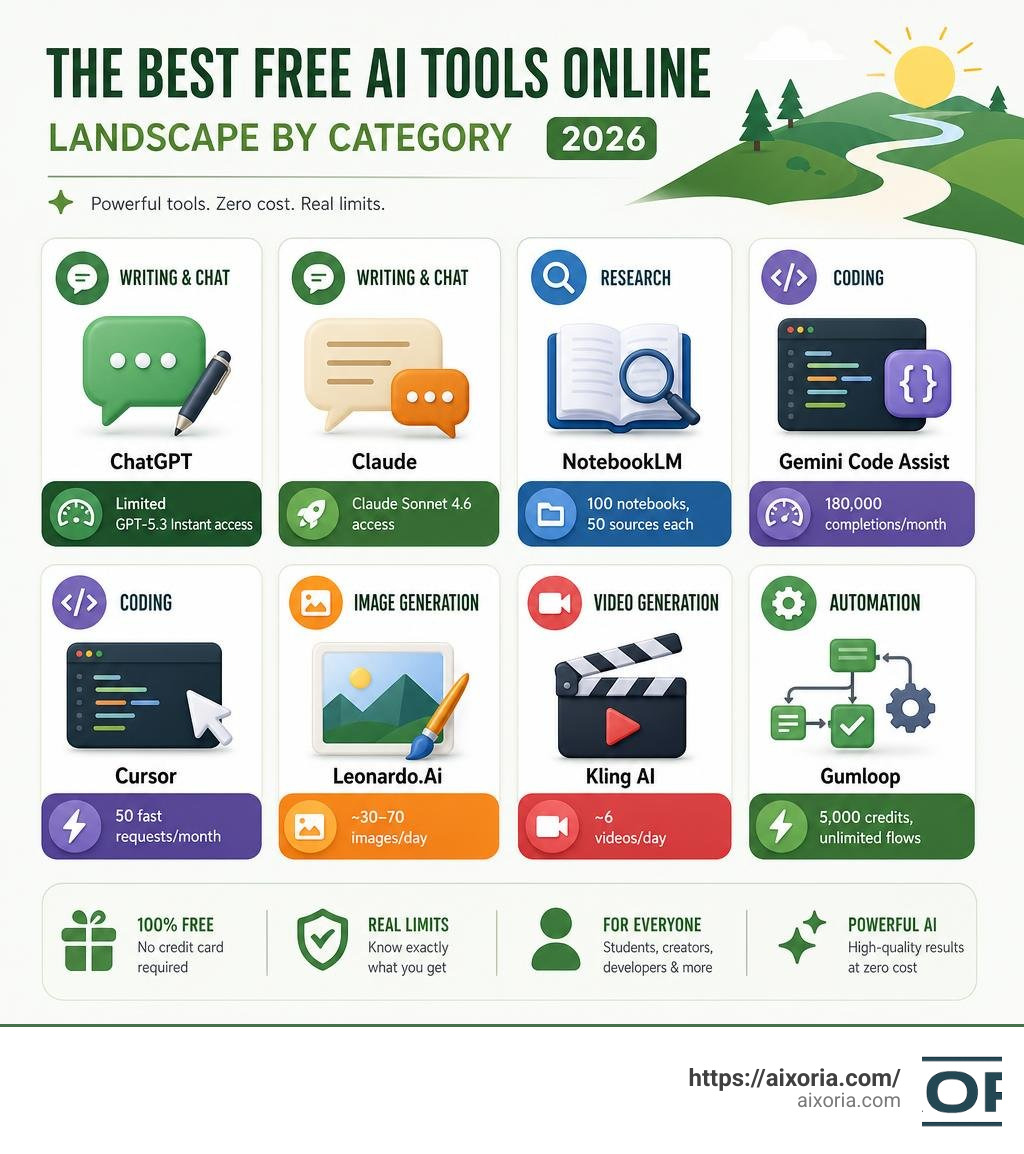
The best free AI tools online in 2026 are more powerful than ever — and many of them cost nothing to use. Here’s a quick look at the top picks across key categories:
| Category | Top Free Tool | Key Free Limit |
|---|---|---|
| Writing & Chat | ChatGPT | Limited GPT-5.3 Instant access |
| Writing & Chat | Claude | Claude Sonnet 4.6 access |
| Research | NotebookLM | 100 notebooks, 50 sources each |
| Coding | Gemini Code Assist | 180,000 completions/month |
| Coding | Cursor | 50 fast requests/month |
| Image Generation | Leonardo.Ai | ~30–70 images/day |
| Video Generation | Kling AI | ~6 videos/day |
| Automation | Gumloop | 5,000 credits, unlimited flows |

There’s a common belief that powerful AI sits behind expensive paywalls. That’s simply not true anymore.
The open-source movement and the rise of freemium models have made enterprise-grade AI accessible to anyone with a browser. Tools that would have cost hundreds of dollars per month just a few years ago now offer generous free tiers — no credit card required.
Whether you’re a student, a developer, a marketer, or just someone curious about AI, there are solid free options in every category: writing, coding, image generation, video, research, and automation.
This guide covers what’s actually worth your time in 2026 — and what to watch out for.
How to Choose the Best Free AI Tools Online
With thousands of new platforms launching monthly, finding the right tool can feel like finding a needle in a digital haystack. You do not want to spend hours signing up for a service only to realize its “free tier” allows you to generate exactly half a sentence before asking for your credit card.
When evaluating whether a free AI tool is worth adding to your daily workflow, we recommend looking at four main pillars:
- Daily and Monthly Usage Limits: Does the tool offer a recurring daily allotment (like Leonardo’s 150 tokens) or a hard monthly cap? Daily resets are generally much better for consistent, long-term workflows.
- Data Privacy and Security: Is your input data being used to train the underlying models? While this might not matter for a casual creative project, it is critical when handling sensitive business documents, proprietary code, or academic research.
- Integration Options: The best tools do not live on isolated browser tabs. They integrate smoothly with your existing ecosystem, whether that is VS Code, Google Workspace, or Slack.
- Output Restrictions: Watch out for hidden traps like low-resolution limits, heavy watermarks, or strict non-commercial licenses.

Evaluating the Best Free AI Tools Online for Writing and Text
The text generation landscape is highly competitive, and the top foundational models constantly try to outdo each other. In 2026, the free tiers of these platforms are incredibly robust.
At the center of the conversational space is ChatGPT, which remains the ultimate generalist. Its free tier gives users access to GPT-5.3 Instant and GPT-4o mini, along with a limited number of Deep Research reports (up to 5 per month). It is highly versatile, making it fantastic for general brainstorming, organizing structured data, and drafting long-form content.
If you are looking for a tool that sounds less like a robot and more like a talented human writer, Claude is the crowd favorite. The free version grants access to Claude Sonnet 4.6. Its writing style is widely considered the most natural and nuanced on the market. Claude’s free tier also supports Model Context Protocol (MCP) connectors, web search, memory, and native integrations with Slack and Google Workspace.
When using these tools for content creation, you might need a specialized writing workflow. If you want to dive deeper into dedicated text generation platforms, check out our guide on the Best Free AI Writing Generators in April 2026 Top Free Picks.
For those times when you have written a draft but need to rephrase it for a different audience, using one of the 7 Best Free AI Paraphrasing Tools in 2026 Tested can save you hours of manual editing. Additionally, if you find that your generated text sounds a bit too robotic or fails to connect with your readers, you can polish it using the 9 Best Free AI Humanizer Tools in 2026 to ensure your voice remains authentic and engaging.
Finding the Best Free AI Tools Online for Research and Data Analysis
Researching used to mean opening fifty browser tabs and drowning in PDFs. Today, free AI research tools act as personalized research assistants that anchor their answers directly to your uploaded documents, preventing the “hallucinations” that plague standard chatbots.
Google’s NotebookLM is a absolute game-changer in this space. Its free tier is incredibly generous, allowing you to create up to 100 notebooks. Each notebook can hold up to 50 sources, and each source can contain up to 500,000 words. You can upload PDFs, Google Docs, slide decks, or paste web URLs. NotebookLM then creates a grounded AI expert on that specific material. It can even generate an “Audio Overview” — a highly realistic, two-host podcast discussing your documents.
Another spectacular tool is Humata, which specializes in parsing complex scientific papers and technical documents. The free plan allows you to process up to 60 pages per month, providing clickable citations that point you directly to the exact paragraph where the information lives.
For students and academic professionals looking to build a highly efficient study suite, we have compiled the ultimate list of resources in our 5 Best Free AI Tools for Students Researchers 2026 Guide.
If your work is less about academic papers and more about spreadsheets, numbers, and databases, you will find tailored recommendations in our 5 Best Free AI Tools for Data Analysis 2026 Guide to help you automate your calculations and visualize trends without spending a dime.
Top Free AI Tools for Creative Media and Coding
Generative art, high-fidelity video generation, and autonomous coding assistants have advanced rapidly. What used to require expensive local hardware or heavy cloud subscriptions can now be run directly through free web interfaces.

Free AI Image and Video Generators
Generating high-quality visual media for free used to mean dealing with ugly watermarks and tiny resolutions. In 2026, several platforms offer stunning, production-ready outputs on their free tiers.
| Tool | Monthly/Daily Free Allowance | Best Suited For | Commercial Use on Free Tier? |
|---|---|---|---|
| Leonardo.Ai | 150 fast tokens daily (~30–70 images) | Photorealism, character design, asset creation | Yes |
| Recraft AI | 30 credits daily (~25 images) | Vector art, graphic design, clean branding | Yes |
| Ideogram | ~10–20 prompts daily | Typography, posters, text-heavy designs | Yes |
| Kling AI | 66 daily credits (~6 videos) | Realistic cinematic video clips | No (Personal use only) |
| Free.ai | 30,000 tokens daily (with free account) | Multi-modal creation (text, images, music, video) | Yes |
For creators wanting to build high-end visual assets, Leonardo.Ai remains a top choice due to its rapid daily token reset. If you are focused on graphic design and need clean vectors, Recraft AI is highly recommended.
If you are looking for an all-in-one suite where you can experiment across multiple creative mediums without signing up, the Free AI Generator — Create Anything with AI | Free.ai is an outstanding option. It hosts open-source models like FLUX for image generation and CogVideoX for video, providing a comprehensive, cost-free playground. You can access their full suite at Free.ai – Every AI Tool, Completely Free, which serves as a massive directory of over 400 free tools.
For a deeper dive into the best image creation tools, take a look at our hands-on review of the 20 Best Free AI Image Generation Tools in 2026 Tested for Creators.
Free AI Coding Assistants and Developer Tools
For software engineers and hobbyists, free AI coding tools have completely transformed the development lifecycle.
Cursor has established itself as one of the most popular AI-powered IDEs. Built as a fork of VS Code, it allows you to import all your extensions with a single click. The Cursor Hobby plan offers unlimited slow requests on standard models and 50 fast requests per month, making it perfect for building complex applications on a budget.
For developers working within the Google Cloud ecosystem, Gemini Code Assist for individuals provides an incredibly generous free tier of up to 180,000 code completions per month. Google also offers Google AI Studio, where developers can prototype with Gemini models and get up to 1,000 free API requests per day when authenticated with a personal Google account.
If you are looking to build data pipelines or automate back-end data workflows, you should explore our curated list of the Best Free ETL Tools for Developers in 2026 to streamline your engineering pipeline.
Understanding the Limitations of Free AI Tiers
While the best free AI tools online are incredibly powerful, they are not charity projects. AI companies use free tiers to acquire users, train their models, and test features. Understanding these limitations will help you avoid unexpected blocks in your workflow:
- Message Throttling and Peak Hours: During high-traffic periods, free users are the first to be throttled. Your fast GPT-4o or Claude Sonnet responses might suddenly downgrade to slower, older models.
- The Privacy Trade-Off: Unless you opt-out or use enterprise-grade APIs, many free tools default to using your conversations, uploads, and prompts to train their next-generation models. Never upload proprietary code, medical records, or sensitive financial data to a standard free chatbot.
- Commercial Restrictions: Some free tiers restrict the commercial use of their outputs. For instance, while Leonardo.Ai allows you to use your free generations commercially, video tools like Kling AI often restrict free outputs to personal, non-commercial use.
- Watermarks and Resolution Caps: Free video and image generators often limit your download resolution or embed a visible watermark in the corner of your media.
To bypass these limitations entirely, many developers and privacy-conscious users are turning to local, self-hosted AI models. Using tools like Ollama or LM Studio, you can run powerful open-source models (like Llama 3 or Qwen 2.5) locally on your own computer. This setup gives you completely free, private, and unlimited AI access with no monthly fees.
Frequently Asked Questions about Free AI Tools
Which free AI tool is best for beginners?
For general use, ChatGPT is the easiest and most user-friendly starting point. If you want to explore a wider variety of specialized tools without dealing with constant sign-ups and paywalls, we recommend checking out our list of the 13 Best Free Apps Similar to ChatGPT.
If you want an instant, no-registration chat experience powered by advanced open-source models, you can also try Free AI Chat – Talk to AI Instantly | Free.ai, which offers a straightforward interface and a generous daily token allowance.
Are free AI tools safe and private to use?
Generally, yes, but you must read the fine print. Established tools from Google, Microsoft, and OpenAI are highly secure, but they do use free-tier data to train their models unless you manually opt out in your account settings. For sensitive workloads, always look for platforms that explicitly state they do not store or train on your data, or opt for local offline models.
Can I use free AI-generated content commercially?
It depends entirely on the tool’s terms of service and the underlying model license. Open-source models (such as those using MIT or Apache 2.0 licenses) generally allow complete freedom for commercial use. Always verify the specific licensing terms of the platform you are using before publishing commercial work.
Conclusion
The landscape of the best free AI tools online in 2026 proves that you do not need a premium subscription to build apps, write compelling copy, generate beautiful art, or conduct deep academic research. By combining the right free tiers — like Claude for writing, NotebookLM for research, and Cursor for development — you can build a highly professional, zero-cost workflow.
To stay updated on the latest AI releases, tutorials, and deep-dives, explore our comprehensive guides on AIxoria. If you are looking for additional resources on open-source AI and clean directories, you can also check out zeroregai.com – zeroregai Resources and Information. to expand your toolkit.
4 thoughts on “Best Free AI Tools Online in 2026: Top Picks by Category”