Zapier vs Make vs n8n for AI Automation Beginners: Which Should You Choose?
Scr0ll d0wn to D0VVNL0AD
Zapier vs Make vs n8n for AI automation beginners comes down to ease, cost, and control. Pick Zapier if you want the simplest way to build your first workflow. Pick Make if you want a visual builder and more room to grow on a tight budget. Pick n8n if you are comfortable with technical setup and want deeper control over complex AI workflows.
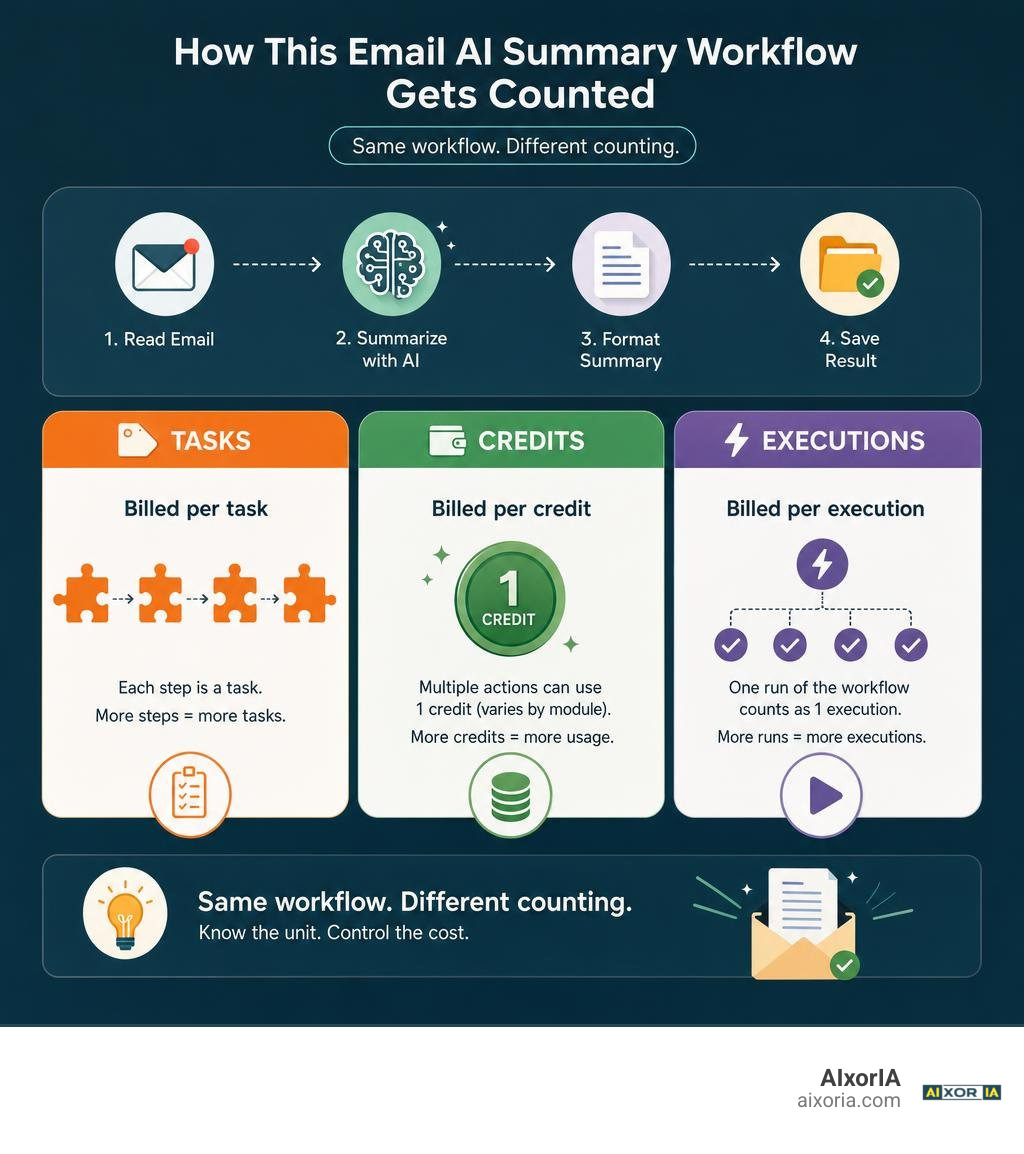
The biggest cost difference is what each tool counts: Zapier bills by task, Make by credit, and n8n Cloud by workflow execution. That matters when one email summary grows into a workflow with many steps. Start by testing the same small job in your top two choices: read an email, summarize it with AI, and save the result. Then check both the setup effort and the usage count before you commit.
Understanding the Core Differences: Zapier vs Make vs n8n for AI Automation Beginners
When diving into workflow orchestration, the most critical lesson is understanding how platforms charge for automated work. Before you start building, it helps to understand what are AI and automation and how these systems execute repetitive tasks.
The fundamental divergence among these three tools lies in their billing units:
- Zapier (Per-Task Billing): Every successful action step inside a Zap counts as a billable task. If your automation has five action steps following a trigger, one single run consumes five tasks.
- Make (Per-Credit/Operation Billing): Make charges per module action (called credits or operations). Every time a module processes an item, filters data, or passes an output to another tool, it burns at least one credit.
- n8n (Per-Execution Billing): n8n bills per overall workflow run on its cloud service, regardless of whether that run contains three steps or thirty steps. If you self-host the open-source Community Edition, runs are unlimited aside from your own server expenses.
To see why this matters, consider a 10-step AI workflow running 10,000 times in a month. On Zapier, that requires roughly 100,000 billed tasks. On Make, it uses approximately 100,000 credits. On n8n Cloud, it counts as exactly 10,000 executions. For high-step pipelines, n8n can slash operational costs by 80% to 90% compared to Zapier.
| Feature / Metric | Zapier | Make | n8n (Cloud / Self-Hosted) |
|---|---|---|---|
| Primary Billing Unit | Per Action Task | Per Credit / Operation | Per Full Execution |
| Starting Paid Price | $19.99/mo (Professional) | $9 – $12/mo (Core) | €20/mo (Starter) or Free self-hosted |
| Free Tier Allowance | 100 tasks/month | 1,000 credits/month | Unlimited self-hosted / 1,000 trial |
| Native Integrations | 8,000+ Apps | 2,000+ Apps | 400 – 500 Apps (plus HTTP API node) |
| Visual Interface | Linear Top-to-Bottom | Drag-and-Drop Canvas | Node Graph Canvas |
| Best For | Fastest non-technical setup | Budget-conscious visual builders | Developers & scalable AI agents |
Evaluating Free Tiers and Usability in Zapier vs Make vs n8n for AI Automation Beginners
Free tiers give you a sandbox to learn without financial pressure. If you are exploring the 7 best free workflow automation tools in 2026, you will find noticeable differences across these three platforms:
- Zapier’s Free Tier: Offers 100 tasks per month. However, it restricts free accounts to basic, two-step linear Zaps (one trigger and one action). Because most AI automations require at least three steps (Trigger to AI Model Prompt to Destination App), Zapier’s free tier is rarely viable for complete AI workflows without an upgraded trial.
- Make’s Free Tier: Provides 1,000 operations per month and unlocks multi-step routing, visual branching, and webhook access right away. You can comfortably build and test several multi-step AI prototypes each month without paying anything.
- n8n Community Edition: Completely free to download and self-host on your own hardware or virtual private server (VPS). There are no artificial caps on workflows, steps, or executions.
Technical Complexity and Coding Requirements: Do Beginners Need Code?
A common question among beginners is whether they must know JavaScript or Python to build workflows. You do not need coding expertise to build your first AI automations.
Zapier and Make are designed as complete no-code environments. You configure drop-down menus, map data tags visually, and let the software handle underlying API communication.
n8n offers a visual drag-and-drop interface as well, but it exposes the underlying JSON data structure at every node. When you want to manipulate text or transform array data, n8n provides a dedicated Code Node supporting JavaScript and Python. While you can construct end-to-end workflows using no-code building blocks or AI-generated snippets from ChatGPT and Claude, n8n still asks you to understand how data payloads are structured. Guides like Build AI Automation Without Code: Your First Workflow demonstrate that beginners can achieve great results without writing scripts manually.
Platform-by-Platform Breakdown for AI Automation Newcomers
Zapier: The Fastest Path for Absolute Beginners
Zapier remains the most established name in workflow automation, boasting over 8,000 native app integrations. If you need to connect niche SaaS tools or legacy marketing software, Zapier almost certainly has a pre-built connector ready to authenticate with a single click.
For newcomers evaluating the best AI tools for business productivity, Zapier’s workflow builder offers quick setup. Its built-in AI Copilot lets you describe what you want in plain English (for example: “When a new lead fills out Typeform, summarize their project goals with ChatGPT and post it to Slack”). The Copilot automatically constructs the draft workflow for you. Most beginners can build, test, and deploy their first working automation in under twenty minutes.
The tradeoff is cost. Zapier’s linear model is simple, but as soon as your automations expand into multi-step pipelines handling hundreds of items a week, the per-task billing adds up quickly.
Make: The Visual Canvas and Sweet Spot for Solo Creators
Make (formerly Integromat) provides an infinite visual canvas where you connect modular bubbles into multi-branching trees. With over 2,000 native apps and an active library of over 7,900 community templates, it hits the sweet spot for visual thinkers.
If you are an independent operator searching for the best AI tools for entrepreneurs in 2026, Make offers advanced logic without enterprise pricing. Its interface features built-in routers, filters, array aggregators, and error-handling directives. Make also includes Maia, an AI assistant that helps configure scenario logic using natural language prompts.
Make’s primary challenge for complete novices is visual density. Connecting iterators and data aggregators requires learning how list variables work, but the payoff is immense flexibility at a modest monthly price point.
n8n: The AI-Native Powerhouse for Scalable Automations
n8n has evolved into the preferred platform for technical operators and builders exploring the best AI tools for building AI agents in 2026. Built on a fair-code model, n8n’s visual node graph connects cleanly with custom APIs, webhooks, and advanced developer tools.
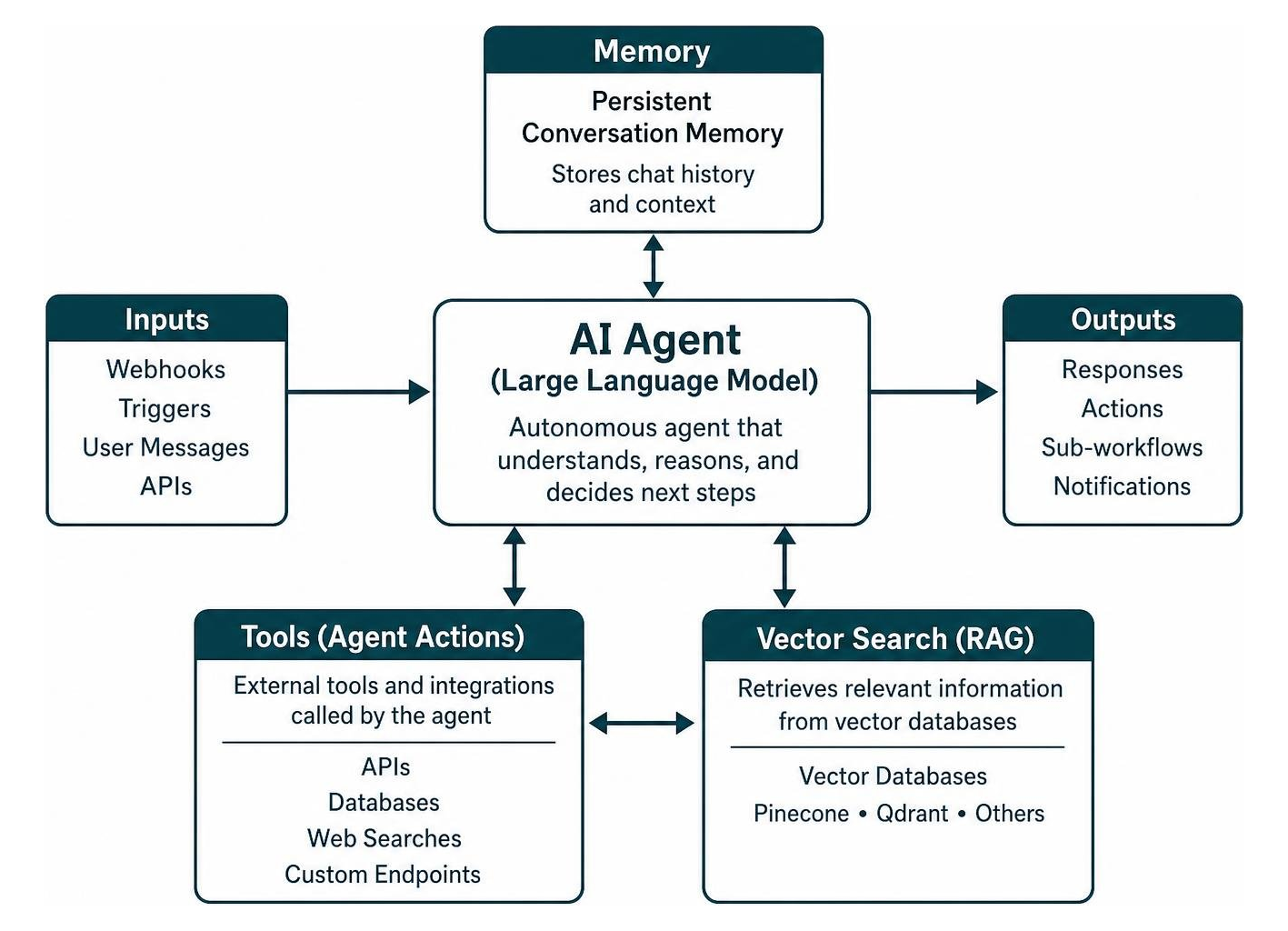
n8n stands out because of its deep, native AI agent architecture. It provides over 70 purpose-built AI nodes, seamless LangChain integration, vector database connectors (such as Pinecone and Qdrant), persistent conversation memory, and Model Context Protocol (MCP) support.
Instead of treating an AI prompt as a simple text box, n8n treats Large Language Models as autonomous agents capable of calling external tools, querying databases, and executing sub-workflows. Furthermore, because n8n can be self-hosted on your own infrastructure, it ensures complete data sovereignty for sensitive business records.
Practical Comparison: Connecting AI Models and Building Your First Workflow

Connecting Large Language Models like OpenAI’s GPT-4o, Anthropic’s Claude 3.5 Sonnet, or Google’s Gemini is straightforward across all three platforms. Each tool allows you to plug in your own API keys, set system instructions, adjust model temperature, and inject dynamic trigger data directly into user prompts.
Step-by-Step Scenario: Email Triage to Google Docs
To understand how each tool performs in everyday scenarios, let’s examine a standard beginner automation: reading incoming emails, generating an executive summary with an AI model, and recording the output in Google Docs. Resources like How to Build an AI Workflow in 2026 (No Code) outline similar foundational builds.
Here is how the experience compares across platforms:
- Zapier: Connecting Gmail and Google Docs takes less than two minutes via OAuth pop-up windows. You insert the native “ChatGPT” or “Zapier AI by Zapier” module in the middle, paste your prompt, and map the output fields directly into your Google Doc template. The process is smooth and takes roughly ten minutes from start to finish.
- Make: You add a Gmail trigger bubble, connect it to an OpenAI module, and route the output to a Google Docs module. If an email contains multiple attachments or body parts, Make uses an Array Aggregator module to compile the text cleanly before sending it to the LLM. Setup takes around fifteen minutes.
- n8n: Connecting the OpenAI node and formatting the prompt is effortless. However, connecting consumer Gmail accounts on self-hosted instances requires setting up a Google Cloud Project (GCP) and configuring OAuth credentials manually—a multi-step authentication process that can feel daunting to complete novices. Once configured, though, the workflow runs reliably without consuming paid step credits.
Native AI Support and Agentic Capabilities Compared
When evaluating these tools against the best workflow automation software in 2026 tested, their approaches to agentic AI highlight distinct design philosophies:
- Zapier Agents: Focuses on accessible, conversational agents that execute Zaps based on user chat commands. It is beginner-friendly but abstracts away deep configuration.
- Make AI Modules: Allows you to place AI processing nodes anywhere on the visual canvas for parsing, sentiment detection, vision analysis, and text generation.
- n8n Advanced Agents: Gives you direct control over agent architectures. You can visually attach vector store retrievers (RAG), conversational memory buffers, and custom tool-calling endpoints to a central AI Agent node.
Decision Framework: Which Platform Should You Learn First?
Picking the right software depends on your current technical comfort, budget, and long-term automation goals. If you are comparing the 7 best AI workflow automation tools for startups 2026, use this decision path to guide your choice:

Choosing the Right Path: Zapier vs Make vs n8n for AI Automation Beginners
- Choose Zapier If: You have zero technical background, your company already pays for software tools, and you want your first automation running in fifteen minutes without troubleshooting data formats.
- Choose Make If: You are a solo creator, freelancer, or growing team wanting a visual canvas with powerful branching logic, generous free/budget pricing, and room to grow without code.
- Choose n8n If: You want to build sophisticated, multi-step AI agents, manage high-volume data pipelines without per-task charges, or require strict privacy through on-premise self-hosting.
Frequently Asked Questions About Beginner AI Automation
Can I migrate my AI workflows between Zapier, Make, and n8n if I switch platforms?
No direct export-and-import mechanism exists between these platforms. Each provider uses proprietary JSON schemas to define nodes, triggers, filters, and credentials.
If you decide to switch tools down the road, you will need to rebuild your workflows manually. However, the foundational concepts—prompt structures, API keys, trigger settings, and routing logic—transfer directly. Once you understand the core logic of automation, rebuilding a workflow in another tool takes only a fraction of your initial build time.
Is self-hosting n8n truly free for a beginner?
The software itself is free and open-source under a Sustainable Use License. However, self-hosting requires computing infrastructure.
If you run n8n on a cloud VPS provider (like Hetzner, DigitalOcean, or AWS), you will pay between $5 and $15 per month for server resources. You will also be responsible for managing Docker updates, SSL certificates, database backups, and server security. If you prefer to avoid server maintenance, n8n Cloud offers managed hosting starting at €20 per month.
Which platform has the best documentation and templates to help get unstuck?
- Make features an intuitive template library with more than 7,900 community-built scenarios ready to clone with a single click, alongside comprehensive visual video academies.
- Zapier provides the largest collection of beginner help articles, troubleshooting guides, and active community forum discussions on the web.
- n8n maintains an active open-source forum where community members share over 6,700 workflow templates. Because n8n workflows export as raw JSON, users can simply copy and paste workflow code directly into their canvas to import complete setups instantly.
Conclusion
Mastering workflow automation is one of the highest-leverage skills you can build. Selecting the right platform is not about chasing what is trendiest; it is about matching your immediate technical needs with a sustainable cost model.
At AIxorIA, we curate expert-driven tutorials, software comparisons, and productivity strategies to help professionals streamline operations and scale effectively. Pick the platform that fits your current comfort level, build your first simple email or content workflow today, and expand your automated systems one step at a time.
1 thought on “Zapier vs Make vs n8n: Best AI Automation Tool for Beginners”