Start with how you want to run it. Choose a hosted tool if you want to build workflows without managing a server. Choose a self-hosted tool if control over your data matters more than easy setup. Then check the free plan’s run limits, the apps you need, and whether AI calls cost extra.
Scr0ll d0wn to D0VVNL0AD
For a small team, the best choice is the tool that can run your actual process within your budget, not the one with the longest feature list. This guide compares those trade-offs across visual builders, code-friendly tools, and AI-first platforms.
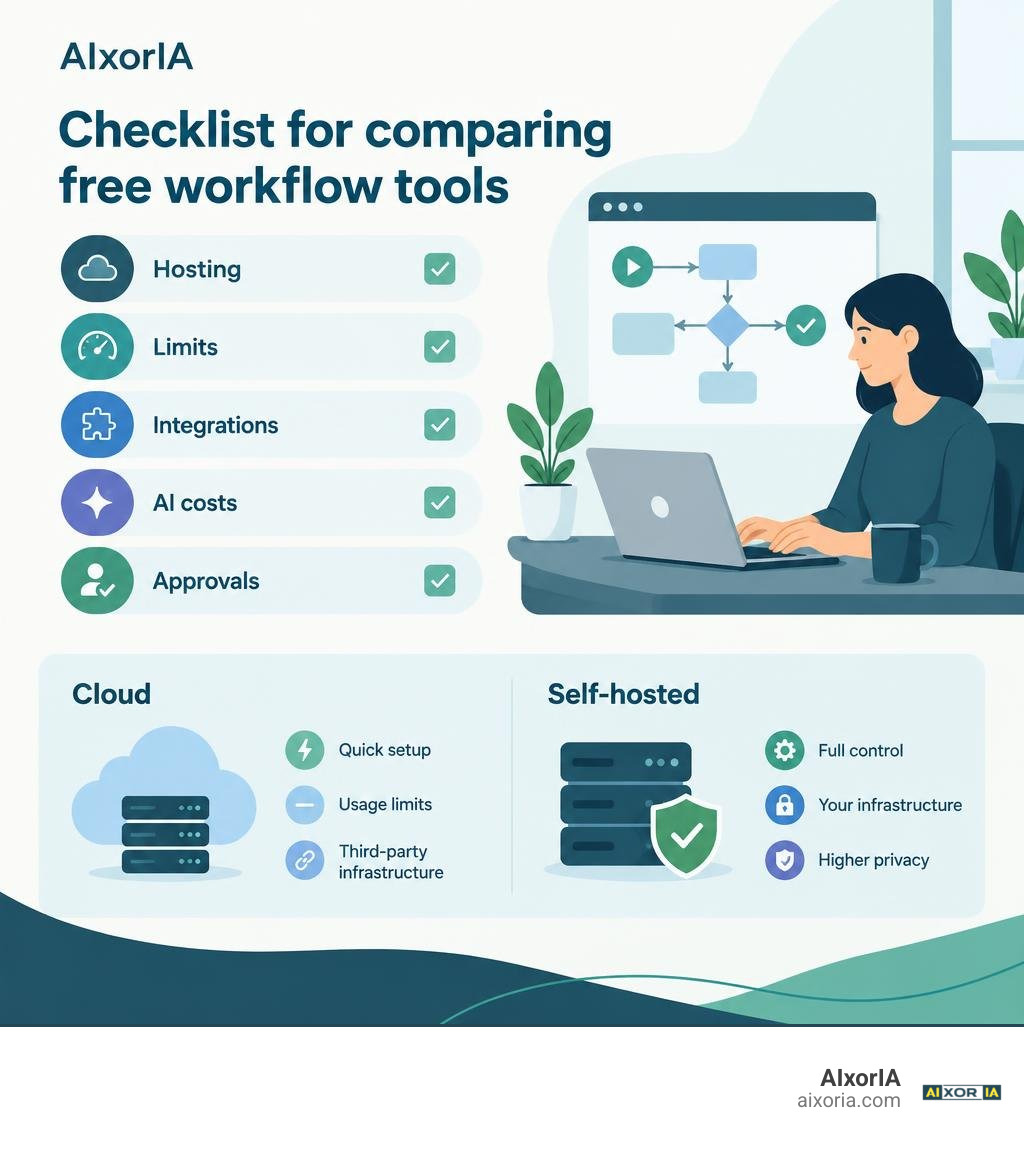
Architecture Comparison: Cloud Platforms vs Self-Hosted Workflow Tools Free
Choosing the right deployment architecture comes down to balancing operational overhead against absolute control. When searching for workflow tools free of recurring subscription costs, you quickly realize there are two fundamentally different engineering paths: running an engine on your own servers or leaning on a cloud provider’s managed infrastructure.
Managed cloud workflow services let you jump straight to dragging canvas nodes without configuring reverse proxies or provisioning storage. However, they come with built-in boundaries. Free tiers on SaaS platforms often enforce strict execution caps, limit concurrent runs, and charge hefty premiums once your usage grows. Every payload running through a cloud service passes through third-party servers, which introduces compliance headaches when dealing with proprietary databases or sensitive customer records.
Self-hosting gives you total data sovereignty. When you host an open-source engine in-house, your payloads never leave your private network, eliminating rate limits imposed by third-party billing engines. You can process millions of events without worrying about a sudden bill at the end of the month.
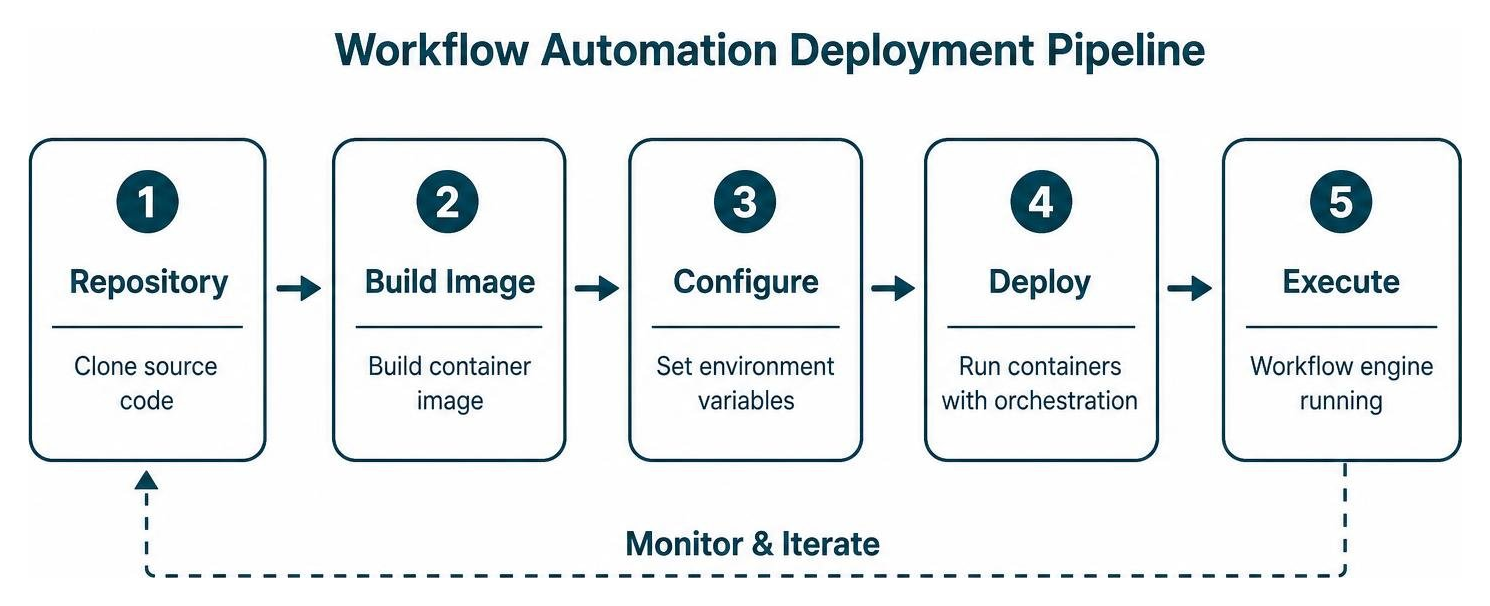
The trade-off is infrastructure management. While older engines required complicated setups with separate database instances and background queues, modern platforms offer streamlined deployment options:
- Docker-based stacks: Tools like n8n and Pneumatic bundle web dashboards, Redis task queues, and PostgreSQL databases into container recipes that run with a single command.
- Single-binary runtimes: Newer engines like Openweavr eliminate container complexity entirely, running directly on Node.js 22+ with zero external database dependencies.
Review our detailed testing of the best workflow automation software to see how hosting models impact long-term scalability.
| Deployment Factor | Managed Cloud Free Tier | Self-Hosted Open-Source |
|---|---|---|
| Setup Time | Under 2 minutes (browser-based) | 10 to 30 minutes (CLI / Docker) |
| Data Privacy | Payload stored on third-party servers | 100% internal data sovereignty |
| Hardware Overhead | Zero local resources required | 4 GB to 16 GB RAM recommended |
| Execution Limits | Strict monthly task caps | Unlimited (hardware-dependent) |
| AI Integration | Token markups or credit meters | Direct Bring-Your-Own-Key (BYOK) or local LLMs |
| Maintenance | Zero maintenance | OS patches, storage management, backups |
Top Open-Source Workflow Tools Free for Self-Hosting
The open-source automation landscape has grown significantly, offering production-grade engines for every operational requirement:
1. n8n
The open-source project from n8n-io/n8n remains a standout option in the automation space, boasting over 200,000 GitHub stars and 60,000 forks. Operating under a fair-code license, n8n lets you self-host a full-featured visual canvas completely free for internal business operations. It combines visual drag-and-drop orchestration with native JavaScript and Python scripting nodes. It also features out-of-the-box support for AI agents, memory sub-nodes, and vector store integrations.
2. Pneumatic
For structured, team-oriented business procedures, the pneumaticapp/pneumaticworkflow engine offers an Apache 2.0 licensed alternative to rigid corporate process managers. Designed around structured business workflows, Pneumatic uses a clear template-and-instance model. Instead of treating workflows as abstract data pipelines, it groups operations into dedicated task buckets for team members. Running it via Docker requires allocating at least 8 GB of RAM (16 GB recommended) and 50 GB of disk space, giving you an internal operational hub without user-seat fees.
3. Openweavr
If you want to avoid container overhead altogether, Openweavr – Self-Hosted AI Workflow Automation delivers a lightweight automation runtime. Requiring only 4 GB of RAM and Node.js 22+ (with no Docker required), Openweavr connects visual automation canvas flows directly to local large language models using Ollama. It comes packed with over 20 built-in Model Context Protocol (MCP) servers, allowing your automated tasks to query local files, interact with system tools, and analyze databases securely.
If your workflows focus primarily on moving records between databases, pairing these engines with specialized ETL tools for developers creates an efficient, zero-cost data pipeline.
Hosted and Webhook-Native Free Cloud Solutions
If you need fast web automation without managing servers, a new generation of webhook-native cloud platforms offers an alternative to legacy SaaS tools.

A clear example is the Free Workflow Automation – Webhook-Native & AI Built-In | Requex.me platform. Instead of forcing you through lengthy signups and credit card verification, Requex lets you generate an anonymous webhook URL immediately in your browser.
Requex is built specifically to handle edge cases that often break basic automation setups:
- Native HMAC Verification: Includes built-in cryptographic signature verification for Stripe, Shopify, and GitHub payloads, protecting your downstream workflows from forged requests without custom scripts.
- Automatic Deduplication: Built-in deduplication nodes drop repeated webhook events automatically, preventing duplicate database entries or double-charging errors.
- Resilient Delivery: If your destination service goes down, HTTP Resilient nodes automatically retry requests using exponential backoff, preventing lost leads or missing alerts.
- Embedded AI Nodes: Classification and text generation nodes work out of the box during its beta without requiring an external OpenAI API configuration.
Feature Deep Dive: Visual Canvas vs Code-First vs AI Orchestration
Modern workflow platforms approach automation design through three distinct paradigms:
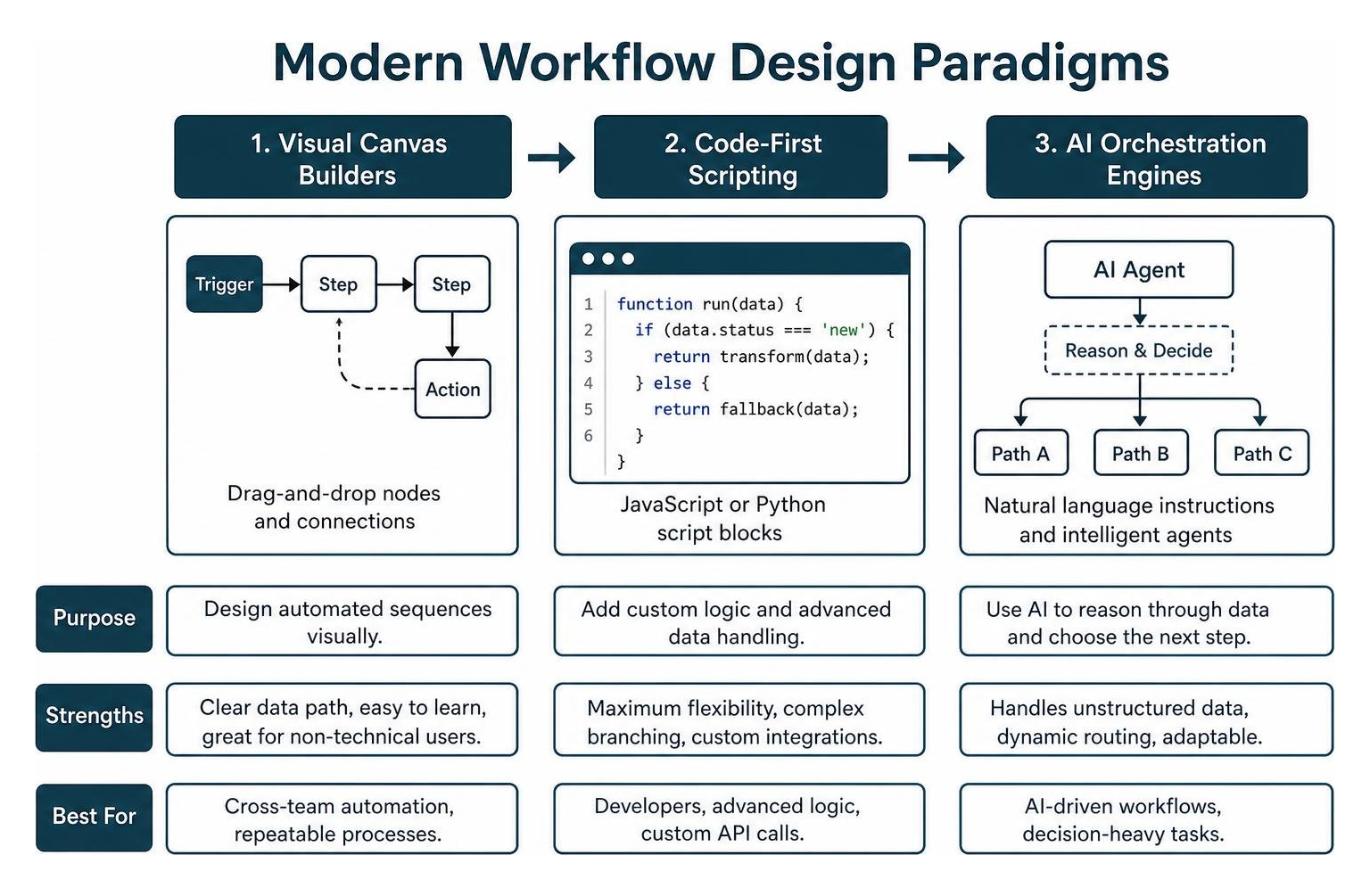
- Visual Canvas Builders: These tools rely on a node-and-wire visual interface. They give you a clear look at your overall data path, making them accessible to non-technical team members who need to build automated sequences.
- Code-First Frameworks: These platforms use native JavaScript or Python script blocks directly within the canvas. This gives developers complete control over data transformation, complex branching, and custom API calls.
- AI Orchestration Engines: Instead of following rigid static paths, these engines use natural language instructions and intelligent agents to reason through unstructured data and handle dynamic routing.
For cross-departmental operations, visual builders that support human-in-the-loop (HITL) checkpoints are essential. When an automation reaches a critical step—such as approving a refund over $500 or reviewing an AI-generated draft—the system pauses execution, creates an approval task, and waits for a team member to verify the data before continuing. Integrating these approval pipelines with your existing free project management tools keeps tasks organized across teams.
Why AI-First Workflow Tools Free Tiers Outperform Legacy Builders
Traditional automation suites were built to pass raw data strings from Point A to Point B. If an API payload changed slightly or an incoming email contained unstructured text, the workflow broke. AI-native workflow platforms take a different approach: they move reasoning across dynamic pipelines rather than just piping text.
For complex, multi-step intelligence tasks, the platform documented at What is TARX? | TARX Docs provides a visual AI agent orchestration canvas. Instead of mapping rigid API steps, TARX lets you build multi-agent pipelines where specialized agents handle distinct stages: a research agent gathers unstructured data, an analysis agent extracts key metrics, and an editor agent structures the final report.
TARX uses a strict Bring-Your-Own-Key (BYOK) model. Because you supply your own LLM provider credentials directly, the platform never marks up API token costs or charges subscription surcharges on your runs.

When it comes to building workflows quickly, Stepper | Free AI Workflow Automation Software changes how automations are constructed. Stepper features a conversational workflow generator that lets you describe what you want in plain English. The platform automatically assembles the visual triggers, filters, and endpoints on the canvas for you.
On its free tier, Stepper includes 5,000 monthly credits and 200 execution steps, alongside access to its library of modular components. Discover more about building dynamic systems in our guide to AI workflow automation tools for startups.
Ecosystem Scale: Integrations, Pre-Built Templates, and Cost Efficiency
An automation tool is only as capable as the services it connects to. Evaluating a platform’s integration library and pre-built templates helps ensure you won’t get stuck writing custom API wrappers for everyday tools.
Open-source and modern AI tools have closed the gap with legacy automation services:
- n8n: Features over 1,500 native integrations and a community library of more than 9,000 pre-built workflow templates. These cover everything from simple CRM synchronization to advanced multi-model LLM chains.
- Stepper: Supports 489 integrated applications across email services, project management boards, CRM databases, and developer utilities. It also lets you build reusable sub-components that drop into any automation flow.
- Requex.me: Focuses on core protocol nodes (HTTP, Webhooks, Logic, and AI transformations) that can connect to any REST or GraphQL endpoint without needing vendor-specific plugins.
Using self-hosted or modern freemium tools helps you avoid the steep pricing cliffs common in traditional automation platforms. Legacy services often charge for every multi-step action, so a single customer inquiry that triggers a filter, looks up a CRM record, and posts a chat notification can consume three or four tasks from a small monthly allowance.
Modern platforms reduce these costs: Requex provides unlimited runs during its beta period, TARX uses your direct API keys without per-task markups, and self-hosted n8n instances let you run high-frequency tasks without tracking task counts. For data-intensive jobs, pairing these platforms with free AI tools for data analysis allows you to run large data extraction and transformation jobs without unexpected costs.
Frequently Asked Questions about Free Workflow Automation
What is the most reliable free self-hosted workflow automation platform?
n8n is the most widely adopted and proven open-source automation engine, supported by a large community and thousands of pre-built templates. For teams looking for lightweight deployments, Openweavr runs directly on Node.js 22+ with minimal resource usage, while Pneumatic offers an Apache 2.0 process manager focused on human task coordination.
How do free AI workflow tools handle API key costs and data privacy?
Platforms like TARX and Openweavr use a Bring-Your-Own-Key (BYOK) architecture. Your API keys are encrypted and used only during execution, so you pay standard model rates directly to providers like OpenAI or Anthropic without middleman markups. For complete data privacy, Openweavr connects directly to local LLMs via Ollama, running workflows entirely offline on your local machine.
Can free workflow automation tools handle enterprise approval processes?
Yes. Modern free workflow engines support Human-in-the-Loop (HITL) workflows. Platforms like Pneumatic assign tasks to specific team member buckets, while tools like n8n and TARX support pause-and-resume nodes that halt execution until an authorized user approves the action via a webhook callback or interactive dashboard.
Conclusion
Choosing the right free workflow automation software comes down to your technical resources and data requirements. If data privacy, high-volume processing, and deep customization are top priorities, self-hosting an open-source engine like n8n or Openweavr gives you full control over your infrastructure without recurring licensing costs. If you need to build quickly without managing servers, modern tools like Requex and Stepper provide webhook reliability and conversational AI canvas creation.
At AIxorIA, we test and review emerging technologies to help teams streamline their operations and scale effectively. Take a look at our curated resources and in-depth guides by visiting AIxorIA to find the right automation setup for your projects.
1 thought on “7 Best Free Workflow Automation Tools in 2026”