Core Categories: What Software Does a Small Business Need?
Scr0ll d0wn to D0VVNL0AD
Every small business needs a focused software stack built on five essentials: business email and cloud productivity, cloud bookkeeping and invoicing, project and task tracking, a customer relationship manager (CRM), and a password manager with multi-factor authentication. These core categories keep daily operations running smoothly without creating extra administrative work.
There are more than 36 million small businesses in the United States, representing roughly 99.9% of all American firms. While every company is unique, almost all of them face the same digital challenge: figuring out which tools are actually necessary to run smoothly without draining the bank account.
When founders ask us, “What software does a small business need?”, we always share one guiding philosophy: a well-chosen software stack should feel invisible. It should support your daily operations quietly in the background without creating extra administrative work. Let’s look into the core categories, implementation timelines, and budgeting strategies you need to build a high-performing tech stack.
The average small business operates using between 10 and 20 software-as-a-service (SaaS) tools. However, accumulating applications without a clear plan leads to fragmented data, distracted employees, and runaway subscription costs. Before evaluating individual vendors, it helps to start by understanding what business software entails and organizing your operational needs into clear, non-negotiable functional categories.
Communication and Team Collaboration
Your communication stack forms the nervous system of your business. It manages how team members coordinate internally and how you present your brand to clients.
- Business Email and Cloud Productivity: A custom domain email (e.g.,
you@yourbusiness.com) paired with cloud document storage and real-time collaboration. The two primary industry standards are Google Workspace (starting around $7/user/month for Starter and $14/user/month for Standard) and Microsoft 365 (from $6/user/month for Business Basic to $12.50/user/month for Standard). Google Workspace is generally the best first choice for small service teams valuing lightweight, browser-based collaboration, while Microsoft 365 excels for organizations requiring desktop Office applications and advanced Excel data modeling. - Team Messaging and Video Conferencing: While email handles formal correspondence, reliable team communication tools like Slack or Microsoft Teams provide dedicated channels for real-time collaboration. Video conferencing through Google Meet, Microsoft Teams, or Zoom keeps remote and hybrid teams connected.
- Calendar and Scheduling: Shared team calendars prevent scheduling collisions, while automated booking tools eliminate frustrating back-and-forth email chains.
Financial Management, Invoicing, and Payroll
Clean financial records keep your business audit-ready, protect your cash flow, and ensure tax season runs smoothly.
- Cloud Bookkeeping: QuickBooks Online remains the most widely supported accounting platform among U.S. accountants (ranging from Simple Start at ~$38/month to Plus at ~$140/month), while Xero and FreshBooks offer intuitive double-entry bookkeeping alternatives.
- Invoicing and Payments: Deploying dedicated small business invoicing software lets you issue professional invoices, set up automatic payment reminders, and accept digital credit card or ACH payments directly.
- Receipt and Mileage Tracking: Tracking every operational expense prevents missed tax deductions. Business miles are easy to lose without an automated GPS log; with IRS standard mileage rates around 70 cents per mile, tracking your travel adds up to thousands in annual savings.
- Payroll and Contractor Management: If you employ staff or contractors, automated payroll systems like Gusto or Rippling handle automatic local, state, and federal tax filings, direct deposits, and compliance reporting.
- Accounts Payable: As transaction volume increases, utilizing accounts payable automation streamlines invoice matching, routing, and vendor payouts.
Project Management and Task Tracking
Without structured task management, project deadlines get lost in overflowing email inboxes and chat channels.
- Task Assignment and Workflow Boards: Using dedicated project management software for small teams (such as monday.com, Asana, or ClickUp) provides total visibility over team workloads, deliverables, and timelines.
- Lightweight Kanban Trackers: For solopreneurs and lean setups, free project tracking platforms like Trello or Notion offer visual kanban boards that organize tasks without overwhelming feature bloat.
Customer Relationship Management and Sales
Customer acquisition requires systematic follow-up. Storing leads in makeshift spreadsheets often leads to lost deals when team members forget to check in or leave the company.
- Centralized Pipeline Management: Adopting modern small business CRM platforms like HubSpot CRM or Pipedrive tracks potential customers across pipeline stages, logs communication histories, and automates sales follow-ups.
- Sales Activity Monitoring: Integrating sales call tracking tools allows sales reps to log conversations, record client preferences, and review call performance metrics.
Account Security and Credential Protection
Small businesses are frequent targets for cyberattacks. Robust credential management is an operational necessity.
- Business Password Managers: Tools like 1Password (Teams Starter at $24.95/month for up to 10 users) or Bitwarden ($4/user/month billed annually) allow teams to generate, store, and share encrypted credentials securely without sharing passwords in plaintext chat channels.
- Multi-Factor Authentication (MFA): National cybersecurity guidelines (such as NIST and CISA frameworks) prioritize universal MFA enforcement across all email, financial, and cloud storage systems.
Staged Rollout: How to Sequence Your Tech Stack for Maximum ROI
Adopting every tool category simultaneously is like buying a full wardrobe before you know your clothing size. It leads to user confusion and unnecessary subscription costs. Staging your software rollout helps your team master core systems before introducing new layers of complexity.
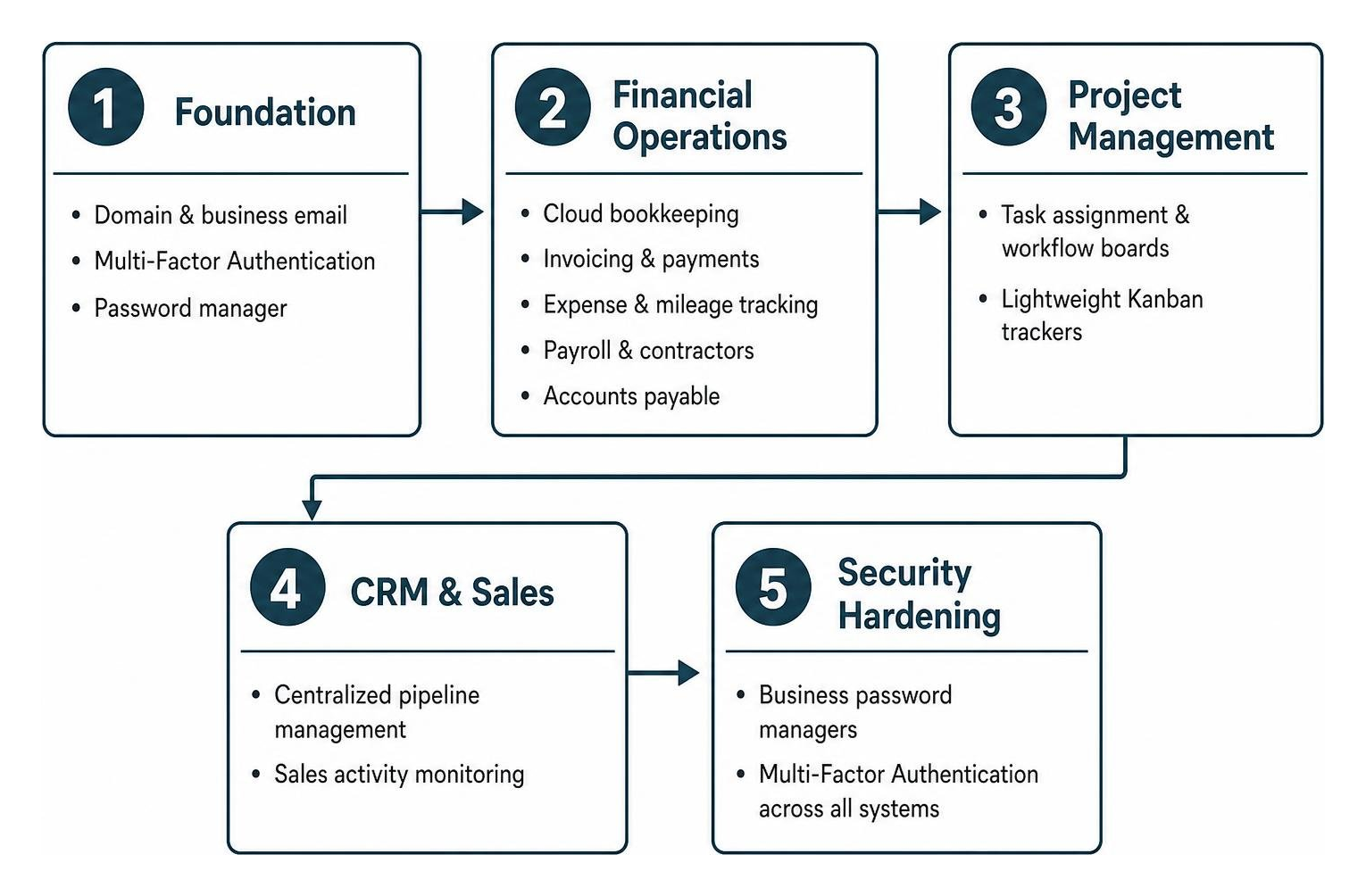
Step 1: Communication, Security, and Domain Setup
Start by purchasing your business domain through an independent registrar. Keeping domain registration separate from web hosting and email gives you maximum flexibility during future software migrations.
Next, provision your business email accounts (Google Workspace or Microsoft 365), enforce mandatory Multi-Factor Authentication across all administrative users, and deploy a team password manager. This secures your digital foundation from day one.
Step 2: Bookkeeping and Financial Infrastructure
Before taking on your first client, configure your financial foundation. Connect your business bank account and credit cards to your cloud bookkeeping tool. For single-operator setups, exploring specialized accounting options for solo businesses lets you track income and expenses without paying for complex multi-user licensing you don’t need.
Step 3: Project Execution and CRM Adoption
Once revenue starts coming in, establish your operational workflows. Introduce a standardized project management workspace to track client deliverables, and deploy a CRM to capture leads and monitor sales opportunities. Ensure your team adopts these platforms consistently—a simpler tool with 100% daily adoption will always outperform an advanced enterprise platform that nobody opens.
Step 4: Layering AI Productivity and Workflow Automation
Once your core databases are running, connect them with no-code middleware like Zapier or Make. Automating cross-app handoffs (such as generating an invoice when a deal closes in your CRM) eliminates manual data entry bottlenecks.
At this stage, you can implement dedicated workflow automation software, adopt approval workflow systems for team requests, and equip your staff with AI tools for business productivity to speed up content drafting, data summarization, and customer support.
Small Business Software Budgeting and Cost Breakdown for 2026
How much should a small business budget for its tech stack? As a general benchmark, software spending should represent between 2% and 5% of monthly revenue. Spending over 8% often indicates you are over-investing in enterprise features your team hasn’t grown into yet.
Below is a breakdown of realistic software costs across different organization sizes:
| Team Size / Profile | Core Categories Included | Sample Software Selection | Estimated Total Monthly Cost | Cost Per User / Month |
|---|---|---|---|---|
| Solo / Freelancer | Communication, Security, Accounting, Simple Tasks | Google Workspace Starter, Bitwarden Free, Wave/Trello | $8 – $30 | ~$8 – $30 |
| 5-Person Team | Essential 4 (Email, Security, Books, Project Tracker) | Google Workspace Starter (5), 1Password Teams, QBO Simple Start, monday.com Standard (5) | ~$160 – $210 | ~$32 – $42 |
| 10-Person Growth Team | Essential 4 + CRM, Payroll, Basic Automations | Google Workspace Standard (10), 1Password, QBO Essentials, monday.com Pro (10), Gusto, Zapier | ~$420 – $580 | ~$42 – $58 |
Bootstrapped Solo and Freelance Stack ($8–$30/Month)
When operating solo, your primary goal is keeping fixed overhead low while maintaining professional communication and clean books. Combining low-cost email hosting with accounting software for freelancers provides tax compliance and client invoicing for less than the cost of a daily coffee.
Standard 5-Person Team Stack (~$160–$200/Month)
A five-person service team requires shared visibility, credential governance, and structured project handoffs. Using flat-rate team plans (such as 1Password Teams Starter at ~$25/month for up to 10 users) alongside per-seat productivity licenses keeps your software budget predictable around $160 to $200 per month.
Growing 10-Person Operations Stack (~$400+/Month)
As your headcount reaches double digits, compliance, role-based access permissions, and automated payroll become essential. Upgrading to mid-tier project management and accounting plans unlocks automated approval workflows and multi-department reporting, bringing your baseline investment to roughly $420–$580 per month.
Free vs. Paid Tiers, Stack Audits, and Common Pitfalls
Free software tiers are fantastic for testing new tools, but they come with trade-offs. Knowing when to upgrade—and when to trim unused tools—keeps your business running efficiently.
Evaluating Hidden Costs in Free Software Tiers
Free tiers often carry subtle operational limits that can slow down your team:
- Searchable History Limits: Free team messaging plans often restrict searchable chat history to 90 days, causing your team to lose important project context and decisions.
- Meeting Time Limits: Free video conferencing platforms frequently cut off group meetings after 40 minutes, which can disrupt important client presentations.
- Third-Party Branding: Invoices or intake forms stamped with third-party software logos can look unprofessional to high-value clients.
- Integration and Export Restrictions: Free tiers frequently block API access and automated webhooks, forcing your staff into hours of manual data entry.
When should you upgrade? Move to a paid plan as soon as a free-tier limitation creates friction for your team at least twice in a single week.
Signs Your Small Business Needs a Software Stack Audit
We recommend conducting a full software stack audit once a year, alongside a quick monthly review of any newly renewing subscriptions. Look out for these warning signs:
- Redundant Subscriptions: Multiple departments paying for separate tools that serve the same purpose (e.g., marketing using Asana while operations pays for monday.com).
- Unassigned Paid Seats: Continuing to pay monthly per-user licensing fees for past contractors or former employees.
- Manual Workarounds: Team members spending hours copying data between spreadsheets because their core tools don’t communicate with each other.
- Feature Utilization Under 20%: Paying for expensive enterprise tiers when your team only uses basic core features.
A 12-person creative agency recently audited their subscriptions and discovered they were spending over $2,100 per month on unused enterprise seats and duplicate tools. By consolidating their stack, they brought their monthly SaaS bill down to $340—saving $1,760 every month without losing any core functionality.
Critical Procurement Mistakes to Avoid
- Buying Enterprise Tools Too Early: Small teams rarely need complex enterprise systems. Start with clean, intuitive software that your team will actually enjoy using every day.
- Using Founder-Owned Accounts for Company Systems: Always register business tools using centralized administrative email aliases (e.g.,
admin@yourcompany.com) rather than personal accounts, ensuring smooth access transitions as your team expands. - Treating Chat Apps as Task Managers: Team chat channels move quickly. When action items and client requests are assigned inside chat threads instead of dedicated project management boards, important tasks inevitably slip through the cracks.
- Skipping Onboarding and Documentation: Buying great software won’t help if your team isn’t trained to use it. Spend time creating simple operating procedures for every platform you introduce.
Frequently Asked Questions About Small Business Software
What software does a small business need to launch on day one?
On day one, keep things lean. You need a custom domain with professional email (Google Workspace or Microsoft 365), a secure password manager (Bitwarden or 1Password), basic double-entry bookkeeping (QuickBooks Online, Xero, or Wave), and a simple task tracker (Trello or Notion).
Exactly what software does a small business need when scaling past five employees?
Once you scale past five employees, you should add a centralized sales CRM (HubSpot or Pipedrive), a structured team project management tool (monday.com or Asana), an automated payroll and HR platform (Gusto or Rippling), and middleware automation (Zapier or Make) to connect your workflows.
What percentage of revenue should a small business spend on software?
For most small businesses, total SaaS expenditure should land between 2% and 5% of monthly gross revenue. If your software spending climbs above 8%, run a thorough stack audit to consolidate redundant tools and remove inactive user seats.
Conclusion
Building an effective small business tech stack doesn’t mean buying dozens of complicated tools. It’s about picking a focused set of reliable, well-integrated platforms that support your core operations—communication, accounting, security, and project delivery.
By taking a phased approach, utilizing free tiers smartly, and routinely pruning unused subscriptions, you can keep overhead low while giving your team the tools they need to succeed. To explore curated software evaluations, productivity tutorials, and vetted automation setups, discover business solutions and AI productivity guides on AIxorIA to build your ideal tech stack today.
1 thought on “What Software Does a Small Business Need? (2026)”