Key Differences Between Consumer and Business Endpoint Protection
Scr0ll d0wn to D0VVNL0AD
Many business leaders wonder why they cannot simply install consumer antivirus on office laptops and call it a day. While retail security software protects individual home computers well enough, running it across a company creates severe operational and compliance risks.
Calling modern business endpoint protection “antivirus” is a bit like calling modern flash drives “floppy disks.” The underlying technology has fundamentally changed. Today, business solutions provide comprehensive endpoint detection, centralized controls, and proactive threat neutralisation.
| Feature Area | Consumer Antivirus | Business Endpoint Protection Suite |
|---|---|---|
| Management Console | Individual device interface | Centralized, cloud-managed multi-tenant dashboard |
| Policy Deployment | Manual configuration on every device | Automated fleet-wide policy push and enforcement |
| Threat Detection | Primarily signature and basic heuristic scans | Next-Gen Antivirus (NGAV), behavioral AI, EDR/XDR |
| Patch Management | Limited or absent | Automated OS and third-party software patching |
| Ransomware Defense | File detection after payload lands | Behavioral rollback, cloud sandboxing, attack disruption |
| Server & Cloud Support | Desktop OS only (Windows/macOS) | Windows Server, Linux, AWS, Azure, Google Cloud |
| Licensing & EULA | Personal, non-commercial use only | Commercial commercial compliance, per-seat/node licensing |
Single-Device Scanners vs Unified Fleet Management
Consumer antivirus puts all administrative control into the hands of the person sitting at the keyboard. If an employee decides to pause a scan, disable a firewall, or ignore a quarantine alert to download a personal file, nobody else knows until malware spreads across the internal network.
Business-grade endpoint platforms solve this by using unified fleet management. System administrators deploy lightweight software agents across hundreds of endpoints simultaneously. Through a centralized dashboard, IT teams maintain full visibility into device health, push security patches remotely, and lock down configuration settings so local users cannot accidentally disable their own defenses.

EULA Terms and Commercial Data Compliance
Installing consumer security software on commercial systems violates the End User License Agreement (EULA) of almost every major antivirus vendor. More importantly, consumer tools do not include the audit logs, continuous telemetry, and tamper protection needed to satisfy regulatory frameworks such as PCI-DSS, HIPAA, or SOC 2.
Underwriters also inspect your endpoint defenses before issuing policies. If you are reviewing your company’s coverage requirements in our Cyber Insurance for Small Businesses in Canada 2026 Guide, you will find that commercial endpoint protection with active behavioral monitoring is a mandatory baseline for coverage.
Evaluating Leading Business Endpoint Security Platforms
Finding the right security solution requires looking past marketing claims and evaluating empirical detection benchmarks, false-alarm rates, and day-to-day management overhead.
In standardized testing by independent research labs like the AV-Comparatives business security testing benchmarks, leading enterprise suites consistently stop 100% of real-world web threats and active malware samples. Platforms like multi-layered endpoint security suites from ESET combine traditional scanning engines with cloud sandboxing and multi-platform telemetry to block zero-day threats before they execute.
What is the best antivirus software for businesses with small teams?
For small teams with up to 50 employees, simplicity and automated protection are top priorities. Small businesses rarely employ full-time security operations staff, making wizard-based onboarding and low maintenance essential.
- Microsoft Defender for Business: An exceptional choice for teams already using the Microsoft ecosystem. At around $3.00 per user per month (or included within Microsoft 365 Business Premium), it delivers enterprise-grade endpoint detection and response (EDR), automated attack disruption, and cross-platform support covering Windows, macOS, iOS, and Android.
- Norton Small Business: Tailored for small offices and professional practices. It bundles real-time threat defense, secure cloud backup storage, password management, and dark web identity monitoring into an easy-to-use package covering up to 20 devices per license tier.
If you are expanding your stack with smart integrations, pairing your endpoint tools with the Top AI Tools for Vendor Security in 2026 ensures your external partners do not become an easy backdoor into your network.
What is the best antivirus software for businesses managing hybrid enterprises?
Growing mid-market companies and enterprises managing hybrid workstations need deeper behavioral telemetry, rapid remediation tools, and automated system maintenance.
- Bitdefender GravityZone: Widely recognized for its high detection rates and minimal system resource drag. It features deep root-cause analysis, cloud sandboxing, and granular policy controls that adapt to virtual machines, on-premises servers, and remote employee laptops.
- Avast Ultimate Business Security: Delivers robust real-time endpoint defense alongside built-in automated third-party patch deployment. Because unpatched vulnerabilities account for nearly 57% of data breaches, built-in application updating saves IT managers dozens of hours every month.
- ESET PROTECT Complete & MDR: A premier enterprise platform offering cross-platform protection across computers, mobile devices, file servers, and cloud office suites like Microsoft 365. For organizations without an in-house security operations center (SOC), ESET’s optional 24/7 Managed Detection and Response (MDR) pairs AI detection with human threat-hunting experts.
To streamline ongoing administration across distributed endpoints, many organizations also leverage the Top Generative AI Tools for IT Support Teams in 2026 to automate routine helpdesk tasks and security log triage.
Integrating Endpoint Security with Layered Business Defense
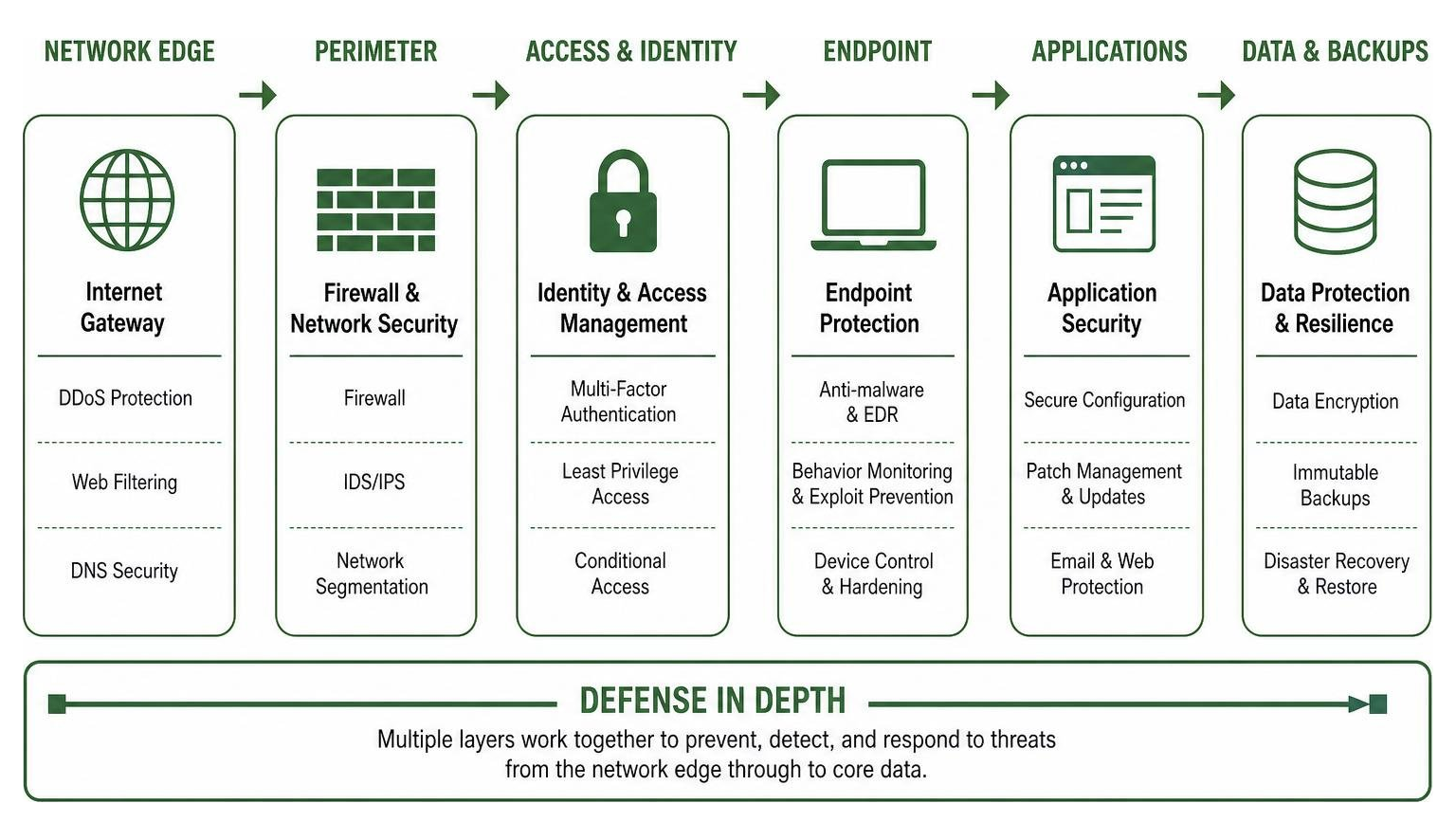
No single antivirus tool provides 100% immunity on its own. Modern cyber defense relies on a defense-in-depth model where endpoint agents work alongside firewalls, access controls, email filters, and backup systems.
Immutable Backups and Ransomware Containment
Ransomware attackers deliberately attempt to disable local antivirus software and encrypt connected network shares. Modern business endpoint solutions counter this with behavioral shields that identify unauthorized file encryption in real time, terminate malicious processes, and automatically roll back affected files to safe states.
However, software rollbacks should always be backed up by an independent recovery plan. Maintaining offline or immutable cloud backups using solutions from our roundup of the Best Rated Computer Backup Programs guarantees that your business can recover critical operations without paying ransoms.
Identity Protection and Cyber Insurance Alignment
Stolen login credentials remain the leading initial access vector for corporate networks. Endpoint security must integrate with identity protection tools, multi-factor authentication (MFA), and brute-force Remote Desktop Protocol (RDP) shields to prevent attackers from walking right past perimeter defenses.
Maintaining these combined technical safeguards directly reduces policy premiums. To see how security controls influence annual coverage expenses, review our breakdown of Small Business Cyber Insurance Cost in 2026 Average Rates Pricing.
Total Cost of Ownership and Deployment Strategies for 2026

When calculating the total cost of business antivirus, the initial license price is only one part of the equation. Administrative overhead, deployment friction, and employee productivity loss caused by slow machines all affect your total cost of ownership (TCO).
To maximize value and performance across your company’s fleet:
- Audit Hardware Baselines: Modern security agents perform behavioral analysis and real-time scanning in the background. Ensure employee workstations have modern multi-core processors, at least 8 GB to 16 GB of RAM, and solid-state drives (SSDs) to prevent background scans from causing slowdowns.
- Choose Cloud Management: Cloud-native management consoles eliminate the cost of buying, hosting, and maintaining on-premises management servers.
- Test Policies Before Fleet Rollout: When enabling aggressive script blocking, AMSI command-line inspection, or USB device controls, test the policies on a pilot group of workstations first to verify compatibility with proprietary line-of-business applications.
- Consolidate Feature Bundles: Purchasing a suite that integrates endpoint protection, vulnerability scanning, cloud email filtering, and patch management into a single agent is generally far more cost-effective than managing separate third-party subscriptions.
Frequently Asked Questions About Business Antivirus
Can small businesses rely on free antivirus software?
No. Free consumer antivirus software lacks the centralized management consoles, administrative policy locks, compliance logging, and server protection required for business operations. Furthermore, installing free personal antivirus in a commercial environment violates vendor licensing agreements.
Is built-in operating system security sufficient for modern businesses?
Basic built-in operating system tools (like standalone Microsoft Defender Antivirus) provide solid core file scanning, but they lack centralized administrative management, attack surface reduction rules, third-party patch automation, and automated EDR threat investigation. Upgrading to a business-tier solution (such as Microsoft Defender for Business or dedicated commercial suites) is necessary to protect business fleets effectively.
How often should automated scans and vulnerability patching occur?
Real-time background scanning should remain active on all endpoints 24/7, supplemented by scheduled weekly deep system scans. Security patches for critical and high-severity software vulnerabilities (based on CVSS scores) should be tested and deployed within 14 days of release to prevent zero-day exploitation.
Conclusion
Securing your business against modern cyber threats requires moving beyond outdated signature scanners. By deploying a modern endpoint security platform equipped with centralized management, behavioral AI detection, automated patch management, and automated ransomware remediation, we protect our critical company assets, maintain regulatory compliance, and ensure uninterrupted daily operations.
As you optimize your company’s security stack, you can also explore how modern intelligent automation streamlines business operations in our comprehensive guide to what is the best AI for productivity in 2026.
1 thought on “Best Business Antivirus Software in 2026: Top Endpoint Security”