How to Choose AI Tools for Client Onboarding at Agencies
Scr0ll d0wn to D0VVNL0AD
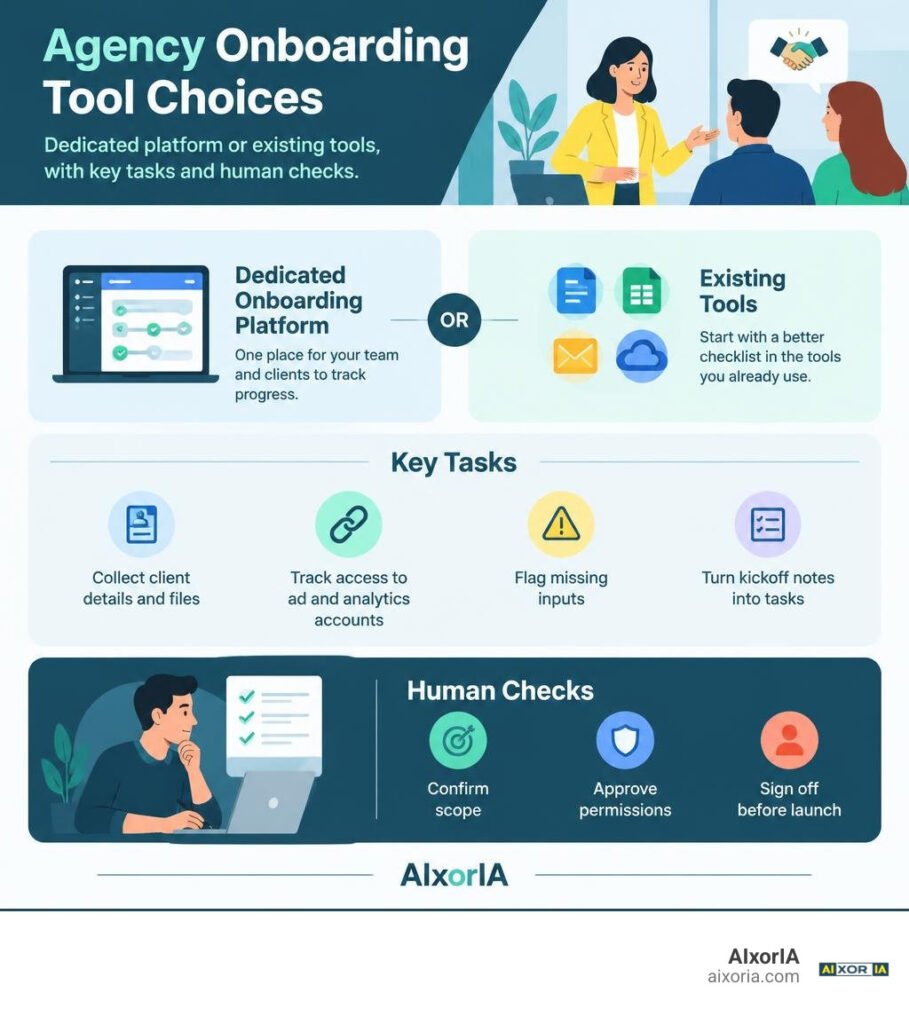
AI tools for client onboarding at agencies are most useful when they do more than send welcome emails. Look for tools that collect client details and files, track access to ad and analytics accounts, flag missing inputs, and turn kickoff notes into tasks.
A dedicated onboarding platform may be worth it if several clients and team members need one clear place to track progress. If you onboard only a few clients, start with a better checklist in the tools you already use. Either way, keep a person responsible for checking scope, approving permissions, and signing off before launch.
What AI client onboarding means for agencies—and where it adds value
For marketing and creative agencies, client onboarding is the high-stakes window between contract signature and campaign launch. Traditionally, this phase descends into asset chaos: logos arrive in broken email threads, ad account permissions stall, and kickoff call notes gather dust in disconnected documents.
True AI client onboarding is not basic automation or a cosmetic chatbot bolted onto a portal. Basic automation relies on rigid, “if-this-then-that” rules that break whenever a client uploads the wrong file format or skips a form field. Bolt-on AI merely offers a floating text assistant that drafts a generic welcome email. In contrast, true AI orchestration deeply connects client data, tools, and timelines. It actively reads unstructured documents, fills intake templates from real-time meeting transcription, validates brand assets against production standards, tracks multi-platform permissions, and flags project risk before deadlines slip.
When implemented well, these automated workflows fit directly into broader business productivity workflows, turning a historically stressful administrative bottleneck into an organized, repeatable launchpad.
Which AI tools for client onboarding for agencies provide more than basic automation?
The primary distinction among onboarding systems comes down to tools that merely draft text versus AI workflow agents that take scheduled, contextual action.
Shallow tools generate text summaries that an account manager must still copy, paste, format, and assign. Purpose-built AI tools for client onboarding for agencies actively handle the administrative heavy lifting. They monitor shared workspaces, parse form submissions, update CRM records automatically, detect stalled milestones, and trigger escalating follow-ups when critical access is missing. Rather than waiting for a human prompt, an agentic onboarding workflow runs on a defined schedule, coordinating handoffs between sales, account management, and creative delivery teams.
Which AI capabilities make the biggest difference during agency onboarding?
Not every AI feature justifies its subscription cost. The capabilities that deliver genuine, measurable value for agency workflows include:
- Dynamic, Conditional Intake: Questionnaires that adapt questions in real time based on the client’s service tier, industry, and existing tech stack, preventing form fatigue.
- Real-Time Meeting Transcription and Field Extraction: Systems that listen to kickoff calls, map agency-specific terminology directly into internal project templates, and surface unfilled requirements during the live conversation.
- Automated Access Provisioning via OAuth: Guiding clients through secure authorization for Google Analytics 4, Google Tag Manager, Meta Business Manager, Google Ads, and content management systems without password sharing.
- Asset and File Validation: Intelligent intake checks that automatically evaluate uploaded brand assets (such as verifying vector files or flagging image resolutions below 300 DPI) before creative teams begin production.
- Automated Risk Scoring and Nudges: Predictive monitoring that scores onboarding health and sends polite, escalating reminders on days 1, 3, 7, and 14 when prerequisites remain incomplete.
Comparing AI tools for client onboarding for agencies by approach
Agencies have several distinct paths when selecting onboarding software. Some choose dedicated, purpose-built portals, while others prefer professional services automation platforms, integrated CRM workflows, or custom automations built atop existing project management software.

The following comparison breaks down how these different product categories approach client onboarding:
| Category | Typical Workflow Coverage | Client-Facing Experience | Setup & Flexibility | Operational Fit |
|---|---|---|---|---|
| Purpose-Built AI Onboarding Portals (e.g., Onboard OS, LaunchBay) | End-to-end: intake, OAuth access, asset validation, AI brief generation, and automated chasing. | High: Branded, white-label client portals accessible via secure, passwordless magic links. | Low setup overhead; includes agency-specific templates and out-of-the-box AI extractors. | Fast-growing digital and marketing agencies managing high client volume. |
| Services Delivery & PSA Platforms | Billable hours, resource allocation, milestone tracking, and task management. | Moderate: Collaborative project spaces with shared task lists and file repositories. | Moderate to high; requires configuring rate cards, team roles, and structured project plans. | Mid-market to enterprise agencies focused heavily on billable utilization and retainer tracking. |
| CRM-Native Onboarding Workflows | Deal-to-onboarding handoff, automated pipeline stages, form collection, and internal task triggers. | Moderate: Standard customer portals or customized form pages connected directly to CRM objects. | Moderate; deeply tied to CRM properties and database custom fields. | Agencies standardized on unified sales and account management platforms. |
| No-Code Automation over Project Tools | Flexible trigger-action pipelines linking forms, e-signatures, task boards, and cloud storage. | Low to Moderate: Fragmented across separate form links, cloud drive folders, and email threads. | High initial build time; requires ongoing maintenance as tool APIs evolve. | Boutique agencies with unique delivery workflows and low monthly onboarding volume. |
How AI tools for client onboarding for agencies differ by workflow
Workflow design varies significantly depending on whether a platform focuses on intake, client interaction, or internal orchestration.
Focused intake agents, such as conversational briefing tools from Gnosari, concentrate purely on turning messy discovery conversations into structured creative briefs before project kickoff. Dedicated client portals from providers like OnboardFlow or OnboardMap focus on eliminating friction for the client, offering single-link asset collection, built-in e-signatures, and real-time checklist tracking.
Meanwhile, workflow orchestration platforms like OKiDO emphasize strict internal approval gates, locking campaign production until creative directors and clients officially sign off on briefs. When evaluating vendor claims, look past promises of “instant setup” and inspect whether the tool provides verifiable audit trails, flexible API webhooks, and predictable pricing models (such as flat tiers or pay-per-onboarding rather than steep per-seat add-ons).
What should an agency expect from a client-facing onboarding experience?
First impressions during onboarding establish an agency’s perceived authority and competence. A modern, AI-enhanced client experience should provide:
- White-Label Portals: Complete agency branding, custom domain mapping, and clean visual layouts that feel bespoke.
- Frictionless Magic Links: Secure, password-free access links that allow clients to upload brand files, approve scopes, and connect platforms without registering new accounts.
- Transparent Progress Trackers: Real-time milestone indicators showing completed inputs versus pending tasks, clarifying project momentum for executive stakeholders.
- Strict Privacy Separation: A clear architectural boundary that keeps internal team commentary, budget margins, and operational notes strictly hidden from external client view.
Building a secure onboarding workflow from contract to campaign launch
An optimal agency onboarding process operates as a synchronized pipeline. When a deal closes, automation should immediately handle routine data capture and project staging while reserving strategic review for experienced team leads.
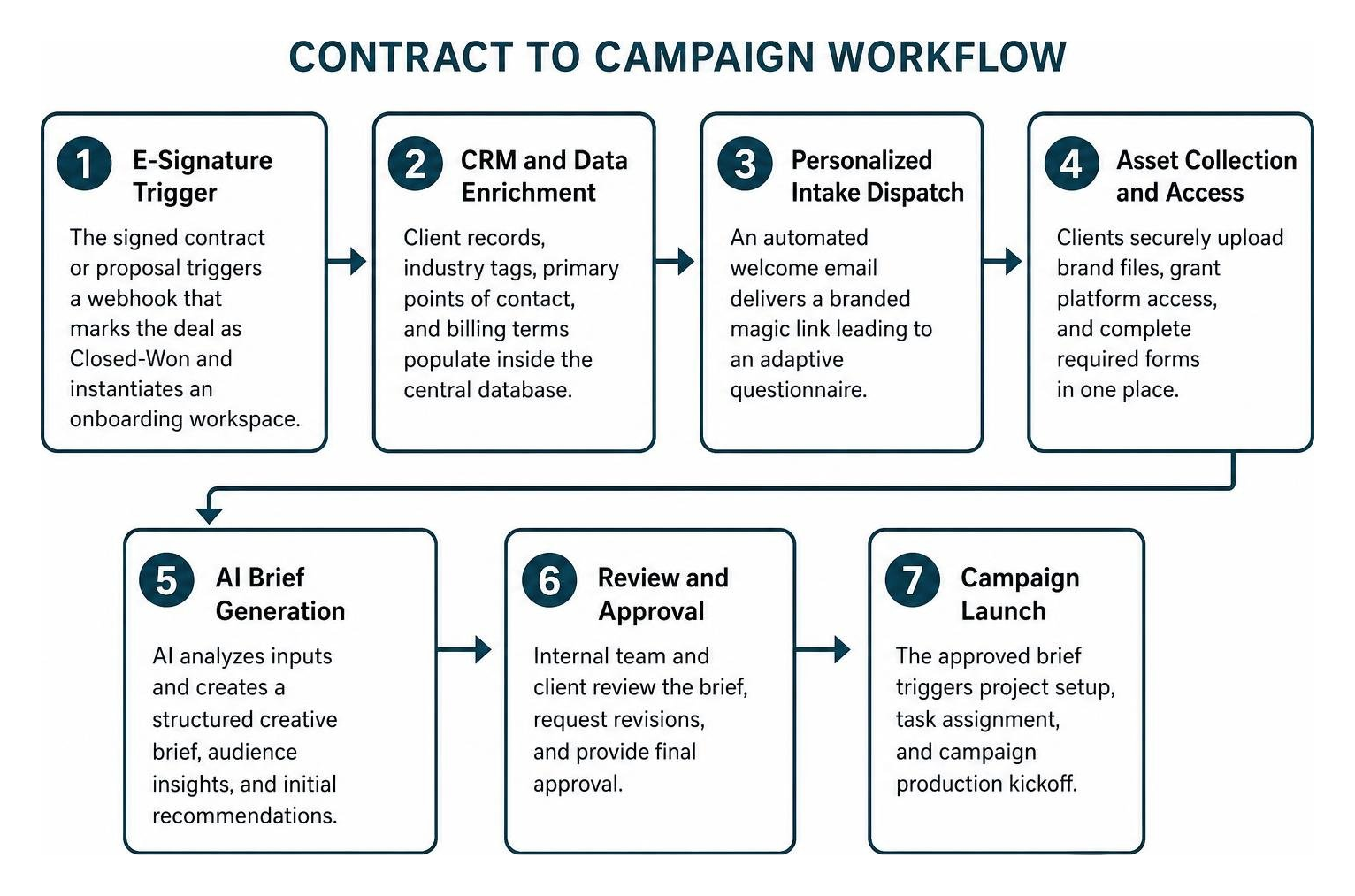
By integrating modern workflow automation methods, agencies can move from contract execution to active campaign development through seven structured stages:
- E-Signature Trigger: The signed contract or proposal triggers a webhook that automatically marks the deal as Closed-Won and instantiates an onboarding workspace.
- CRM and Data Enrichment: Client records, industry tags, primary points of contact, and billing terms populate inside the central database.
- Personalized Intake Dispatch: An automated welcome email delivers a branded magic link leading to an adaptive questionnaire capturing target audiences, key performance indicators, and brand guidelines.
- Automated Asset and Access Collection: The client uploads high-resolution brand assets and grants access to analytics, ad managers, and hosting environments via secure OAuth connections.
- Project Workspace Staging: Internal boards auto-generate inside your project management system with role-specific tasks assigned to strategists, designers, copywriters, and media buyers.
- AI Brief Drafting & Pre-Kickoff Validation: An AI agent parses intake responses and discovery notes to draft the initial campaign brief, running automatic checks to ensure all permissions and files are functional.
- Kickoff Meeting and Production Launch: The team conducts an informed kickoff call with a pre-validated brief, transitioning immediately into billable creative production.
For deeper technical context on document processing and automated risk validation during onboarding, academic analyses like this research on Optimizing Client Onboarding Efficiency Using Document Automation detail how automated extraction and data modeling remove manual administrative friction.
Where should human oversight remain critical?
While AI agents excel at data extraction and task generation, human accountability remains non-negotiable across several critical junctures:
- Scope and Retainer Boundaries: An AI must never negotiate pricing, promise delivery timelines, or confirm out-of-scope deliverables during automated intake conversations.
- Resolving Contradictory Feedback: If multiple client stakeholders provide conflicting goals or target audience definitions, account directors must step in to clarify priorities.
- Low-Confidence Data Extraction: Any AI-extracted data field scoring below a defined confidence threshold (such as 0.75) must be flagged for manual review by an operations manager.
- Access Permission Verification: A technical lead must confirm that granted platform permissions match the exact administrative access levels required for campaign execution.
- Final Creative Sign-Off and Campaign Launch: Production approvals and live media deployment must always require explicit, recorded human authorization.
What security, consent, and compliance checks should agencies require?
Handling sensitive client assets, ad account tokens, and meeting recordings introduces legal and security responsibilities. Agencies implementing AI onboarding software should enforce strict data governance:
- Explicit Recording Consent: Before recording kickoff meetings for automated AI transcription, agencies must obtain and log informed consent from all participants in accordance with regional two-party or all-party wiretapping laws.
- Data Minimization and Retention: Raw meeting audio should be streamed for transcription and purged immediately, with text transcripts and client files subject to defined retention schedules (e.g., retaining transcripts for 12 months and purging temporary setup assets within 24 hours of transfer).
- OAuth Least Privilege: Never collect raw client passwords or store login credentials in spreadsheets. Use revocable OAuth tokens with minimum necessary permissions, encrypted using AES-256 standards.
- Model-Training Protections: Verify through vendor data processing agreements that proprietary client data, strategic plans, and brand assets are never used to train public or foundational third-party AI models.
- Role-Based Access and Audit Logs: Ensure software maintains immutable activity logs detailing who accessed, approved, or exported client files throughout onboarding.
How to evaluate ROI, readiness, and long-term fit
Determining whether to buy dedicated onboarding software begins with assessing internal operational maturity. According to an industry outlook by RSW/US, 45% of surveyed marketers cited an agency’s lack of proactivity as their top reason for conducting an account review—a roughly 50% jump compared to the prior year. When onboarding is slow, disorganized, or reactive, client relationships start on unstable footing.
Before purchasing new software, audit your existing stack. Review your current CRM software setup and your team’s project management software workflows to identify whether onboarding delays stem from broken internal communication or genuine tooling deficits.
When do AI tools for client onboarding for agencies deliver worthwhile ROI?
A dedicated onboarding solution typically pays for itself once an agency manages more than roughly 8 to 10 concurrent onboardings per year involving cross-functional delivery teams.
To calculate realistic return on investment, start with a straightforward formula: net annual savings equals hours saved per client multiplied by average hourly labor cost multiplied by annual new clients, minus annual tool cost.
For example, if an agency onboards 25 clients annually, and automated asset collection, AI brief generation, and automated chasing save 12 hours of senior account management time per client (valued at $75 per hour), the gross annual labor savings equals $22,500. Subtracting a dedicated software platform cost of $1,200 to $2,400 per year yields a clear payback period within just a few client cycles. Beyond direct time savings, accelerated onboarding shortens time-to-first-value, allowing agencies to recognize retainer revenue faster while decreasing early client churn.
How can agencies avoid common implementation failures and choose future-proof tools?
Implementing new onboarding technology requires careful change management. Agencies frequently encounter pitfalls by attempting to automate flawed, undefined processes.
- Standardize Before Automating: If your agency lacks a standardized intake checklist, an AI tool will simply automate chaos. Document your handoff criteria on paper before configuring software.
- Prevent Automated Spam: Calibrate follow-up cadences carefully. Excessive automated emails and text messages annoy clients and erode goodwill before kickoff.
- Pilot with Live Accounts: Run a 14-day trial using 3 to 5 real client accounts with active account directors rather than evaluating vendor demos populated with sanitized dummy data.
- Verify Exportability and Open Standards: Ensure any platform you select supports open API standards, webhooks, or Model Context Protocol (MCP) integrations so your data can flow freely into internal delivery boards, cloud storage, and reporting dashboards.
Frequently Asked Questions about AI client onboarding for agencies
Can a small agency improve onboarding without buying dedicated software?
Yes. Boutique agencies onboarding fewer than 5 clients per year rarely need dedicated onboarding software. You can achieve substantial efficiency by standardizing intake forms in your existing CRM, building reusable task templates inside your project management software, and connecting automated notification triggers via no-code workflow tools.
How much time can AI onboarding realistically save?
While vendor marketing claims often cite time reductions of 80% or 1 to 3 weeks saved in back-and-forth communication, independent operational benchmarks show that well-configured AI onboarding typically cuts administrative setup and document chasing from 4 to 6 hours down to under 45 minutes per client.
Should AI be allowed to approve scope, creative, or campaign launch?
No. AI agents should be restricted to administrative orchestration: extracting inputs, organizing files, drafting briefs, and preparing tasks. Critical business decisions—such as confirming retainer scope, approving final creative assets, modifying pricing, and authorizing live campaign launches—must always remain behind documented human approval gates.
Conclusion
Elevating your agency’s onboarding process is one of the highest-leverage operational investments you can make. By replacing scattered inboxes, lost files, and broken platform permissions with intelligent intake forms, real-time transcription, and automated task staging, your team can deliver strategic value on day one instead of day fourteen.
To discover more in-depth reviews, operational frameworks, and software comparisons, explore practical AI tools and guides to scale your business with confidence.