Why Choosing the Right Approval Workflow Software Can Make or Break Your Operations
Scr0ll d0wn to D0VVNL0AD
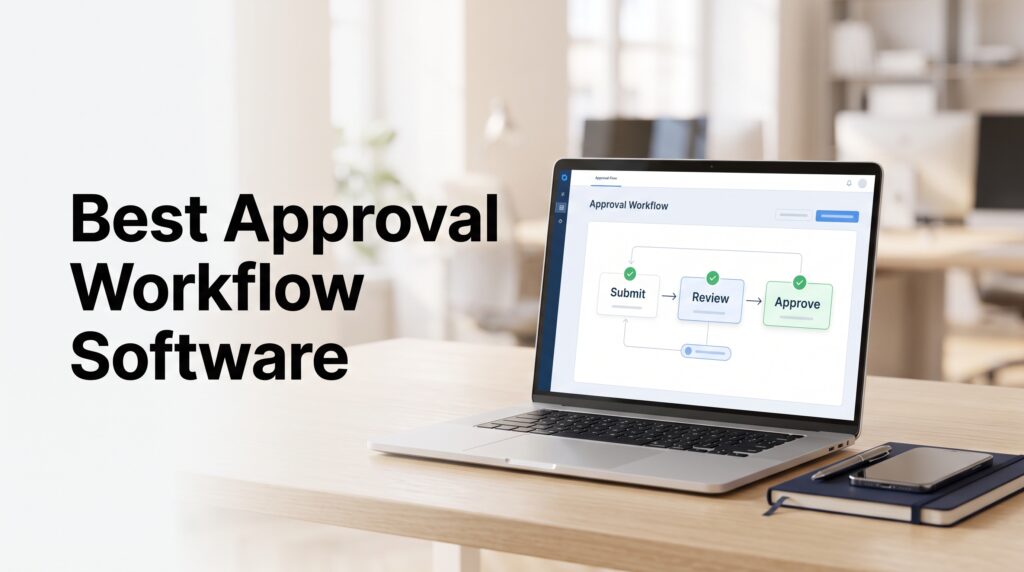
Approval workflow software is a tool that automates how requests — like purchase orders, invoices, and HR documents — move through a defined chain of reviewers until they’re approved, rejected, or escalated.
Here’s a quick breakdown of what it does and why it matters:
| What It Does | Why It Matters |
|---|---|
| Routes requests to the right approvers automatically | Eliminates manual chasing and lost emails |
| Tracks every decision with timestamps | Creates a complete audit trail for compliance |
| Sends reminders and escalates stalled approvals | Prevents bottlenecks from killing deadlines |
| Connects to tools like Slack, QuickBooks, and ERPs | Keeps data synced across your existing systems |
| Gives every stakeholder real-time status visibility | Removes guesswork from cross-team coordination |
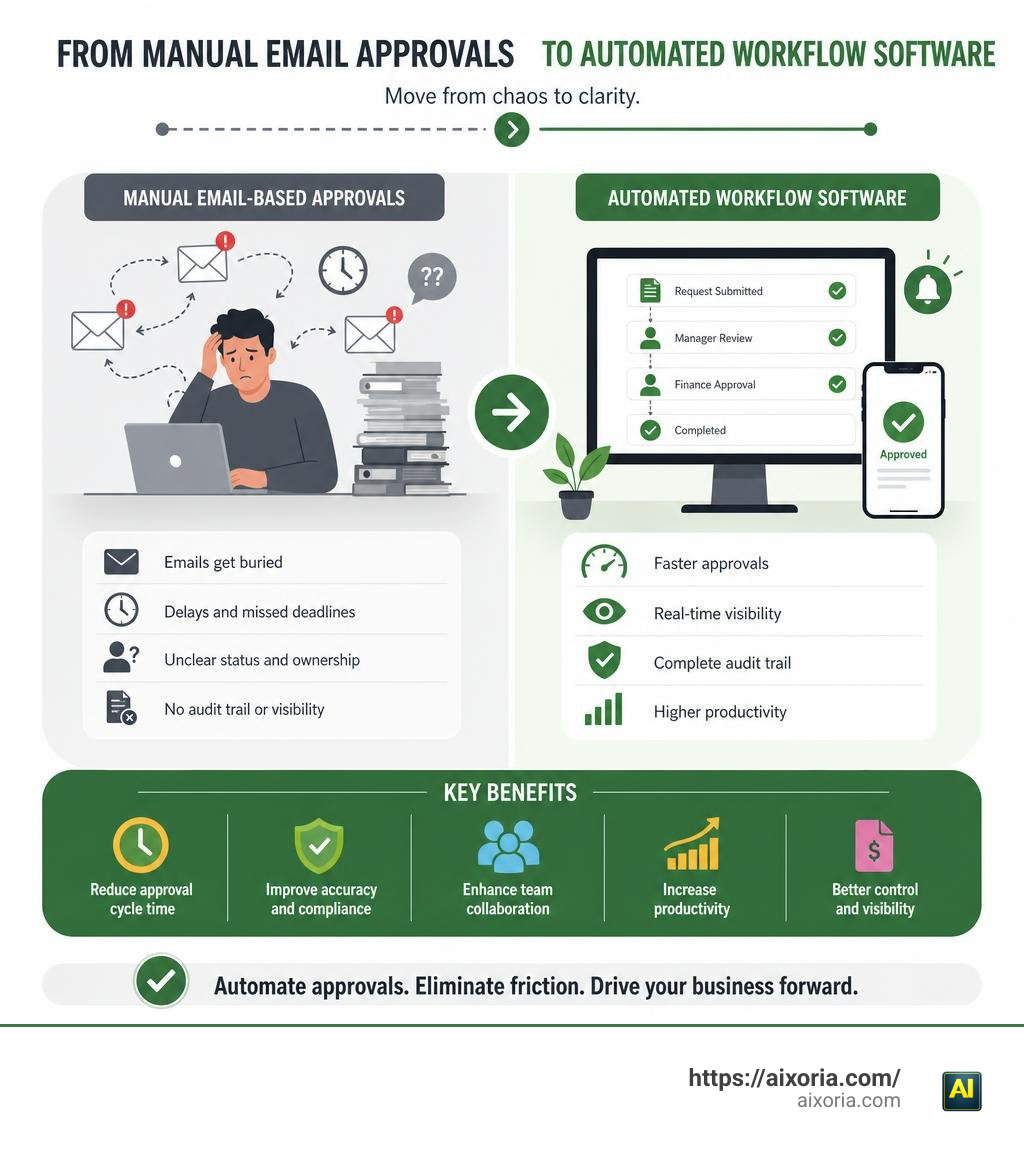
Think about how approvals work at most companies today. Someone sends an email. It gets buried. A manager goes on vacation. A purchase order sits unread for two weeks. Sound familiar?
This is the norm — not the exception. And it’s expensive.
Research from McKinsey & Company shows that workflow automation can drive a 20-25% increase in workforce productivity. Forrester research points to a 50% reduction in compliance violations when manual approval processes are replaced with automated systems. Some organizations report cutting approval cycle times by 60-65%.
The problem isn’t that teams don’t care about efficiency. It’s that most approval processes were never designed — they just happened. Someone sent a Slack message. Someone replied to a thread. Someone forgot to CC the right person. Over time, that becomes your process.
Dedicated approval workflow software replaces that chaos with structure, speed, and accountability.
This guide compares the key types, features, and solutions available in 2026 — so you can find the right fit for your organization without wading through a dozen vendor demos first.
What is Approval Workflow Software and Why Does Your Business Need It?
At its core, approval workflow software is a specialized engine designed to guide a business item from submission to final sign-off. While it sounds simple, the operational impact of moving from manual, ad-hoc approvals to structured digital systems is massive.
Many organizations confuse basic task lists with true business process management automation (BPMA). While task lists tell you what to do, approval software enforces how decisions are made, by whom, and under what conditions. It establishes a digital highway for your critical business data, ensuring nothing gets lost in transit.
Consider how much time your team spends acting as “administrative detectives.” When an invoice or project proposal goes missing, employees must search through sent emails, check chat histories, and knock on doors just to find who is holding up the line. This operational friction acts as a silent tax on your growth.
By implementing structured approval workflow software, you establish a single source of truth. The system automatically knows who needs to sign off on a $5,000 purchase versus a $50,000 contract. It handles the routing, sends the reminders, and logs the final decision without requiring human intervention.
To see how this fits into the broader landscape of process optimization, check out our comprehensive review of the Best Workflow Automation Software In 2026 Tested.
Beyond simple time savings, automating these paths safeguards your business against compliance risks. When regulatory audits occur, having your approvals scattered across personal email accounts is a recipe for disaster. Structured workflow software guarantees that every decision is logged, timestamped, and fully traceable.
Key Features to Look For When Comparing Solutions
Not all workflow platforms are built the same. Some are designed for simple document sign-offs, while others can orchestrate complex, multi-department operational cycles. When evaluating options, look for core primitives that ensure flexibility, security, and ease of use.

Core Capabilities of Modern Approval Workflow Software
To move away from manual bottlenecks, your software must empower business users to build and modify processes without waiting on IT. Look for these essential features:
- No-Code Visual Building: A drag-and-drop interface allows you to map out your processes visually. You should be able to see the exact path a request takes from start to finish.
- Customizable Web Forms: To ensure requests are submitted correctly from the start, you need smart forms that collect all required data, attachments, and context upfront.
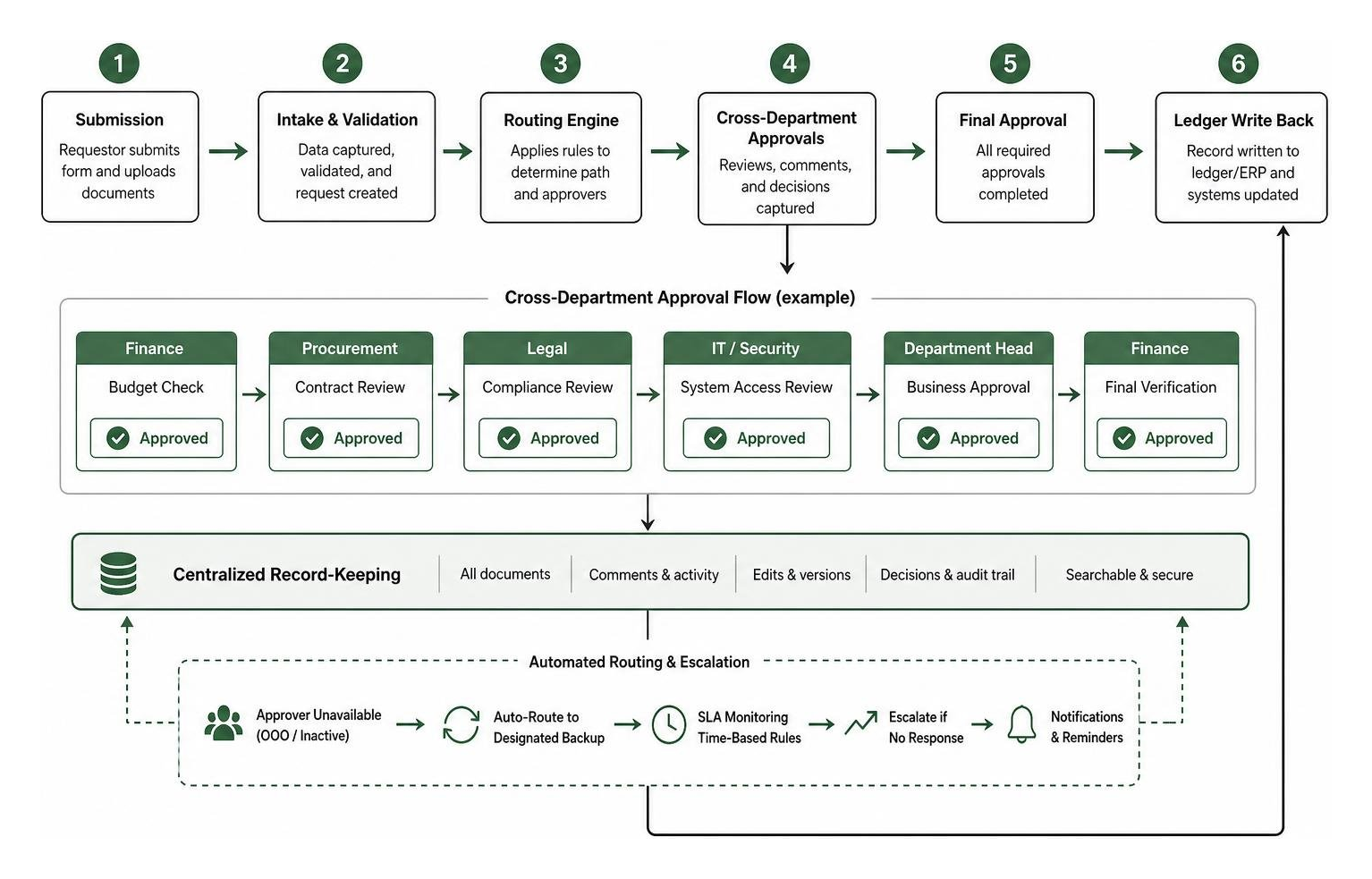
- Centralized Record-Keeping: Every request, comment, edit, and decision should live in one secure, searchable database.
- No-Code Routing and Escalation Solutions: When an approver is out of office, the software should automatically route the task to a designated backup. Platforms like Approval Workflow Automation Software | No-Code Routing & Escalation | altaFlow excel at handling these real-world exceptions seamlessly.
Advanced Routing and Customization Options
As your business grows, your approval rules will become more complex. Your software must be able to handle sophisticated logic:
- Sequential vs. Parallel Workflows: Sequential workflows route a request to Approver A, and only after Approver A signs off does it move to Approver B. Parallel workflows send the request to multiple stakeholders simultaneously to speed up review times.
- Conditional Routing Rules: This allows you to route requests based on specific data fields. For example, a travel request under $1,000 might get approved instantly, while anything over that threshold automatically routes to a department VP.
- Quorum Approvals: For high-stakes decisions, you may require a majority vote (e.g., “two out of three board members must approve”) before a step resolves.
- AI-Powered Automation: Modern platforms, such as Cflow: AI-Powered Approval Workflow Platform | No Code Required, leverage artificial intelligence to draft workflows from simple text prompts, predict bottlenecks, and automatically flag anomalous requests that fall outside standard patterns.
How Different Departments Benefit from Automated Workflows
A common mistake is thinking that approval software is only useful for finance teams. In reality, structured workflows streamline operations across every corner of your company.
Finance and Accounting
Finance departments are often buried under purchase orders, expense reports, and vendor invoices. Automated workflows enforce your company’s spending policies automatically. By implementing two-way or three-way matching (aligning the invoice with the purchase order and the receiving slip), the system can flag discrepancies before any money leaves your bank account. For a deeper look at financial automation, read our guide on the Best Accounting Workflow Automation Software In 2026 Soc 2 Ai.
Human Resources
From onboarding new hires to managing time-off requests, HR operations rely heavily on approvals. Automated workflows ensure that when an employee requests PTO, their manager is notified instantly. Once approved, the system can automatically update your payroll or scheduling systems without manual data entry.
IT and Security
IT teams must manage software licenses, hardware provisioning, and system access rights. Using structured workflows, an employee can submit an access request form. The software routes it to their manager for business justification, then to the security team for technical sign-off, and finally logs the completed action for compliance audits.
Legal and Procurement
Contract reviews and vendor onboarding require meticulous attention to detail. Automated routing ensures that contract drafts are sent to the correct legal specialists concurrently, allowing them to collaborate on redlines without creating version-control confusion.
Here is how these departmental use cases compare in terms of typical impact:
| Department | Common Use Case | Key Bottleneck Solved | Typical Cycle Time Reduction |
|---|---|---|---|
| Finance | Invoice & Purchase Orders | Manual data entry & policy matching | 60% to 75% faster |
| HR | Onboarding & PTO Requests | Lost emails & manual system updates | 50% fewer delays |
| IT | System Access & Hardware | Unsecured, ad-hoc access grants | Immediate compliance logging |
| Legal | Contract Redlining | Sequential review delays | 3x quicker turnaround |
Key Categories of Approval Systems in 2026
When shopping for approval workflow software, you will find that tools generally fall into one of four distinct categories. Understanding these buckets helps you narrow down your search based on your team’s daily habits.

1. Project Management & Collaboration Platforms
These are tools your team might already use for daily tasks, upgraded with lightweight approval features. They are excellent for content reviews, creative proofing, and general task handoffs. However, they often lack the deep financial compliance controls or complex database routing required for enterprise-grade operations.
2. Document Routing & Management Systems
These systems focus heavily on the lifecycle of files, contracts, and PDFs. They excel at managing version control, collecting legally binding electronic signatures, and keeping documents organized. Platforms like Workflow & Approvals | Document Routing & Process Automation | Klyck are prime examples of tools built to move documents securely across departments.
3. Low-Code Application & BPM Platforms
If you need to build highly customized, database-driven workflows that match unique business rules, low-code platforms are the answer. They allow you to build custom applications around your workflows. For example, Approval Workflow Software | Unlimited Users, No Per-Seat Fees | Caspio provides a robust database engine to construct custom workflows without per-seat licensing penalties. Similarly, visual tools like Approval Workflow Software | Automate Business Approvals | HEFLO let you model your processes using global visual standards (like BPMN) to handle complex real-world exceptions easily.
4. Embedded Developer APIs & SDKs
For software companies looking to build approval features directly into their own proprietary SaaS products, building a workflow engine from scratch is a massive engineering headache. Instead, developers use specialized tools like Approval Workflows | Add an approval workflow builder | Velt to embed collaborative, enterprise-ready approval flows directly into their software applications using simple React SDKs and APIs.
Choosing the Right Approval Workflow Software for Your Organization
To pick the right tool, you must weigh your technical resources against your operational complexity. If you have a dedicated IT team and highly specific legacy databases, a low-code application platform or developer API will give you the customization you need. If you want to get up and running in an afternoon, look for lightweight, no-code SaaS tools that focus on user adoption.
Pay close attention to licensing models. Some vendors charge strictly per-user, which can penalize your business as you scale or prevent you from including external stakeholders (like vendors or clients) in your approval chains. Look for platforms that offer unlimited user models or “license-free approvals” for external reviewers to keep your scaling costs predictable.
Integration with Existing Communication and Accounting Tools
Your approval software should not feel like another isolated destination. The most successful implementations occur when approvals happen where your team already works.
Integrating your workflows with communication hubs like Slack or Microsoft Teams allows managers to approve purchase orders or PTO requests with a single click directly inside their chat apps. This eliminates tool fatigue and dramatically speeds up response times.
On the backend, your system must write approved data back to your core records automatically. When an invoice is approved, the software should instantly sync that data with QuickBooks Online, Xero, or your enterprise ERP to prevent double data entry.
To explore how modern startups are leveraging these interconnected ecosystems, dive into our breakdown of the 7 Best Ai Workflow Automation Tools For Startups 2026 From No Code To Ai Agents.
Frequently Asked Questions about Approval Workflows
What is the difference between approval workflow software and robotic process automation (RPA)?
While both are automation technologies, they serve different purposes. Approval workflow software manages end-to-end business processes, orchestrating the interaction between humans, systems, and logic over time. It is designed to facilitate decision-making, collaboration, and compliance.
Robotic Process Automation (RPA), on the other hand, focuses on task-level automation. RPA uses software “bots” to mimic repetitive human actions, like copying data from a spreadsheet and pasting it into an old legacy desktop application. Think of BPMA as the conductor of the orchestra, while RPA is a highly efficient musician playing a single instrument.
How does approval workflow software help with compliance and audit trails?
Manual approvals via email or paper are incredibly difficult to audit. Automated workflow software solves this by generating a permanent, tamper-proof record of every action.
Every time a user submits, reviews, edits, approves, or rejects a request, the software logs:
- The exact user identity and role.
- The precise timestamp of the decision.
- Any comments, rejections, or attached files.
- The IP address or device used.
This centralized, exportable trail ensures that when internal or external auditors ask to see who authorized a specific transaction, you can generate a complete report in seconds.
Can external users approve requests without a paid software license?
Yes, depending on the software platform you choose. Some advanced workflow engines allow you to route approvals to external stakeholders — like vendors, clients, or freelance partners — via secure, temporary email links. These external users can review the request and click “Approve” or “Reject” without needing a registered, paid seat on your software platform. This is a crucial feature to look for if you want to scale your operations without your software licensing fees skyrocketing.
Conclusion
At Aixoria, we believe that operational efficiency is the ultimate competitive advantage. Delaying the automation of your core business processes doesn’t just slow down your daily work — it accumulates organizational debt that becomes harder to clear as you scale.
By replacing chaotic email threads and fragmented chat messages with dedicated approval workflow software, you give your team the clarity, speed, and structural guardrails they need to perform at their best.
Ready to take your organization’s productivity to the next level? Explore our insights on What is the Best AI for Productivity in 2026 to discover how to build a highly optimized, future-proof operational engine today.