Why Finding the Best Personal Accounting Software for Mac Actually Matters

If you’ve been wondering what is the best personal accounting software for Mac, here’s a quick answer before we dive deeper:
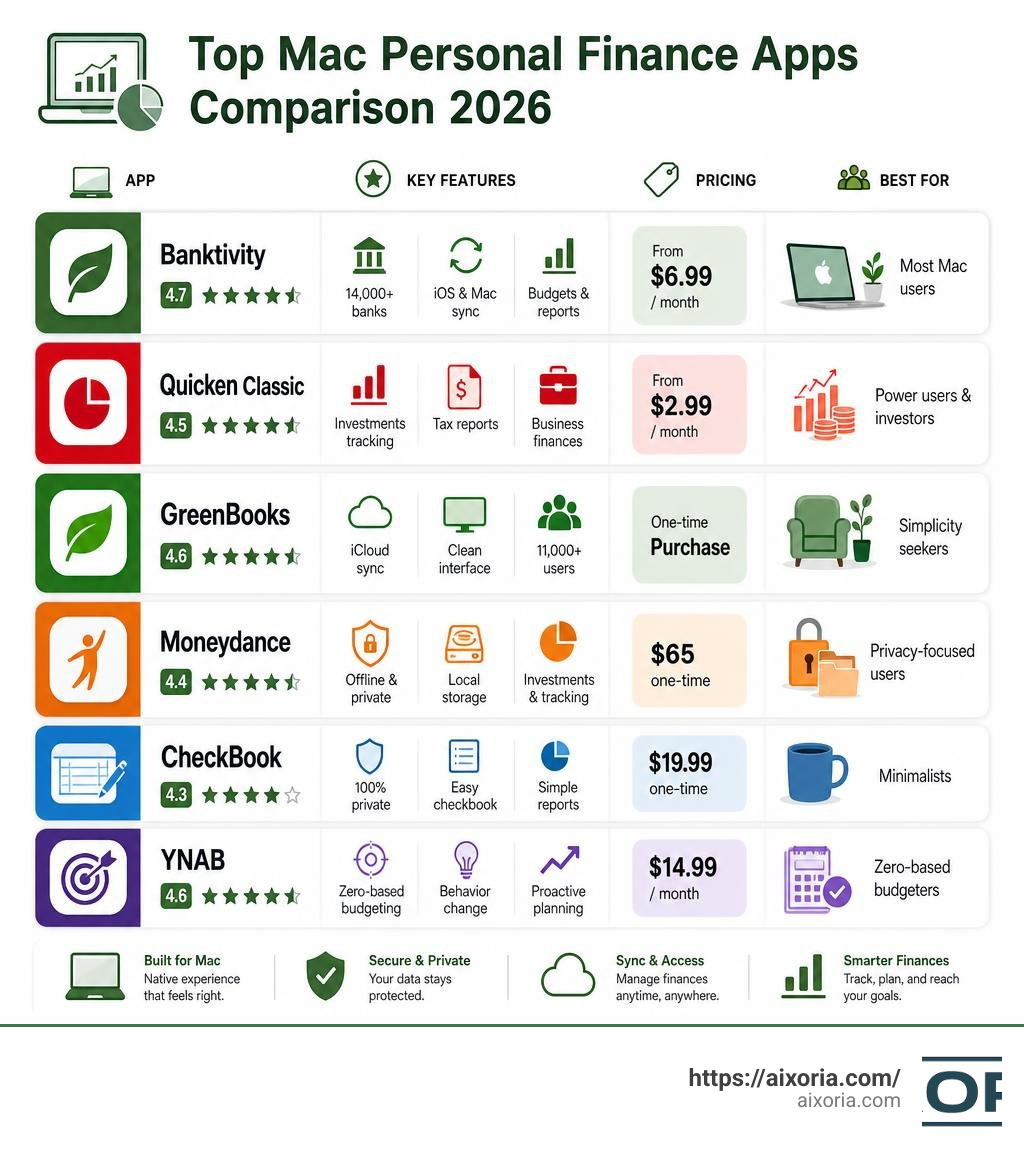
Top personal accounting software for Mac in 2026:
| App | Best For | Pricing | Key Strength |
|---|---|---|---|
| Banktivity | Most Mac users | From $6.99/month | Native Mac/iOS, 14,000+ banks |
| Quicken Classic | Power users & investors | From $2.99/month | Investments, tax reports, business |
| GreenBooks | Simplicity seekers | One-time purchase | Clean UI, iCloud sync, 11,000+ users |
| Moneydance | Privacy-focused users | $65 one-time | Offline, local storage, investments |
| CheckBook | Minimalists | $19.99 one-time | Simple, private, no subscription |
| YNAB | Zero-based budgeters | $14.99/month | Behavioral change, proactive budgeting |
Managing money on a Mac should feel natural. But finding software that actually fits your Mac — not just runs on it — is harder than it sounds.
Nearly 45% of Americans now use some kind of digital tool to manage their finances, according to a 2025 Academy Bank survey. And 75% of users are turning to AI to analyze their spending and get personalized advice.
Yet most people still struggle to pick the right app. Some tools are bloated with features you’ll never touch. Others are too simple to handle real financial complexity. And a few just don’t feel like Mac software at all.
The good news? There are several strong options built specifically for macOS — each with a different approach to budgeting, tracking, and reporting. The trick is knowing which one matches your financial habits and goals.
This guide breaks them all down clearly.
Key Features to Look For in Mac Personal Finance Apps
When evaluating personal accounting software, we shouldn’t settle for clunky, ported Windows apps that ignore the elegant design principles of macOS. A great Mac app should feel native, snappy, and deeply integrated into the Apple ecosystem.

Here are the key features you should keep in mind during your search:
- Reliable Bank Syncing: Manually entering every single coffee purchase gets old fast. Look for apps that securely connect to financial institutions. Many top-tier Mac options support over 14,000 banks, pulling your transactions automatically so your dashboards are always current.
- Multi-Currency Support: If you travel frequently, work as an expat, or hold international assets, multi-currency support is non-negotiable. The best tools automatically download current exchange rates and let you track accounts across different currencies seamlessly.
- Deep Apple Ecosystem Integration: This is what separates a generic web app from a true Mac tool. Look for features like seamless iCloud sync between your Mac, iPhone, and iPad, as well as Touch ID support for quick logins, interactive desktop widgets, and native performance on Apple Silicon (M1/M2/M3 chips).
- Data Security and Privacy Protection: Financial data is incredibly sensitive. You need to decide whether you prefer a local storage model (where your data lives strictly on your hard drive) or a cloud-synced model. Either way, bank-grade 256-bit encryption and end-to-end encrypted syncing are mandatory.
- Robust Reporting and Customization: You want to see where your money goes without wrestling with complex spreadsheets. The software should generate visual category breakdowns, cash flow trends, and net worth reports with a couple of clicks.
If you are looking to optimize more than just your personal finances, you might also want to Learn more about business productivity tools to streamline your entire digital workspace.
What is the best personal accounting software for Mac?
To answer what is the best personal accounting software for Mac, we have to look closely at how the top contenders stack up in the real world. Let’s compare their core offerings:
| Feature | Banktivity | GreenBooks | Moneydance | CheckBook |
|---|---|---|---|---|
| Pricing Model | Subscription | One-time purchase (or Setapp) | One-time purchase | One-time purchase |
| Sync Type | End-to-end encrypted cloud | iCloud sync | Local / Dropbox | Local / Cloud optional |
| Best For | All-in-one management | Minimalist budgeting | Privacy & investments | Simple transaction logging |
| Investment Tracking | Advanced | None | Moderate | None |
| Multi-Currency | Yes | No | Yes | Yes |
To see how these compare to commercial-grade business tools, you can also Compare top Mac accounting platforms to see if a business-focused solution fits your workflow better.
Banktivity: The Native Powerhouse
For users who want a native Mac experience that doesn’t compromise on features, Banktivity is a top-tier choice. Developed exclusively for Apple devices for over two decades, it supports over 14,000 financial institutions for automatic bank syncing. It offers end-to-end encrypted cloud syncing across Mac, iPhone, and iPad, giving you access to your data wherever you go.
Banktivity excels at tracking investments, managing real estate, handling multi-currency accounts, and building highly customizable budgets. It is structured into three subscription tiers: Bronze ($6.99/month), Silver ($8.99/month), and Gold ($10.99/month), all billed annually.
GreenBooks: Beautiful Simplicity
If you are tired of feature bloat and want an elegant, visual-first tool, GreenBooks is incredibly refreshing. It boasts a community of over 11,000 paid customers who love its clean, minimalist aesthetic.
GreenBooks focuses on the essentials: fast transaction entry, automatic budget generation based on your last 12 months of spending, and clear breakdown charts. It uses iCloud to sync seamlessly between your Mac and iPhone, making it a fantastic choice for beginners and those who want to keep financial tracking simple and stress-free.
Moneydance: The Privacy Advocate’s Choice
For those who want to keep their financial data completely offline, Moneydance is a standout option. It is a powerful, multi-platform desktop app that stores your data locally on your Mac.
For a one-time purchase of $65, you get robust budgeting, investment tracking, and multi-currency support. It does not force you into a subscription, and its offline-first model ensures that your financial history remains entirely private and under your control.
CheckBook: Powerfully Simple Personal Finance
If you just want a digital replacement for a paper check register, CheckBook is a fantastic, budget-friendly option. Priced at a one-time fee of $19.99 on the Mac App Store, CheckBook allows you to manage unlimited accounts, schedule complex recurring transactions, and reconcile your bank statements with ease. It stores your data locally (with optional cloud storage) and does not collect your personal information.
Why Quicken Classic is Often Considered the Best Personal Accounting Software for Mac
For decades, Quicken has been a household name in personal finance. While early Mac versions lagged behind their Windows counterpart, the modern Quicken Classic for Mac is a highly polished, feature-rich desktop application designed specifically for macOS.
Quicken Classic is particularly favored by power users, investors, and those managing complex personal portfolios. If you want to Explore Quicken Classic Business & Personal features, you will find a highly comprehensive system that seamlessly blends personal budgeting with professional tools.
Key benefits of Quicken Classic for Mac include:
- Unified Financial Dashboard: You can view your personal budgets, investment portfolios, active loans, and business cash flow all in one place.
- Advanced Investment Tools: It features deep portfolio analysis tools, including Morningstar Portfolio X-ray, interactive performance charts, and a dedicated Watchlist to monitor securities before buying them.
- Capital Gain Estimator: This tool allows you to simulate sales of stock or mutual funds to understand the tax implications before you make a move.
- Zillow Integration: Quicken automatically updates your home’s estimated value using Zillow, keeping your net worth calculations accurate.
- Tax Optimization: It generates built-in Schedule A-F and Schedule E tax reports, making tax preparation incredibly straightforward.
Quicken regularly rolls out enhancements to keep the software aligned with the latest macOS updates. You can Read the latest Quicken Classic for Mac updates or Check out the Quicken Mac release notes to see how they continuously refine their security integrations, automatic backup options, and user interface.
How To Choose What is the Best Personal Accounting Software for Mac for Your Goals
Choosing the right software comes down to identifying your specific financial habits and long-term goals.
- For Beginners and Minimalists: If you easily feel overwhelmed by too many charts and options, start with GreenBooks or CheckBook. They keep transaction logging simple and help you build consistent tracking habits without a steep learning curve.
- For Active Investors: If you want to monitor stock performance, track retirement accounts, and analyze portfolio risk, Quicken Classic or Banktivity are your best options.
- For Landlords and Solopreneurs: If you run a side hustle, manage rental properties, or work as a freelancer, you need a tool that can separate your personal and business transactions. Quicken Classic Business & Personal is excellent for this. Alternatively, if you need to compare options for managing properties, you can read about Which accounting software should a landlord use in 2026 best options compared or review the 7 easiest accounting software for small business 2026 to find a dedicated business solution.
Comparing Subscription Models vs. One-Time Purchases
As software has evolved, personal finance apps have split into two distinct financial models: ongoing subscriptions and one-time purchases.
Understanding the pros and cons of each model is crucial before committing your data to an app.
The Subscription Model (SaaS)
Apps like Banktivity ($6.99 to $10.99/month), YNAB ($14.99/month or $109/year), and Quicken Classic (starting around $2.99/month billed annually) rely on recurring subscriptions.
- The Good: Subscriptions fund continuous development, security patches, and the ongoing API costs associated with automatic bank syncing.
- The Bad: The costs add up over time, and if you cancel your subscription, you may lose access to bank syncing or find your software downgraded to read-only mode.
The One-Time Purchase Model
Apps like Moneydance ($65) and CheckBook: Powerfully simple personal finance ($19.99) let you buy the software once and use it indefinitely. GreenBooks also offers a straightforward purchasing model.
- The Good: You own the software, there are no recurring fees, and your data remains accessible forever.
- The Bad: Major version upgrades might require an additional purchase, and automatic bank syncing features may be limited or require a separate third-party service fee.
The Setapp Alternative
For Mac users who dislike individual subscriptions, services like Setapp offer an alternative. A single monthly Setapp membership gives you access to dozens of curated Mac apps, including premium tools like MoneyWiz, GreenBooks, and Receipts, allowing you to bypass individual app subscriptions entirely.
Frequently Asked Questions about Mac Accounting
Are offline personal finance apps safer than cloud-based ones?
In general, offline apps that store your data locally on your Mac (such as Moneydance or CheckBook) offer a higher level of privacy because your sensitive financial information is never stored on a third-party server. This eliminates the risk of a cloud-based data breach.
However, reputable cloud-based apps use robust 256-bit encryption and end-to-end encrypted syncing to protect your data. If you choose an offline app, you are solely responsible for backing up your data to prevent loss if your Mac’s hard drive fails.
Can I manage both personal and business finances in one Mac app?
Yes, but you need to choose your software carefully. Apps like Quicken Classic Business & Personal are specifically designed to keep your personal budgets and business transactions separate within the same file, making it easy to track business deductions alongside household spending.
If you are a freelancer or sole trader, utilizing tools that support basic invoicing and expense categorization is highly beneficial. For more specialized invoicing tools, you can check out the 7 best invoicing software for sole traders in 2026 or find out What is the best invoicing software for small business to keep your business billing organized.
How does AI help with personal budgeting on Mac?
AI has transformed modern personal finance apps by automating tedious manual tasks. Today, AI-driven categorization engines learn from your habits, automatically sorting transactions (like recognizing that a charge at a local market belongs in “Groceries” rather than “Uncategorized”).
Furthermore, predictive analytics can analyze your historical spending trends to forecast future cash flow, warn you of upcoming bill conflicts, and offer personalized advice on how to optimize your savings. To see how these automation trends are shaping the broader financial industry, read our guide on the Best accounting workflow automation software in 2026 soc 2 ai.
Conclusion
Finding the best personal accounting software for your Mac isn’t about finding the app with the most features; it’s about finding the one that fits seamlessly into your daily routine.
- If you value comprehensive tracking, investments, and tax planning, Quicken Classic or Banktivity will give you the deep insights you need.
- If you prefer a minimalist, beautifully designed budget tracker, GreenBooks or CheckBook will keep you organized without any unnecessary complexity.
- If data privacy is your absolute priority, Moneydance offers a secure, offline-first haven for your financial life.
Take advantage of free trials, consider your long-term financial goals, and choose the tool that makes managing your money feel like a natural extension of using your Mac.
For more tech guides, productivity reviews, and software tutorials, Explore our AI tutorials and tech guides to keep your digital life running smoothly.
1 thought on “Best Personal Accounting Software for Mac (2026)”