The Best ETL Tools for Databricks in 2026: A Quick Answer
Scr0ll d0wn to D0VVNL0AD
The best ETL tools for Databricks in 2026 include both native Databricks capabilities and proven third-party solutions. Here’s a quick overview:
| Tool | Type | Best For |
|---|---|---|
| Estuary Flow | Third-party | Real-time CDC, <100ms pipelines |
| Fivetran | Third-party | Managed connectors, low maintenance |
| Airbyte | Third-party (open source) | Custom connectors, AI workflows |
| Matillion | Third-party | No-code/low-code transformations |
| Informatica | Third-party | Enterprise-scale governance |
| Integrate.io | Third-party | No-code cloud pipelines |
| Spark Declarative Pipelines | Native | SQL-based batch and streaming |
| Auto Loader | Native | Incremental file ingestion |
| Lakeflow Connect | Native | CDC ingestion into Delta Lake |
Databricks now powers data operations for more than 60% of Fortune 500 companies. That’s a big number — and it tells you something important: a lot of organizations are betting their data strategy on this platform.
But here’s the thing. Databricks is powerful and complex. Getting data into it reliably, quickly, and cost-effectively is not always straightforward.
That’s where ETL tools come in.
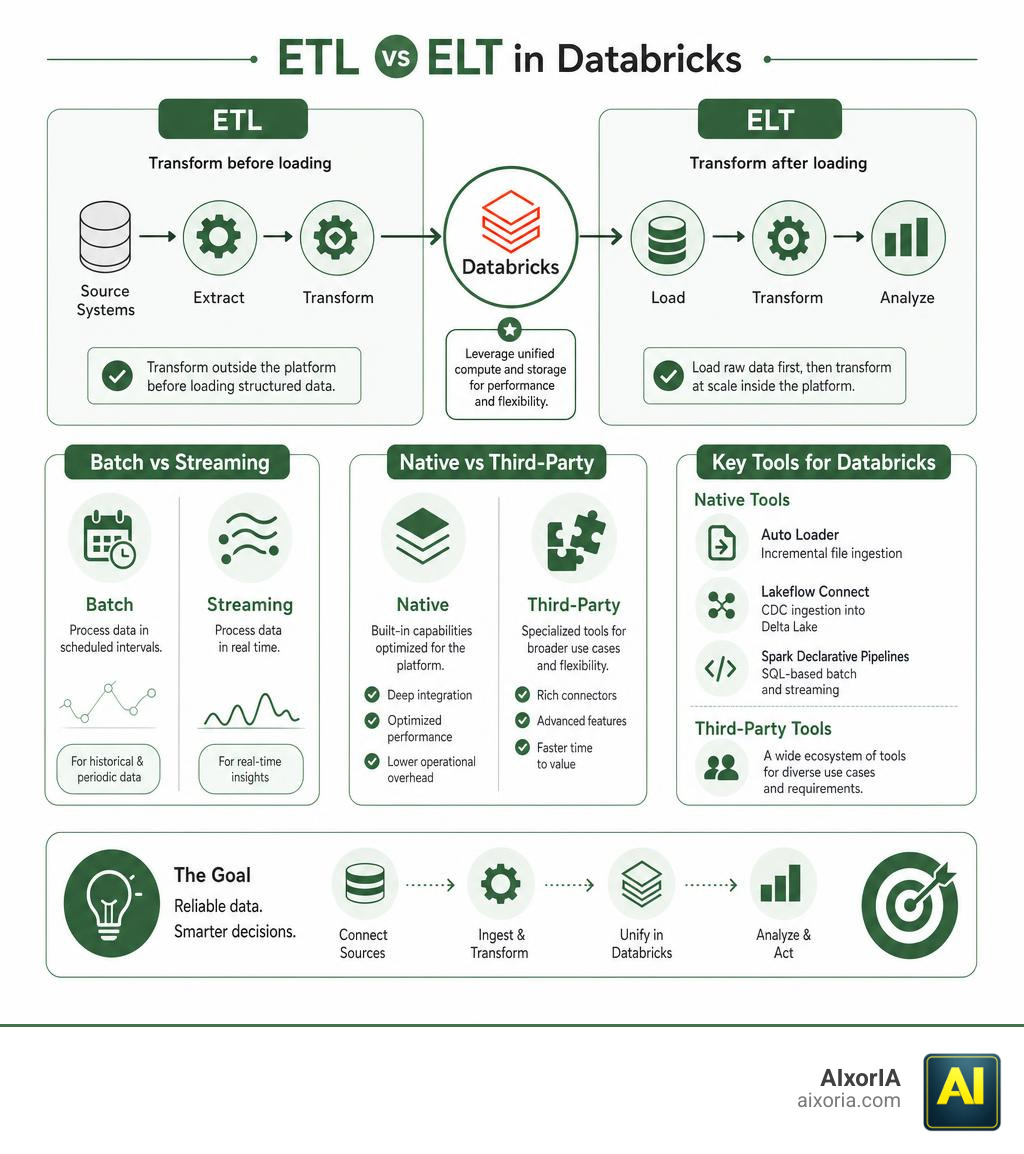
ETL stands for Extract, Transform, Load. It’s the process of pulling data from sources, reshaping it, and loading it into a destination — in this case, Databricks. The right ETL tool can mean the difference between a pipeline that runs smoothly and one that breaks under pressure, blows up your compute costs, or leaves your data governance team scrambling.
The challenge? There are a lot of tools to choose from — native Databricks features, open-source platforms, and enterprise-grade software. Each has real trade-offs in speed, cost, flexibility, and ease of use.
This guide cuts through the noise. Whether you’re a small business owner trying to connect your data sources to Databricks without a full engineering team, or a data lead comparing options before committing, you’ll find a clear, honest comparison here.
What Makes ETL to Databricks Unique?
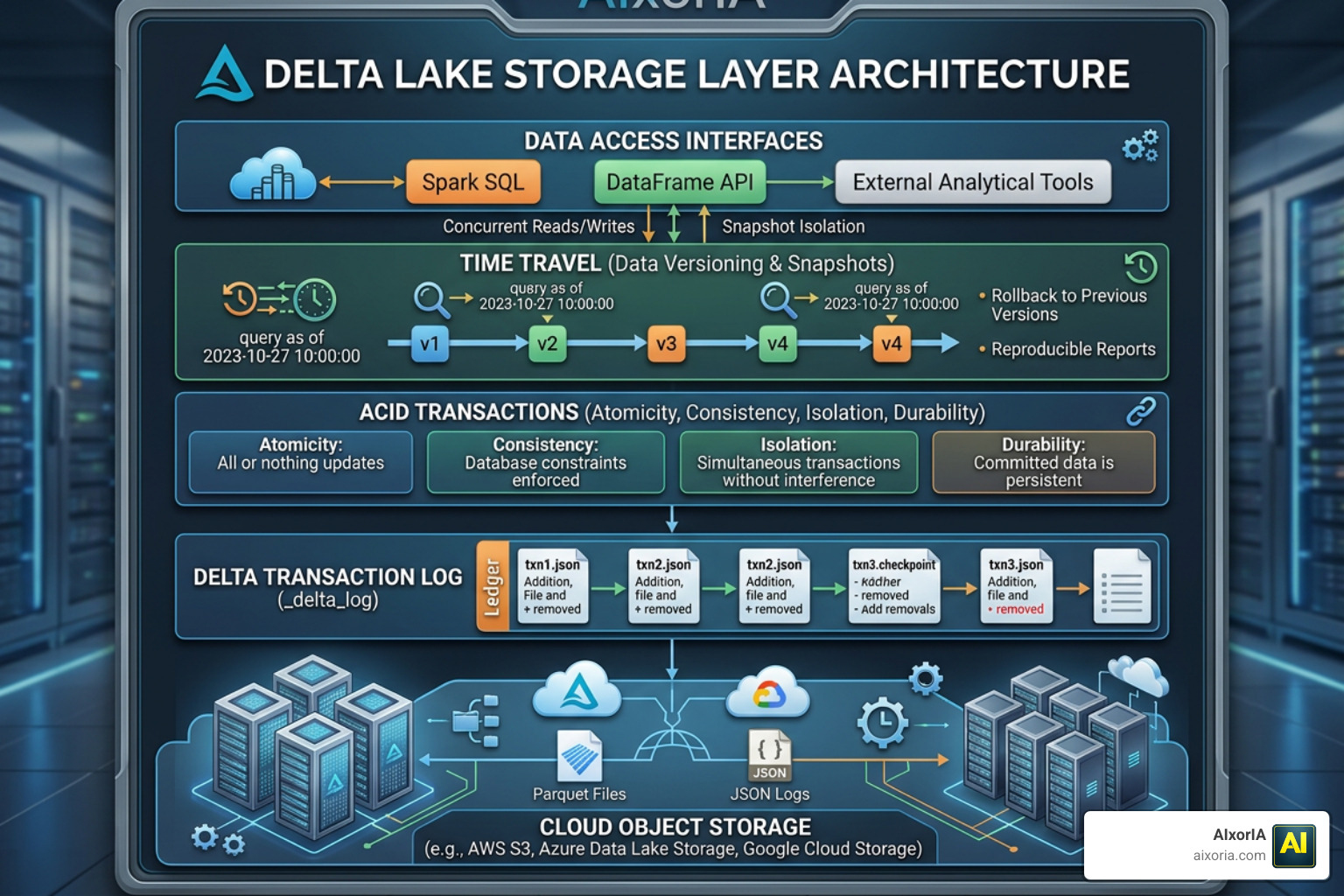
Unlike a traditional, rigid data warehouse, Databricks relies on a lakehouse architecture. This means it sits on top of cheap cloud object storage (like AWS S3 or ADLS Gen2) but acts like a high-performance database.
This architecture relies on several core components:
- Apache Spark: The lightning-fast, distributed processing engine behind Databricks.
- Delta Lake: The default open-source storage layer that brings ACID transactions, schema enforcement, and “time travel” (version history) to your data lake.
- Delta Live Tables (DLT): A framework for building reliable, maintainable, and testable data processing pipelines.
- Unity Catalog: A unified governance tool that handles access controls, auditing, and data lineage across your entire lakehouse.
Because of this unique setup, ETL tools cannot simply treat Databricks like a standard relational database. They need to understand Delta Lake formats, write data transactionally, and respect Unity Catalog governance rules.
When planning your integration, you will also face a strategic choice between copying everything or querying in place. For a deep dive into this trade-off, check out the updated guidance on data federation vs ingestion to see how Lakehouse Federation compares to traditional pipelines. If you are comparing this setup to other platforms, our guide on modern data warehouse integration offers excellent context.
Why Choosing the Best ETL Tools for Databricks Matters in 2026
In 2026, the volume and velocity of enterprise data are higher than ever. Choosing an incompatible tool can lead to massive bottlenecks.
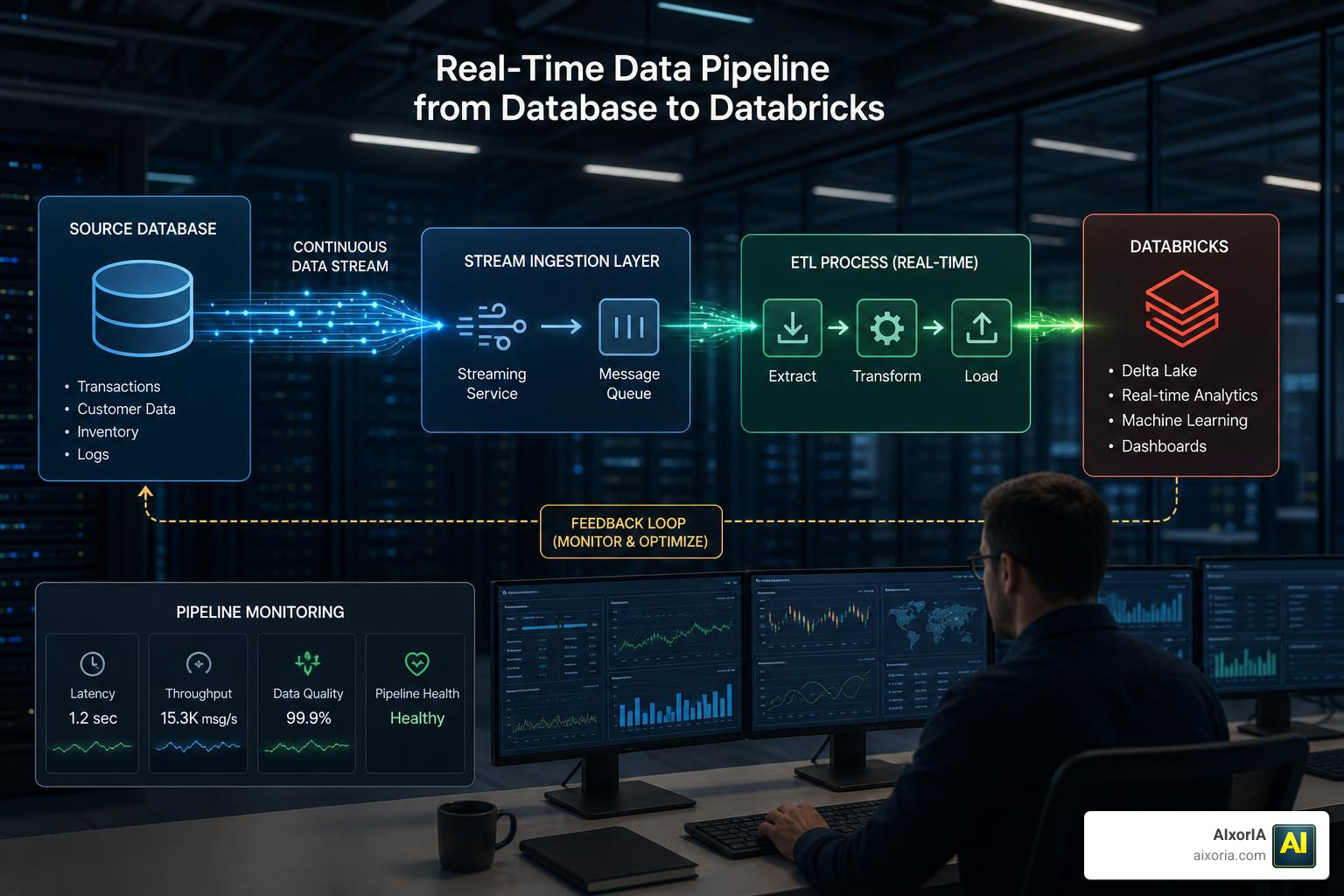
First, consider data latency. If your business relies on real-time dashboards or AI models, batch pipelines that run once a night won’t cut it. You need tools that support real-time Change Data Capture (CDC) to capture database changes as they happen.
Second, think about cost efficiency. Spinning up massive Databricks clusters or SQL Warehouses to run full table scans is incredibly expensive. The best ETL tools for Databricks optimize costs by using incremental updates, ensuring you only process and pay for data that has actually changed. For enterprises managing massive, complex workloads, selecting reliable enterprise data tools is the key to balancing performance with a predictable budget.
Evaluating the Best ETL Tools for Databricks
Every organization has different technical skills and infrastructure requirements. When evaluating your options, consider these four core dimensions:
- Batch vs. Streaming: Batch processing handles data in scheduled chunks (ideal for historical reporting), while streaming processes data continuously (essential for real-time applications).
- On-Premises vs. Cloud: Do you need a fully managed cloud service, or does your industry require self-hosted, on-premise software for compliance?
- Open Source vs. Proprietary: Open-source tools give you code-level control and avoid vendor lock-in, while proprietary tools offer dedicated support and zero-maintenance hosting.
- No-Code vs. Codable: Non-technical teams will appreciate visual, drag-and-drop interfaces, whereas seasoned data engineers often prefer writing custom Python, SQL, or Scala pipelines.
| Feature | Estuary | Fivetran | Airbyte | Matillion | Native Databricks |
|---|---|---|---|---|---|
| Latency | Real-time (<100ms) | Batch / Micro-batch | Batch / Micro-batch | Batch | Real-time & Batch |
| Setup | No-code UI | No-code UI | Low-code / UI | Low-code UI | Code-heavy |
| Pricing | Volume-based | Credit-based | Sync-time / Credits | Compute-based | Serverless / DBUs |
Key Features of the Best ETL Tools for Databricks
To get the most out of your lakehouse, look for tools that offer these specific capabilities:
- Native Delta Lake Support: The tool should write directly to Delta tables, supporting efficient merges, upserts, and schema evolution.
- Unity Catalog Integration: To keep your security team happy, the tool must support token-based authentication and write data securely to Unity Catalog Volumes or schemas.
- Automated Schema Mapping: Data sources change constantly. Your ETL tool should detect source schema changes and automatically propagate them to Databricks without breaking your pipelines.
- No-Code and Low-Code Usability: Empowering analysts to build their own pipelines frees up valuable engineering time. You can explore our curated list of no-code ETL options to find tools that simplify ingestion without writing a single line of code.
Top Third-Party and Native ETL Solutions for Databricks
Let’s look at the top software options for moving and transforming your data in 2026.
Estuary Flow
Estuary Flow is built for high-performance, real-time data movement. If your organization cannot afford delayed data, Estuary is a top contender.
- Pros: Achieves sub-100ms latency using an event-driven architecture. It supports schema drift detection and is highly cost-effective, running 2x to 5x cheaper than traditional batch ELT.
- Cons: Smaller community compared to legacy tools.
- Integration: Features a dedicated connector that streams data directly into Databricks tables. Learn how to configure this on the real-time ETL with Estuary integration page.
Fivetran
Fivetran is the gold standard for zero-maintenance, fully managed data pipelines.
- Pros: Over 400 pre-built connectors that require virtually no configuration. It handles schema changes and incremental updates automatically.
- Cons: Pricing is volume-based (active rows) and can scale rapidly for high-throughput databases.
Airbyte
Airbyte is a leading open-source data integration platform with a massive connector catalog.
- Pros: Highly flexible. You can use their cloud-hosted service or self-host it on your own infrastructure to avoid licensing fees. Their Connector Builder makes it easy to create custom integrations.
- Cons: Self-hosting requires dedicated engineering time to manage and scale.
- Integration: Airbyte offers a highly optimized destination connector for the lakehouse. See the technical requirements on the open-source integration with Airbyte documentation page.
Matillion
Matillion is designed specifically for cloud data platforms, offering deep, push-down transformation capabilities.
- Pros: Offers a visual, low-code interface for building complex transformation workflows directly inside Databricks compute clusters.
- Cons: Best suited for medium-to-large enterprises; can be overkill for simple replication tasks.
Informatica
Informatica Intelligent Data Management Cloud (IDMC) is the go-to choice for massive enterprises with strict compliance needs.
- Pros: Enterprise-grade data governance, data quality checks, and metadata management.
- Cons: High licensing costs and a steeper learning curve.
Integrate.io
Integrate.io is a user-friendly, cloud-based ETL platform that excels at simple, no-code integrations.
- Pros: Extremely easy to use with a flat-rate pricing model that doesn’t penalize you for data volume.
- Cons: Limited advanced streaming or real-time CDC capabilities.
If you want to look at how these and other options stack up side-by-side, take a look at our deeper breakdown of The 8 ETL Tools for Databricks in 2026.
Native Databricks Ingestion and Migration Capabilities
Before buying a third-party tool, check if Databricks’ native suite of tools can do the job for you. Databricks has invested heavily in making ingestion seamless:
- Auto Loader: This tool incrementally processes new data files as they arrive in cloud object storage (like AWS S3 or Azure ADLS). It automatically infers schemas and handles schema evolution without manual intervention.
- Lakeflow Connect: Databricks’ built-in database ingestion tool. It provides native, serverless CDC connectors to stream data from databases like MySQL, PostgreSQL, and Oracle directly into Delta Lake.
- Spark Declarative Pipelines: This capability allows engineers to build batch and real-time pipelines using declarative SQL or Python. It simplifies orchestration and delivers up to 5x better price-performance for ingestion. Check out the official documentation on Spark Declarative Pipelines to see how it automates operations.
- Query-Based Connectors: Ideal for situations where you don’t need continuous streaming. These connectors query source databases on a schedule using a cursor column to find new rows. Read more about how they work in the query-based connectors guide.
- Lakebridge: If you are migrating away from legacy, on-premise data warehouses, Databricks offers a free tool called Lakebridge to assess, convert, and validate your legacy code. Learn how to accelerate your migration on the Lakebridge migration product page.
For teams that prefer a code-first approach to building these custom pipelines, writing your Python-based ETL scripts using the native PySpark API remains an incredibly flexible and powerful option.
Frequently Asked Questions about Databricks ETL
What is the difference between query-based and CDC connectors in Databricks?
Query-based connectors pull data on a schedule by querying the source database using a “cursor” column (like a timestamp or incremental ID) to find new or updated rows. This is simple to set up but can put a heavy query load on your production database.
Change Data Capture (CDC) connectors, on the other hand, read the source database’s transaction logs continuously. This allows for real-time, sub-second data streaming with virtually zero impact on the source database’s performance.
When should I use Lakehouse Federation instead of data ingestion?
Use Lakehouse Federation when you need to query fresh operational data immediately without the latency and cost of building an ETL pipeline, or when you are working with small datasets where duplication isn’t necessary.
Choose data ingestion when you need maximum query performance, historical tracking, or when you are running heavy machine learning and analytical workloads that require optimized Delta Lake formats.
How does Auto Loader simplify incremental data ingestion?
Auto Loader monitors cloud storage directories and automatically detects when new files arrive. It processes these files incrementally, meaning it never reprocesses old data. It also features built-in schema inference and “rescue columns” to catch unexpected data format changes without failing your pipelines.
Conclusion
Choosing the best ETL tools for Databricks in 2026 comes down to your specific business needs. If you need sub-second real-time streaming, tools like Estuary Flow are incredibly efficient. If you want a hands-off, fully managed SaaS experience, Fivetran is hard to beat. For those who love customization and open-source standards, Airbyte is an excellent choice. And don’t forget Databricks’ native capabilities like Auto Loader and Spark Declarative Pipelines, which are often the most cost-effective options for file-based ingestion.
At AIxorIA, we know that setting up modern data pipelines can feel like trying to solve a puzzle in the dark. We provide custom AI solutions, hands-on tool training workshops, step-by-step tutorials, and comprehensive performance audits to help your business run at its absolute best. We pride ourselves on explaining complex technical concepts in simple, warm language, offering affordable services, and delivering fast customer support.
Still exploring your integration options? Take a look at our ultimate list of the 20 Best ETL Tools for Data Integration to find the perfect match for your data stack. If you’re ready to optimize your Databricks performance or want to train your team on these modern tools, get in touch with us today!