Choose Free AI That Can Analyze Your Real SEO Data
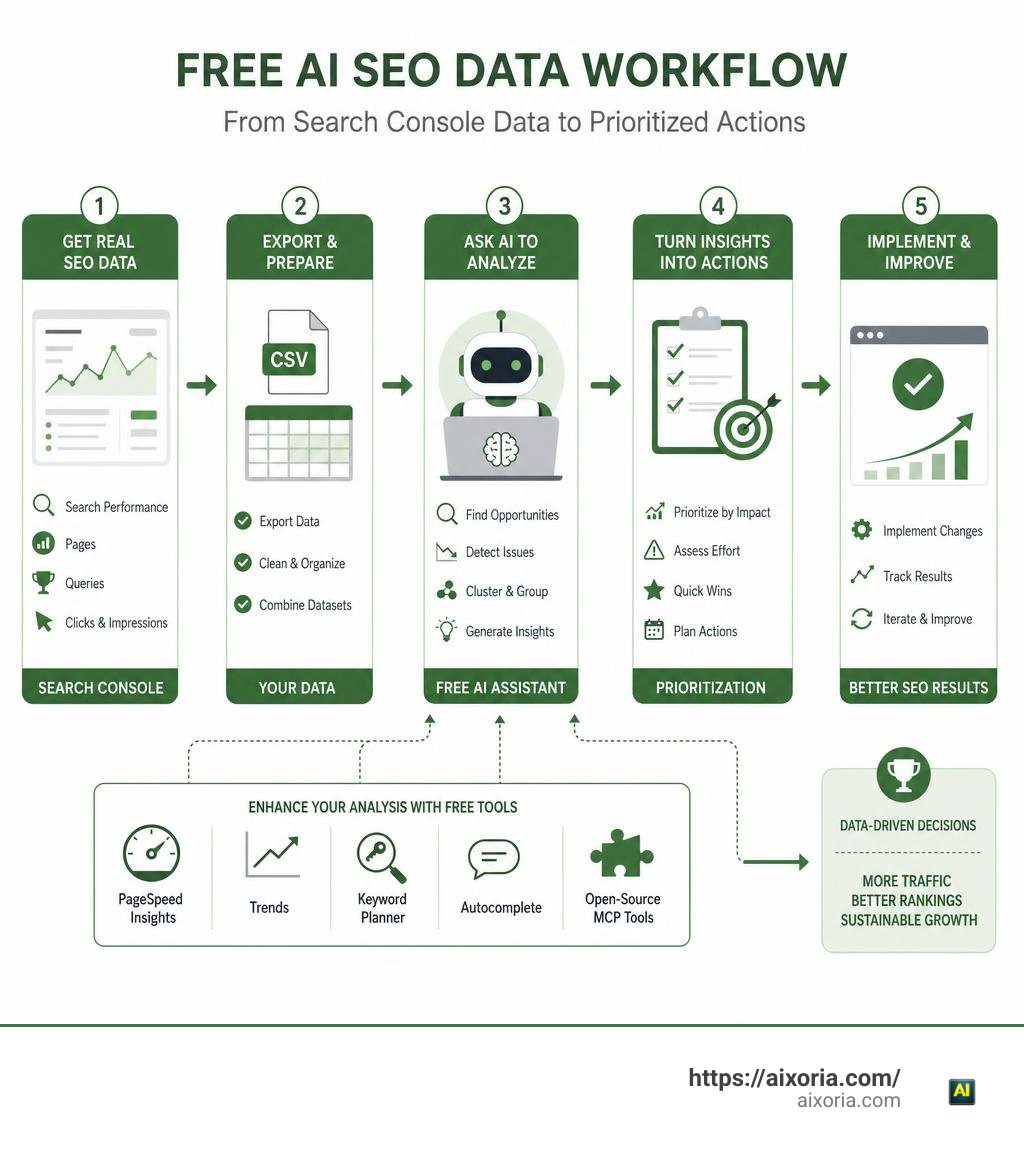
For most beginners, the best free option is a general AI assistant paired with first-party data from Google Search Console, Google Analytics, and PageSpeed Insights. Export your data to a CSV or spreadsheet, then ask the AI to find pages with falling clicks, high-impression/low-CTR queries, and keywords ranking just outside page one.
Scr0ll d0wn to D0VVNL0AD
If you want AI to work with fresher data, a self-hosted open-source tool with a Google Search Console connection is the stronger choice. These tools can let an AI assistant query your approved data directly rather than guessing from a pasted prompt.

The practical answer to which free AI is best for SEO optimization data analysis is not one chatbot. It is this simple stack:
- Google Search Console for the most reliable Google performance data.
- A free AI assistant for sorting exports, spotting patterns, and turning findings into actions.
- Free Google tools such as PageSpeed Insights, Google Trends, Keyword Planner, and Autocomplete for technical and keyword context.
- Open-source MCP tools, if you have technical help and want private, direct AI access to live SEO data.
Free AI can be very good at clustering search queries, finding content decay, explaining technical audit results, drafting content briefs, and identifying missing topics. It is far less reliable for large backlink databases, precise competitor traffic estimates, or alwayson tracking of brand mentions in ChatGPT, Perplexity, and other AI search tools.
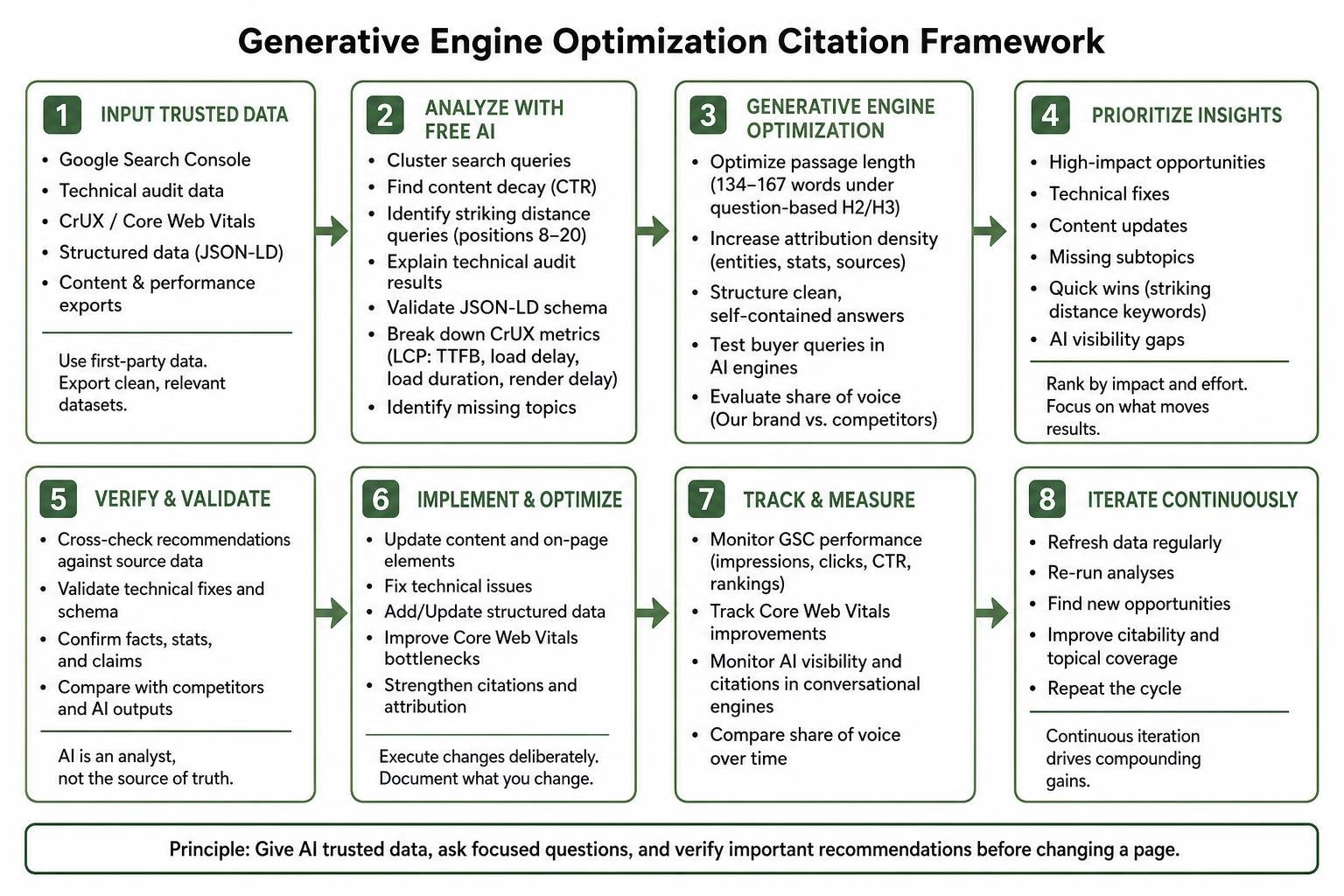
The key is to treat AI as an analyst, not the source of truth. Give it trusted data, ask focused questions, and verify important recommendations before changing a page.
Core SEO Tasks Free AI Tools Handle Effectively

When we look at modern search workflows, manual auditing across hundreds of URLs can easily eat up 40 hours a month. Sorting keywords manually often consumes another 30 hours. That is where using the 5 best free AI tools for data analysis makes a measurable difference. Free artificial intelligence tools excel at turning messy, raw spreadsheets into clear, structured optimization steps.
Rather than expecting a free model to magically crawl the entire live web on its own, we get the best outcomes by feeding the model clean data extracts. Free AI handles semantic intent clustering effortlessly. It groups thousands of long-tail queries into logical topic buckets, identifies missing subtopics, spots duplicate intent across competing URLs, and translates raw Core Web Vitals diagnostic logs into clear technical fixes.
First-Party Search Data and Technical Audit Analysis
Our most valuable SEO asset is first-party data. By downloading search query logs from Google Search Console (GSC) and pairing them with self-hosted toolkits like upgrade-ventures/upgradeseo, we can run powerful automated analyses without paying for third-party subscription seats.
Free AI models shine when analyzing these specific dataset patterns:
- Click-Through Rate (CTR) Decay: Spotting URLs where search impressions are rising or stable, but total clicks are dropping over a 90-day window.
- Striking Distance Queries: Isolating keywords currently ranking in positions 8 through 20 that carry solid impression volume. These represent fast wins with light on-page restructuring.
- JSON-LD Schema Validation: Checking structured data code blocks against current Google Search guidelines, identifying deprecated types (such as older FAQ or HowTo snippets), and fixing entity relationship errors.
- Chrome User Experience Report (CrUX) Breakdown: Deconstructing Largest Contentful Paint (LCP) into its four core subparts: Time to First Byte (TTFB), load delay, load duration, and render delay to pinpoint exact server or rendering bottlenecks.
Generative Engine Optimization and AI Search Visibility Tracking
Search is evolving rapidly. Industry research indicates that AI search visitors could surpass traditional search visitors for digital marketing topics by early 2028. This makes Generative Engine Optimization (GEO) just as vital as classic SERP tracking. We need to know how AI search optimization tools increase organic traffic across conversational engines.
Free AI assistants help us audit our content for generative citability. To make informational copy easy for an LLM to cite in an AI Overview or answer engine:
- Optimize Passage Length: Structure core answers into clean, self-contained blocks between 134 and 167 words directly below clear question-based H2 or H3 headings.
- Boost Attribution Density: Include direct entities, statistics, and verifiable source claims rather than vague conversational fluff.
- Evaluate Share of Voice: Test standard buyer queries inside conversational models to see if our brand or our competitors get cited as the primary recommendation.
Deciding Which Free AI Is Best for SEO Optimization Data Analysis
Selecting the right free tool depends entirely on your technical comfort level and whether you prefer point-and-click web interfaces or direct API connections. An analysis of 9,531 AI tools over a 24-month span revealed that the most sustainable SEO workflows avoid generic “AI wrappers” and instead connect raw data directly to capable underlying foundation models.
| Tool Category | Best Free Options | Live Data Integration | Context Window & Data Limits | Ideal SEO Use Case |
|---|---|---|---|---|
| General LLM Chatbots | ChatGPT Free, Claude Free, Google Gemini | Manual CSV upload / Web browsing | 8k to 128k+ tokens (fair-use rate limits apply) | Query clustering, on-page content briefs, regex generation |
| Open-Source MCP Agents | Claude SEO, SEOmonster, DispatchSEO | Direct GSC, GA4, CrUX via local APIs | Full conversation history / local memory | Automated site health audits, JSON-LD checks, striking distance mining |
| Self-Hosted Dashboards | CrawlSEO, UpgradeSEO | Direct connection to GSC & Google APIs | Server-dependent (runs on 1GB RAM) | Private rank tracking, Core Web Vitals history, crawl issue alerts |
Evaluation Criteria: Which Free AI Is Best for SEO Optimization Data Analysis in 2026?
Determining which free tool best fits your workflow requires looking beyond marketing claims. In 2026, evaluate free solutions using four core technical criteria:
- Structured Data Parsing: The model must accurately parse large CSV/JSON tables without dropping rows or miscalculating mathematical sums like total impressions and average CTR.
- Context Window Stability: When evaluating the best AI tools for data analysis and visualization in 2026, the tool must maintain consistent instructions across large datasets without suffering from context drift.
- Custom Voice Guidance: The platform must support custom system instructions or brand voice documentation so recommendations match your specific editorial standards.
- Entity Recognition: The AI should identify real-world entities, knowledge graph relationships, and brand footprints rather than just matching raw string keywords.
Comparing Standalone LLMs, Open-Source Agents, and MCP Tools
Standard web chatbots are user-friendly: you drag and drop a Search Console export, paste a prompt, and get instant suggestions. However, their data is static. They only know what is inside that specific file export.
If you are comfortable running developer tools, Model Context Protocol (MCP) servers and open-source stacks like crawlseo/crawlseo offer a major step up. MCP is an open standard that allows AI assistants to interact directly with local files, databases, and external APIs. Instead of repeatedly exporting spreadsheets, you simply ask your AI assistant to run a weekly check on your GSC properties, spot declining pages, and validate schema markup right from your desktop workspace.
Top Free AI Workflows and Open-Source Solutions for Search Data

If you are exploring what is the alternative to ChatGPT data analysis, several free, modular workflows can analyze search metrics without ongoing subscription fees.
Practical Workflows: Which Free AI Is Best for SEO Optimization Data Analysis for Beginners?
For straightforward, day-to-day search analysis, you do not need complex code. You can build an effective workflow using Google Sheets, Search Console, and any major free AI chatbot:
- Export Query Data: Download your top 1,000 queries from Google Search Console for the last 90 days with impressions, clicks, CTR, and average position.
- Run a Cannibalization Audit: Upload the CSV to your AI assistant and prompt it: “Analyze this dataset to find instances where multiple URLs are ranking for the exact same search query with positions between 4 and 15. Flag any pages splitting impressions.”
- Find Striking Distance Opportunities: Ask the AI to filter for queries with over 500 impressions, an average position between 8.0 and 15.0, and a CTR below 2%.
- Automate Content Fixes: For git-based static blogs or documentation sites, repositories like NeoZi12/dispatchseo can mine these queries and draft content update suggestions for review.
Open-Source MCP Servers and Google API Integrations
For deeper technical auditing, developer-focused plugins like aomogol/claude-seo turn terminal AI assistants into dedicated audit engines. These systems run specialist subagents in parallel to check technical SEO, E-E-A-T signals, and passage structure against Google’s search documentation.
By connecting directly to free Google APIs (PageSpeed Insights, CrUX, Search Console, and Google Analytics 4), these open-source tools let you run multi-page technical health scoring in 10 to 15 minutes, a process that historically took hours of manual spreadsheet work.
Key Limitations, Data Freshness, and Privacy Considerations
While free tools provide incredible analytical power, we must understand their technical limits. Setting realistic expectations prevents costly optimization mistakes, especially when comparing them against the 20 best AI search visibility tools in 2026.
Free vs Paid SEO Platforms: Accuracy, Freshness, and API Boundaries
- Historical Backlink Indices: Free AI models cannot crawl the entire public web to maintain a multi-billion-link backlink database. For comprehensive competitor link building or historical backlink audits, paid data providers remain necessary.
- Data Reporting Lag: Native Google Search Console data carries an inherent 24 to 48-hour reporting delay. Free AI models analyzing this data reflect this lag.
- Usage Quotas: Free-tier APIs and open endpoints (such as Google Autocomplete or free PageSpeed quotas) have strict rate limits. Attempting to crawl thousands of pages concurrently on free tiers will quickly trigger rate-limit blocks.
- Deterministic Verification: Language models can occasionally produce false positives. Every technical recommendation—such as deleting canonical tags or rewriting redirects—requires human verification before deployment.
Safeguarding Proprietary Search Data and API Security
Data security is critical when analyzing organic traffic figures, unreleased product URLs, or client keyword portfolios:
- Use Read-Only API Scopes: When generating Google Cloud OAuth credentials for open-source AI tools, restrict access exclusively to read-only search console scopes. Never grant write or delete permissions.
- Local Credential Storage: Ensure MCP servers and local scripts store authentication tokens in private local directories (such as file permissions restricted to mode 0600) rather than sending them to third-party cloud servers.
- Opt Out of Model Training: When using free standalone web chatbots, review your data privacy settings to ensure your uploaded proprietary spreadsheets are not used to train public models.
Frequently Asked Questions About Free AI for SEO Data Analysis
Can free AI tools replace legacy paid SEO suites?
For on-page optimization, content brief generation, search intent clustering, schema validation, and first-party performance tracking, free AI paired with Google’s native APIs can handle almost everything a paid suite does. However, if your strategy relies heavily on deep competitor backlink analysis, automated enterprise rank tracking across dozens of geographical regions, or mass web crawling across 50,000+ pages, dedicated paid platforms remain superior.
How do free AI tools track brand citations across AI search engines?
Free AI tools track conversational citations by sampling target commercial prompts across various AI engines and analyzing the returned text. You can run structured prompts across free tiers of ChatGPT, Claude, and Perplexity to see whether your brand entity is cited in the top recommendations. Dedicated open-source MCP tools automate this by querying conversational endpoints and measuring your brand’s sampled share of voice against competitors.
What is the safest way to connect Google Search Console to AI tools?
The safest method is using self-hosted, open-source MCP servers or direct local Python scripts with restricted Google OAuth credentials. By running the AI integration locally on your own machine or private container, your API keys and search metrics never pass through third-party servers. Always ensure your Google Cloud project is configured with strict read-only permissions for Search Console data.
Conclusion
Finding the right free AI setup for search optimization does not require signing up for expensive software suites. For most teams, the most accurate and cost-effective approach is pairing Google’s free first-party search data with capable AI assistants and open-source MCP frameworks.
By letting AI handle the heavy lifting of sorting query clusters, identifying striking distance rankings, and auditing structured data, you can turn raw analytics into clear, high-impact site updates in minutes. To explore more ways artificial intelligence can streamline your daily digital workflows, check out our comprehensive directory of AI tools.
Interesante. Transcripción IA Gemini 3.5: Gem Transcribe . Gem Transcribe