How AI tools help home staging companies with photos and proposals
Scr0ll d0wn to D0VVNL0AD
AI tools for photos and proposals for home staging companies solve two different problems. Photo tools furnish room images and help test design styles. Proposal tools turn walkthrough notes into editable estimates, client-ready proposals, and approval requests. If you do both physical and virtual staging, look for a platform that also tracks clients, payments, and furniture inventory.
Start with the task that takes your team the most time. Test photo quality or estimate accuracy on a real project before paying for a plan. Keep original photos, review every AI result, and check local listing rules before publishing staged images.
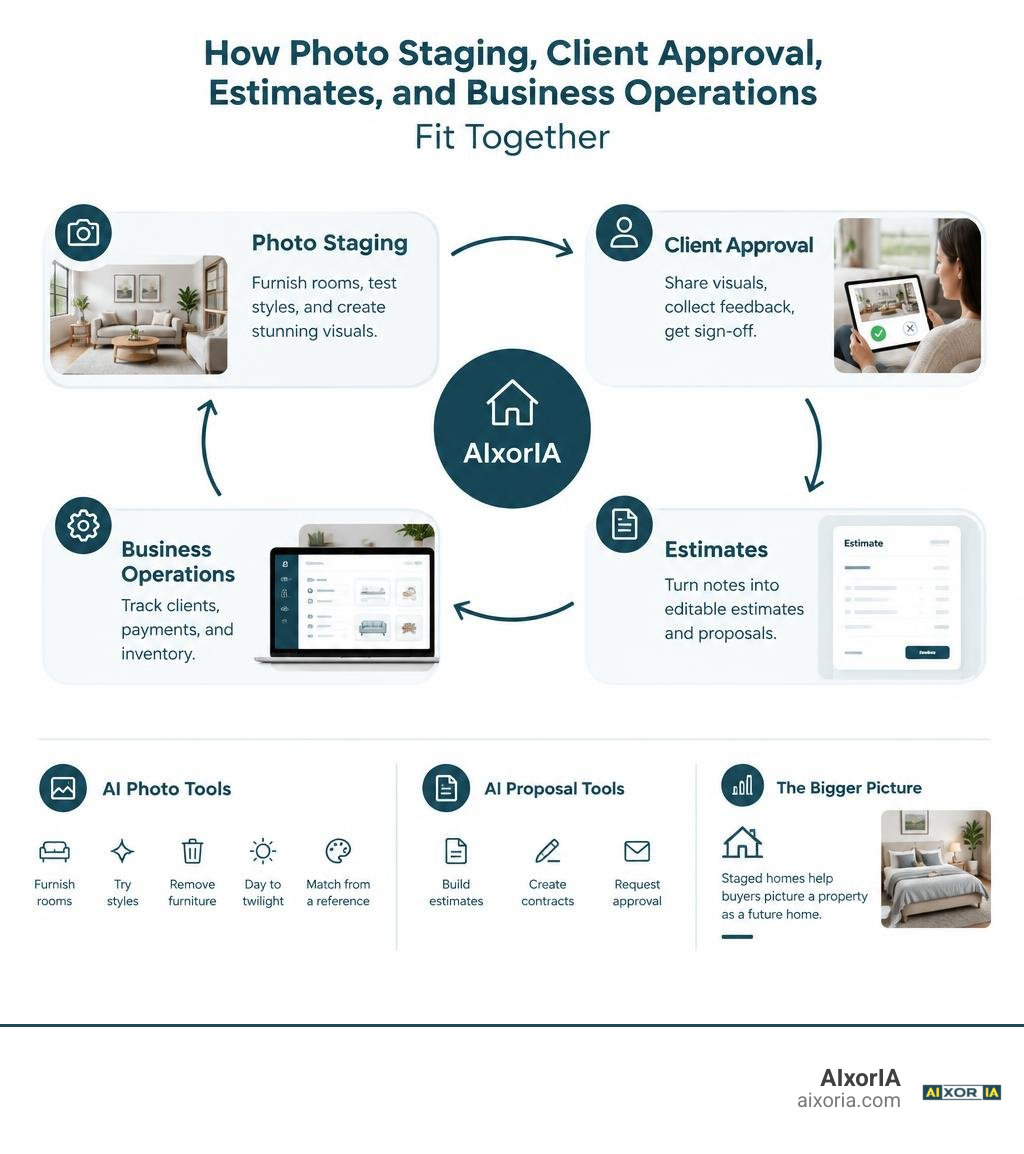
AI tools for home staging companies for photos and proposals: compare the main capabilities
Think of the market as three groups. Photo tools generate furnished rooms. Proposal tools build estimates and contracts. All-in-one platforms try to do a bit of everything. Most photo tools share the same core: upload a picture, pick a style, and get a furnished render in roughly 15 to 40 seconds. Many also remove furniture, declutter, convert day shots to twilight, and let you match a look from a reference photo.
The numbers behind the hype are worth keeping in perspective. According to the research we reviewed, 83% of buyer’s agents say staging helps buyers picture a property as a future home. Bolder claims, like 73% faster sales or 20% higher offers, come from vendor marketing without cited evidence. Treat them as sales copy, not guarantees. For agent-side context, the National Association of Realtors has a useful piece on rethinking virtual staging for today’s real estate agents.
Here is how the photo-staging side compares at a glance:
| Tool type | Output | Consistency | Pricing model | Free access |
|---|---|---|---|---|
| One-click staging tools | Furnished render in about 15 seconds | Unlimited regenerations | From $16/month for 6 images | Varies |
| Credit-based staging studios | Staging, declutter, video | Multi-angle option (up to 4 photos) | Credits with rollover | 10 free renders |
| Whole-listing stagers | Up to 40 photos per setup | One shared setup across a listing | Free credits, then paid | Free credits on signup |
| Concept tools for stagers | Style options for proposals | Per-photo | Pay per photo | Free starter credits |
| Approval-first tools | Versions with review links | Batch-applied style direction | Free during beta | No card needed |
| Credit-bundle tools | Staged rooms from about 0.23 euros | Original stays attached | One-off bundles or monthly | 5 free credits |
If you want a broader view of design generators, our roundup of the best AI room design tools for staging concepts is a good companion.
AI tools for home staging companies for photos and proposals: choose photo-generation features
Start with what you actually photograph. Vacant rooms are the easy case. Furnished rooms are harder, so check that a tool can remove or restyle existing furniture without touching the architecture. A few features separate good tools from toys:
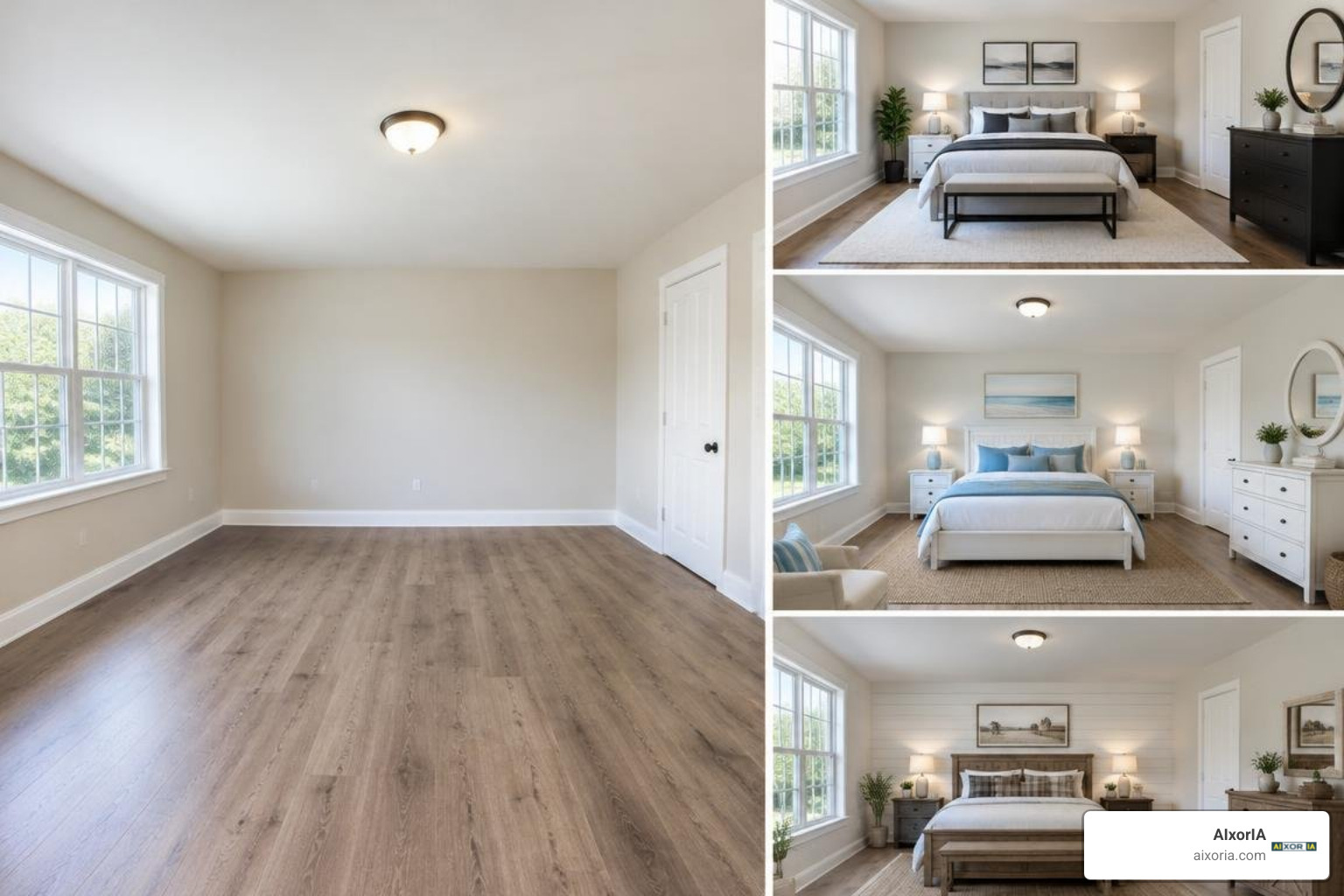
- Precise and creative modes. Precise keeps the room exactly as photographed. Creative allows restyling. Use precise for listings.
- Room preservation. Walls, windows, floors, ceiling height, and camera angle should stay the same. A separate “renovate” mode should say plainly when it changes finishes.
- Photo realism. Check furniture scale, shadows, and rug placement at full size, not on a phone thumbnail.
- Regeneration limits. Unlimited regenerations let you iterate freely. Capped re-renders (for example, nine free re-renders per credit) are fine if the first result is usually close.
- Style range. Presets (modern, Scandinavian, coastal, farmhouse) plus reference-image matching help you suit each buyer pool.
If you are still experimenting, our guide to free AI room design options shows what you can try without spending anything.
AI tools for home staging companies for photos and proposals: check consistency and media outputs
A single pretty render is easy. A whole listing that looks like one coherent home is not. Ask about these capabilities:
- Multi-angle staging. Some tools keep the same sofa, layout, and rug across doorway and window shots of one room. One vendor lists up to four angles. Another labels the feature early beta and warns that results vary.
- Whole-listing styles. Staging up to 40 photos with one setup keeps the style consistent from room to room.
- Room-by-room review. Approve a style direction once, batch-apply it, then check every image yourself.
- Listing videos. Some platforms turn staged photos into clips with camera movement, music, voiceover, captions, and branded closing cards, often in reel, widescreen, and MLS-clean versions. Pricing varies, for example about $29 per video or a set number of plan credits.
- Virtual tours. Some vendors advertise 360-degree tours, but treat these as add-ons, not core staging features. Our look at AI video walkthrough tools covers that side.
Now the honest limits. AI can still get furniture scale wrong, invent odd doorways, blur window edges, or place a rug that floats. Layout changes are risky, and quality varies between generations. Build a quick quality check: zoom to 100%, inspect edges and shadows, compare against the original, and reject anything that misleads a buyer about the space.
Compare AI virtual staging with physical staging
Physical staging means renting furniture, delivering it, installing it, re-shooting photos, and picking it all up again. Virtual staging works from the photos you already have. Neither is always better, so many companies run a hybrid: virtual for quick-turn vacant listings and out-of-area projects, physical for premium homes where buyers will walk through.
| Factor | AI virtual staging | Physical staging |
|---|---|---|
| Cost | Dollars to tens of dollars per photo | Rentals, labor, and logistics |
| Speed | Seconds to minutes | Days to schedule and install |
| Buyer experience | Online photos only | Real in-person feel |
| Best use | Vacant, quick-turn, concept previews | Premium and showing-heavy listings |
One smart use of AI is prototyping. Show a client several styles in the first consultation, then commit rental inventory only to the design they choose. That helps avoid costly returns.
Disclosure matters here too. Listing portals and MLS boards often require labeling virtually staged images and keeping the original photo available. Some tools add a “virtually furnished” notice and attach the original to share links. Others offer paired original-and-staged listing packs with a US MLS-oriented checklist. None of these replaces checking your local rules.
Create faster estimates and client-ready staging proposals
Photos win attention. Proposals win jobs. AI helps by turning messy inputs into structured documents. Some platforms accept photos, voice notes, or a plain-English description, then draft a line-item estimate using labor-rate benchmarks and material pricing, which you edit before sending. A branded proposal, an online acceptance, an e-signature, and a deposit link can follow in a few clicks, and the client record updates in your CRM.
To see the photo-based approach in action, look at photo-based estimating and branded proposal workflows built for staging companies. If you would rather write proposals with a general assistant, our guide to AI proposal-writing methods covers prompts and structure.
AI tools for home staging companies for photos and proposals: streamline estimate creation
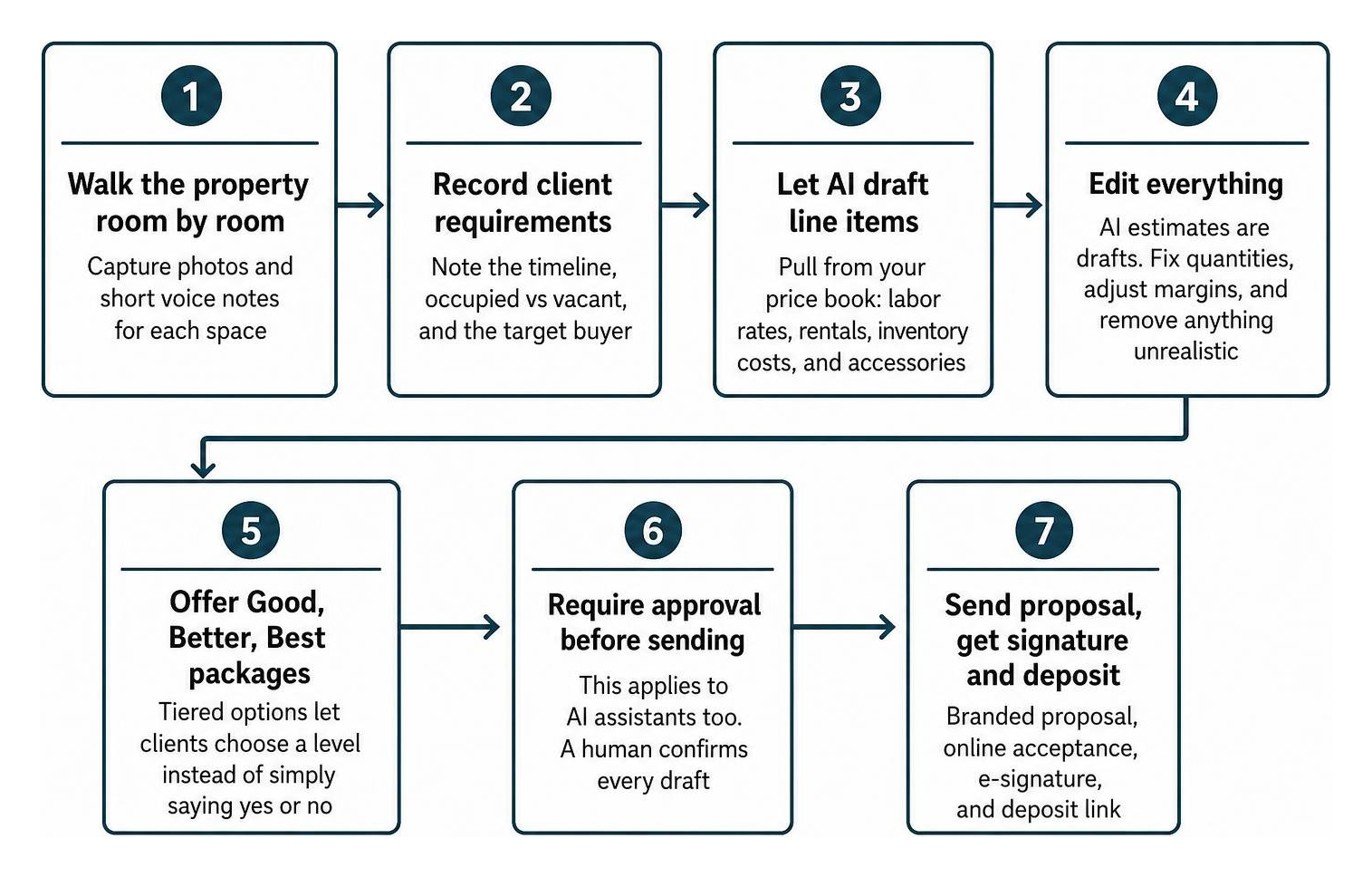
A reliable estimate workflow looks like this:
- Walk the property room by room. Capture photos and short voice notes for each space.
- Record client requirements. Note the timeline, occupied versus vacant, and the target buyer.
- Let AI draft line items. It should pull from your price book: labor rates, furniture rental, inventory costs, and accessories.
- Edit everything. AI estimates are drafts. Fix quantities, adjust margins, and remove anything unrealistic.
- Offer Good, Better, Best packages. Tiered options let clients choose a level instead of simply saying yes or no.
- Require approval before sending. This applies to AI assistants too. Set up a step where a human confirms every draft.
Save your common packages as estimate templates so each new job starts from a proven version, not a blank page. Some systems even void an open signature request if you edit an estimate after sending, so clients never sign an outdated version.
Turn staging concepts into a clear approval workflow
Clients change their minds, and sometimes they forget what they approved. Good approval tools solve both problems:
- Before-and-after previews inside the estimate or presentation.
- Client review links that need no account.
- Comments and favorites attached to each option. A favorite shortlists a design, while approval records the chosen one.
- Revision history so each new version stays in the thread.
- Original-photo preservation so you can always compare against the untouched image.
Some tools also group several design options by area into a concept board with planning estimates, which helps on remodel-style pitches. For ideas on presenting looks, see our guide to AI tools for interior design mood boards and proposals.
Compare proposal tools with standalone photo-staging tools
A photo tool will not collect a deposit. A proposal platform will not give you your best renders. Many staging companies use both, though a few all-in-one platforms bundle a small number of renders into their plans.
| Tool category | Best at | Usually lacks | Typical fit |
|---|---|---|---|
| Photo tools | Rendering, decluttering, videos | Contracts, invoices, client portals | Teams with heavy listing volume |
| Proposal and CRM tools | Estimates, e-signatures, invoices, scheduling | Strong image generation | Teams that lose time on quoting |
| Combined platforms | Inventory, CRM, proposals, some renders | Deepest photo quality | Growing physical stagers |
The trade-off is specialization. A dedicated renderer often produces better images, while a combined platform removes copy-and-paste between apps. A good test is whether your biggest bottleneck is winning clients or producing images.
Connect photo and proposal tools to day-to-day staging operations
A staging job runs from inquiry to walkthrough, estimate, signature, deposit, install, photos, and final payment. Every handoff is a chance to lose time or data. Look for these connections:
- CRM and client management with job history and follow-ups.
- Invoicing and payment links so deposits can be paid by card or wallet on site.
- Scheduling with booking pages that avoid double-booking.
- QuickBooks sync if your accountant lives there.
- API access and cloud storage for photo-heavy teams.
- Team permissions so installers see jobs but not margins.
A platform for inventory, CRM, and staging operations shows how these pieces can live in one place.

Match pricing and free access to your workload
Pricing models differ more than the features do:
| Model | Sample price points | Free access | Likely best fit |
|---|---|---|---|
| Per photo | $35 per photo; $49 for a single order | Rarely | Occasional users |
| Monthly subscription | $16/month for 6 images; $35/month for 30 photos | Some trials | Steady volume |
| Credit bundles | From 0.23 euros per room; about $0.32 per image | 5 to 10 free credits | Agencies with varying volume |
| Business platform | $29.99 to $49/month starting plans | 14-day trials; free plan from one provider | Small to mid-size stagers |
| Beta or free tiers | Free during beta | No card needed | Testing and light use |
Watch for fine print. Free downloads are often low resolution and watermarked. Credits may roll over for three to six months, but only while your plan is active. Some plans cap renders, contacts, or active projects. Estimate your monthly photo count first, then pick the cheapest model that covers it with a little room to spare.
Manage physical inventory and document projects
If you own furniture, software should know where it is. Useful features include QR codes on every piece, warehouse and truck tracking, low-stock alerts, furniture sets and collections, supplier records, and job-site counts. Some systems deduct stock automatically when a linked invoice is paid.
Documentation protects you, too. Furniture sits in a client’s home for weeks, so time-stamped before-and-after photos organized by job help defend against false damage claims. Add project timelines so installs, photos, and pickups never collide. Have an attorney review your rental agreements and liability language for your state.
Check disclosure, privacy, and image quality before publishing
Before any staged image goes live, run a short checklist:
- Labels. Mark virtually staged images clearly and show the original where required.
- Local rules. Check your MLS and portal requirements. Tools can offer checklists, but none guarantees compliance.
- Client consent. Tell clients you use AI on their property photos.
- Privacy. Ask where photos are processed and stored.
- Accuracy. Confirm that architecture, windows, flooring, and furniture scale match reality.
- Final human review. A person should approve every image.
Frequently Asked Questions about AI tools for home staging photos and proposals
Can AI keep furniture consistent across multiple room angles?
Sometimes. Multi-angle modes try to match the same furniture across different shots of one room, and one vendor supports up to four photos. Another still calls the feature early beta. Camera-angle differences can cause a sofa to change shape or size, so always review each image next to the others.
Can AI create listing videos or virtual tours from staged photos?
Yes, with limits. Photo-to-video tools add camera movement, voiceover, captions, and branded versions for social and MLS use. Some vendors also pitch 360-degree tours, but results depend on the source photos. Label videos as virtually staged.
How should a staging company choose between photo AI and business-management AI?
Find your primary bottleneck. If listing volume and image turnaround slow you down, start with a photo tool. If proposal turnaround, deposits, or inventory chaos cost you jobs, start with business software. Check integrations, then build a hybrid stack and test each tool on one real project.
Conclusion
Picking the right tools comes down to a few habits. Start with your main workflow bottleneck. Test image quality and approval steps on a real job. Verify disclosure requirements before anything goes live. Choose tools that fit your company’s scale, not the biggest feature list. At AIxorIA, we publish practical, up-to-date AI guidance so you can make those calls with confidence, so explore AI tools and business productivity guides for your next step.