How to Choose AI Tools for Interior Design Mood Boards and Client Proposals
Scr0ll d0wn to D0VVNL0AD
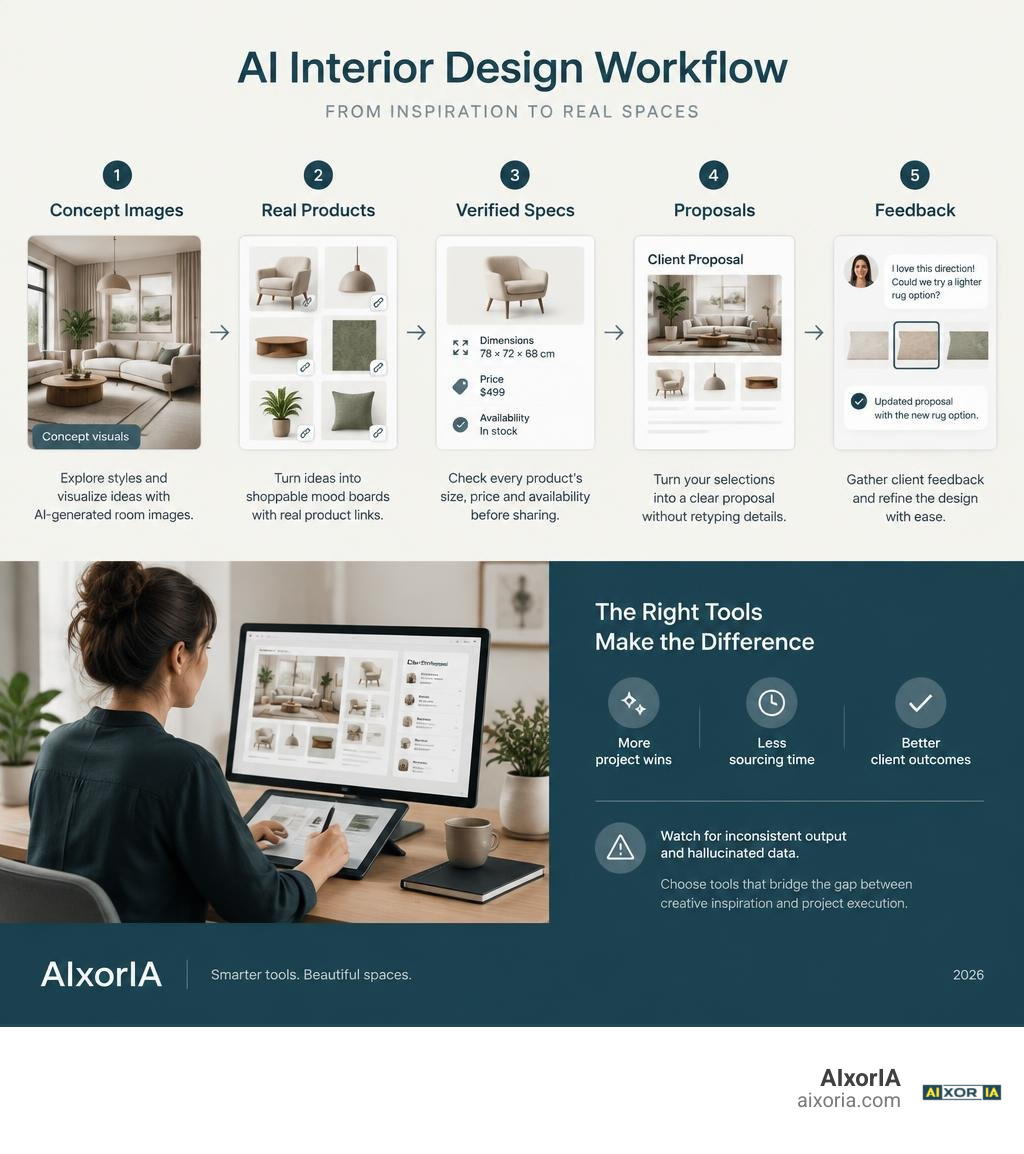
AI tools for interior designers to create mood boards and client proposals work best when each tool has a clear job. Use image generation to explore styles, a board with real product links to make ideas shoppable, and a proposal tool to gather client feedback. Before sharing a proposal, check every product’s size, price, and availability. Label generated room images as concept visuals, not finished plans.
The key test in 2026 is what happens after the mood board looks good. Can you turn its selections into a clear proposal without retyping product details? This checklist will help you find tools that save time without adding more work to your process.
Evaluating AI Tools for Interior Designers for Mood Boards and Client Proposals
Finding the right software stack requires looking past flashy demo videos. In 2026, the interior design industry is seeing massive adoption of intelligent systems. Research shows that 64% of architects and designers have experimented with AI, and 43% report that concept and pre-design is where AI delivers the greatest impact. Early adopters are experiencing up to 25% more project wins while reducing sourcing time by 35%.
However, 48% of practitioners name inconsistent output quality and hallucinated data as their biggest hurdles. When choosing ai tools for interior designers for mood boards and client proposals, we need to evaluate systems based on how effectively they bridge the gap between creative inspiration and project execution.
If you are exploring the broader landscape, our roundup of the best AI interior design tools tested highlights how different rendering and planning platforms compare across real-world studio benchmarks.
| Feature / Criteria | Generative Visual Concept Tools | AI-Native Studio Workspaces |
|---|---|---|
| Primary Purpose | Fast aesthetic ideation & atmosphere renders | Project management, schedules, and client proposals |
| Product Feasibility | Invented/synthetic furniture (unpurchasable) | Real catalog items with vendor SKUs and pricing |
| Data Re-entry Cost | High (requires manual reverse-sourcing) | Low (auto-populates proposals and FF&E schedules) |
| Client Review Model | Static image exports and revision prompts | Interactive portals with line-item sign-offs |
| Dimensional Accuracy | Visual approximation | Bounded by measured room geometry & CAD sync |
Key Features in AI Tools for Interior Designers to Create Mood Boards and Client Proposals
To eliminate administrative friction, a modern design platform must handle dynamic data extraction. When evaluating software, look for these foundational features:
- Browser Extension Product Scraping: Automatically pull high-resolution imagery, dimensions, trade pricing, and lead times directly from vendor web pages into your project database.
- Interactive Freeform Canvases: Dynamic boards that allow you to layer textures, remove backgrounds with a single click, and organize assets by room.
- Direct Trade Discount & Markup Tracking: Financial suites that automatically calculate designer margins, freight, and taxes into client-facing line items.
- Password-Free Client Portals: Interactive links where clients can view curated proposals, approve specific items, and leave contextual notes without creating accounts.
AI-native workspace platforms exemplify this shift by acting as intelligent assistants that actively compile schedules and turn pinboards directly into client proposals.
Sourcing Real vs Synthetic Products in AI Mood Boards
One of the most expensive traps in modern design workflows is presenting synthetic AI furniture to clients. Standard text-to-image models create gorgeous velvet sectionals and sculptural coffee tables that simply do not exist in the physical world. When a client falls in love with an imaginary rendering, you are stuck spending hours reverse-sourcing similar physical products—often blowing the budget or missing the aesthetic mark.
Modern spatial platforms solve this disconnect by enabling designers to place real catalog products directly into photorealistic scenes while preserving structural perspectives. This ensures that every item on your presentation board corresponds to an actual manufacturer SKU, verified dimensions, and active vendor pricing.
Best AI Tools for Concept Visualization and Mood Board Curation
During preliminary intake, speed is everything. 67% of design projects stall at the concept phase because clients struggle to visualize abstract ideas from flat swatches. Using AI during early consultations allows studios to present 3D aesthetic directions in seconds.

For studios testing visual ideation on a budget, exploring free AI tools for interior design ideas offers a zero-risk way to experiment with palette generation and prompt-based room styling. When presenting higher-end commercial or residential concepts, specialized concept generators allow designers to produce photorealistic room transformations across complex aesthetics—such as Japandi, Wabi-Sabi, or Warm Organic—in under 30 seconds.
Preserving Architectural Integrity in Generative Visuals
The quickest way to lose client trust is presenting an AI render that accidentally moves a load-bearing column or relocates a window. To maintain structural accuracy, professional workflows follow a disciplined 4-part prompt structure:
- Source & Camera Position: Define the exact viewpoint (e.g., Eye-level perspective looking toward north garden doors).
- Protected Conditions: Explicitly list immutable boundaries (e.g., Preserve exterior window openings, 10-foot ceiling height, and hardwood floor boundary).
- Design Alterations: Detail the specific material and furniture changes (e.g., Apply ribbed smoked-oak wall cladding, ivory boucle sectional, and indirect 2700K cove lighting).
- Boundary Parameters: Specify finish restrictions to avoid random architectural artifacts.
For technical precision, mastering the process of converting floor plans to 3D room workflows ensures your generative imagery aligns perfectly with measured architectural blueprints.
Multi-Concept Iteration for Live Client Intake
Presenting multiple stylistic directions during initial discovery calls transforms the consultation from a speculative conversation into an immediate closing opportunity. Using AI-powered interior platforms, designers can input client preferences to auto-generate color palettes, room-by-room material schedules, and rough budget estimates on the fly.
Offering rapid visual iterations allows studios to package concept consultations as standalone billable services ($500 to $1,500) rather than absorbing unpaid pre-design work.
Streamlining Client Proposals and Approvals with AI Workspaces
Turning an approved mood board into a formal, branded proposal historically consumed days of administrative drafting. Between writing scope descriptions, calculating trade margins, and organizing spec sheets, project momentum often ground to a halt.
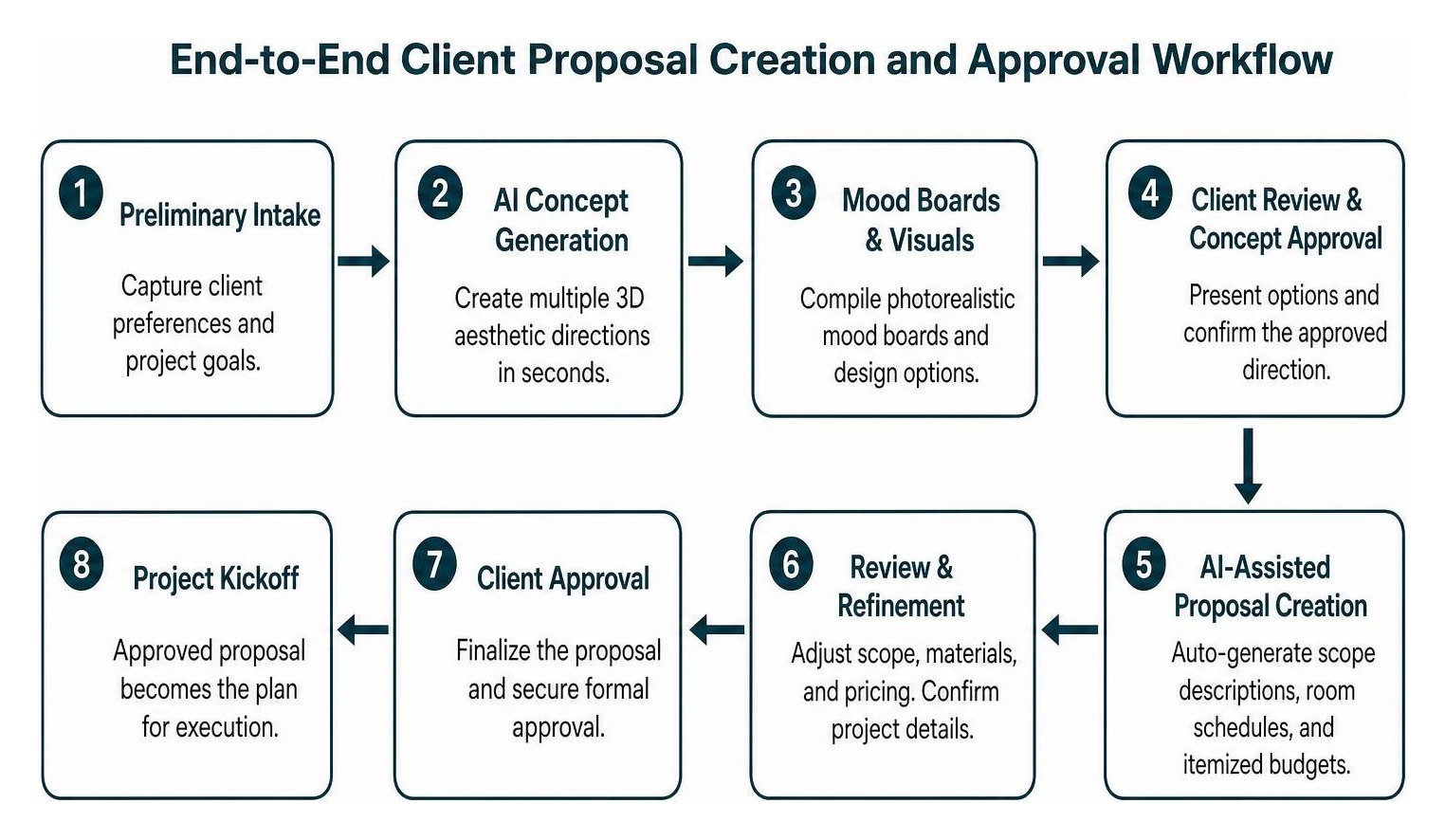
Studios utilizing dedicated tools for project documentation experience dramatic efficiency gains. Adopting the best AI tools for proposal writing helps automate scope summaries, tone matching, and contract clauses. AI studio tools reduce proposal creation times from two full days down to under an hour by translating conceptual briefs directly into itemized room schedules with linked budgets.
Step-by-Step Workflow: Using AI Tools for Interior Designers for Mood Boards and Client Proposals
To maintain operational clarity, integrate AI tools step-by-step into your existing design practice:
- Brief Deconstruction & Concept Exploration: Feed intake meeting notes into an AI assistant to extract core functional requirements and aesthetic preferences. Review our guide on the best way to use AI for interior design to establish clear project guardrails.
- Mood Board Assembly & Product Scraping: Build your visual board on a dynamic canvas, pulling real furnishings via web clippers to ensure every piece has verified specs and trade pricing.
- Architectural Staging: Generate photorealistic room visuals using structural bounding prompts to showcase how selected finishes interact under calibrated lighting.
- Proposal Compilation: Auto-populate client proposals directly from your schedule, grouping line items by room with transparent cost options.
- Interactive Client Sign-off: Share a secure digital presentation link where clients can approve individual items, reducing revision delays.
Managing Live Feedback and Revision Cycles
Traditional revision cycles average 4.2 rounds per project, largely due to fragmented email chains and static PDF markups. Modern AI design suites simplify this phase.
Using AI design platforms, designers can make targeted modifications—such as swapping countertop finishes or repainting cabinetry—in seconds using selective brush inpainting without re-rendering the entire scene. Clients can leave timestamped comments directly on digital presentation slides, creating a single source of truth for all project decisions.
Managing Risk, Disclosures, and Client Transparency
While AI increases productivity by 20% to 40%, maintaining professional credibility requires transparency. Clients hire designers for their spatial expertise, refined taste, and technical accountability—qualities AI cannot replicate.

Understanding where generative technology belongs—and where it becomes a liability—is vital for risk management. For a comprehensive look at setting project boundaries, see the detailed industry guide on how to use AI for interior design.
Best Practices for AI Disclosure in Client Presentations
To maintain client trust while leveraging modern visualization tools, incorporate these professional protocols:
- Label Visual Scope Clearly: Include concise captions beneath early renders (e.g., “Concept Visualization: For spatial atmosphere and color harmony. Physical materials and fixtures subject to final field verification”).
- Separate Concept from Construction: Never include unverified AI renders in construction documentation or millwork fabrication sets.
- Pair Visuals with Physical Samples: Always validate AI-generated schemes with physical textile cuttings, wood finish samples, and manufacturer paint swatches before ordering.
- Protect Client Data: Ensure your software tools do not use proprietary client floor plans or project photos to train public machine learning models.
Frequently Asked Questions About AI Interior Design Workflows
Can AI tools build mood boards using real, purchasable furniture?
Yes. Dedicated interior design workspace platforms integrate web clippers and vendor catalog databases. Instead of generating fictional imagery, these platforms import real items along with dimensions, pricing, and supplier URLs directly onto your board canvas.
How do AI tools handle client revisions during the proposal phase?
Rather than rebuilding 3D models or starting from scratch, modern tools use selective inpainting and prompt modification. Designers can highlight a specific element—such as a rug or pendant light—and swap its material or style in seconds while preserving the surrounding room geometry.
Are free AI tools suitable for professional interior design proposals?
Free tools are excellent for early brainstorming, color extraction, and rough mood boards. However, professional proposals require high-resolution exports (2K/4K), commercial usage rights, and real FF&E schedule synchronization, which are typically reserved for professional subscription tiers. If you are assessing entry-level options, explore our guide to evaluating free AI room generators to understand their capabilities and limitations.
Conclusion
The evolution of artificial intelligence in interior design is not about replacing human creativity—it is about removing administrative drag. By delegating repetitive tasks like data entry, spec retyping, and preliminary rendering to intelligent tools, design studios can reclaim 20 or more hours each week to focus on client relationships and high-level spatial curation.
At AIxorIA, we help creative businesses and B2B practices build sustainable, cost-effective automation frameworks and avoid restrictive software lock-in. Explore our resources to discover how you can implement scalable design workflows that elevate your studio’s efficiency and presentation impact.