How to Choose an AI Coding Assistant for Small Teams
Scr0ll d0wn to D0VVNL0AD
The best AI coding assistant for small teams is the one that fits how your team already works. Start with GitHub Copilot if your developers live in GitHub and want a lower-cost team plan. Try Cursor if they want an AI-first editor, Claude Code if they prefer the terminal, or Replit if they need to build and publish apps in a browser.
Don’t choose on the seat price alone. Agent usage, extra credits, security controls, and time spent reviewing code can change the real cost. Test one or two tools on the same tasks, then compare monthly spend, review time, defects, and completed work against your team’s baseline. Faster code is useful only if it helps you ship better software.
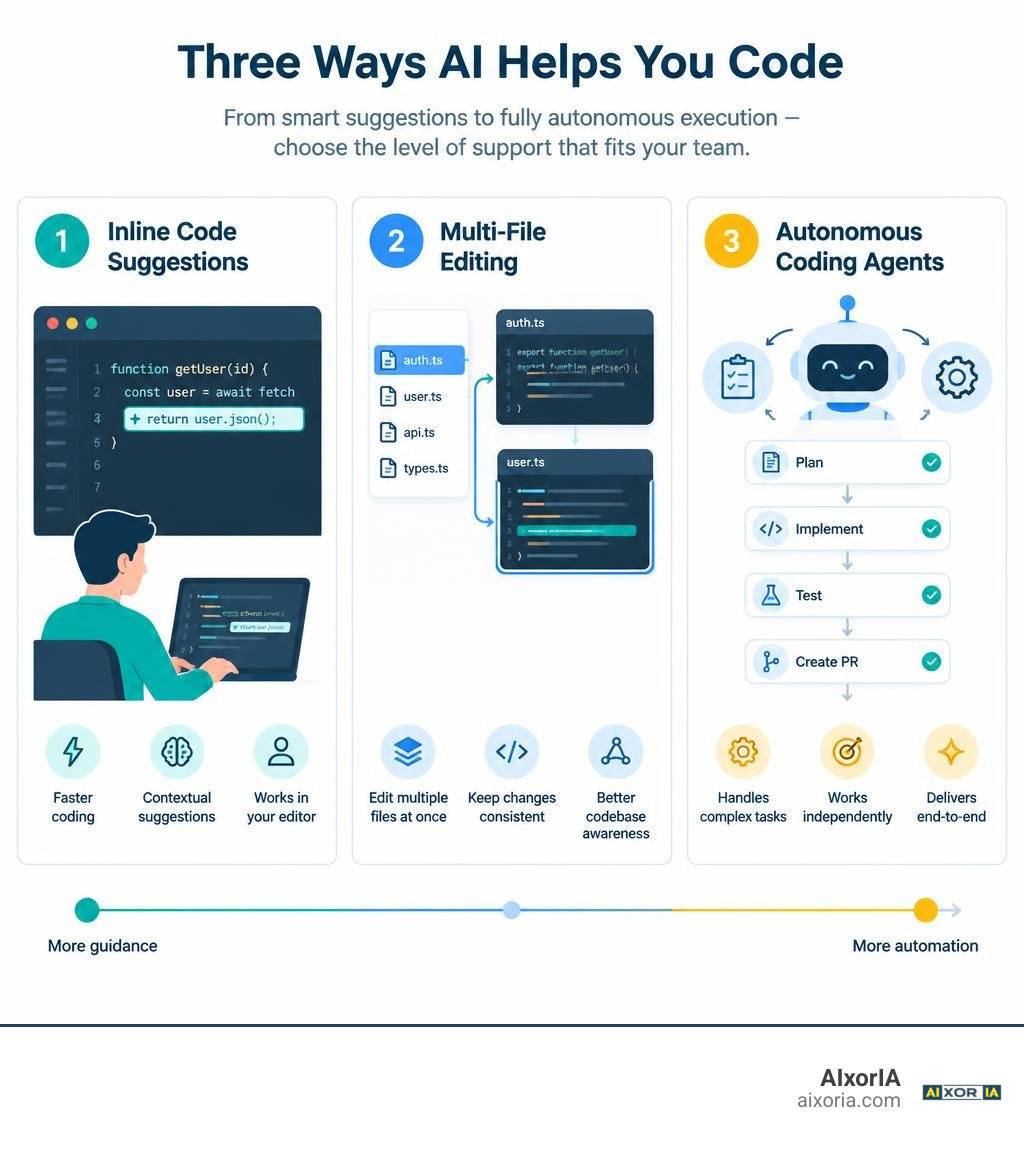
Understanding Tool Architectures: Inline Generation vs. Autonomous Agents

The developer tooling landscape has moved far beyond simple “tab-to-autocomplete” suggestions. Today, engineering teams evaluate tools across distinct technical architectures, ranging from real-time inline ghost text to multi-step autonomous execution engines. Finding the best AI for generating code requires understanding how these tools process your codebase and interact with your development environment.
Text-Generation Assistants vs. Full-Lifecycle Coding Agents
Traditional code generators operate primarily inside the active file. They look at your cursor position, read neighboring lines or open tabs, and guess the next few lines of code. This reduces keystrokes when writing boilerplate, setting up standard unit tests, or constructing repetitive API calls.
Modern agentic platforms take a fundamentally different approach. By exploring what makes finding the right AI agent for coding so transformative, we see that agents can:
- Read and index entire project directories using semantic search and retrieval-augmented generation.
- Plan complex, multi-file refactoring tasks before modifying code.
- Execute terminal commands directly to run test suites, check linter outputs, and fix runtime errors autonomously.
- Connect to external documentation and live databases via protocols like the Model Context Protocol (MCP).
Key Factors When Selecting an AI Coding Assistant for Small Teams
When choosing the right AI partner for your engineering squad, look past marketing claims and evaluate these functional factors:
- IDE & Workflow Fit: Does the tool run natively in VS Code, JetBrains, or the terminal? Forcing developers to switch editors causes friction.
- Context Retrieval Quality: Can the tool accurately pull definitions across microservices without blowing through token limits?
- Local Control vs. Cloud Sandboxes: Does your team need browser-based instant prototyping environments or local-first, terminal-driven CLI agents?
- Model Flexibility: Can you switch between fast, lightweight models for daily code edits and heavy reasoning models for system architecture design?
Evaluating the Best AI Coding Assistant for Small Teams: Features and Pricing
Pricing models in modern software engineering have shifted away from simple flat-rate subscriptions. To choose wisely among the top AI coding tools for developers, compare the prominent platforms available:
| Platform | Core Architecture | Team Pricing (Monthly) | Context & Agent Capabilities | Ideal Fit |
|---|---|---|---|---|
| GitHub Copilot | IDE Extension & Cloud Agent | $19/seat (Business) | Inline completion, PR summaries, workspace chat | Teams deeply embedded in GitHub repos |
| Cursor | AI-Native Editor (VS Code Fork) | $40/seat (Team) | Multi-file Composer, terminal execution, codebase indexing | Teams wanting frictionless full-editor AI |
| Claude Code | Terminal-Centric CLI Agent | Pay-as-you-go (~$150–$250/dev avg) | Agentic multi-file edits, test runner, script orchestration | Senior engineers who love command-line workflows |
| Replit | Cloud IDE & Autonomous Agent | $20/user + Agent compute packs | End-to-end scaffolding, instant hosting, collaborative canvas | Rapid prototyping and full-stack app shipping |
| Tabnine | IDE Plugin / On-Prem Agent | $39–$59/seat | Local code indexing, zero data retention, air-gapped hosting | Regulated industries with strict compliance |
Calculating the True Cost of an AI Coding Assistant for Small Teams
Published seat prices rarely reflect the total invoice at month-end. Teams mixing inline completion with agentic loops frequently spend $200 to $600 per developer per month once token usage and usage-tier overages are added.
Claude Code, for example, averages $13 per active developer day ($150 to $250 monthly), with intensive refactoring sessions exceeding $30 per day. Similarly, heavy background agentic loops can quickly drain monthly credit buckets. Small engineering departments must account for:
- Base seat licenses across all team members.
- Consumption-based API tokens for deep reasoning queries.
- Administrative and governance overhead for security audit logs.
Local-First, BYOK, and Open-Source Alternatives
For teams wary of rising subscription overhead or vendor lock-in, Bring Your Own Key (BYOK) and open-source command centers offer significant cost control.
By evaluating popular AI coding assistant alternatives, teams can leverage tools that connect directly to model providers via their own API keys. You pay raw provider rates without middleware markups, storing keys in local credential stores. Similarly, open-source command centers can manage coding agents across devices while keeping source code on servers you control. For collaborative decision-making, some platforms help teams bridge discussion plans directly into GitHub pull requests.
Measuring Real ROI and Developer Productivity in Small Engineering Teams
Many vendor benchmarks claim massive 3x to 5x productivity leaps. However, broad research across 400+ organizations shows a median pull request (PR) throughput gain of 7.76%, with most teams landing between 5% and 15%.
Why does a tool that cuts boilerplate writing by 40% only boost overall throughput by 8%? According to industry research, actual raw coding accounts for only about 14% of an engineer’s working day. The rest is spent on architectural design, code reviews, debugging, team syncs, and system triage. Understanding this realistic AI impact on software development prevents unrealistic expectations.
The DX AI Measurement Framework: Utilization, Impact, and Cost
To properly gauge your investment, measure three core dimensions instead of counting raw lines of code:
- Utilization: Track daily active usage, model selection distribution, and suggestion acceptance rates across the team.
- Impact: Monitor PR cycle time (from initial commit to merge), PR review turnaround, and developer satisfaction scores using dedicated developer productivity tools.
- Cost: Calculate total expenditure by adding seat licenses, credit consumption, and review remediation time against engineer hours saved.
Timelines for Measurable Gains Across Autocomplete and Agentic Workflows
Measurable ROI does not appear on day one:
- Months 1 to 3 (Inline Autocomplete): Developers quickly build muscle memory for keyboard shortcuts, reducing repetitive boilerplate and API lookup time by 35% to 45%.
- Months 3 to 6 (Agentic Workflows): Teams adapt to multi-file planning, autonomous test generation, and automated refactoring. Here, sprint cycle times begin to compress noticeably as downstream bottlenecks are addressed.
Security, Privacy, and Compliance for Small Regulated Teams

Security and intellectual property governance are non-negotiable, particularly for startups handling healthcare, financial, or user-sensitive data.
Zero-Data Retention, On-Premises, and Air-Gapped Deployments
If your organization must comply with SOC 2 Type II, HIPAA, or strict GDPR rules, evaluate how providers handle your source code:
- Zero Data Retention: Ensure cloud vendors sign data processing agreements confirming your proprietary code is never cached or used to train public foundation models.
- On-Premises & Air-Gapped Solutions: Solutions like Tabnine or dedicated Enterprise AI Coding Assistant platforms allow fully isolated or on-prem deployments, ensuring zero outbound code transmission.
Managing Intellectual Property and Codebase Privacy
Implement strong governance policies before distributing AI seats:
- Turn on organization-wide model training opt-outs.
- Enforce centralized Single Sign-On (SSO) and role-based access control.
- Use automated secret scanners to prevent API keys and environment variables from entering prompt context windows.
Implementation Strategy: Avoiding Adoption Pitfalls and Code Quality Risks
Deploying an AI assistant without clear guidelines can create cognitive debt, where developers generate massive code blocks they do not fully understand. When bugs emerge, teams spend hours untangling hallucinated logic rather than writing clean software. To balance velocity and stability, engineering leads should implement structured AI tools for debugging code alongside clear peer-review rules. Small teams can also explore specialized models to augment task planning and code review pipelines.
Establishing Codebase Hygiene and Context Standards with AGENTS.md
AI agents perform best when provided with clear, structured context. Adding an AGENTS.md file to your repository root establishes persistent team guidelines across all AI sessions. Pair this with code understanding and documentation tools to keep context lean:
- Document architectural naming conventions, folder structures, and preferred libraries.
- Specify mandatory test runners, linting commands, and mock data setups.
- Detail database schema rules and security boundaries.
Preventing Social Friction, Defective Code, and Skill Gaps
Avoid common operational friction points with these cultural guardrails:
- Update Code Review Etiquette: PRs containing AI-assisted code must be reviewed with equal or greater scrutiny. Reviewers should look for edge cases, resource leaks, and unnecessary dependencies.
- Protect Junior Engineers: Encourage junior developers to use AI for explanations and test generation rather than generating code blindly, preventing skill atrophy.
- Automate Verification: Use continuous integration (CI) pipelines with robust linting and test suites to catch defective code before it reaches staging, combining these with AI-driven code refactoring tools during routine maintenance.
For teams operating in sensitive public sector or enterprise environments, consulting frameworks like the AI Insights: AI Coding Assistants for developers in HMG HTML – GOV.UK guidance provides practical standards for security and code validation.
Frequently Asked Questions About AI Coding Assistants for Small Teams
How much does an AI coding assistant typically cost per developer per month?
While basic team seat licenses range from $19 to $40 per user per month, total costs typically reach $150 to $300 per developer when including usage-based token overages for agentic reasoning and multi-file workflows.
How long does it take for a small team to see measurable ROI from AI coding tools?
Inline autocomplete gains appear within 4 to 6 weeks as routine boilerplate writing speeds up. Complex agentic workflows and automated multi-file refactoring usually show measurable improvements in PR throughput and sprint velocity after 3 to 6 months.
Can small teams use AI coding assistants without exposing proprietary code?
Yes. Most business tiers guarantee that code snippets are not retained or used for model training. Teams needing complete privacy can select BYOK tools, local open-source models, or on-premises solutions with zero external data transmission.
Conclusion
Selecting the right AI coding assistant requires balancing workflow integration, context depth, team size, and total operating cost. When chosen thoughtfully, an AI assistant removes mundane boilerplate, accelerates test creation, and empowers small engineering teams to punch well above their weight. Take time to audit your baseline metrics, run hands-on pilots, and discover practical development strategies at AIxorIA to build a faster, more resilient engineering workflow.
1 thought on “Best AI Coding Assistant for Small Teams: How to Choose”