How to Compare Marketing Automation Tools for SaaS
Scr0ll d0wn to D0VVNL0AD
Choose a marketing automation tool based on the work it must do, not the longest feature list. For SaaS, start with three checks: Can it respond to in-app behavior? Can it share clean data with your CRM? Will its price still make sense as your contacts and message volume grow?
An all-in-one platform may simplify setup. A focused tool may give you more control over product-led journeys. This guide compares both approaches, plus tools for email, SMS, AI, and cross-app workflows, so you can build a stack that works without constant fixes.
Core Categories of Marketing Automation Tools and Architectural Models
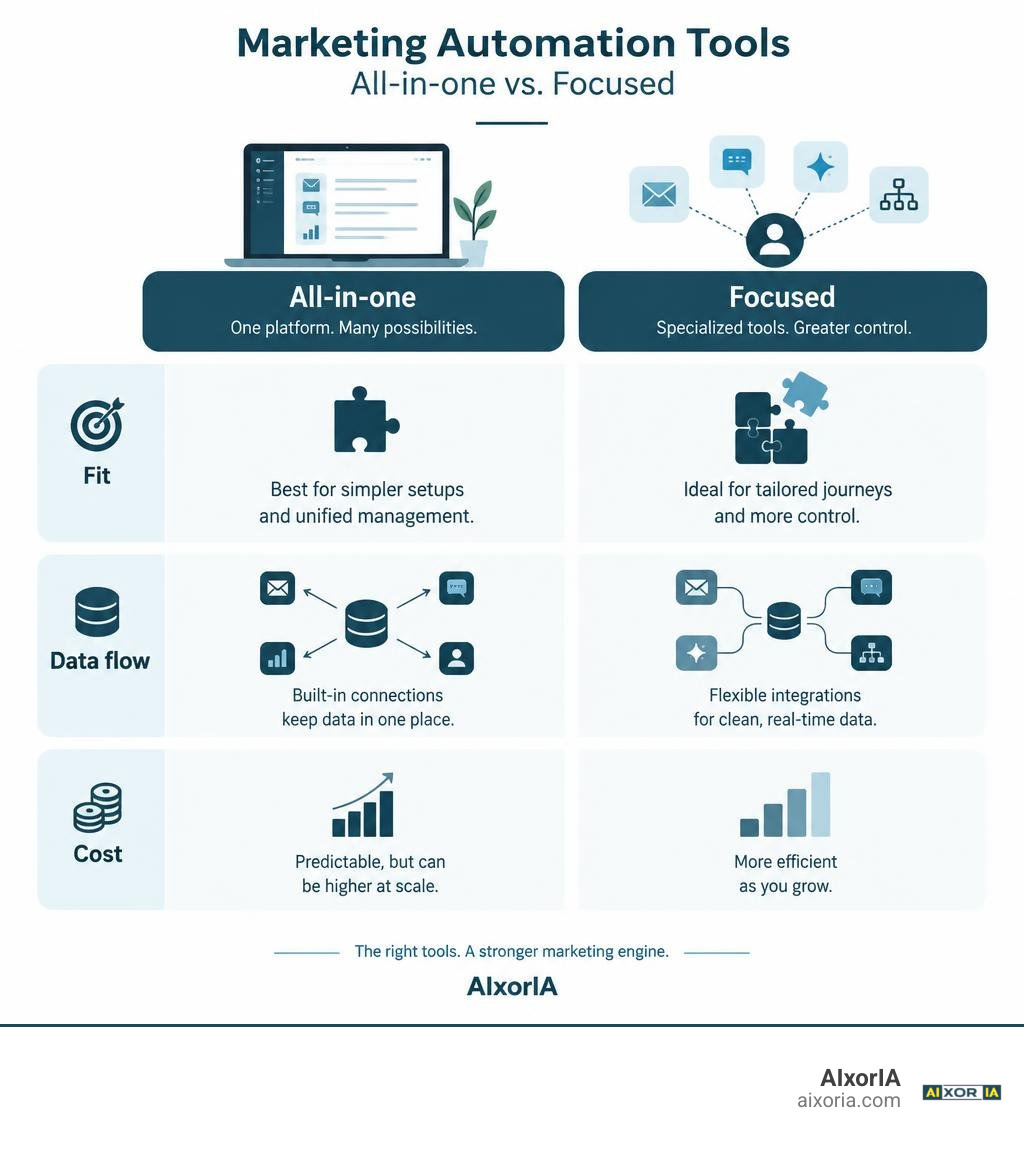
Navigating the landscape of modern marketing automation tools begins with understanding architectural design. The global marketing automation industry has surged past $6.4 billion as teams shift from batch-and-blast emails to event-driven, behavioral communication. However, how you assemble your tech stack determines whether your team spends its time driving revenue or untangling broken webhook integrations.
Today, martech infrastructure generally falls into two primary models:
- Monolithic All-in-One Suites: Platforms that bundle contact relationship management (CRM), email marketing, form generation, landing page hosting, and social scheduling into a single vendor package.
- Modular Best-in-Class Stacks: Purpose-built, specialized applications connected through APIs, event streaming protocols, and webhook relays to handle specific touchpoints (such as product-led onboarding or transactional alerts) with surgical precision.
Building an effective operational engine requires balancing your core marketing channels. Understanding foundational systems like the 4 essential tools of marketing helps marketing teams avoid bloated software contracts while maintaining clean data pipelines.
| Architecture Model | Primary Strengths | Major Trade-offs | Ideal Business Stage |
|---|---|---|---|
| All-in-One Platforms | Unified UI, native database, zero integration setup required for baseline tools. | Steep price escalations, rigid feature sets, and expensive developer API tiers. | Seed-stage teams needing immediate all-in-one simplicity or mid-market operations. |
| Modular Stacks | Deep channel customization, advanced event triggers, granular data ownership. | Requires ongoing integration maintenance, webhook governance, and technical setup. | Product-led SaaS, high-volume eCommerce, and scaling enterprise ecosystems. |
Selecting an All-in-One vs. Best-in-Class Tool Marketing Automation Solution
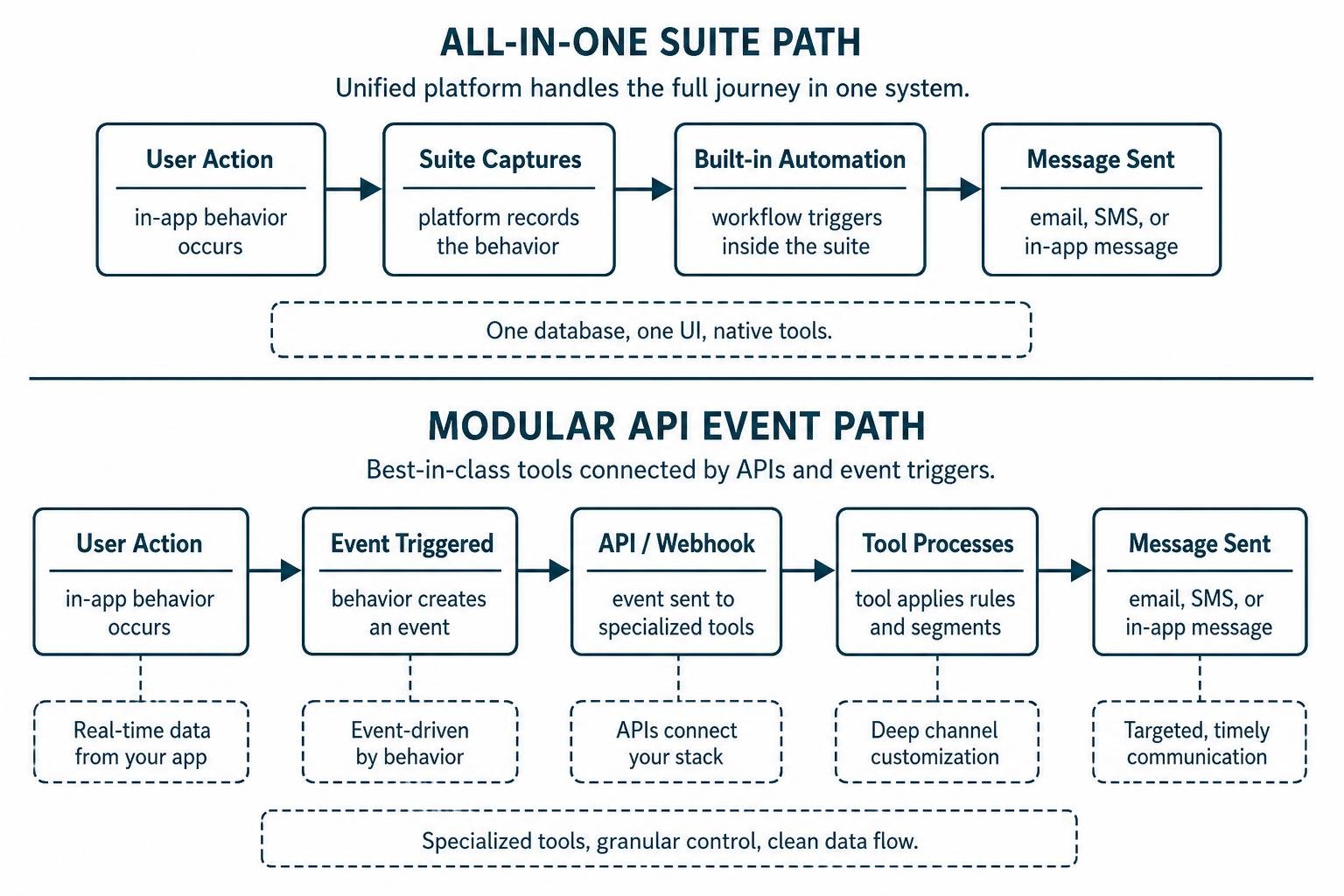
Choosing between an all-in-one suite and a modular point solution comes down to how your business model captures value. When evaluating a tool marketing automation platform for product-led growth (PLG), standard email autoresponders are insufficient. You need real-time data ingestion that triggers a message when a trial user encounters an error, invites a teammate, or ignores a key feature for three consecutive days.
Monolithic platforms provide unified contact records out of the box, but they often place behavioral event tracking behind expensive enterprise tiers. A scaling software company might pay moderate fees for basic contact storage, only to find that custom event triggers and webhook web APIs require thousands of dollars in monthly upgrades.
Conversely, best-in-class tools focus on event-driven messaging. By connecting a specialized messaging engine directly to your application’s database, you avoid paying for unused CMS features while gaining granular control over your customer lifecycle.
Specialized Messaging Channels: Email, SMS, and Conversational Automation
Modern customer journeys rarely exist on a single channel. While email remains the backbone of B2B communication—generating up to a 4300% ROI for US organizations—relying solely on inboxes risks message fatigue and missed conversions.
Expanding your communication matrix across specialized channels includes:
- Behavioral Email Workflows: Tailoring messages using the best email drip campaign software in 2026 ensures trial users receive contextual guidance at their exact stage of product adoption.
- Direct SMS and RCS Alerts: Reaching prospects with urgent account updates, time-sensitive trial expiration alerts, or transactional verifications that achieve 90%+ open rates.
- Conversational Channels (WhatsApp & Push): Meeting international users on preferred messaging applications for conversational onboarding, support ticket routing, and instant feedback loops.
- Automated Abandonment Triggers: Recovering lost pipeline by detecting abandoned checkout pages or incomplete signup flows and automatically deploying multi-channel recovery incentives.
Essential Features to Evaluate in Marketing Automation Software
Selecting software without a structured evaluation framework often leads to shelfware. Before signing long-term vendor contracts, evaluate whether the platform matches your technical maturity and go-to-market strategy.

Every sustainable system relies on centralized campaign oversight. Understanding what is marketing campaign management software gives your team a clear baseline for evaluating visual journey builders, data filters, and branching logic.
Core Features in Every Modern Marketing Automation Tool
When auditing potential software, ensure these non-negotiable capabilities are included in the standard tier:
- Visual Drag-and-Drop Workflow Builders: Canvas-style workflow builders that allow non-technical operators to build complex branching logic, delays, A/B split conditions, and event goals.
- Behavioral Lead Scoring and Grading: A dual-qualification model that measures behavioral activity (content downloads, webinar attendance, in-app actions) alongside demographic fit (job title, annual revenue, company size).
- Dynamic Content Personalization: The ability to modify copy, images, and calls-to-action in real time based on database properties, past purchases, or custom user tags.
- Closed-Loop Revenue Attribution: Built-in reporting dashboards that connect initial campaign touchpoints directly to closed-won deals inside your CRM.
- Automated Deliverability Protocols: Native monitoring tools that track spam complaints, manage bounce rates, and enforce authentication protocols like SPF, DKIM, and DMARC.
Integrating CRM Systems with Marketing Automation Workflows
A common friction point in B2B growth is the disconnect between marketing operations and sales execution. Industry research shows that 37% of marketing managers regularly see leads get stuck during the sales handoff, while 51% identify improved integration as their primary operational need. Furthermore, 45% of businesses state that workflow automation is the most important feature they seek in a CRM platform.
Implementing dedicated email marketing tools for CRM software establishes a continuous, bidirectional sync. When a sales representative marks an opportunity as “Closed-Lost due to Timing,” the system should automatically enroll that contact into a long-term educational nurture track without manual data entry.
Leveraging AI and Cross-App Orchestration in 2026
Artificial intelligence has transformed marketing automation from rigid if-this-then-that rule sets into adaptive, autonomous customer journeys. Marketing departments are leading the adoption of generative and predictive models, with AI lowering the time and cost required to produce personalized multi-channel campaigns.

Integrating the best AI tools for sales and marketing in 2026 allows operations teams to deploy predictive send-time optimization, auto-generate localized copy variants, and utilize conversational agents that guide leads through self-service discovery.
| Orchestration Engine | Core Architecture | Developer Overhead | Best Use Case |
|---|---|---|---|
| Zapier | Cloud-based trigger-action engine with 9,000+ app connectors. | Zero code; approachable for non-technical marketing teams. | Rapid prototype integration, simple lead routing, and lightweight cross-app tasks. |
| Make (formerly Integromat) | Visual data router with advanced array manipulation and webhook parsing. | Low code; requires understanding of JSON structures and API endpoints. | Complex multi-branch data transformations and detailed operational workflows. |
| n8n | Fair-code/Self-hostable node ecosystem with deep custom AI agent capabilities. | Moderate to High; benefits from dedicated engineering or technical Ops. | Privacy-sensitive enterprise data pipelines, on-prem deployments, and custom AI agents. |
AI Workflow Agents and Cross-Stack Automation
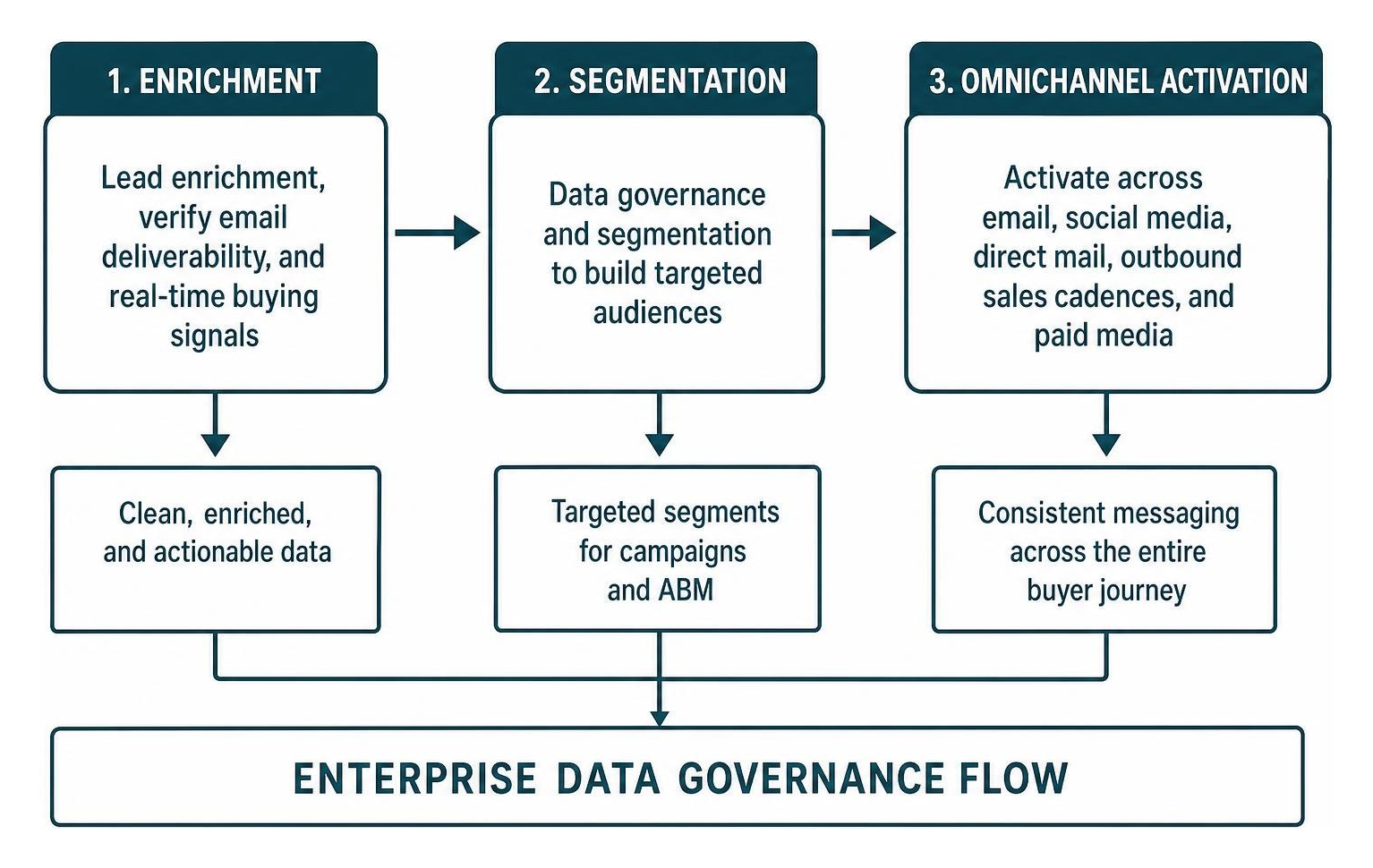
Modern growth teams rarely rely on built-in native integrations alone. Deploying AI workflow automation tools for startups allows lean teams to automate lead enrichment, verify email deliverability before sending, and route accounts based on real-time buying signals.
When evaluating middleware engines to connect your messaging tools, comparing Zapier vs Make vs n8n helps identify the right balance between setup speed, customization, and operating costs.
Enterprise Lifecycle Orchestration and ABM Automation
For organizations managing long, complex sales cycles with multiple decision-makers, automation must support account-based marketing (ABM). Enterprise platforms coordinate targeted advertising, outbound sales cadence triggers, and direct-mail gifting sequences when target accounts exhibit intent spikes on high-value web pages.
Connecting these nurture tracks with social media campaign management software in 2026 allows marketing teams to synchronize custom audience segments with paid media channels, ensuring consistent messaging across the entire buyer journey.
Implementation Best Practices and Avoiding Common Pitfalls
Adopting new automation software requires careful planning to prevent data fragmentation, deliverability issues, or unexpected budget overruns.
- Audit and Cleanse Data Before Migration: Never import unsegmented, stale subscriber lists into a fresh platform. Run verification checks to purge inactive addresses, spam traps, and duplicates.
- Establish Core Deliverability Authentication: Configure custom DKIM, SPF, and DMARC records on your domain before sending your first campaign. When migrating to dedicated IP addresses, follow a phased 30-day warmup schedule.
- Account for Pricing Models and Contact Growth: Scrutinize how vendors charge for scale. Some platforms bill based on total stored contacts, penalizing you for maintaining historical records, while others charge strictly on monthly active contacts emailed.
- Implement Bot and Security Scanner Filtering: Modern enterprise firewalls often pre-click and scan incoming emails, skewing engagement analytics and triggering incorrect behavioral workflows. Use platforms with native bot-detection filters to preserve data accuracy.
- Document Every Workflow and Webhook: Avoid creating undocumented, overlapping automation rules that send multiple conflicting emails to the same contact in a single day.
Frequently Asked Questions about Marketing Automation Tools
What is the difference between CRM and marketing automation software?
Customer Relationship Management (CRM) software is primarily a system of record that manages customer interactions, sales pipelines, account histories, and long-term customer service records.
Marketing automation software focuses on the top and middle of the funnel, automating repetitive tasks such as lead capture, email nurturing, audience segmentation, behavioral scoring, and multi-channel campaign execution. Integrating the two ensures that marketing engagement data updates sales pipeline stages in real time.
How much do marketing automation tools cost for early-stage companies?
Entry-level marketing automation software typically starts between $15 and $100 per month for basic contact tiers and standard email drip sequences.
However, as contact databases grow and teams require advanced features—such as custom event tracking APIs, dedicated IP addresses, multi-touch attribution, and CRM data syncing—costs can scale to $800 to $3,200+ per month. Early-stage companies should choose platforms that allow flexible upgrades without forcing immediate enterprise contract commitments.
What are the main pitfalls when switching marketing automation platforms?
The most common pitfalls include:
- Loss of Historical Behavioral Data: Failing to export custom event engagement, lead scores, and activity logs from your legacy platform.
- Broken API Webhooks and Lead Forms: Overlooking embedded website forms, third-party landing pages, and lead-routing webhooks that point to the old system.
- Sender Reputation Drops: Sending high-volume broadcasts from a new platform without proper domain authentication (SPF, DKIM, DMARC) and gradual IP warmup.
- Duplicate Messaging Collisions: Running overlapping automation workflows in both systems during migration, resulting in contacts receiving duplicate or out-of-order emails.
Conclusion
Choosing the right marketing automation tools is not about finding a single platform that claims to do everything. It is about building an integrated, cost-effective engine that reliably guides prospects from initial interest to long-term advocacy. By auditing your required messaging channels, evaluating data integration capabilities, and designing clean data handoffs, you can build a marketing engine that scales smoothly as your business grows.
At AIxorIA, we specialize in helping businesses design high-performing tech stacks. Our custom GTM orchestration solutions, curated tool frameworks, and hands-on workshops empower teams to scale revenue operations efficiently while avoiding restrictive vendor lock-in.
1 thought on “How to Compare Marketing Automation Tools for SaaS”