The Best QuickBooks Alternatives for Small Businesses in 2026
The best QuickBooks alternatives for small businesses in 2026 are:
Scr0ll d0wn to D0VVNL0AD
| Software | Best For | Starting Price |
|---|---|---|
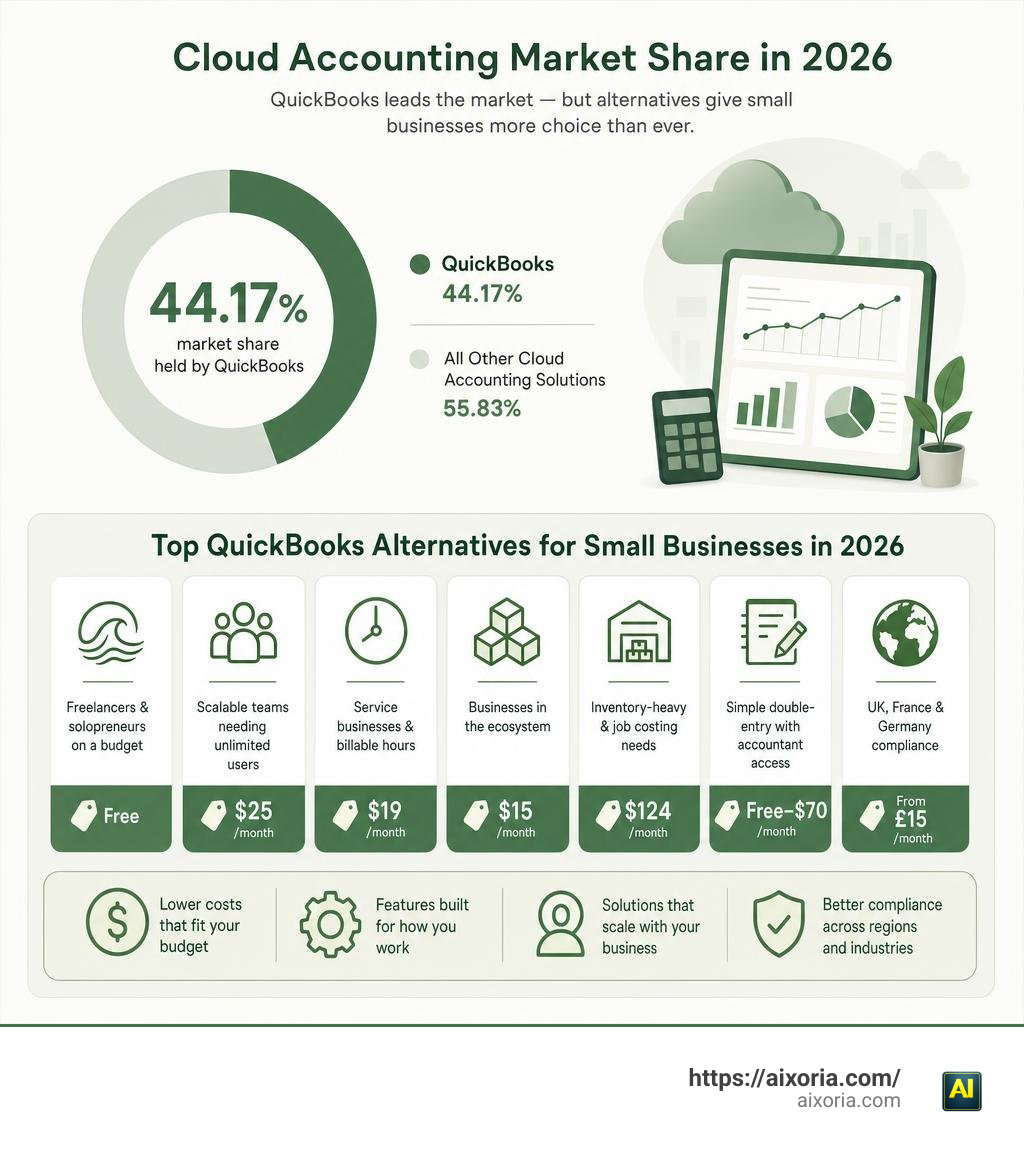
| Wave | Freelancers & solopreneurs on a budget | Free |
| Xero | Scalable teams needing unlimited users | $25/month |
| FreshBooks | Service businesses & billable hours | $19/month |
| Zoho Books | Businesses in the Zoho ecosystem | $15/month |
| Sage 50 Cloud | Inventory-heavy & job costing needs | $124/month |
| Note.now | Simple double-entry with accountant access | Free–$70/month |
| Finovo | UK, France & Germany compliance | From £15/month |

QuickBooks dominates the cloud accounting market with a 44.17% market share — but that doesn’t mean it’s the right fit for every small business.
Many small business owners find QuickBooks too expensive, too complex, or simply more software than they need. A freelance photographer doesn’t need the same tools as a 50-person manufacturing firm. And when QuickBooks’ entry-level plan runs at $38/month — compared to Wave’s free tier — the cost difference is hard to ignore.
The good news: the alternatives have never been better. Whether you need zero-dollar bookkeeping, unlimited users, or multi-country tax compliance, there’s a platform built for your situation.
Why Companies Seek QuickBooks Alternatives for Small Businesses
While QuickBooks has long been the default choice for business bookkeeping, we frequently talk to small business owners who are eager to jump ship. Managing finances is one of the most important (and sometimes overwhelming) parts of running a business. It directly impacts your tax readiness, cash flow, and ability to secure funding from lenders or investors. Because bookkeeping is the financial foundation of your company, the tool you use needs to align with your daily workflow.
Unfortunately, QuickBooks often creates more friction than it resolves. Common pain points include ballooning subscription costs, unnecessary software complexity, and inconsistent customer support. Many businesses feel trapped because they dread the data migration process, but continuing to pay for a clunky system that causes administrative anxiety is a recipe for burnout.
If you are weighing your options, exploring a detailed head-to-head comparison like our guide on QuickBooks vs Wave: Which is Better in 2026? is an excellent place to start. Let’s break down the two primary catalysts driving business owners to seek alternatives.
High Subscription Costs and Hidden Fees
Let’s talk numbers. QuickBooks Online has steadily increased its pricing over the years, and its entry-level “Simple Start” plan now sits at $38 per month. For a brand-new startup or a solo contractor, that is a significant recurring expense.
Worse still, QuickBooks structures its pricing tiers around strict user limits. If you want to give access to your co-founder, your virtual assistant, and your in-house bookkeeper, you are forced to upgrade to more expensive plans. The costs scale rapidly as your team grows.
Beyond subscription fees, hidden costs often lurk beneath the surface. These include:
- Add-on charges for basic payroll functionality.
- Additional fees to unlock advanced inventory tracking.
- Higher payment processing transaction fees when clients pay invoices online.
- Extra costs for receipt scanning and optical character recognition (OCR) tools.
When you add it all up, a small business can easily spend hundreds of dollars a month on a system where they only use a fraction of the features.
Steep Learning Curve and Interface Complexity
QuickBooks is built by accountants, for accountants. While that makes it incredibly robust, it also means the user interface can feel cluttered and intimidating to the average business owner. You didn’t start your business to spend hours deciphering double-entry accounting terminology or navigating multi-layered menus.
This complexity often leads to “administrative anxiety.” Business owners worry about clicking the wrong button and ruining their balance sheet, or miscategorizing expenses in a way that triggers a tax audit. When software is too hard to use, bookkeeping gets postponed. This delay leads to inaccurate financial data, missed tax deductions, and a chaotic rush at the end of the fiscal year.
Modern alternatives focus heavily on user-friendliness, offering simplified dashboards designed for non-accountants. If your goal is to get up and running without a steep learning curve, you may want to review our curated list of the 7 Easiest Accounting Software for Small Business 2026.
Top-Rated Accounting Platforms for 2026
The accounting software landscape has evolved rapidly to meet the diverse needs of modern SMBs. Below, we look at the top-rated platforms challenging QuickBooks’ dominance in 2026.
Wave: Best Free QuickBooks Alternatives for Small Businesses
If you are a freelancer, consultant, contractor, or solopreneur operating on a tight budget, Wave is an absolute game-changer. Unlike paid platforms that lure you in with temporary trials, Wave’s core accounting, invoicing, and receipt-scanning tools are completely free, with no monthly subscription fees.
Wave offers two primary tiers:
- Starter Plan ($0/month): Covers unlimited invoicing, estimates, expense tracking, and basic bookkeeping.
- Pro Plan ($19/month or $190/year): Adds advanced automation, receipt OCR scanning, and premium customer support.
Even if you choose to upgrade, Wave’s Pro Plan is 50% less expensive than QuickBooks’ comparable Simple Start plan. Over 300,000 small businesses trust Wave to keep their finances organized. It is designed to banish “imposter syndrome” for solo business owners, giving you a professional financial interface without the hefty price tag.
While Wave is incredibly user-friendly, its credit card processing fees are standard for the industry (2.9% + $0.60 for Visa/Mastercard; 3.4% + $0.60 for Amex), and bank payments (ACH) cost a flat 1% with a $1 minimum. For a deeper look at invoicing solutions tailored to independent professionals, check out our guide on the 7 Best Invoicing Software for Sole Traders in 2026.
Xero: Scalable QuickBooks Alternatives for Small Businesses
For growing businesses that need a robust, collaborative platform, Xero is the leading contender. Xero’s defining feature is that it offers unlimited users on all plans at no extra cost. This is a massive advantage over QuickBooks, allowing you to invite your entire team, your external accountant, and your bookkeeper to collaborate on your books in real time without paying extra seat licenses.

Xero has built an incredibly loyal following, with over 250,000 accountants and bookkeepers using its platform globally. The software is highly regarded for its automation capabilities, particularly its one-click bank reconciliation and automatic bank feeds.
According to customer data:
- 88% of customers agree Xero helps improve financial visibility.
- 81% of customers agree Xero’s online invoice payments help them get paid on time, reducing the time spent chasing late payments by up to 50%.
Xero offers three main subscription tiers in the US:
- Early ($25/month): Best for sole traders, though it limits you to sending 20 invoices and entering 5 bills per month.
- Growing ($55/month): Unlocks unlimited invoicing and bills.
- Established ($90/month): Adds multi-currency support, project tracking, and expense claims.
One of Xero’s most exciting modern features is its live integration with Claude AI, allowing business owners to ask conversational questions about their cash flow, revenue, and overdue invoices using live financial data. To explore Xero’s full feature set, visit Accounting Software for Your Small Business | Xero US.
FreshBooks and Zoho Books: Invoicing and Ecosystem Depth
If your small business is service-based and relies heavily on tracking billable hours, FreshBooks is a standout option. It started as a dedicated invoicing tool and has grown into a comprehensive accounting platform. FreshBooks makes it incredibly simple to track time spent on client projects, log expenses, convert estimates into professional invoices, and set up recurring client retainers. It eliminates the clunkiness of traditional ledgers, making invoice management intuitive.
On the other hand, Zoho Books is the ultimate choice for businesses already leveraging the Zoho suite of business tools. Starting at just $15 per month, Zoho Books provides deep functionality, including automated workflows, inventory tracking, and customizable client portals. Because it integrates natively with Zoho CRM, Zoho Projects, and Zoho Sign, it acts as a unified financial engine for your entire operation.
To help you decide which invoicing features matter most for your business, take a look at our comprehensive breakdown of What is the Best Invoicing Software for Small Business.
Specialized and Advanced Accounting Solutions
As small businesses scale, their operational needs often become too complex for standard, one-size-fits-all tools. Let’s look at three specialized alternatives designed for advanced inventory, simplified double-entry, and cross-border European compliance.
Sage 50 Cloud: Best for Inventory and Job Costing
Formerly known as Peachtree Accounting, Sage 50 Cloud is a powerhouse designed for businesses with in-house bookkeepers who require advanced operational control. Unlike basic cloud accounting tools, Sage 50 Cloud excels at serialized inventory tracking, job costing (tracking labor, materials, and overhead in real time), and deep financial reporting.
Pricing starts at $124.42 per month for the Pro plan, scaling up to Premium ($169.33/month) and Quantum ($253.42/month) to support up to 40 users. While it represents a larger financial investment, Sage offers a free, secure data migration path from most QuickBooks versions with help from their expert support team. You can explore their robust capabilities directly at Sage 50 Cloud Accounting Software for Small Business | Sage US.
Note.now: Simple Double-Entry Accounting
If you want a platform that strikes the perfect balance between a clean, modern user interface for you and robust double-entry accounting for your accountant, Note.now is an exceptional choice. It is designed to get your business up and running in under 30 minutes, offering direct data import from QuickBooks and Xero.
Note.now features a tiered pricing model:
- Free ($0/month): Basic bookkeeping and invoicing.
- Starter ($9.99/month): Expense tracking and bank reconciliation.
- Pro ($29.99/month): Full double-entry ledger access.
- Business ($69.99/month): Unlimited team members and advanced tools.
By offering a free accountant seat on every paid plan, Note.now ensures you and your financial advisor stay on the same page. Some users report cutting their software bill by 60% and saving up to six hours a week on bookkeeping after switching. You can learn more about their onboarding wizard at Note.now — Cloud Accounting Software for Small Business.
Finovo: Multi-Country European Compliance
For small businesses operating across borders in Europe, local tax regulations can quickly become an administrative nightmare. This is where Finovo shines. It is the only platform that natively supports built-in compliance, tax filing, and invoicing for the United Kingdom, France, and Germany within a single subscription.

Finovo integrates local European standards directly into its platform, including:
- United Kingdom: Fully compliant with HMRC’s Making Tax Digital (MTD) VAT submissions.
- Germany: Supports one-click DATEV exports for German tax advisors (Steuerberater), ELSTER VAT filing, and mandatory B2B e-invoicing standards like ZUGFeRD and XRechnung.
- France: Fully approved for the upcoming French Facture électronique e-invoicing reforms.
With plans starting at £15 per month and a 60-day free trial on their Professional plan, Finovo eliminates the need to pay for multiple localized accounting packages. Read more about their cross-border compliance features at Finovo — Accounting software for UK, France & Germany.
Key Considerations When Switching Platforms
Switching your financial software is a major operational decision. To ensure a smooth transition, we recommend keeping these key factors in mind:
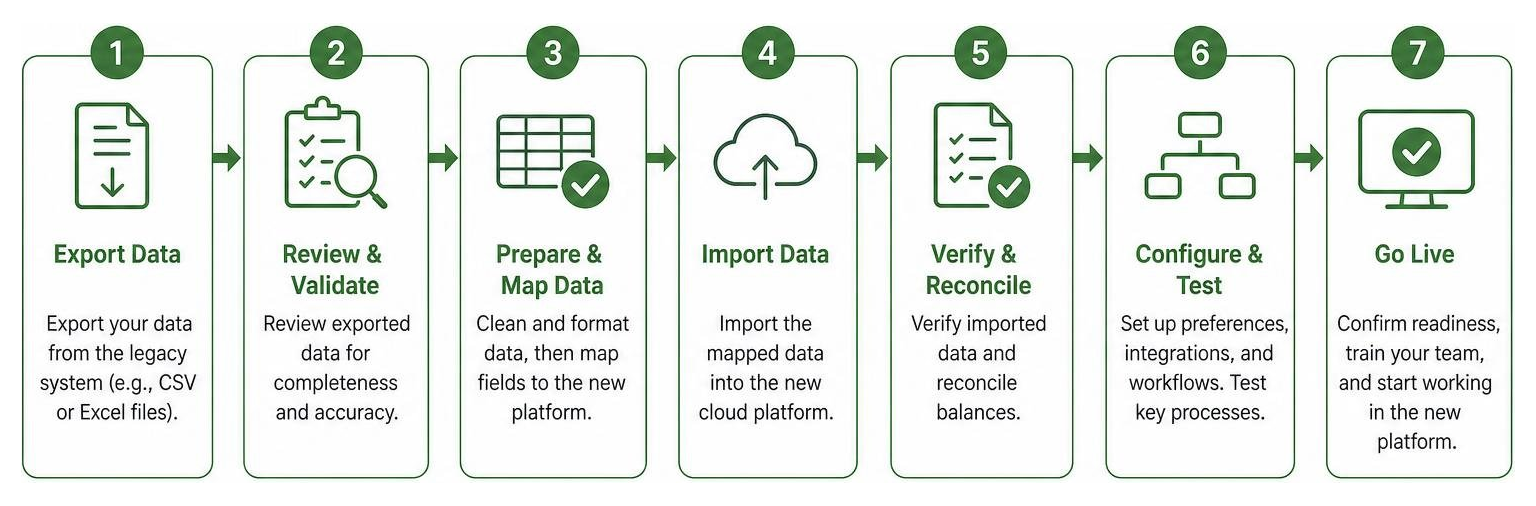
- Data Migration: Before canceling your QuickBooks subscription, export your historical data. Many platforms offer direct CSV imports or dedicated migration tools, but you should verify if they import full transactional history or just opening balances.
- Setup Time & Onboarding: Factor in the time it will take to link your business bank accounts, customize your invoice templates, and train your team.
- CRM and Ecosystem Integration: Your accounting software shouldn’t live in a silo. Look for platforms that integrate with your existing CRM, POS, or e-commerce tools. For instance, if you rely heavily on Salesforce (ranked the #1 CRM by IDC for 12 consecutive years), choosing an accounting tool that connects natively to the Salesforce database prevents data sync failures.
- All-in-One Operations: If you want to manage your sales pipeline, project delivery, and billing in one place, look at comprehensive business management platforms like Sunodesk — All-in-One Business Management Platform.
- Industry Specifics: Some business models require highly specific features. For example, if you manage rental units, you should look for real estate-specific tools by reading our guide on Which Accounting Software Should a Landlord Use in 2026? Best Options Compared.
- Micro-Tools: If you only need rapid expense management rather than a full ledger, specialized tools like Pleelo can help streamline your daily workflow.
Frequently Asked Questions about QuickBooks Alternatives
What is the easiest accounting software to learn?
For most micro-businesses and freelancers, Wave and Note.now are considered the easiest platforms to learn. They feature clean, uncluttered dashboards that avoid complex accounting jargon, and both offer guided setup wizards that help you connect your bank accounts and send your first invoice in under 30 minutes.
Is Wave accounting completely free?
Yes, Wave’s core accounting, invoicing, and receipt-scanning features are 100% free under their Starter Plan, with no trial limits or credit card required. Wave makes money through payment processing fees when your clients pay online, optional payroll subscriptions, and their paid Pro Plan ($19/month) which unlocks advanced receipt automation.
Can I migrate my historical QuickBooks data easily?
Yes, most modern accounting platforms provide built-in import tools to help you transition. Platforms like Sage 50 Cloud and Note.now offer guided migration support to import your chart of accounts, customer lists, and outstanding invoices via CSV files, helping you transition without losing your historical financial records.
Conclusion
Choosing the right accounting software is about building a strong financial foundation that supports your business growth. While QuickBooks remains a powerful tool, it is no longer the only viable option on the block. By matching your business size, budget, and operational footprint to the right alternative, you can eliminate administrative anxiety and reclaim hours of valuable time every week.
Once your back-office finances are running smoothly on autopilot, you can focus on maximizing your daily business efficiency. To find the right tools to optimize your workflow, check out our guide on the best AI for productivity in 2026 and take your business operations to the next level!
1 thought on “Best QuickBooks Alternatives for Small Businesses in 2026 (Top Picks Compared)”