Why Finding the Best AI for Debugging Code Can Transform Your Development Workflow
Scr0ll d0wn to D0VVNL0AD
Finding the best AI for debugging code is one of the most valuable decisions a developer or small business owner can make in 2026. Bugs are expensive. They slow down shipping, frustrate customers, and eat up hours that could go toward building new features.
Here are the top AI tools for debugging code right now:
| Tool | Best For | Standout Feature |
|---|---|---|
| Cursor | General development | Multi-model agentic debugging, whole-codebase indexing |
| Claude Opus 4.6 / Sonnet | Deep reasoning on complex bugs | Strong code comprehension and explanation |
| GitHub Copilot | Teams already on GitHub | Inline suggestions, autofix, code review |
| OpenAI Codex | Agentic workflows | Multi-agent parallel tasks, PR bug catching |
| Gemini Code Assist | Google Cloud / enterprise teams | 1M token context window, smart fix actions |
| Zentara Code | Runtime debugging in VS Code | Live debug sessions via DAP, breakpoint management |
| Workik AI | Multi-framework context | Context-aware fixes, CI/CD pipeline integration |
The stakes are real. Teams using AI debugging tools have reported cutting their mean-time-to-repair by up to 60%. That’s not a small gain — that’s the difference between a bug fix taking hours versus minutes.
And yet, most small business owners and developers feel overwhelmed by the sheer number of options. Which tool actually understands your codebase? Which one just gives you plausible-sounding code that still breaks in production?
That’s exactly what this guide cuts through.
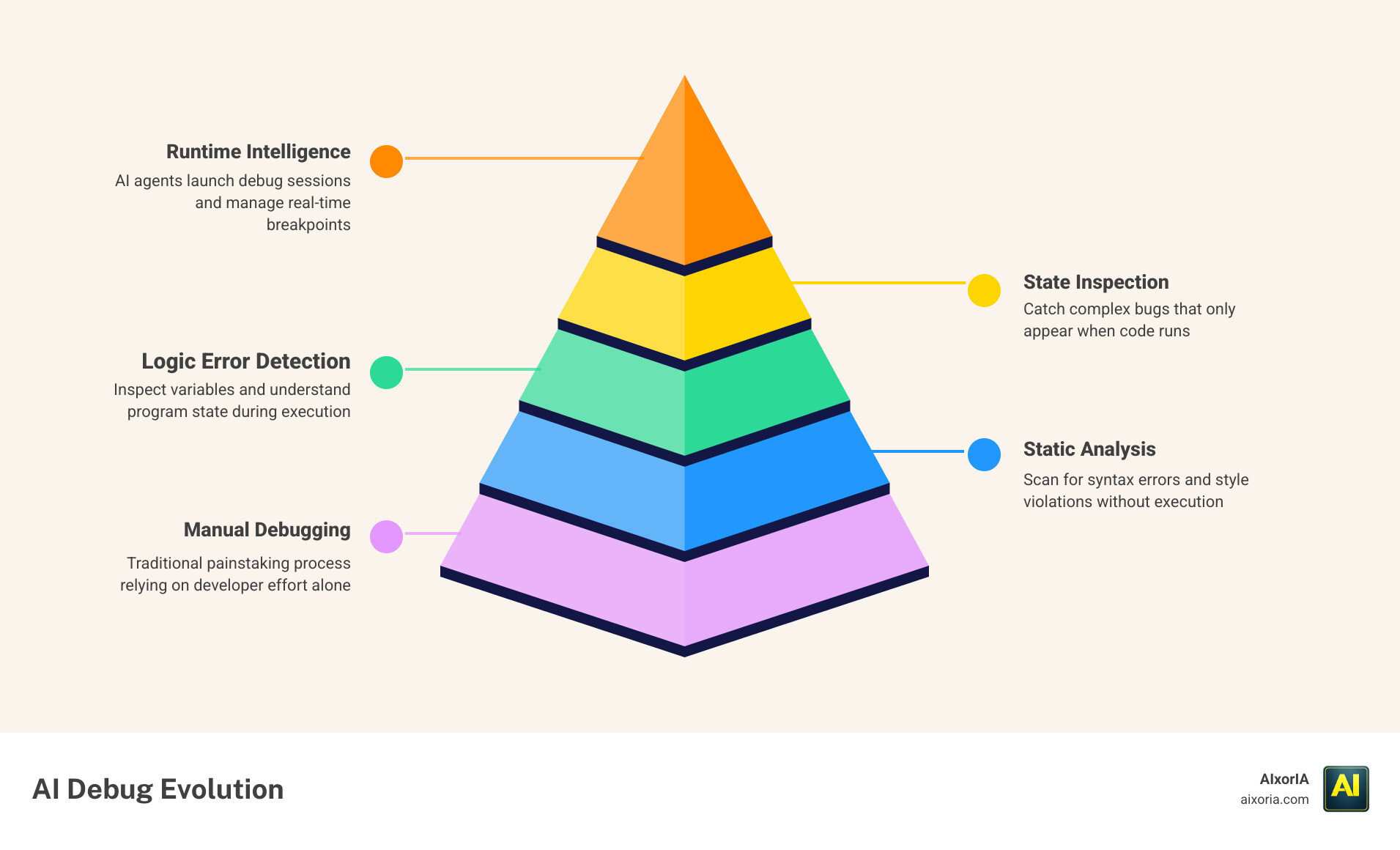
Evolution of AI Debugging: From Static Analysis to Runtime Intelligence
In the early days of software engineering, debugging was a manual, painstaking process. We relied on static analysis—tools that scanned code for syntax errors or style violations without actually running it. While helpful, static analysis often missed the “ghosts in the machine”—those logic errors that only appear when the code is executed.
By 2026, the landscape has shifted toward runtime intelligence. The best AI for debugging code today doesn’t just look at your text; it understands the program’s state while it runs. This is a massive leap forward. Instead of just highlighting a missing semicolon, modern AI agents can launch full debug sessions, manage breakpoints, and inspect variables in real-time.
For instance, tools like Zentara Code use the Debug Adapter Protocol (DAP) to provide language-agnostic debugging. This means the AI can “see” why a quicksort algorithm fails on an empty list or why a variable is returning zero instead of a negative value. This shift has led to a reported 60% reduction in mean-time-to-repair (MTTR) for teams that embrace these autonomous agents.
However, we must remain grounded. Scientific research on AI engineering limitations from MIT CSAIL reminds us that while AI is brilliant at code completion, it still struggles with idiosyncratic, large-scale codebases. It can produce “superficially plausible” code that lacks functional correctness. This is why the Best Ai Tools For Generating Code are most effective when paired with human oversight and automated pipelines that verify every fix.
Top Contenders: The Best AI for Debugging Code in 2026
When we look for the best AI for debugging code, we aren’t just looking for a chatbot. We are looking for an integrated partner. Here are the leaders currently dominating the field:
- Cursor: This AI-powered code editor has become a favorite for its “agentic” development. It doesn’t just suggest code; it uses its own “computer” to build, test, and demo features. It allows you to toggle between models like GPT-5.5 and Claude Opus 4.7, giving you the flexibility to choose the “brain” that fits your specific bug.
- Claude Opus 4.6 & Sonnet 5: Anthropic’s models are widely regarded as the gold standard for deep reasoning. If you have a logic error that spans multiple files, Claude’s ability to “think” through the architectural implications makes it a top choice for complex troubleshooting.
- Codex (OpenAI): Powered by OpenAI’s frontier models, Codex acts as a command center. It is particularly strong at catching bugs during the Pull Request (PR) phase, with users reporting that it catches tricky backward compatibility issues that human reviewers might miss.
- Zentara Code: As a specialized debugger, Zentara stands out by automating the runtime process. It can intercept failing Pytest assertions and drop you straight into a debug session with the fix already proposed.
- Gemini 3 (Google): With a staggering 1-million-token context window, Gemini is the king of “big picture” debugging. It can digest your entire codebase and documentation to find a needle in a haystack.
- GitHub Copilot: Still the most widely used tool, Copilot has evolved to include “Autofix” capabilities. It integrates directly into the GitHub workflow, scanning for vulnerabilities and suggesting fixes before the code even reaches production.
For a deeper dive into these platforms, check out our reviews on the 8 Best Ai Coding Tools For Developers and The 7 Best Ai Coding Tools For Developers In 2026.
Specialized Workflows: Best AI for Debugging Code in Data Science
Data science and Machine Learning (ML) present unique debugging challenges. A bug in an ML pipeline isn’t always a crash; often, it’s a silent data quality issue—like a Pandas transformation producing unexpected nulls in cell 15 of a notebook.
The best AI for debugging code in this niche must have “architectural awareness.” It needs to understand how data flows from a Spark job into a feature engineering pipeline and finally into a model-serving layer. Tools that offer persistent context across notebook cells are essential here. They allow developers to trace why a specific feature transformation might break a downstream model.
Teams working on complex ML projects should look for tools that offer cross-service analysis. If you’re managing 12 microservices and an ML pipeline, you need an AI that knows when a change in the data schema will cause a cascading failure three services away. You can find more targeted recommendations in our guide on the Best Ai Tools For Ml Projects 2026 Tested Ranked By Workflow.
Key Features: Context Depth and Whole-Codebase Indexing
Why does one AI fix a bug instantly while another “hallucinates” a solution that doesn’t exist? The answer usually lies in context depth.
There are two main ways AI tools understand your code:
- Raw Context Window: This is the amount of data the AI can “hold in its head” at once (e.g., Gemini’s 1M tokens).
- Whole-Codebase Indexing: This is where the tool creates a searchable map of your entire repository.
For effective debugging, indexing is often more important than raw window size. An AI that has indexed your code understands dependencies. It knows that changing a function in auth.py will affect login_controller.ts. In recent code review benchmarks, tools with deep codebase reasoning achieved a 59% F-score—the highest among tested tools—because they could trace errors across file boundaries.
Security is the other side of the coin. When searching for the best AI for debugging code, enterprise teams must prioritize compliance. Look for tools with ISO 42001 and SOC2 certifications. These ensure that your proprietary code isn’t being used to train public models without your consent. For more on maximizing your output securely, see our Best Ai Productivity Tools For Coders In 2026 Tested.

Choosing Your Tool: Enterprise vs. Individual Needs
The right tool for a solo freelancer is rarely the right tool for a Fortune 500 company. Here is how the landscape splits:
| Feature | Individual/Small Team | Enterprise |
|---|---|---|
| Primary Need | Speed and low cost | Security and scalability |
| Model Control | Flexible (BYO Key) | Strict (VPC controls) |
| License Management | Personal subscription | Organizational policy management |
| Customization | Standard models | Custom private models trained on internal code |
| Support | Community/Docs | Dedicated support and IP indemnity |
For individuals, tools that offer a “Free” tier or “Pro” plans for around $10–$20 a month are usually sufficient. For businesses, the focus shifts to collaborative workspaces where teams can jointly view and solve bugs. Enterprise-grade tools like Gemini Code Assist or Copilot Enterprise provide usage metrics, allowing managers to see how AI is impacting the bottom line. You can compare more options in our list of the Best Ai Productivity Tools For Developers In 2026.
How to Select the Best AI for Debugging Code for Your Team
Choosing the best AI for debugging code for your specific team comes down to three factors:
- Workflow Integration: Does it live in your IDE (VS Code, JetBrains) or your terminal? If your team spends all day in the CLI, a tool with a strong CLI agent is a must.
- Task Completion Gain: Research shows that deploying AI assistants can increase completed tasks by 25% on average. Test a tool on a “real-world” bug from your backlog and see if it actually reaches a fix faster than a human.
- Onboarding Speed: How long does it take to index your 450,000-line repository? If it takes days, it might not be the right fit for an agile team.
Frequently Asked Questions about AI Debugging
How does AI runtime debugging differ from traditional manual debugging?
Traditional debugging requires a human to set breakpoints, step through code line-by-line, and manually inspect variables. AI runtime debugging automates this. The AI can autonomously run the code, identify where the state deviates from the expected outcome, and suggest a fix—often before the human developer has even finished reading the error log.
Can AI debugging tools handle complex microservices architectures?
Yes, but only the advanced ones. Tools with “cross-repository” awareness are designed for this. They can individually debug each service and ensure that a fix in one doesn’t cause a “cascading failure” in another. This is particularly useful for debugging issues where the original developer has left the company.
What security risks should I consider when using AI for code debugging?
The biggest risks are data leakage and IP infringement. Ensure your chosen tool has a “zero-retention” policy or an opt-out for model training. Also, look for “code referencing filters” that prevent the AI from suggesting code that matches copyrighted public repositories, which could lead to legal headaches later.
Conclusion
The quest for the best AI for debugging code isn’t just about finding a “magic button” that fixes every error. It’s about finding a tool that augments your expertise, handles the repetitive “grunt work” of state inspection, and allows you to focus on high-level system design.
At AIxorIA, we specialize in helping businesses navigate this rapidly evolving landscape. Whether you need custom AI solutions, tool training workshops to get your team up to speed, or a performance audit to see where your current workflow is leaking time, we are here to help. Our mission is to provide simple language help and affordable services to empower your business in the 2026 technology landscape.
Ready to supercharge your development? Explore More info about AI productivity tools on our site or reach out to us for a consultation. The future of software engineering is human-in-the-loop debugging—let’s make sure your loop is as efficient as possible.
1 thought on “Best AI for Debugging Code Can Transform Your Development Workflow”