Are AI Coding Assistants Actually Worth It in 2026?
Scr0ll d0wn to D0VVNL0AD
The best AI coding assistant tools available right now can save developers hours every week — but only if you pick the right one for your needs.
Here’s a quick look at the top options:
| Tool | Best For | Starting Price |
|---|---|---|
| Cursor | Autonomous agents, large codebases | $20/month |
| GitHub Copilot | Inline autocomplete, VS Code users | $10/month |
| Claude Code | Terminal-first agentic workflows | $17/month |
| JetBrains Junie | JetBrains IDE users | $100/year |
| OpenAI Codex | Multi-agent background automation | Pay as you go |
| Augment Code | Enterprise monorepos, deep context | Contact for pricing |
These tools have gone from simple autocomplete to full autonomous agents in just a few years. Today, they can write code, fix bugs, run tests, open pull requests, and even review their own work — all without you lifting a finger.
The numbers tell the story. According to JetBrains’ 2025 State of Developer Ecosystem report, 85% of developers now regularly use AI tools. That’s a massive jump from 62% in 2024.
But here’s the catch: only 29% of developers actually trust the accuracy of AI-generated code, according to Stack Overflow’s 2025 Developer Survey. So the tools are everywhere — but trust hasn’t kept up.
That gap between adoption and trust is exactly why picking the right tool matters so much.
Whether you’re a solo developer or running a small team, this guide breaks down what each tool does well, what it costs, and who it’s really built for.
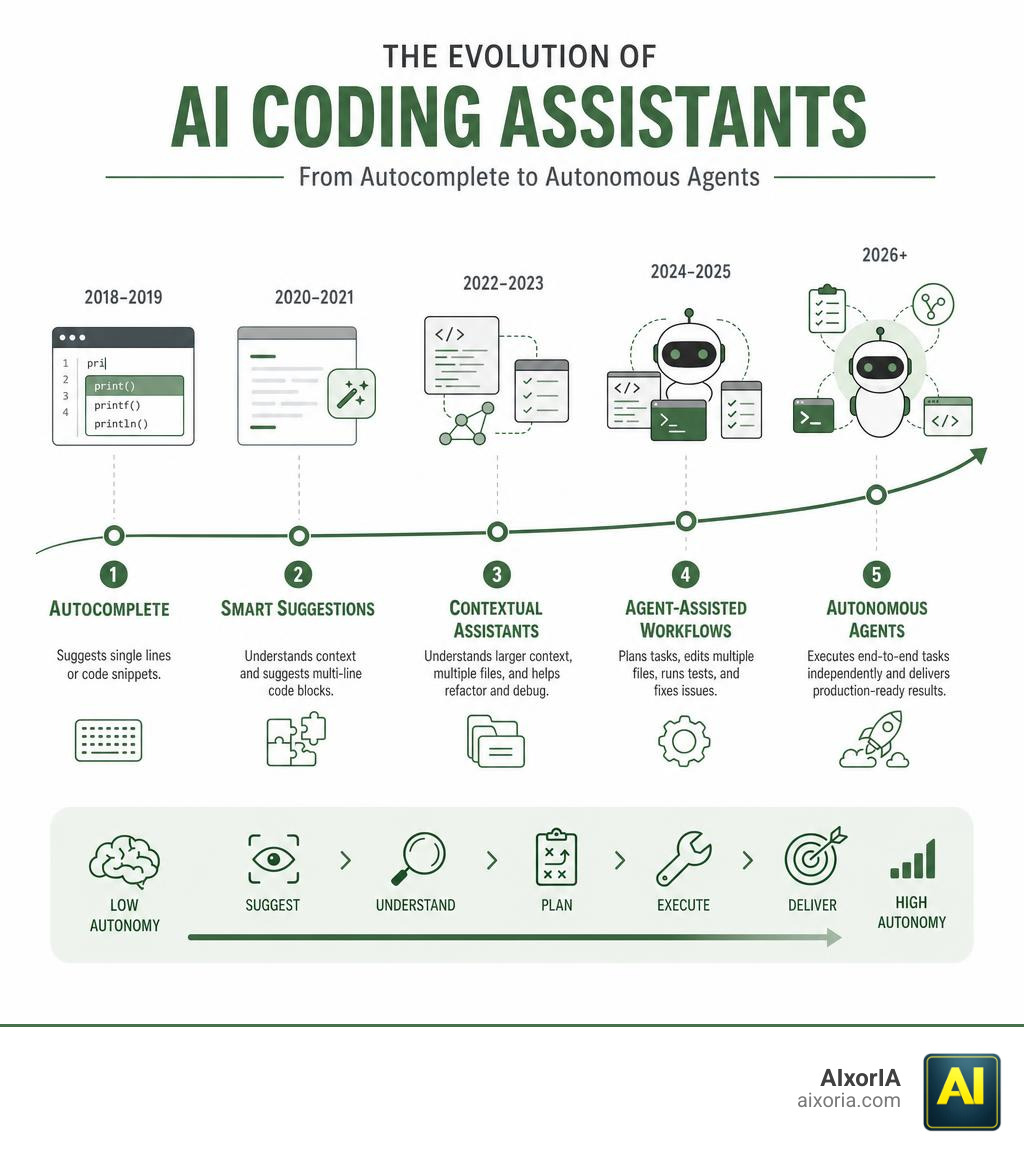
Evolution and Market Trends of the Best AI Coding Assistant Tools
The transition from basic autocomplete to fully autonomous workflows is complete. In 2024, developers used AI mostly to generate short code blocks or complete single lines of code. By May 2026, the industry has undergone a massive “agentic pivot.” Today’s leading systems don’t just guess your next line of code; they map entire system architectures, plan multi-file changes, run local test suites, and fix their own errors in real-time.

This dramatic shift has triggered an explosion in market value and venture capital funding. For instance, Cursor surpassed an incredible $2 billion in annualized revenue by March 2026—effectively doubling its $1 billion run rate from November 2025. Following a Series D round that valued the startup at $29.3 billion in late 2025, Cursor is already in talks to raise an additional $2 billion at a staggering $50 billion valuation.
At the same time, the industry is shifting focus from raw generation speed to codebase reliability. This is highlighted by Qodo raising $70 million in March 2026 on the core thesis that faster AI code output does not equal reliable software. To stay ahead of these trends, teams must carefully evaluate how these models integrate into daily operations. For a deeper look at how these tools affect engineering workflows, check out our guide on the Best AI Productivity Tools for Developers in 2026.
Top AI Coding Assistants Compared
To help you navigate this crowded market—which now features over 1,080 AI coding extensions in the VS Code marketplace alone—we have broken down the core differences between the top platforms.
| Feature | Cursor | GitHub Copilot | Claude Code | JetBrains Junie | OpenAI Codex | Augment Code |
|---|---|---|---|---|---|---|
| Primary Interface | Forked VS Code IDE | Editor Extension | Terminal / CLI / Web | JetBrains IDE Sidebar | API / Integrations | IDE & CLI |
| Agentic Autonomy | High (Parallel agents) | Moderate (Agent mode) | High (Local execution) | Moderate (Execution plans) | High (Background tasks) | High (SWE-bench leader) |
| Context Indexing | Full codebase | Open files / Workspace | On-demand scan | Project structure | Cloud / Worktrees | Deep semantic engine |
| Best Suited For | Heavy refactoring | Rapid autocomplete | Terminal power users | JetBrains ecosystem | Custom workflows | Enterprise monorepos |
Evaluating Cursor as one of the Best AI Coding Assistant Tools
Cursor has quickly become the darling of the development community. By forking VS Code, the Cursor team built an experience where the AI isn’t just an add-on—it is the core of the editor.
Its standout feature is its autonomous agent capability. You can hand off complex, multi-step tasks to Cursor, which then runs them in parallel on its own secure cloud environment. It explores your files, searches your codebase, and writes code using premier models from OpenAI, Anthropic, and Gemini. Whether you are building complex dashboards or refactoring legacy modules, Cursor’s complete codebase understanding ensures it rarely loses track of your system’s architecture.
GitHub Copilot: The Reliable Autocomplete Workhorse
If Cursor is the cutting-edge agent, GitHub Copilot remains the reliable industry workhorse. Deeply integrated into the VS Code and GitHub ecosystems, Copilot excels at staying out of your way while providing magically accurate inline suggestions.
With its newer Agent Mode and Next Edit Suggestions (NES), Copilot has closed the gap on multi-file edits. It predicts where you want to make your next change and prepares the code block before you even scroll there. For teams already deeply embedded in GitHub, Copilot offers unmatched convenience and predictable pricing.
Claude Code: Terminal-First Agentic Workflows
Anthropic’s entry into the space, Claude Code by Anthropic | AI Coding Agent, Terminal, IDE, takes a completely different approach. Operating directly inside your terminal, Claude Code acts as an interactive command-line companion.
It can analyze complex codebases in seconds, run local test suites, triage bugs, and automatically generate working pull requests. Its mobile-to-desktop routing is particularly impressive: you can trigger a task from your phone on the go, and Claude Code will execute it on your local desktop machine, leaving a completed PR ready for your review when you return to your desk.
JetBrains Junie: Deep IDE Integration
For developers who prefer IntelliJ, PyCharm, WebStorm, or Rider over VS Code, Junie, the AI coding agent by JetBrains is the premier choice. Junie brings native agentic workflows directly into Android Studio and JetBrains IDEs.
Junie works by analyzing your project structure and proposing a clear execution plan before writing any code. It leverages JetBrains’ industry-leading static code analysis and built-in syntax checks to verify its own output, ensuring your project state stays green. You can easily toggle between “Code Mode” for autonomous execution and “Ask Mode” for collaborative brainstorming.
Why OpenAI Codex and Augment Code Rank Among the Best AI Coding Assistant Tools
For enterprise teams managing massive codebases, OpenAI Codex and Augment Code offer powerful alternatives to standard editor tools.
Codex | AI Coding Partner from OpenAI | OpenAI acts as an always-on background assistant. Connected directly to your cloud environments, Codex automates routine pull request reviews, scans continuously for vulnerabilities, and coordinates multi-agent workflows across platforms like Slack, GitHub, and Linear.
Meanwhile, Augment Code has emerged as an enterprise powerhouse. Its Auggie CLI achieved a history-making 51.80% score on the SWE-bench Pro benchmark—the top result at its time of publication. Powered by a proprietary Context Engine that maps dependencies across massive multi-million-line monorepos in minutes, Augment Code provides unmatched multi-file accuracy for large-scale engineering organizations.
Key Evaluation Criteria for Enterprise Adoption
When we help organizations audit their engineering systems, we advise looking beyond simple autocomplete speed. True ROI comes from how well a tool handles complex, real-world systems.

When evaluating the Best AI Coding Assistant Tools for your business, prioritize these four pillars:
- Architectural Reasoning: Can the tool trace dependencies across multiple microservices, or does it only understand the file currently open on your screen?
- Multi-File Accuracy: When refactoring a shared database schema, does the AI correctly update the schema, the API endpoints, and the frontend queries simultaneously?
- Context Management: How efficiently does the tool index your repository? Tools with semantic context engines prevent the AI from “forgetting” important project constraints.
- Security and Compliance: Does the tool train its models on your proprietary code? Ensure your provider offers zero-data-retention guarantees and robust IP protection.
For a detailed analysis of how to measure these factors, explore our resource on The 7 Best AI Coding Tools for Developers in 2026.
Challenges, Limitations, and the Trust Paradox
Despite their incredible power, AI coding assistants are not magic wands. The “trust paradox” remains a major hurdle: while 85% of developers use these tools, only 29% trust their output. Interestingly, senior developers with 10+ years of experience show the highest distrust rates at approximately 20%.
This skepticism is well-founded. AI models still hallucinate deprecated library methods, introduce subtle security vulnerabilities, or fail to catch N+1 query problems in database transactions. Relying blindly on automated generation can quickly lead to “code bloat” and massive technical debt.
To mitigate these risks, organizations must treat AI suggestions as drafts that require strict human peer reviews and automated testing pipelines. To learn more about managing these maintenance challenges, read our breakdown of the 8 Best Ai Coding Tools For Developers.
Frequently Asked Questions about AI Coding Assistants
What is the difference between an AI autocomplete tool and an AI coding agent?
An autocomplete tool (like basic inline suggestions) predicts the next few words or lines of code as you type. An AI coding agent is goal-oriented; you give it a high-level task (e.g., “Add user authentication to this endpoint”), and it autonomously plans, writes, tests, and refactors code across multiple files to achieve that goal.
How do organizations handle security and privacy with AI coding tools?
Most enterprise-grade AI tools offer business plans with strict privacy policies, including zero-data retention (meaning your code is never stored or used to train public models). Many organizations also enforce blocklists for public code suggestions to prevent potential intellectual property or licensing issues.
Which AI coding assistant offers the best context window for large codebases?
Augment Code and Cursor currently lead the industry in context management. Augment Code uses a specialized semantic Context Engine designed to index massive enterprise monorepos, while Cursor utilizes advanced vector search to keep your entire codebase accessible to the model during chat and edit sessions.
Conclusion
Choosing the right coding assistant isn’t about finding the tool with the loudest hype; it is about finding the one that fits seamlessly into your team’s existing workflow. Whether you want the absolute cutting-edge agentic power of Cursor, the reliable flow of GitHub Copilot, or the deep monorepo indexing of Augment Code, the right tool can fundamentally transform how your team builds software.
At AIxorIA, we specialize in helping businesses navigate this rapidly evolving landscape. We provide custom AI solutions, tool training workshops, hands-on tutorials, and performance audits to empower your engineering teams. If you want to maximize your development speed while keeping code quality high, we are here to help in simple, clear language with fast, affordable support.
Ready to calculate the true impact of autonomous agents on your bottom line? Explore our comprehensive AI Tools for Business in 2026: Autonomous Agents ROI Formula Enterprise Guide and learn how to optimize your technology workflows today!
1 thought on “What Are the 8 Best AI Coding Assistant Tools?”