What a Free AI Website Builder and Publisher Can Actually Do
Scr0ll d0wn to D0VVNL0AD
A free AI website builder and publisher can turn a short description into a draft website, let you edit it, and put it online without coding. Some free plans include hosting and HTTPS. The catch: you may need to use a platform subdomain, and features such as custom domains, payments, or stronger AI models may cost extra.
For a small team, the best choice is not just the tool that makes the first draft fastest. It is the one that lets you fix the design, manage the content you need, and move your data if you leave. Let’s separate the common myths from the limits worth checking before you publish.
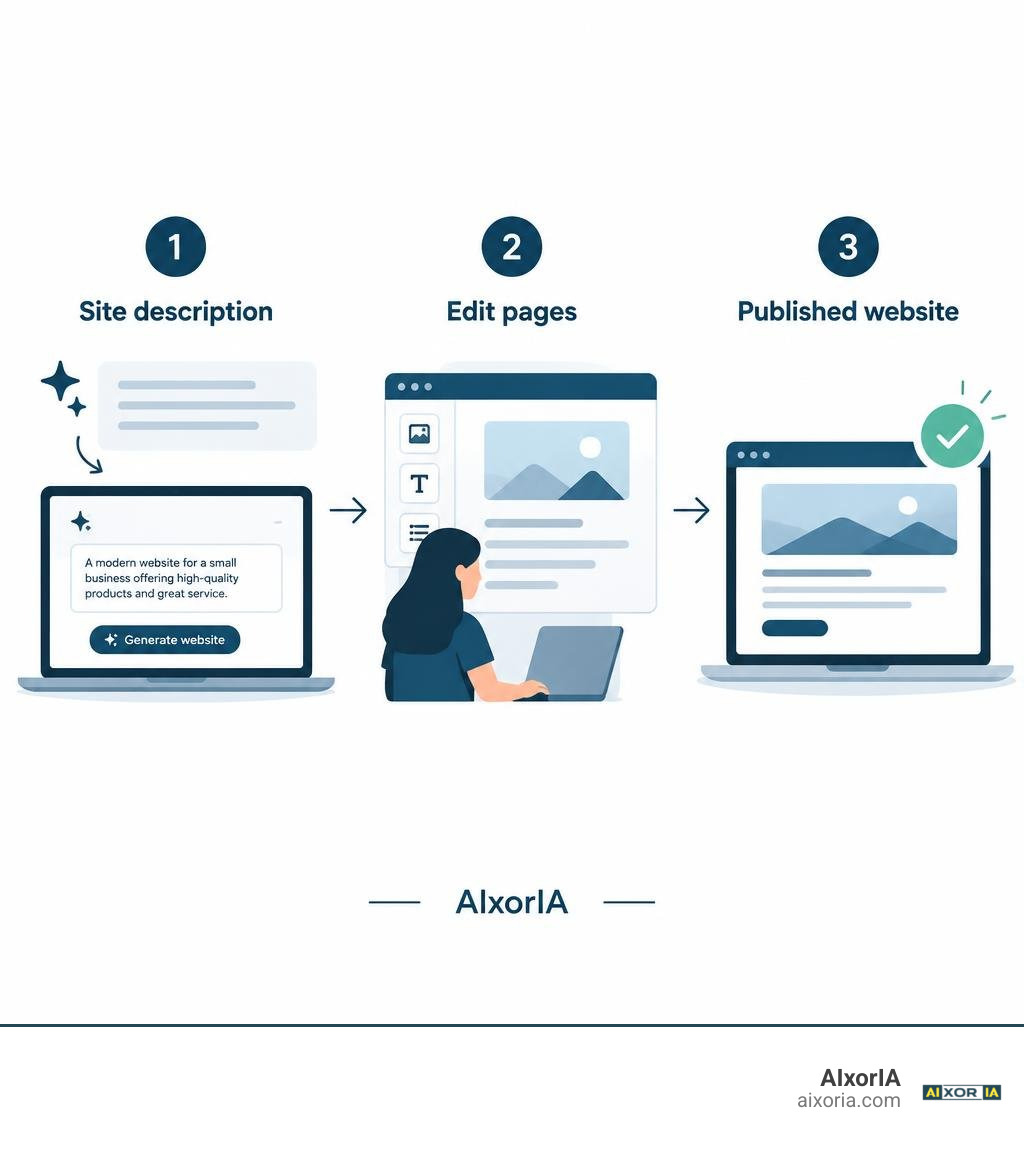
Building an online presence used to mean hiring a developer or spending weeks dragging boxes around a blank canvas. Today, with 91% of consumers searching online before purchasing and 84% viewing businesses with a website as far more credible, being visible online is essential. At the same time, roughly 85% of all existing websites across the web are completely inactive, often abandoned due to high maintenance friction or clunky setups.
Modern AI tools aim to eliminate this friction. Yet, many creators hesitate because of outdated assumptions regarding what free tools can achieve. Let’s dismantle the biggest myths surrounding these platforms.
Myth 1 & 2: How a Free AI Website Builder and Publisher Actually Operates vs. Traditional CMS

Traditional content management systems (CMS) and legacy drag-and-drop builders require you to manually assemble page layouts, format headers, source placeholder images, and draft copy from scratch. When people hear about artificial intelligence taking over this workflow, they often assume it is either a superficial gimmick or an uncontrollable “black box.”
In reality, an intelligent builder acts as an orchestrator. When paired with modern tools like the top free AI writing generators, the system analyzes your natural language prompt, maps the intent to modern UI components, writes relevant body text, selects fitting visual assets, and outputs a complete, responsive site structure within minutes.
Myth 1: AI Builders Just Fill In Generic Static Templates
A common misconception is that AI builders simply take a single pre-made template and swap out three lines of text. While early website generators worked this way, modern platforms compile customized page architectures based on your business sector, target audience, and specific instructions.
Advanced solutions like The AI Web Platform — AI Website & App Builder demonstrate how far this technology has come. Instead of rigid structures, large language models (LLMs) assemble semantic HTML, responsive grids, hero sections, testimonials, and interactive contact modules tailored specifically to your prompt. Because around 62% of global web traffic comes from mobile devices, modern engines automatically structure mobile-first viewport rules so your site looks sharp across smartphones, tablets, and desktop screens.
Myth 2: You Cannot Edit Layouts After Generation
Another widespread myth is that once the AI generates a page, you are stuck with what it produces. Creators fear that if an AI hallucinates a strange color scheme or places a call-to-action button in an awkward spot, they have no way to correct it.
Modern builders combine generative prompts with visual block editors. Every generated section—whether a navigation bar, pricing grid, or feature list—remains fully editable. You can click any element to reword text, swap images, adjust margins, or drop into raw code if you prefer granular control. If an entire section feels off, you can ask the AI to rewrite or redesign just that single block without disturbing the rest of your site.
Myth 3 & 4: Free Publishing Limits, Custom Domains, and Backend Capabilities
There is a persistent belief that free tiers are merely interactive demos that cannot publish functional sites to the live web. Creators worry that without paying upfront, their websites will lack basic infrastructure like secure hosting or operational contact forms.
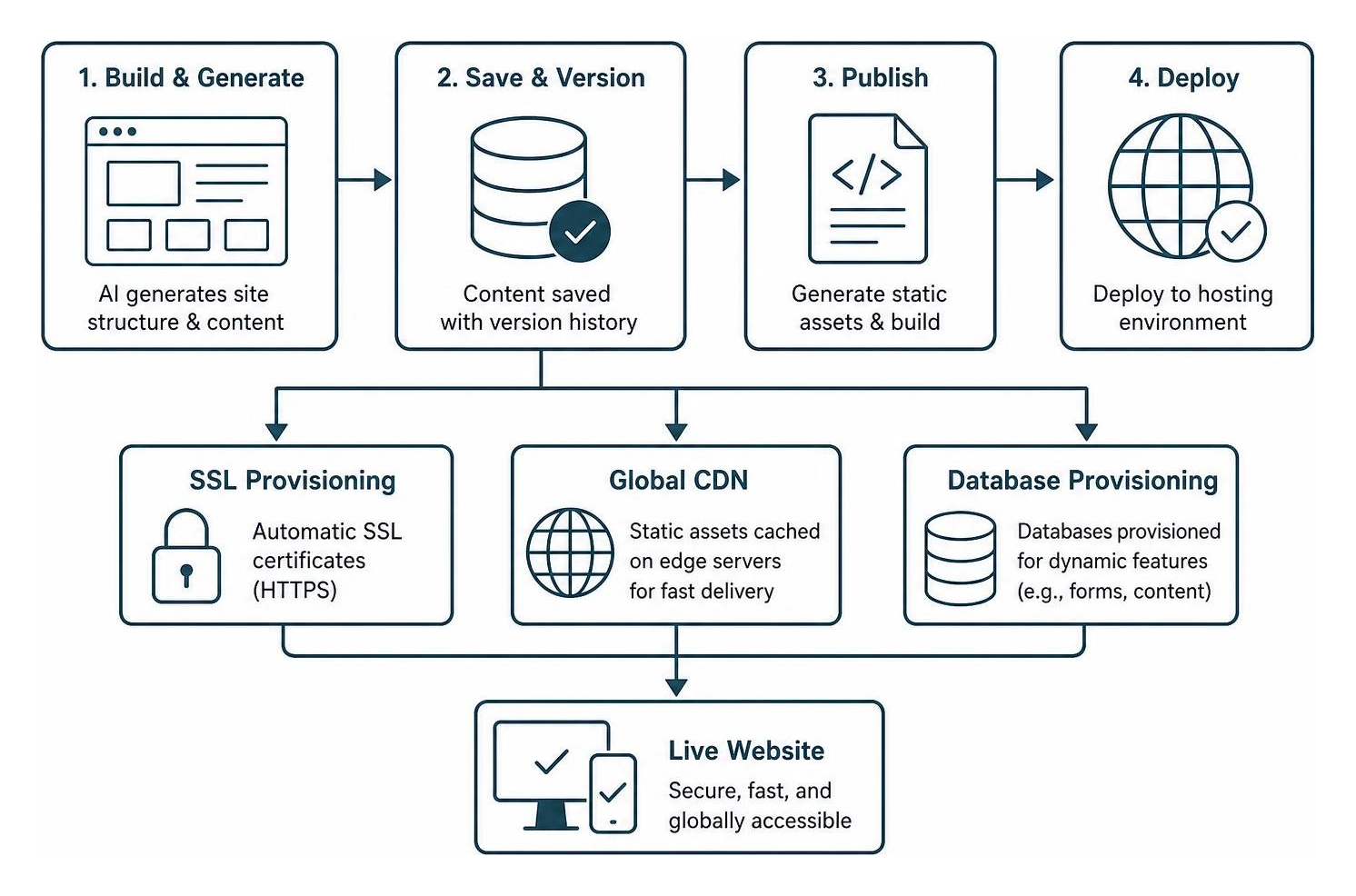
Platforms such as the Free AI Website Builder | MonolithCMS show that free tiers routinely provide production-ready hosting environments, automatic SSL provisioning, global content delivery network (CDN) caching, and integrated databases without requiring a credit card.
Myth 3: A Free AI Website Builder and Publisher Locks You Into Inflexible Subdomains
Many users assume that using a free plan permanently traps them on an ugly, platform-branded subdomain. While free tiers assign a staging subdomain upon initial generation (e.g., yourbrand.builder.com), modern platforms provide straightforward paths for domain binding.
Through standard DNS records (such as configuring CNAME and A records), you can connect your own custom domain. The hosting infrastructure automatically generates and renews SSL certificates via Let’s Encrypt or integrated CDN edge networks, ensuring your visitors always enjoy encrypted HTTPS browsing.
Myth 4: You Cannot Run Dynamic Content, Blogs, or Payment Forms
Skeptics often claim that free AI platforms only produce static “brochure” pages that cannot capture leads or process transactions. However, if you are setting up a landing page or launching a store, modern builders integrate functional backends directly into their components.
Using the best free landing page builder tool, you can deploy functional inquiry forms, dynamic blogging engines, and one-click payment buttons connected to Stripe. Rather than writing server-side scripts or setting up external mail relays, form submissions are routed directly to your dashboard inbox or notification email.
Myth 5 & 6: Search Engine Visibility, Code Export, and Platform Portability

A frequent worry among business owners is that search engines will penalize AI-generated websites or that choosing an AI platform means losing ownership of their digital assets.
Myth 5: Search Engines Penalize AI-Built Websites
Search engines evaluate web pages based on content quality, mobile responsiveness, fast page load speeds, and structured metadata—not whether human hands or machine algorithms arranged the initial layout.
Platforms such as SHEYU AISITE: no-code website builder optimize for search visibility right out of the box by using server-side rendering (SSR), generating automated XML sitemaps, and embedding JSON-LD structured data. By combining these structural strengths with targeted AI tools for SEO data analysis, you can rank AI-built pages just as effectively as traditional sites.
Myth 6: You Are Permanently Locked In and Cannot Export Your Data
Vendor lock-in is a legitimate concern in web development, but modern AI publishers increasingly prioritize data portability. Many leading free tools allow you to export your entire website as a static bundle containing HTML, CSS, JavaScript, and image assets, or download your content database as a lightweight SQLite file. This flexibility means you can deploy your project to standard web hosting, run it on a private server, or migrate to another platform whenever you choose.
Myth 7: Security and Infrastructure Gaps on Free Plans
It is common to assume that because a service is free, its security standards must be lax. In the software-as-a-service ecosystem, free tiers share the exact same underlying cloud infrastructure, firewalls, and encryption protocols as enterprise tiers.
Exploring verified free AI tools online reveals standard security controls including CSRF token protection, password hashing via bcrypt, cross-site scripting (XSS) sanitation, rate limiting against brute-force attacks, and automated daily backups.
Evaluating Modern Free AI Website Builder and Publisher Architecture
When you publish through a reputable AI platform, your website runs inside an isolated container or static edge environment. Serverless API routes process form submissions without exposing your database credentials, and content is delivered via global edge caches, protecting your pages against sudden traffic spikes and malicious DDoS attempts.
Free AI Platforms vs. Traditional Builders: Feature Breakdown
To help you decide between an AI-first builder and a traditional no-code platform, we have compiled a direct comparison of key workflows:
| Feature / Workflow | Free AI Website Builder & Publisher | Traditional Drag-and-Drop Builder | Manual CMS (WordPress, etc.) |
|---|---|---|---|
| Initial Setup Time | 2 to 5 minutes from prompt | 2 to 6 hours picking/tweaking templates | Days to weeks setting up themes & plugins |
| Copy & Asset Generation | Automated via integrated LLMs | Manual writing & image sourcing | Manual writing & third-party plugins |
| Mobile Responsiveness | Built-in automatically across all viewports | Requires manual tablet/mobile adjustments | Dependent on theme quality |
| Hosting & SSL Setup | Instant one-click deployment with auto SSL | Instant, but often throttled on free plans | Manual server setup, certificate renewal |
| Technical Skill Required | Plain English prompts + visual editing | Visual layout intuition | HTML/CSS, hosting management, PHP |
| Maintenance Overhead | Zero (platform handles updates & patches) | Low | High (constant plugin/core updates) |
| Export Portability | Static packages / SQLite export available | Often locked into proprietary ecosystem | Full control over database and files |
For more recommendations on modern digital workflows, explore our curated free AI tools category.
Frequently Asked Questions About Free AI Website Publishing
Can I connect a custom domain to a free AI website builder?
Yes. While free plans give you an instant staging subdomain to preview and launch your project, most platforms let you point your registered custom domain to their servers by updating standard DNS records (such as CNAME and A records).
How do AI website generators create a complete site from a single prompt?
The engine uses an LLM trained to convert plain English descriptions into structured data models. It determines the optimal layout sections (such as headers, value propositions, feature grids, and contact forms), generates contextual copy, assigns cohesive color schemes, and renders the result as clean, responsive code.
Which large language models power no-code AI website publishing?
Modern platforms leverage a blend of leading models, including Anthropic’s Claude series, OpenAI’s GPT models, and Google’s Gemini models. Some platforms even let you choose which AI model generates your content and site architecture.
Conclusion
The web development landscape has shifted dramatically. Building a fast, secure, and professional website no longer requires weeks of manual design or thousands of dollars in agency fees. By leveraging an AI builder and publisher, entrepreneurs, creators, and small teams can launch an online presence in minutes while keeping full control over their design and data.
Ready to explore vetted tools, in-depth tutorials, and productivity guides to accelerate your business? Visit AIxorIA’s curated AI tool directory to discover practical AI solutions designed to streamline your digital workflow.