Consumer vs. Business-Grade Antivirus: Key Operational Differences
Scr0ll d0wn to D0VVNL0AD
The best antivirus software for corporate use depends on company size and infrastructure needs. For small and midsized businesses, Bitdefender GravityZone and Norton Small Business offer the best balance of automated ransomware remediation, cloud sandboxing, and minimal management overhead. For growing and large enterprises, ESET PROTECT and Microsoft Defender for Endpoint (or Defender for Business) lead the industry with centralized policy enforcement, deep telemetry, and Extended Detection and Response (XDR) capabilities.
When deciding how to protect workplace hardware, many founders wonder whether standard consumer software is enough. After all, if an off-the-shelf program blocks malicious files on a personal laptop, why wouldn’t it work across twenty office workstations?
The distinction comes down to control, visibility, and legal compliance. Consumer antivirus protects individual devices in isolation. It relies on individual employees to click “update,” run routine scans, and notify IT if an alert pops up. In a commercial setting, this creates massive blind spots.
Business-grade endpoint security, by contrast, operates as a coordinated defense network. It connects all endpoints—laptops, desktops, physical servers, and virtual machines—into a single operational framework.
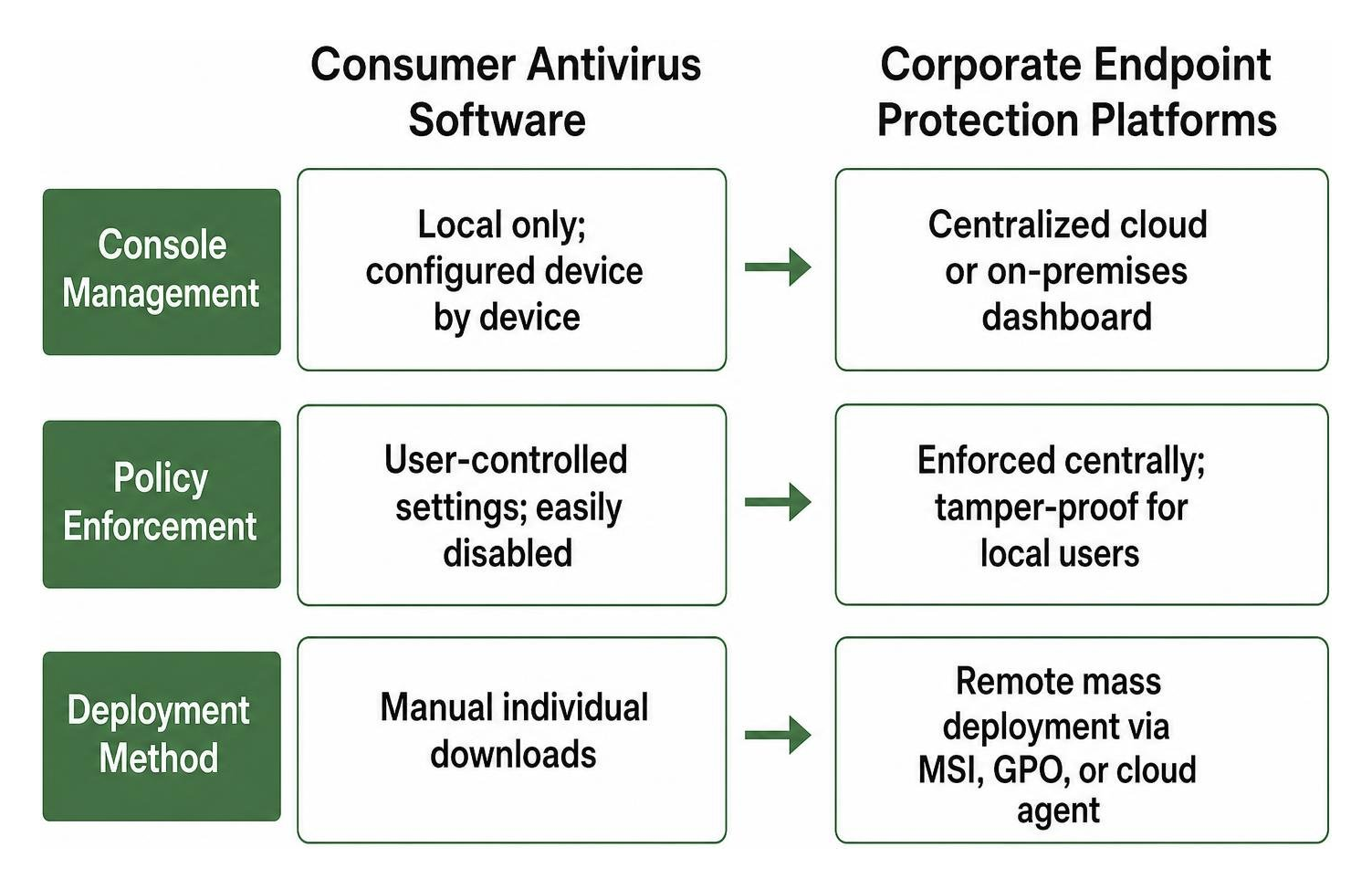
| Operational Capability | Consumer Antivirus Software | Corporate Endpoint Protection Platforms |
|---|---|---|
| Console Management | Local only; configured device by device | Centralized cloud or on-premises dashboard |
| Policy Enforcement | User-controlled settings; easily disabled | Enforced centrally; tamper-proof for local users |
| Deployment Method | Manual individual downloads | Remote mass deployment via MSI, GPO, or cloud agent |
| Software Patching | Basic application reminders (rare) | Automated third-party and OS vulnerability patching |
| Server Protection | Not supported (blocks Windows/Linux server OS) | Specialized shields for Exchange, SQL, and Linux servers |
| Remediation & Rollback | Manual quarantine or basic file deletion | Automated cloud sandboxing, root-cause analysis, and rollback |
| Licensing Terms | Personal/home use only (EULA restriction) | Commercial multi-seat licensing with volume tiers |
Beyond day-to-day management, running consumer software in an enterprise violates End User License Agreements (EULAs). It also leaves organizations non-compliant with standard data privacy regulations such as HIPAA, SOC 2, or PCI-DSS, which mandate centralized logging, active access controls, and administrative auditing.
Centralized Cloud Consoles and Administrative Visibility
Centralized management hubs serve as the backbone of modern corporate endpoint defense. Rather than walking over to an employee’s desk or trying to coordinate with a remote worker over a call, an administrator can manage policy distribution, device control, and system telemetry through a single pane of glass.
Through a unified console, IT managers can:
- Restrict unauthorized USB storage drives and external peripherals to prevent internal data exfiltration.
- Block access to malicious or non-work-related domains using integrated web content filtering.
- Lock down exposed Remote Desktop Protocol (RDP) ports against brute-force intrusion attempts.
- Remotely isolate a compromised workstation from the local network with one click while preserving administrative access for investigation.
Centralized consoles also collect telemetry from across the entire organization. If a suspicious script runs on a laptop in sales, the console flags the anomaly, traces its origin across other connected endpoints, and prevents horizontal movement across the network.
Automated Vulnerability Scanning and Patch Management
Flaws in operating systems and third-party software are among the most common access points for corporate intrusions. An average of 50 new major software vulnerabilities are discovered every single day.
Studies show that 57% of corporate data breaches stem directly from poor patch management, and nearly 60% of breached organizations cited a known, unpatched vulnerability as the root cause. When security patches are published, attackers immediately analyze them to build exploits targeting systems that haven’t updated yet.
Modern business security suites incorporate automated patch management that prioritizes fixes using the Common Vulnerability Scoring System (CVSS). IT administrators can automatically push critical patches within the industry-standard two-week deployment window, even for off-network or traveling employees.
Automating these administrative and maintenance routines protects core financial records and day-to-day operations. Teams using systems like the best offline accounting software for small business 2026 benefit greatly from these protections, ensuring local operational ledgers and database environments stay secure from unpatched vulnerabilities.
What is the Best Antivirus Software for Corporate Use? Essential Selection Criteria
Choosing the right endpoint security involves matching technical capabilities with your team’s size, infrastructure, and administrative resources.
To select the right solution, evaluate platforms against these core benchmarks:
- Independent Detection & False Positive Rates: Look for verified scores from independent testing bodies. In the Business Security Test August-September 2025 – Factsheet – AV-Comparatives, solutions from Cisco, Elastic, ESET, G Data, and Microsoft scored a 100% Malware Protection rate, while Avast, Kaspersky, and VIPRE achieved 100% Real-World Protection with zero false alarms on common business software.
- System Footprint & Scan Impact: Endpoint agents must run quietly in the background. High CPU usage causes performance issues on local machines, which tempts staff to disable their security tools.
- Multi-Platform Support: Modern offices rarely run on a single operating system. Solutions must provide protection across Windows, macOS, Linux distributions, iOS, and Android mobile devices.
- Administrative Usability: A tool with advanced settings is only effective if your team can manage it properly. Platforms that are too complex lead to misconfigurations and security blind spots.
What is the Best Antivirus Software for Corporate Use Across Small and Midsized Teams?
Small and midsized businesses are frequent targets for cyberattacks. According to industry data, cyberattacks on small businesses rose by 28% compared to 2022, and 94% of SMB leaders consider cybersecurity critical to their operations. Because smaller organizations often lack a dedicated security operations center (SOC), their antivirus software needs to deliver robust protection with minimal maintenance.
For teams with 5 to 100 employees, the top solutions balance ease of use, automated threat remediation, and value:
- Norton Small Business: Designed for smaller offices (up to 10–20 devices), Norton Small Business earned a SecurityScore of 9.5/10. It combines real-time malware protection with secure cloud backups, an integrated VPN, and password management without requiring a complex management server.
- Bitdefender GravityZone: GravityZone can secure up to 100 devices on standard business tiers, making it a great fit for growing companies. It features cloud sandboxing, automated ransomware remediation that restores encrypted files from clean cached copies, and built-in attack forensics.
- Surfshark Antivirus: An affordable entry point for micro-businesses with basic needs, offering a two-year plan at $2.69 per month for up to 5 devices, though it lacks advanced enterprise policy management.
Securing administrative workstations is especially critical when handling sensitive employee and financial records. Teams managing payroll through the which payroll software is best for small businesses in 2026? need strong endpoint defenses to keep employee records, banking details, and payroll data protected from keyloggers and malware.
What is the Best Antivirus Software for Corporate Use in Large Enterprises?
Large enterprises face distinct security challenges: hybrid cloud environments, distributed workforces, thousands of endpoints, and complex compliance mandates. At this scale, protection requires advanced Extended Detection and Response (XDR) and unified policy enforcement.
Leading enterprise platforms include:
- Avast Business: Scalable up to 999 devices on standard packages (with custom tiers beyond), Avast features a centralized Cloud Business Hub alongside integrated patch management, USB blocking, and Remote Access Shields.
- ESET PROTECT Platform: Ranging from ESET PROTECT Complete | Business Security Suite | ESET to the enterprise-grade ESET PROTECT Elite | ESET, this suite offers low system footprint, automated vulnerability management, cloud app security for Microsoft 365 and Google Workspace, and advanced prevention through ESET PROTECT MDR Ultimate | ESET.
- Sophos & Bitdefender Enterprise: Both vendors offer advanced cross-platform coverage across AWS, Azure, and Google Cloud environments, containerized workloads, and physical servers, supported by continuous telemetry and security integrations.
Large manufacturing networks and industrial supply chains face unique risks when connecting legacy industrial hardware to cloud management platforms. Organizations implementing advanced operational tools—such as the top 9 AI tools for manufacturing industry—rely on these enterprise-grade endpoint security suites to protect data pipelines and connected workstations across production facilities.
Modern Threat Defense: The Critical Role of EDR, XDR, and Native Security
Traditional antivirus relied on signature-based detection, checking incoming files against a database of known malware samples. While signature scanning is still useful for catching common threats, it cannot stop modern cyberattacks.
Today’s attacks use polymorphic code that shifts its structure, fileless malware that runs entirely in system memory, and AI-driven spear-phishing that exploits human error. Modern corporate defense relies on Endpoint Detection and Response (EDR) and Extended Detection and Response (XDR) to identify and stop these techniques.
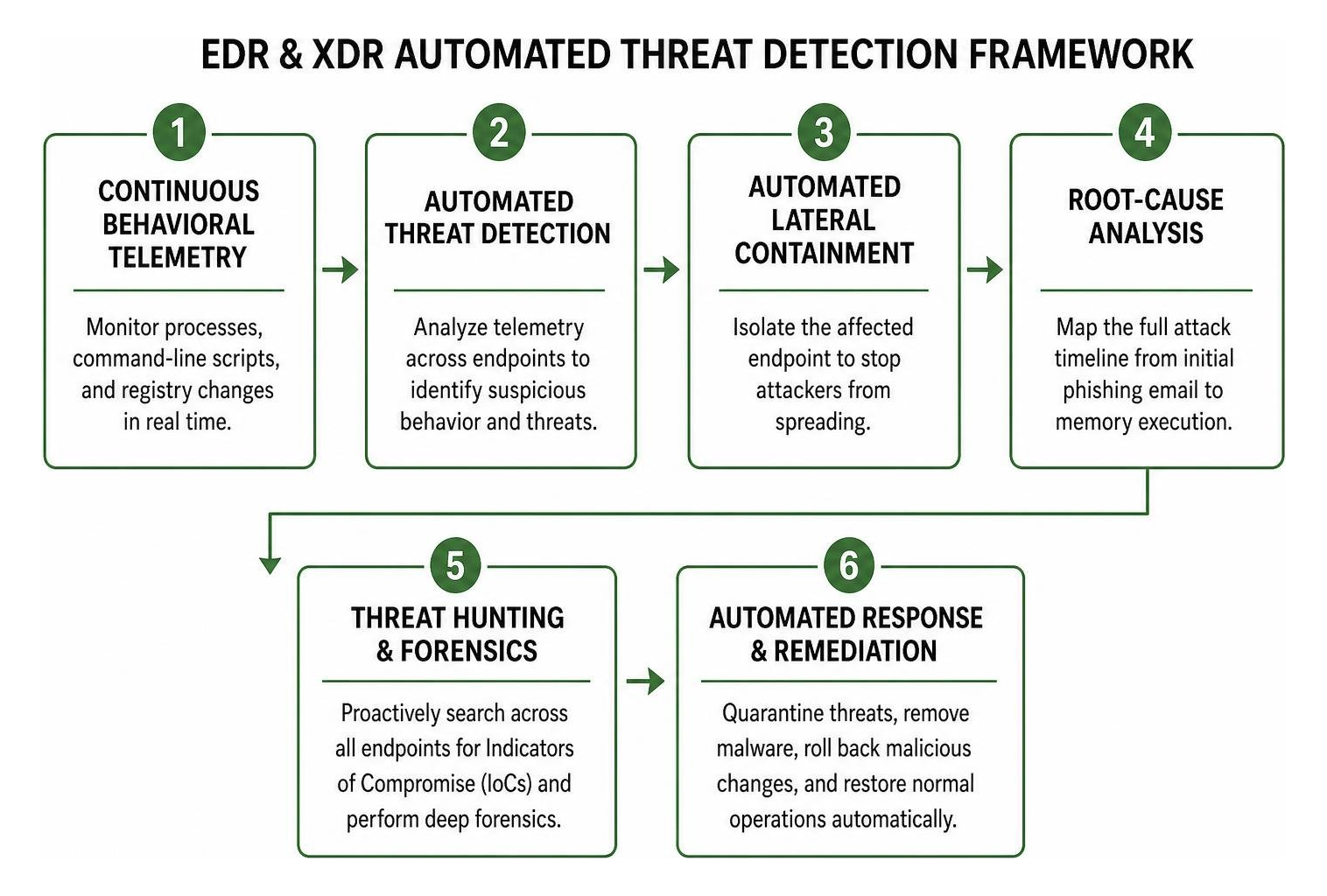
Core components of an EDR/XDR defense strategy include:
- Continuous Behavioral Telemetry: Monitoring active processes, command-line scripts, and system registry modifications in real time.
- Automated Lateral Containment: Isolating a suspicious machine from the local network to keep an attack from spreading.
- Root-Cause Analysis: Mapping the entire attack timeline from initial phishing email to memory execution.
- Threat Hunting & Forensics: Proactively searching across all company endpoints for Indicators of Compromise (IoCs).
Behavioral Heuristics and Cloud-Based Sandboxing
Behavioral heuristics monitor how programs act rather than how their code looks. If an unknown script suddenly tries to modify master boot records, inject code into system processes, or rapidly encrypt local files, the behavioral engine terminates the process immediately.
Cloud sandboxing adds an extra layer of protection by routing suspicious, never-before-seen files to an isolated cloud environment. The file executes safely within the sandbox, where machine-learning models analyze its behavior. If it proves malicious, the platform blocks the threat and updates definitions across all connected devices worldwide.
Integrated Extended Detection and Response (XDR)
Extended Detection and Response (XDR) builds on traditional EDR by breaking down security silos. Instead of analyzing endpoint telemetry on its own, XDR correlates data across multiple systems:
- Email Security Gateways: Inspecting Microsoft 365 and Google Workspace inboxes to stop phishing links and malicious attachments.
- Cloud Workload Shields: Monitoring virtual machines, serverless functions, and storage buckets across AWS, Azure, and Google Cloud.
- Identity & Access Management: Tracking authentication anomalies to catch credential theft and unauthorized access.
For organizations without an in-house Security Operations Center, Managed Detection and Response (MDR) bridges the gap. MDR services pair automated XDR platforms with 24/7 monitoring by dedicated cybersecurity analysts who investigate alerts, contain active breaches, and help remediate threats.
Frequently Asked Questions About Corporate Antivirus Solutions
Can free antivirus software be safely used in a corporate environment?
No, free consumer antivirus should not be used in a business environment. Most free versions explicitly prohibit commercial use in their End User License Agreements.
Beyond legal licensing issues, free tools lack the features businesses need:
- No centralized management console to monitor all company devices.
- No automated third-party software patching.
- No visibility into network-wide threat patterns.
- No protection for servers or cloud applications.
If a breach occurs on a device running unlicensed consumer software, insurance providers may deny cyber insurance claims due to non-compliance with required security controls.
Is Microsoft Defender alone sufficient for enterprise endpoint security?
The built-in version of Microsoft Defender included with standard Windows consumer editions provides good baseline protection for individual PCs, but it lacks the centralized management and policy tools needed for business use.
However, business-tier versions like Microsoft Defender for Business and Defender for Endpoint (included in Microsoft 365 Business Premium and Enterprise E5 plans) are fully capable, enterprise-grade platforms. When properly configured through Microsoft Intune and Entra ID, Microsoft Defender provides robust threat protection, behavioral heuristics, and XDR capabilities that rival dedicated third-party security platforms.
How frequently should corporate antivirus run scans and deploy patches?
Corporate systems need different scan and update schedules to balance security with day-to-day performance:
- Real-Time Scanning: Must remain active at all times on every device. Real-time shields monitor file downloads, web traffic, and running memory processes without requiring user intervention.
- Scheduled Full Scans: Run full system scans once a week during off-peak hours (such as weekends or overnight) using idle-state scanning to avoid slowing down workstations during the workday.
- Security Definition Updates: Endpoint agents should check for definition updates and cloud telemetry multiple times throughout the day.
- Vulnerability Patch Deployment: Critical patches (high CVSS severity ratings) should be tested and deployed within two weeks of release. High-risk zero-day patches should be pushed immediately through automated deployment.
Conclusion
Protecting modern corporate data requires moving beyond basic signature-based antivirus scanners. Today’s cyber threats target vulnerabilities across hybrid workforces, cloud mailboxes, unpatched software, and third-party tools.
Building a resilient cybersecurity posture means selecting an endpoint protection platform with centralized management, automated patch deployment, behavioral ransomware defenses, and EDR/XDR visibility. Whether your team relies on lightweight tools like Norton and Bitdefender or advanced platforms like ESET and Microsoft Defender, the goal is the same: complete visibility, strong policy enforcement, and proactive threat prevention.
Pairing strong cybersecurity defenses with intelligent automation helps organizations safeguard critical data and maintain operational continuity. Explore our comprehensive guide to the best AI tools for corporate productivity and security to learn how modern AI solutions can streamline daily workflows while keeping your business secure.
1 thought on “Best Antivirus Software for Corporate Use in 2026: Top Business Picks”