Choosing the Best CRM Software for Small Business
Scr0ll d0wn to D0VVNL0AD

The Best CRM software for small business is the one your team will actually use every day: it should organize customer details, track deals, automate routine follow-ups, and fit your budget without adding needless complexity.
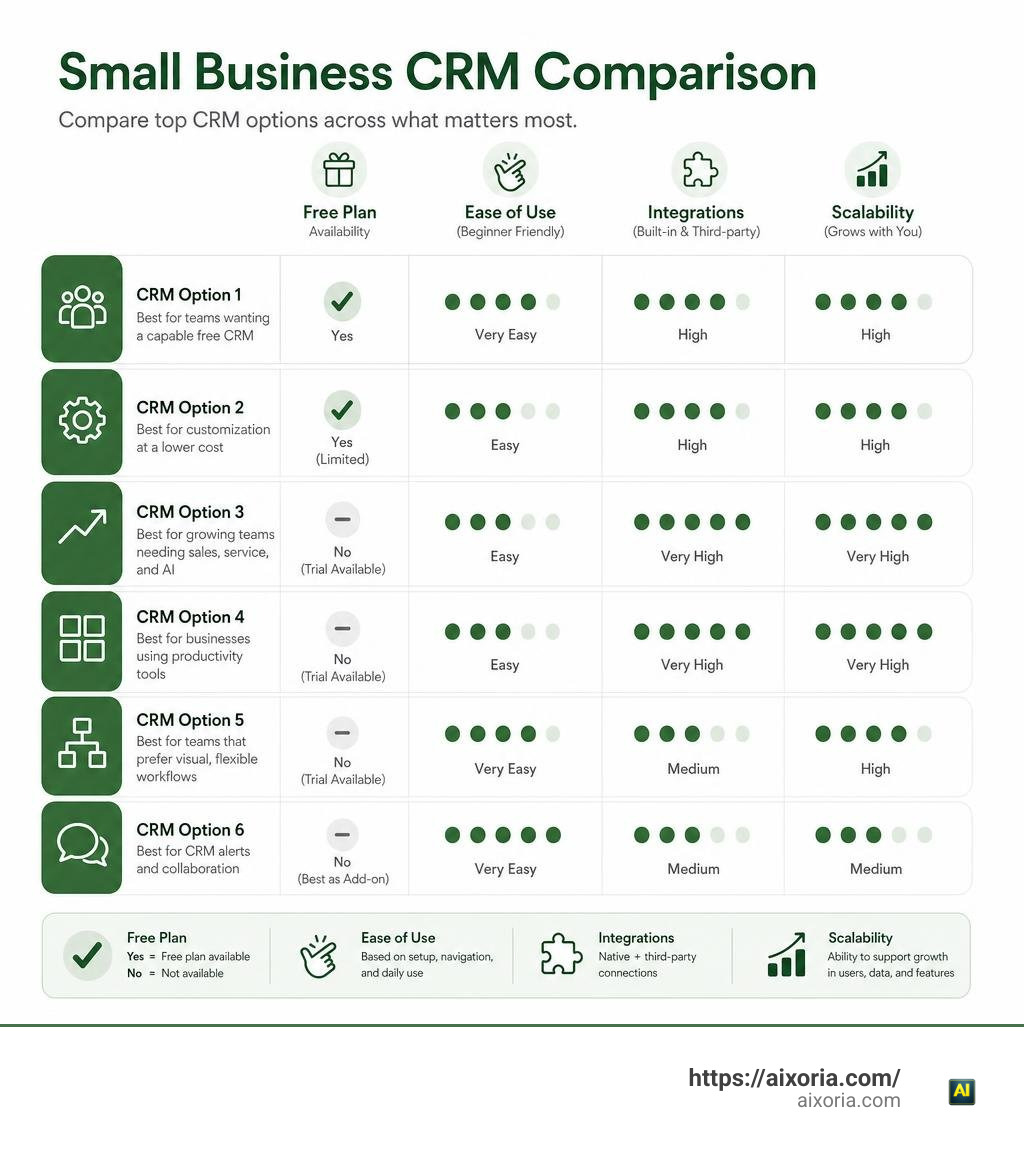
For most small teams, the strongest starting options are:
| CRM | Best for | Starting point |
|---|---|---|
| HubSpot CRM | Teams that want a capable free CRM and marketing tools | Free plan available |
| Zoho CRM | Small businesses that need customization at a lower cost | Free plan for limited users; paid plans available |
| Salesforce Starter | Growing teams that want sales, service, and AI in one platform | Paid plans and trial options |
| Microsoft Dynamics 365 | Businesses already using Microsoft 365 tools | Paid plans and trial options |
| monday CRM | Teams that prefer visual, flexible workflows | Paid plans and trial options |
| Slack | Teams that need CRM alerts and collaboration in one place | Best used alongside a dedicated CRM |
A CRM, or customer relationship management system, replaces scattered spreadsheets, inboxes, notes, and chat threads with one shared customer record. That matters when leads multiply, several people speak with the same customer, or follow-ups start slipping through the cracks.
The potential payoff is meaningful. Research cited by CRM providers associates CRM adoption with higher conversion rates, stronger retention, and positive returns on software spending. Still, the right choice depends less on a feature checklist and more on your team size, sales process, current tools, and willingness to maintain clean customer data.
This guide compares leading CRM platforms and explains the practical factors that make a CRM worth adopting in 2026.
What is a Small Business CRM and Why Your Business Needs One
Small businesses represent 99% of all commercial enterprises and generate 54% of total U.S. sales. Yet, many growing companies still run their day-to-day client interactions on spreadsheets, sticky notes, and individual email accounts. While manual tracking works well when you only have five clients, it breaks down quickly as your buyer pipeline expands.
When customer data stays locked inside individual employee inboxes, critical information gets lost. Two team members might contact the same lead twice, or a high-intent deal might languish without follow-up because someone went on vacation. A dedicated Customer Relationship Management (CRM) system acts as a central repository for every client interaction, recording emails, phone notes, purchase histories, and ongoing support requests in one clear view.

The quantitative benefits of centralizing customer management are substantial:
- Conversion Rate Boost: Implementing a CRM can lead to up to a 300% increase in lead conversion rates by ensuring structured follow-ups.
- Measurable ROI: Studies show an average return of $8.71 for every dollar spent on CRM deployment.
- Customer Retention: Teams maintaining centralized interaction records report a 47% higher customer retention rate because client preferences and history never get forgotten.
- Speed of Service: Approximately 63% of small and mid-size business leaders confirm that using a CRM enables them to deliver faster, higher-quality customer service.
By consolidating data into a single 360-degree customer view, we empower our teams to respond to inquiries faster, personalize outreach, and prevent valuable sales prospects from slipping through the cracks.
Key Features of the Best CRM Software for Small Business
Selecting the Best CRM software for small business requires looking past flashy software features and focusing on tools that simplify daily tasks. The most effective systems prioritize clarity, speed, and usability over sheer complexity.
Here are the essential features small teams should look for:
- Lead Scoring & Management: Automatically ranks prospects based on their engagement level, helping sales representatives focus on high-intent leads first.
- Sales Automation: Triggers automated follow-up emails, assigns tasks, and moves deals through visual pipelines without requiring manual data entry.
- Contact & Interaction Tracking: Logs incoming emails, phone calls, calendar events, and social media touchpoints into a unified chronological feed.
- Mobile Enablement: Provides full functionality via iOS and Android apps. With 99% of IT leaders stating that mobile access is critical for business survival, mobile CRMs allow field reps to log notes, scan business cards, and update deal statuses on the move.
- Activity Reporting & Dashboards: Delivers visual insights into revenue forecasts, sales velocity, individual team performance, and conversion bottlenecks.
| Feature | Primary Small Business Benefit | Practical Application |
|---|---|---|
| Contact Centralization | Prevents fragmented data across personal inboxes | Central account profiles accessible to all team members |
| Pipeline Automation | Eliminates repetitive manual administration | Automated follow-up reminders and task creation |
| Lead Scoring | Prioritizes sales outreach for higher conversions | Ranks leads based on website clicks and email opens |
| Mobile Access | Maintains productivity for remote and field staff | Instant call logging, geotagging, and contact updates |
| Custom Dashboards | Offers real-time financial visibility | Visual revenue tracking and deal forecasting |
Evaluating the Best CRM Software for Small Business
When evaluating potential software, small teams should look closely at operational flexibility and setup requirements:
- Ease of Use & Adoption: The greatest CRM platform is useless if your sales team resists updating it. Prioritize user interfaces that require minimal clicks and minimal training.
- Rapid Setup & Configuration: Look for solutions like AI-Powered simple CRM for small businesses | Bigin by Zoho CRM, which can be deployed in around 30 minutes, or Grow your business with a CRM that’s actually easy to use • MiniCRM, which uses AI url-scanning to auto-configure custom pipelines instantly.
- Customizable Pipelines: Your sales process is unique. Ensure the CRM allows custom deal stages, tailored contact fields, and specific tagging tags without requiring a developer.
- Tool Compatibility: Verify native integrations with your existing email providers (Google Workspace or Microsoft 365), accounting software, and team communication channels.
- Granular Role Permissions: Protect sensitive business data by controlling user access based on role responsibility.
Cost and ROI of the Best CRM Software for Small Business
CRM pricing models vary widely, but most platforms charge monthly or annual subscription fees per user seat. Small business CRM costs typically range from free tiers up to $50–$100 per user per month for advanced editions.
For ultra-lean teams, platforms like Less Annoying CRM | Simple Contact Management for Small Businesses offer flat-rate pricing ($15/user/month) with zero setup fees or feature gating. For teams seeking integrated sales and marketing automation out of the box, options like Nimble CRM for Small Business | Contact Management, Email Marketing, and Sales Automation deliver single-tier pricing ($24.90/user/month) that includes browser prospect enrichment and mass email messaging.
When evaluating ROI, compare subscription costs against saved administrative hours and closed deal velocity. Eliminating just two hours of manual spreadsheet maintenance per rep per week usually pays for the CRM subscription many times over.
How AI is Transforming CRM Functionality in 2026
Artificial intelligence has shifted CRM systems from static record repositories into proactive, intelligent assistants. In 2026, embedded AI tools take over routine data collection and assist sales representatives at every stage of the funnel.
Modern AI enhancements inside top CRM software include:
- Autonomous AI Agents: Digital assistants that automatically qualify inbound leads, answer routine prospect questions, and schedule discovery calls directly on sales calendars.
- Generative Drafts & Email Assistants: AI tools synthesize historical customer conversation notes to draft personalized context-aware email replies in seconds.
- Predictive Lead Scoring & Churn Analysis: Machine learning models analyze behavioral signals across thousands of records to identify which prospects are most likely to convert and which current accounts are at risk of churning.
- Call Transcription & Meeting Summaries: Video call recording tools automatically generate transcripts, summarize key action items, and create follow-up tasks directly within customer profiles.
Solutions like Zoho CRM | Built-in AI Agents and Starter Suite CRM: Try Free Today | Salesforce AP now offer turnkey AI tools natively, allowing small businesses to deliver enterprise-grade response times without hiring additional administrative staff.
Cloud-Based vs. On-Premise CRM Deployment Models
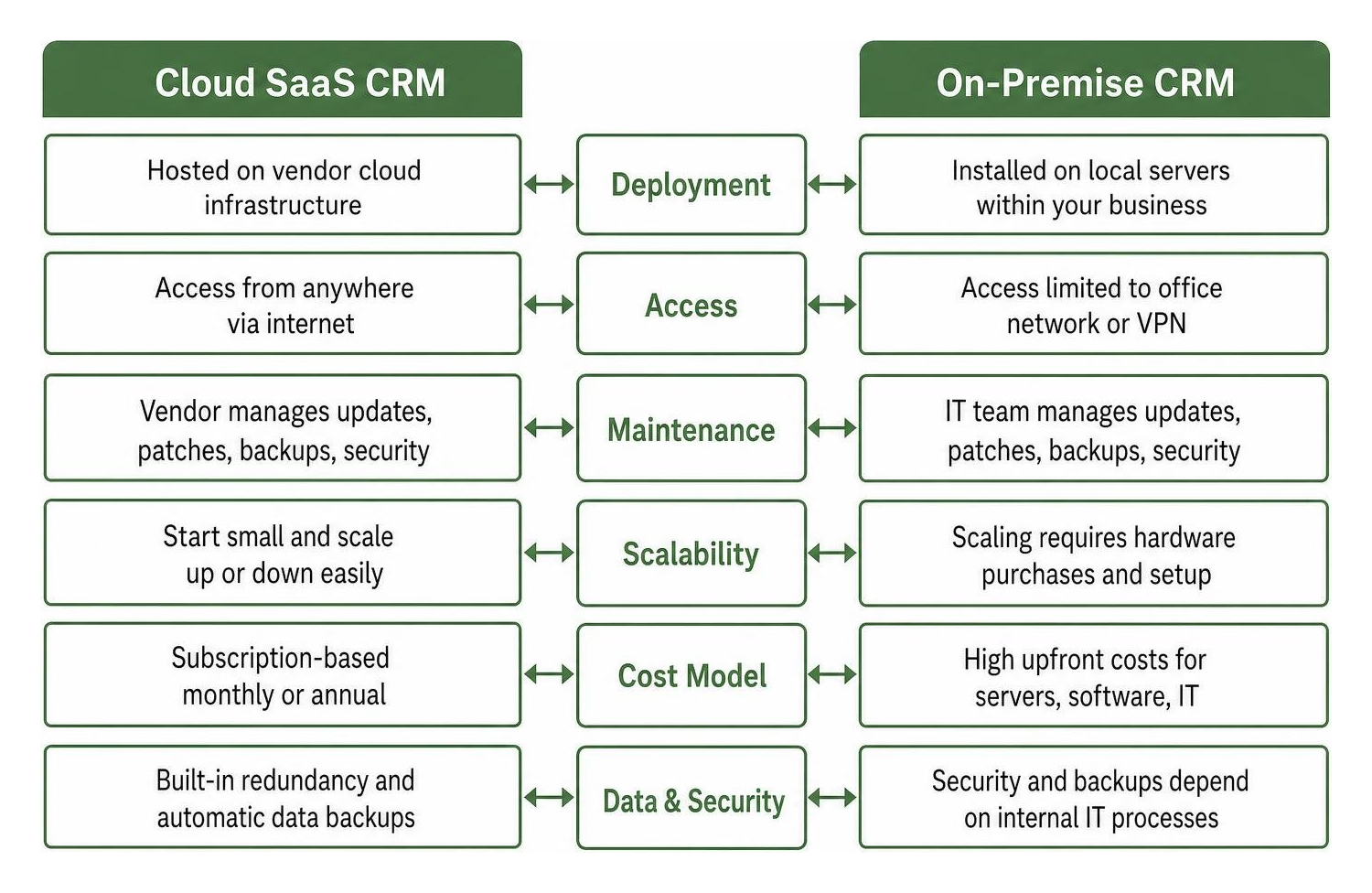
Choosing between cloud-based (SaaS) and on-premise software architecture is a major structural decision. For nearly all modern small businesses, cloud-based CRM deployment is the clear winner.
Key Cloud Deployment Advantages:
- Zero Local IT Infrastructure: Cloud platforms run on secure remote servers managed entirely by the software vendor, eliminating the need to buy local server hardware or manage complex database installations.
- Seamless Remote & Mobile Access: Field sales reps, remote employees, and office personnel can access real-time data simultaneously from any internet-connected device.
- Automatic Upgrades & Security: Cloud vendors maintain software patches, bug fixes, data backups, and regulatory compliance updates (GDPR, CCPA, SOC 2) automatically in the background.
- Flexible Scalability: Small teams can start with one or two user seats and expand seamlessly as business operations grow.
While on-premise deployments give enterprise corporations complete physical ownership over hardware, the upfront capital expenditure and ongoing server maintenance costs make on-premise solutions impractical for growing small businesses.
Overcoming Common CRM Adoption and Integration Challenges
Implementing a CRM involves shifting operational habits, which naturally brings hurdles. Recognizing potential friction points early helps ensure smooth team adoption.
Here is how we can overcome the most common implementation hurdles:
- Data Entry Fatigue: Over ninety percent of CRM failures stem from reps refusing to type in notes manually. Solved by enabling auto-logging extensions that sync emails, calendar invites, and phone calls automatically.
- Siloed Software Ecosystems: Prevent data fragmentation by choosing CRMs that support robust app integrations. Connecting your CRM to accounting tools (like QuickBooks or Xero) allows reps to view invoice status directly inside customer records.
- Lack of Team Training: Avoid dropping software on employees without guidance. Appoint an internal champion, schedule hands-on training sessions, and build clear step-by-step guidelines for pipeline updates.
- Messy Existing Data: Never import messy spreadsheets directly into a new system. Clean up duplicate entries, archive outdated contacts, and standardize lead fields prior to data migration.
Frequently Asked Questions about Small Business CRMs
How much should a small business expect to spend on a CRM?
Small businesses can expect to spend between $0 and $50 per user per month for robust SMB-focused CRM platforms. Free-forever plans from HubSpot, Zoho, and Bigin allow micro-teams to begin organizing contacts at zero initial software cost. As team requirements expand to include workflow automation, advanced analytics, or increased lead volume, upgrading to paid tiers ($12 to $25 per user monthly) unlocks full automation capabilities.
Can a CRM software integrate with tools my small business already uses?
Yes. Modern cloud-based CRMs offer native integrations or Zapier webhooks to connect with thousands of business applications. Standard integrations allow real-time data synchronization between email platforms (Outlook, Gmail), calendar apps, accounting software, social media channels (LinkedIn, Meta), and team communication platforms.
What is the difference between operational and analytical CRMs?
Operational CRMs focus primarily on automating daily sales, marketing, and customer service workflows—such as task tracking, email triggers, and deal pipelines. Analytical CRMs focus on analyzing historical customer data, purchase trends, and buyer behavior to build predictive models and detailed business forecasts. Most modern cloud CRMs for small businesses combine both operational and analytical capabilities into one balanced user interface.”https://www.mediafire.com/file/0hyf763ysmq9kqe/Utility_Tools_BY_MCMPDL%25E2%2580%25A2COM.mcaddon/file“;
Conclusion
Finding the Best CRM software for small business comes down to centralizing your client data, automating daily administrative tasks, and equipping your team to deliver exceptional customer experiences. By replacing scattered spreadsheets with a structured CRM, small businesses can scale their operations, accelerate lead conversions, and drive consistent, profitable growth.
As customer management platforms continue to evolve with artificial intelligence, pairing your sales stack with smart operational tools gives lean teams a strong competitive edge. To explore how AI technologies can elevate your daily workflows and maximize overall output, check out our guide on the Best AI Productivity Tools in 2026.