Why Law Firms Can’t Afford to Ignore Document Management Software

The best document management software for law firms in 2026 includes platforms like iManage, NetDocuments, Clio, CosmoLex, and SmartVault — each offering different strengths depending on your firm’s size, budget, and workflow needs.
Quick comparison of top options:
| Software | Best For | Key Strength |
|---|---|---|
| iManage | Large/global firms | Enterprise security, email management |
| NetDocuments | Mid-to-large firms | Cloud-native, FedRAMP certified |
| Clio | Small-to-mid firms | All-in-one practice management |
| CosmoLex | Small firms | Billing + documents in one platform |
| SmartVault | Solo/small firms | Branded client portal, simple setup |
Lawyers are drowning in paperwork. Client files, contracts, court documents, correspondence — without a proper system, staying organized feels impossible.
And the stakes are high. Law firms have legal and ethical obligations to keep client information secure, maintain accurate records, and meet strict compliance standards. A lost document or a version control mistake isn’t just an inconvenience — it can cost a case.
That’s exactly why document management software has become essential infrastructure for modern legal practices, not just a nice-to-have upgrade.
The numbers back this up. Over 60% of law firms using dedicated document management platforms report a 25% improvement in productivity from automation and better version control alone. Some firms have cut document management costs by as much as 30%.
This guide compares the leading solutions head-to-head so you can find the right fit for your firm.
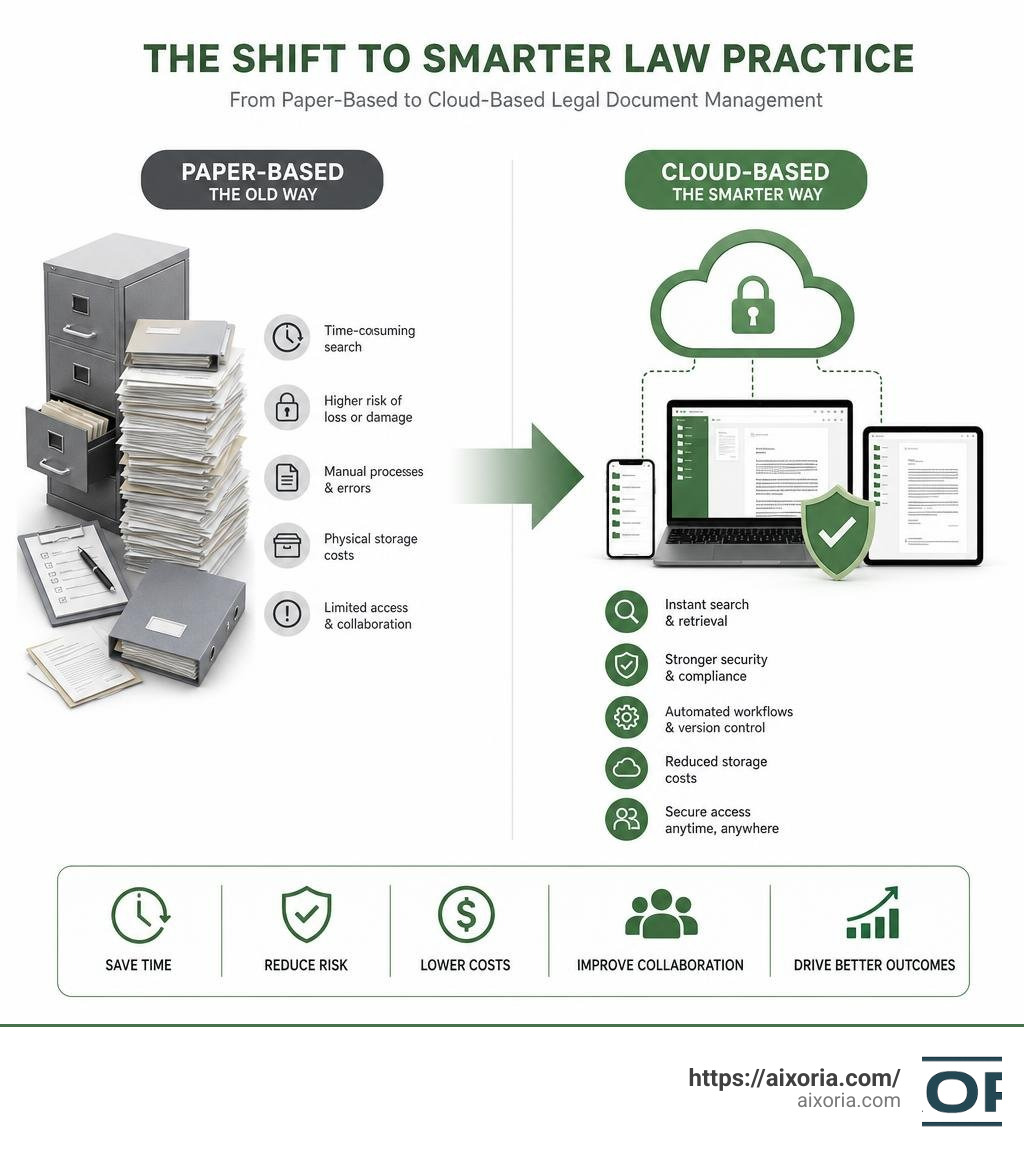
What is Document Management Software for Law Firms?
At its core, document management software for law firms (often abbreviated as legal DMS) is a highly specialized digital filing system. Unlike generic cloud storage options like Google Drive or Dropbox, a legal DMS is built specifically to handle the complex, highly sensitive workflows of legal practices.
A standard file share uses simple folder trees where anyone can drag, drop, or accidentally delete crucial files. In contrast, a legal DMS acts as a centralized repository that enforces structure and security. Every document is organized by “matter” or case file, ensuring that all correspondence, pleadings, contracts, and emails are grouped logically.
Key elements of a legal DMS include:
- Centralized Repository: A single source of truth where all firm files and emails reside, eliminating the risk of documents being saved to local desktops.
- Version Control: The system automatically tracks every edit, draft, and revision. You will never have to guess whether “Contractv4final_final(2).docx” is actually the latest version.
- Matter-Centric Organization: Files are structured around specific clients and matters, making it easy to see the complete history of a case.
- Seamless Email Integration: Because a massive portion of legal work happens in Microsoft Outlook, top systems automatically profile and save emails directly to the corresponding matter.
- Robust Audit Trails: Every time a document is opened, edited, shared, or printed, the system logs the action. This is crucial for both compliance and client transparency.
If you want to see how these systems compare to general corporate setups, check out our guide on the 7 Best Enterprise Document Management Software In 2026.
The Growing Need for Digital Transformation in Legal Practices
For decades, law firms relied on physical paper files and localized servers. However, several modern pressures have made manual filing completely obsolete:
- Eliminating Data Silos: When lawyers save files to their local hard drives or personal cloud accounts, institutional knowledge is lost. If an attorney leaves the firm, finding their work product becomes a nightmare.
- Supporting Remote and Hybrid Work: Legal teams in 2026 expect to work securely from courtrooms, home offices, and client sites. Without a secure, cloud-native DMS, productivity grinds to a halt.
- Reducing the Administrative Burden: Lawyers are highly trained professionals, yet they spend countless non-billable hours searching for misplaced documents, profiling emails, and manually organizing folders.
- Maximizing Billable Hours: By streamlining document retrieval and administrative tasks, attorneys can reclaim valuable hours. For instance, tools like MyCase’s Smart Time Finder help lawyers capture an average of 64 additional billable hours per year.
- Meeting Rising Client Expectations: Modern clients expect instant updates, secure collaboration portals, and rapid turnaround times. Firms using outdated tech simply cannot keep up with agile, tech-forward competitors.
Key Features of Modern Legal Document Systems
When evaluating document management software for law firms, you shouldn’t just look for a digital filing cabinet. Modern platforms offer advanced features designed to accelerate your daily workflows.

- Metadata Tagging: Instead of relying entirely on folder paths, a modern DMS uses metadata (such as client name, document type, jurisdiction, and date) to categorize files. This makes sorting and filtering highly intuitive.
- Full-Text Search: Rather than searching only by file names, advanced systems index the entire contents of your repository. You can search for a specific clause or keyword across millions of pages in seconds.
- Optical Character Recognition (OCR): When you scan physical court filings or receive flat PDFs from opposing counsel, OCR technology automatically converts those images into searchable, editable text.
- Secure File Sharing and Branded Client Portals: Emailing sensitive PDFs as attachments is a massive security risk. Modern systems allow you to share encrypted links or invite clients into a secure, branded portal to review, sign, and upload documents.
Core Capabilities of Document Management Software for Law Firms
To protect your practice and improve collaboration, any software you choose must handle access control and document histories flawlessly.
With version history, you can compare changes side-by-side and revert to older drafts with a single click. Access controls allow administrators to restrict sensitive files to specific team members or establish “ethical walls” to prevent conflicts of interest within the firm.
For firms seeking a unified practice management platform that handles both cases and documents, platforms like the Document Management Software for Law Firms | CosmoLex offer an excellent balance. It combines built-in document storage with compliant trust accounting and billing. Alternatively, if you need a sleek, stand-alone option focused purely on case organization and tracking, the Document Management System | Clarra provides specialized matter-centric file management to keep your litigation teams aligned.
AI-Powered Automation and Document Intelligence
Artificial intelligence has completely transformed the legal tech landscape. Today’s AI tools go far beyond basic search:
- Generative AI Summaries: Platforms like CosmoLex and Everchron now include integrated AI assistants that can read hundreds of pages of deposition transcripts or contracts and generate concise summaries in minutes.
- Auto-Classification and Tagging: AI can automatically analyze incoming documents, determine their type (e.g., a motion, pleading, or lease agreement), and tag them with the correct metadata without human intervention.
- Smart Extraction: AI can pull key dates, contract deadlines, and action items directly from legal documents and automatically add them to your firm’s calendar.
To discover how AI can boost your firm’s overall efficiency, take a look at our reviews of the Best Ai Tools For Business Productivity and the Best Ai Tools For Project Reports.
Comparing Cloud-Based vs. On-Premises Legal Systems
One of the most important decisions your firm will make is choosing between a cloud-native platform and a traditional on-premises installation.

Historically, many law firms preferred on-premises servers because they wanted physical control over their data. However, in 2026, the industry has shifted overwhelmingly to the cloud.
Let’s break down the key differences:
| Feature | Cloud-Based DMS | On-Premises DMS |
|---|---|---|
| Upfront Cost | Low (subscription-based) | High (servers, hardware, licensing) |
| Maintenance | Handled by vendor (automatic updates) | Handled by internal IT or consultants |
| Accessibility | Secure access from any device, anywhere | Requires complex VPNs or remote desktops |
| Scalability | Scale up storage and users instantly | Requires purchasing additional physical hardware |
| Disaster Recovery | Automatic backups across multiple regions | Rely on local backup drives and physical security |
While on-premises setups still exist in highly restrictive government environments, cloud-native systems offer superior agility, lower long-term maintenance costs, and better protection against local disasters (like fires, floods, or hardware failures).
Selecting the Right Document Management Software for Law Firms
When choosing a system, you will generally face two paths: a dedicated document management system (DMS) or an all-in-one legal practice management platform.
- Dedicated DMS (e.g., iManage, NetDocuments): These platforms focus purely on document and email management. They are incredibly powerful, highly secure, and ideal for mid-to-large firms handling complex, document-heavy litigation. 80% of the Global 100 law firms trust iManage for their document and knowledge management needs, while NetDocuments is trusted by over 7,000 global firms.
- All-in-One Practice Management (e.g., Clio, CosmoLex, EG Lex247): These solutions combine document storage with billing, time-tracking, client intake, and calendars. They are highly efficient for small-to-midsize firms because they keep everything under one digital roof.
For instance, the Legal Document Management Software | Law Society Approved – Clio Australia is a market leader that offers unlimited cloud storage alongside practice management tools. For firms operating in Europe or those prioritizing strict regional data hosting, the Legal Practice Management Software | EG Lex247 | EG provides native cloud practice management with a strong emphasis on digital sovereignty and EU-based hosting.
If you are curious about how these platforms compare to setups in adjacent professional services, read our guide on the 7 Best Document Management Software For Accounting Firms In 2026.
Security, Compliance, and Data Protection Standards
Because law firms handle highly confidential corporate secrets, medical records, and financial details, security is non-negotiable. When evaluating any software, ensure it meets these industry standards:
- GDPR and CCPA Compliance: The platform must allow you to manage, export, or delete personal data in accordance with international privacy laws.
- SOC 2 Type II Certification: This independent audit proves that the cloud vendor adheres to strict operational standards regarding security, availability, and processing integrity.
- End-to-End Encryption: Your data must be encrypted both “at rest” (while stored on cloud servers) and “in transit” (while being sent from your computer to the cloud). Look for AES 256-bit encryption and TLS 1.2 protocols.
- Multi-Factor Authentication (MFA): This prevents unauthorized access even if a hacker manages to compromise a lawyer’s password.
- Ethical Walls and Permissions: Administrators should have the power to restrict document access on a matter-by-matter level, ensuring that only authorized team members can view sensitive case files.
Best Practices for Implementing a New System
Migrating to a new document management software for law firms can feel daunting. However, following a structured implementation plan will minimize disruption and ensure a high return on your investment.
- Assess Your Current Workflows: Before buying software, map out your current processes. Identify where your files currently live, what naming conventions you use, and where your bottlenecks occur.
- Involve Key Stakeholders Early: Don’t let the IT department make the decision in a vacuum. Get input from partners, associates, paralegals, and legal assistants. If they feel involved in the process, they will be much more receptive to the change.
- Plan a Phased Rollout: Rather than forcing the entire firm to switch overnight, consider launching the new DMS with a single practice group or department first. Use their feedback to refine the system before rolling it out firm-wide.
Planning and Executing a Seamless Data Migration
Moving thousands of legacy documents, emails, and case notes into a new cloud system requires careful planning:
- Conduct a Pre-Migration Audit: Clean up your data before moving it. Delete duplicate files, archive closed matters that no longer need active access, and resolve broken file paths.
- Standardize Folder Templates: Create uniform folder structures for new matters (e.g., Correspondence, Pleadings, Discovery, Research). This ensures that every team member files documents the exact same way.
- Choose Your Migration Method: Depending on your resources, you can opt for a do-it-yourself migration using vendor-provided guides or hire a turnkey migration service.
For firms seeking guidance on European cloud migrations, platforms like Kleos provide hands-on transition support for their cloud-native practice software. If you are handling complex litigation and need a platform that helps you build a collaborative case story from day one, Collaborative Case Management Software for Lawyers – Everchron offers specialized tools to organize transcripts, witnesses, and documents seamlessly during your migration.
Maximizing User Adoption and Training
Even the most advanced software is useless if your team refuses to use it. To ensure high adoption rates:
- Offer Hands-On Training: Provide interactive training sessions tailored to different roles (e.g., separate sessions for partners who need to review files on mobile devices vs. paralegals who manage high-volume filing).
- Appoint Internal “Champions”: Train a few tech-savvy team members to act as internal super-users. They can answer quick questions and help their colleagues troubleshoot minor issues without overwhelming your IT support.
- Establish a Feedback Loop: Schedule weekly check-ins during the first month to address user frustrations and make necessary adjustments to folder structures or permission settings.
For firms looking to optimize their document draft and proposal workflows during this transition, exploring the Best Ai Tools For Proposal Writing In 2026 can provide excellent inspiration for modernizing your legal drafting processes.
Frequently Asked Questions about Legal Document Management
How does document management software improve law firm productivity?
A legal DMS eliminates the hours attorneys spend searching for lost files or sorting through cluttered email folders. By offering full-text search, OCR, automated email profiling, and instant version histories, legal teams can find what they need in seconds. Standardized workflows and automated templates also reduce administrative work, allowing lawyers to focus on billable client tasks.
What security standards should law firms look for in a DMS?
At a minimum, law firms should choose a system that offers AES 256-bit encryption at rest, TLS 1.2 encryption in transit, SOC 2 Type II compliance, and support for multi-factor authentication (MFA) and single sign-on (SSO). If you handle government work, certifications like FedRAMP are highly recommended.
Can document management systems integrate with existing legal tools?
Yes. Leading document management platforms offer deep integrations with popular tools like Microsoft Outlook, Gmail, Adobe Acrobat, and DocuSign. Furthermore, dedicated systems often integrate seamlessly with legal billing, time-tracking, and practice management software through open APIs.
Conclusion
Implementing the right document management software for law firms is one of the most impactful operational upgrades your practice can make. By centralizing your files, automating routine administrative tasks, and securing sensitive client data, you protect your firm’s reputation while giving your lawyers the freedom to work efficiently from anywhere.
Whether you choose an all-in-one practice management system or a dedicated, enterprise-grade DMS, the key to success lies in choosing a platform that matches your firm’s unique workflows and committing to thorough staff training.
Ready to take your legal practice’s efficiency to the next level? Explore our AI Tutorials to optimize your firm’s workflows and discover how modern technology can future-proof your business.
At this time it appears like BlogEngine is the best blogging platform available right now.
(from what I’ve read) Is that what you’re using on your blog?