The Ultimate Guide to Free Personal Accounting Software in Excel
Taking control of your finances doesn’t require expensive monthly software subscriptions or proprietary apps that store your financial history behind paywalls. Utilizing free personal accounting software in excel allows you to combine professional bookkeeping practices—such as double-entry accounting principles, cash flow tracking, and general ledger design—with popular, time-tested budgeting frameworks like the 50/30/20 rule or zero-based budgeting.
The 50/30/20 rule suggests allocating 50% of your net monthly income to essential needs (rent, groceries, utilities), 30% to discretionary wants (dining out, entertainment), and 20% to savings goals and targeted debt reduction. Zero-based budgeting, on the other hand, assigns every single dollar a specific job so that total income minus total expenses, investments, and savings equals exactly zero. Implementing these financial strategies inside Microsoft Excel builds immediate financial awareness, helping you understand where every cent goes while maintaining complete customizability.
Key Features to Look For in an Accounting Spreadsheet
When selecting or building a personal accounting sheet in Excel, prioritize functional features that simplify transaction management while providing executive-level financial intelligence:
- Structured Chart of Accounts: Clear, consistent categorization for assets, liabilities, gross income, and operational expenses to keep your records organized.
- Dynamic Visual Dashboard: Visual summary cards showing real-time monthly income, total expenses, net cash flow, and overall savings rates at a glance.
- Automated Formulas: Native Excel math functions (such as
SUM,SUMIFS, andXLOOKUP) that remove manual calculation errors and eliminate repetitive manual recalculations. - Income and Expense Ledgers: Dedicated, structured tables featuring clean date tracking, vendor/payee fields, payment method tags, and category picklists.
- Data Validation & Conditional Formatting: Dropdown menus for consistent tagging and color-coded alerts to instantly signal budget overruns or unauthorized charges.
Free Personal Accounting Software in Excel vs Dedicated Apps
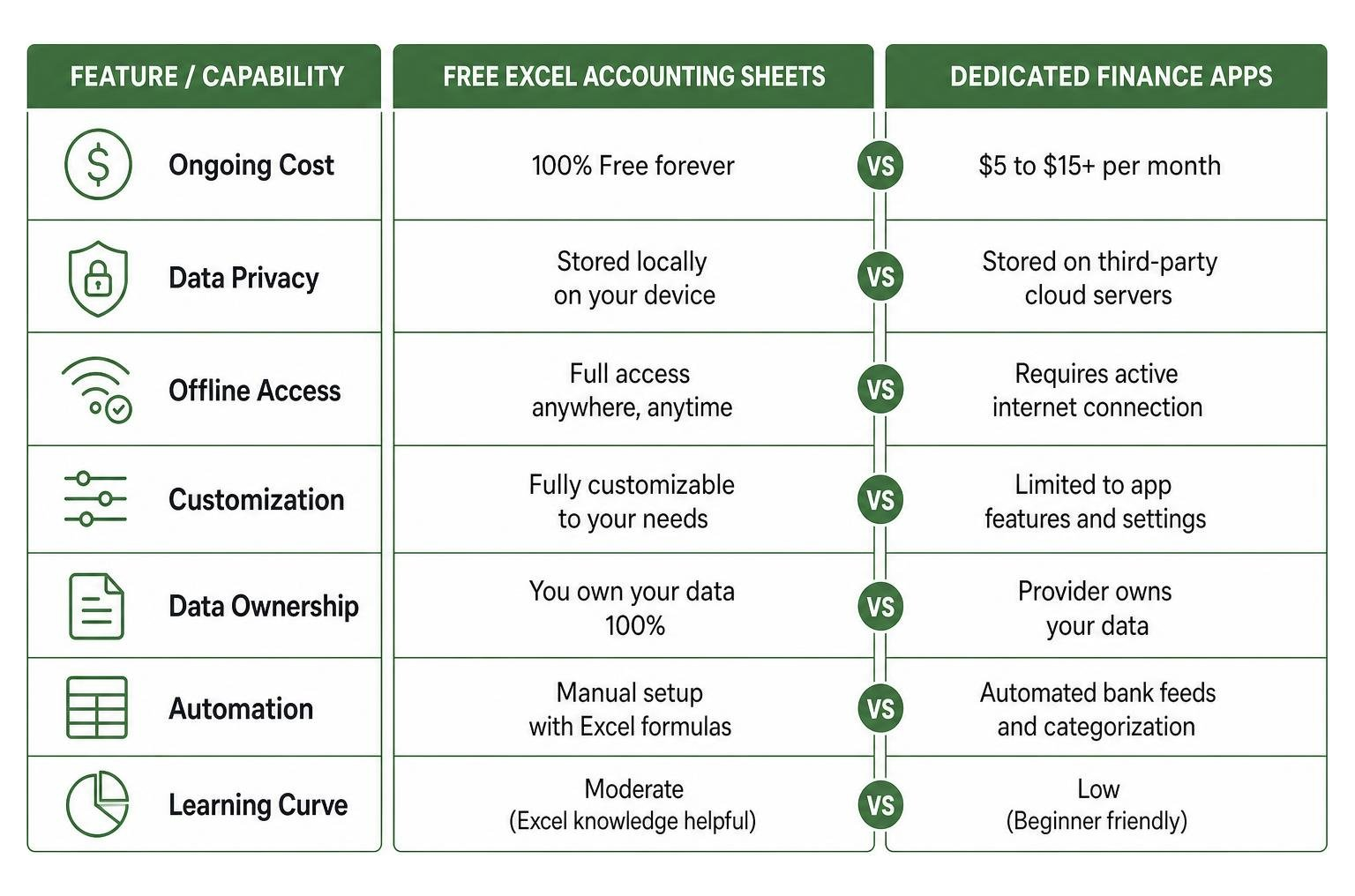
While cloud-based finance applications offer automated bank connections, Excel provides complete privacy, offline availability, endless formula customization, and permanent local ownership of your financial records.
| Feature / Capability | Free Excel Accounting Sheets | Dedicated Finance Apps |
|---|---|---|
| Ongoing Cost | 100% Free forever | $5 to $15+ per month |
| Data Privacy | Stored locally on your device | Stored on third-party cloud servers |
| Offline Access | Full access anywhere, anytime | Requires active internet connection |
| Customization | Unlimited (formulas, layout, reports) | Limited to vendor’s fixed features |
| Transaction Imports | Manual entry or local CSV parsing | Automatic bank API sync |
Days 1–10: Setting Up Your Core Bookkeeping Framework

The first ten days are all about establishing your general ledger, structuring your primary worksheets, and configuring your transaction sources. Building a solid structural foundation ensures that your dynamic formulas calculate accurately as transaction volumes grow across weeks and months.
Download and Configure the Best Free Excel Accounting Templates
Instead of starting from a blank grid, save time by leveraging proven template structures. You can use pre-configured options like the Personal Finance Tracker in Excel to jumpstart your workbook setup.
When configuring your accounting template:
- Open the file in Microsoft Excel (version 2016 or newer recommended for modern formula function support).
- Clear out sample placeholder data while keeping table structures, named ranges, and header rows intact.
- Input your true starting balances for all liquid checking accounts, high-yield savings accounts, retirement funds, and active credit card balances.
Setting Up Your Chart of Accounts and Multi-Account Sources
A robust chart of accounts organizes your transactions into distinct, manageable buckets. If you want an advanced open-source structure, you can explore community-developed frameworks like the GitHub Open-Source Personal Finance System.
To manage multiple financial accounts cleanly inside one central workbook, establish unique account codes or source tags for each physical bank and credit card.
| Account Code | Account Name | Account Type | Initial Balance |
|---|---|---|---|
| ACC101 | Main Checking | Liquid Asset | $2,500.00 |
| ACC102 | Emergency Savings | Liquid Asset | $10,000.00 |
| ACC201 | Rewards Credit Card | Liability | -$450.00 |
| ACC999 | Internal Transfer Log | Contra Account | $0.00 |
Using a dedicated Contra Account (such as ACC999) allows you to log internal transfers between your own accounts—like transferring $500 from Checking to Savings—without artificially inflating your reported income or expense totals.
Days 11–20: Automating Daily Income, Expense, and Savings Tracking
Once your account framework and chart of categories are live, focus on automating background calculations so daily record maintenance takes no more than two to three minutes.
Implementing Dynamic Excel Formulas and Auto-Formatting
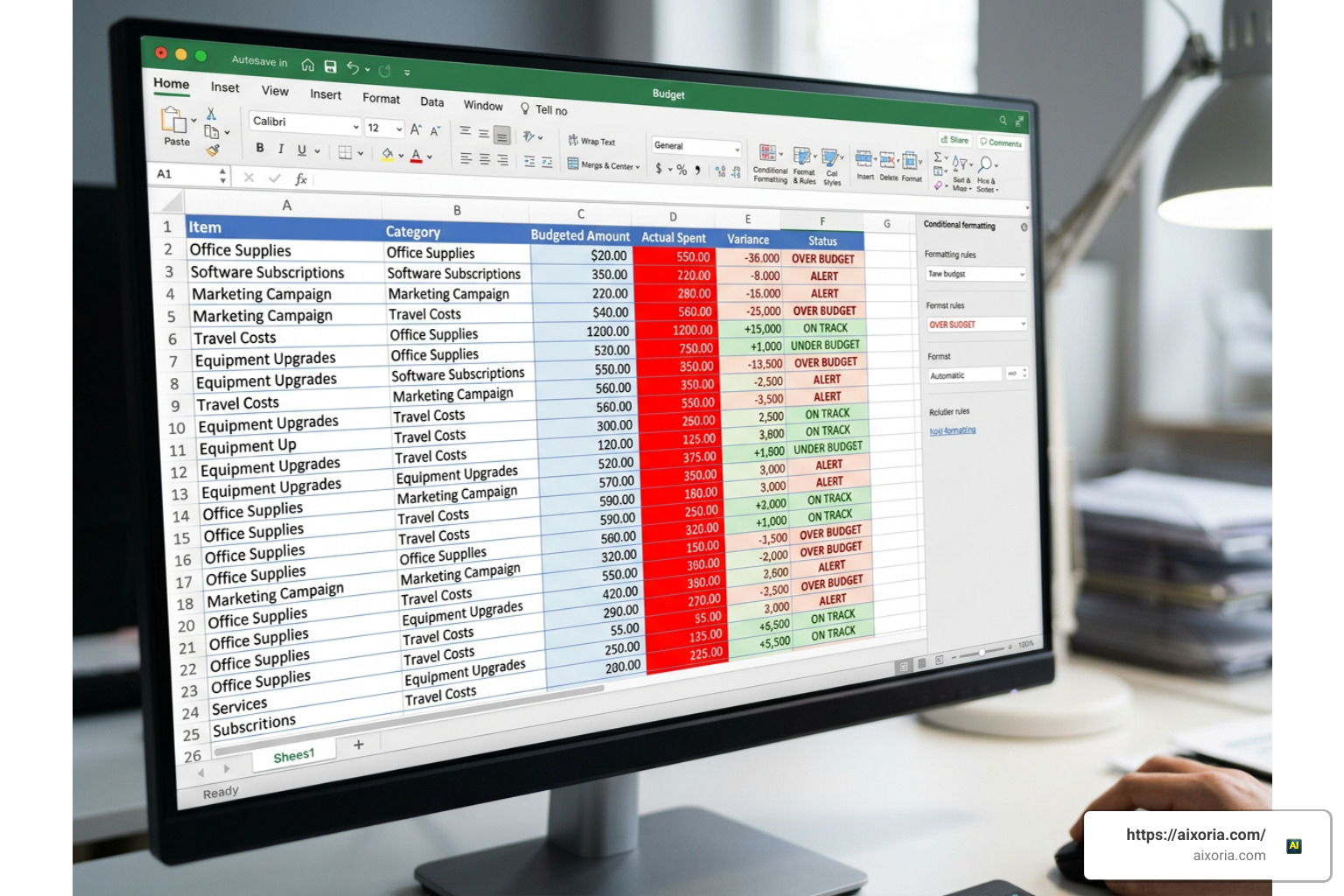
Leverage native Excel logic to calculate real-time financial totals automatically:
- Categorical Totals: Use
SUMIFSto sum all operational expenses matching specific spending categories and date ranges across your master ledger. - Dynamic Lookups: Use
XLOOKUPto match specific category budget limits against real-time actual spending to evaluate monthly progress. - Conditional Formatting: Apply visual highlight rules to turn cells light red when spent amounts exceed target caps, or soft green when spending stays comfortably under budget.
Setting up variance analysis tables (comparing Projected Budget vs. Actual Spend) gives you instant visual feedback on your financial health throughout the month.
Automated Statement Imports and Data Processing
If manual entry feels tedious, you can automate data ingestion using Power Query or custom automation macros. A great technical reference for implementation is the VBA Financial Management Tool Documentation, which demonstrates how to import and parse raw bank CSV files automatically.
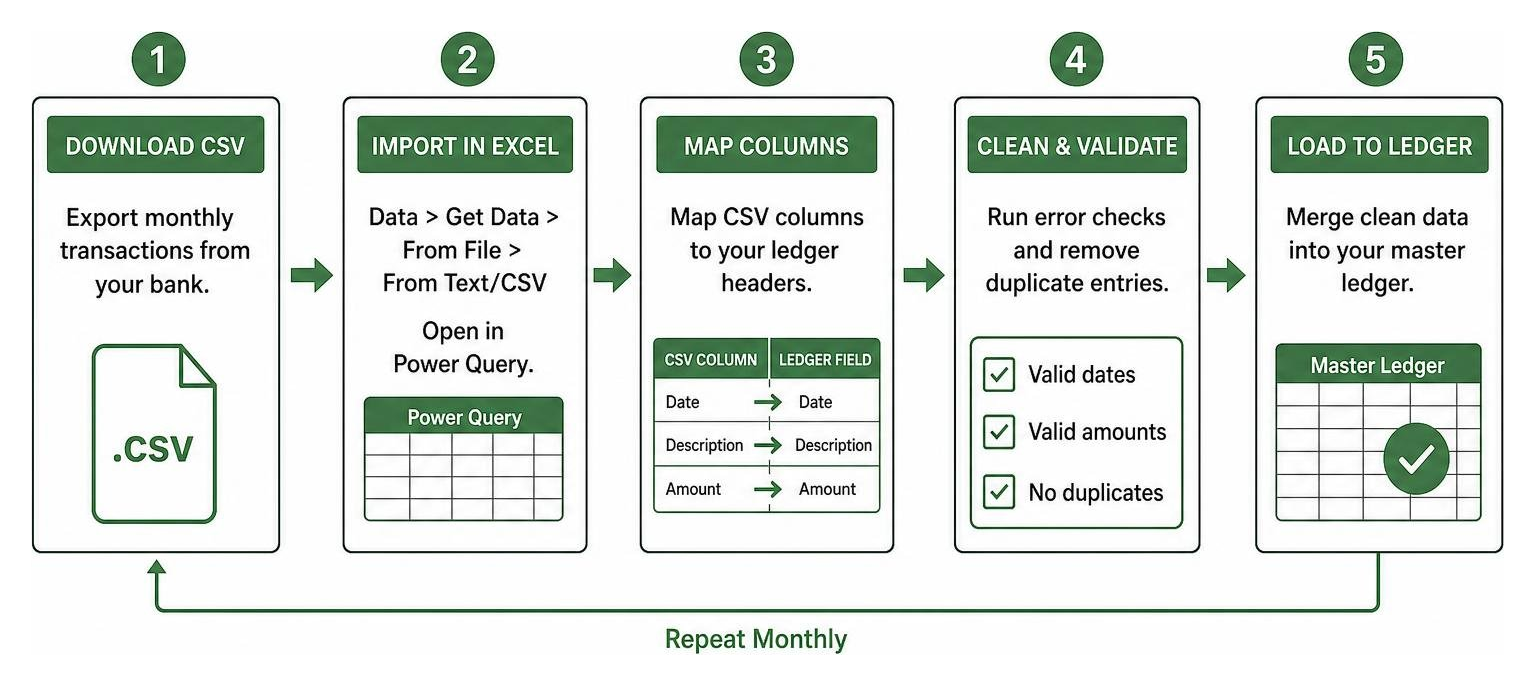
- Download monthly
.csvtransaction exports directly from your financial institution’s online portal. - In Excel, navigate to Data > Get Data > From File > From Text/CSV to launch the Power Query editor.
- Map CSV text columns (Date, Description, Amount) to match your master Excel ledger headers.
- Apply data cleaning steps to normalize date formats, reverse credit/debit signs where necessary, and filter duplicate entries before appending records into your master log.
Days 21–30: Advanced Reporting, Net Worth, and AI Insights

The final ten days convert your daily raw transaction records into executive-level reporting summaries, cash flow forecasts, and comprehensive net worth trackers.
Customizing Free Personal Accounting Software in Excel for Net Worth Tracking
Your net worth represents the ultimate measure of long-term financial health, calculated as Total Assets minus Total Liabilities. You can build a comprehensive net worth manager by following step-by-step guides like the Personal Wealth Manager Building Guide.
To build a full net worth tracker in Excel:
- Create an Asset Sheet tracking checking balances, savings accounts, investment portfolios, retirement funds, and real estate values.
- Create a Liability Sheet logging credit card balances, student loans, auto financing, and mortgage balances.
- Calculate Total Net Worth using standard auto-updating cell formulas:
=SUM(Assets) - SUM(Liabilities). - Monitor your savings ratio targets over time: a savings ratio of 30%+ of net income is considered excellent, 20%+ is solid, while under 10% indicates your monthly spending strategy requires immediate restructuring.
Generating Reports and Utilizing AI Assistance
Take your financial reporting further by adding Pivot Tables and interactive visual charts. Grouping your expenses by month allows you to easily identify seasonal spending spikes, such as higher winter utility bills or summer vacation costs.
Furthermore, modern spreadsheet workflows benefit immensely from artificial intelligence integration. Utilizing built-in AI assistants like Microsoft Copilot directly within Excel allows you to query your dataset using natural language prompts, such as: “What was my average spending on dining out over the last three months?” or “Generate a chart comparing fixed versus variable expenses for this quarter.”
Frequently Asked Questions About Excel Accounting
What key features should I look for in a free personal accounting Excel sheet?
Look for structured data validation dropdown menus, dynamic lookup formulas (SUMIFS, XLOOKUP), explicit internal account transfer options, customizable expense categories, and dynamic dashboard cards that summarize gross income, operating expenses, and net savings automatically.
How do free Excel accounting sheets compare to paid personal finance software?
Free Excel templates offer total data privacy (stored locally on your hard drive), zero monthly subscription costs, offline capabilities, and unlimited customization. Paid software often provides automated bank syncing, but sacrifices long-term flexibility, stores personal data on third-party servers, and requires recurring payment plans.
Where can I find reliable and free personal accounting Excel downloads?
Reliable, virus-free accounting templates can be downloaded directly from official Microsoft Office template repositories, open-source code hosting sites like GitHub, or dedicated community developer platforms offering pre-built financial workbooks.
Conclusion
Mastering free personal accounting software in excel in 30 days comes down to building consistent financial logging habits paired with smart spreadsheet design. By moving systematically from initial account setup and automated daily tracking to advanced net worth reporting dashboards, you gain complete control over your financial health without paying a single dollar in recurring software fees.
To streamline your modern digital workflows even further and boost daily organizational efficiency, discover What is the Best AI for Productivity in 2026? and pair intelligent automation with your personal financial tracking system!