How to Choose AI Tools for Cold Email Deliverability
Scr0ll d0wn to D0VVNL0AD
The best AI tools for email deliverability in cold outreach help you spot problems before you send more mail. If you already have an outreach platform, look for a specialist tool that tests inbox placement and monitors sender reputation. If you need a sending platform too, compare options with built-in safeguards.
In either case, check for email verification, SPF/DKIM/DMARC checks, gradual sending controls, and alerts for bounces or spam complaints. AI can help you catch changes faster than manual checks, but no tool can guarantee an inbox spot. Your list quality, message relevance, and sending habits still matter.
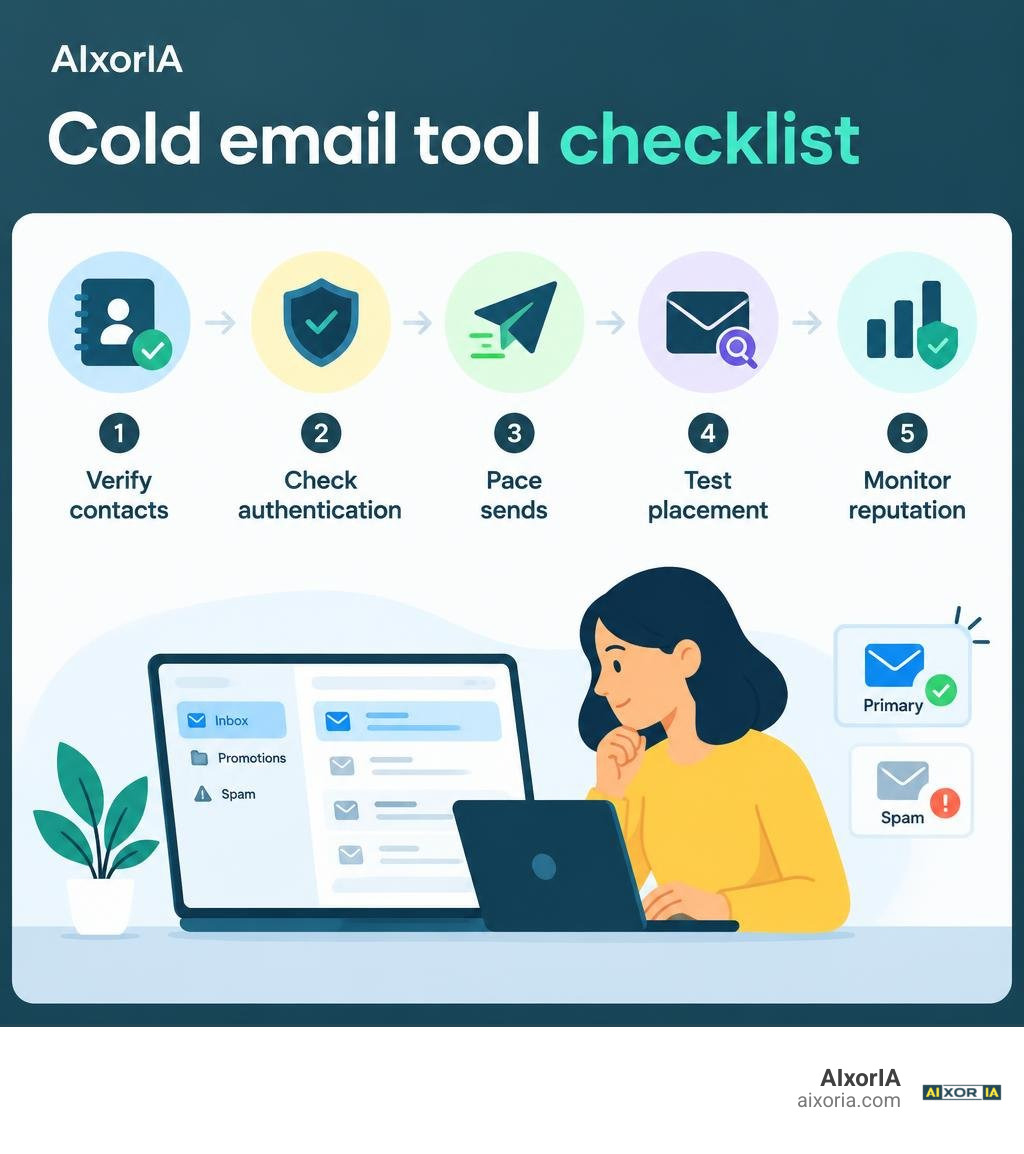
What Email Deliverability Means and What AI Tools Should Improve
When managing outbound sales campaigns, it is vital to distinguish between email delivery and email deliverability. Email delivery simply means the receiving mail server accepted your message without bouncing it. Email deliverability measures whether that message actually landed in the recipient’s primary inbox rather than the promotions tab or the spam folder.

Industry benchmarks show that nearly 46% of sales and outreach emails land in spam. Cold emails can achieve open rates as high as 60% with typical response rates between 1% and 5%, but those metrics drop to zero if prospects never see the message. Strong deliverability is earned through several technical and behavioral pillars:
- Sender Reputation: A dynamic score assigned by mailbox providers based on your sending history, spam complaints, and user interaction.
- Bounce Rate Management: Keeping hard bounces minimal by filtering out invalid or dead email addresses before sending.
- Spam Complaint Rates: Preventing recipients from manually flagging your emails as junk.
- Blacklist Monitoring: Ensuring your sending domains and dedicated IP addresses do not appear on global blocklists.
- Message Relevance: Delivering concise, targeted copy that recipients find valuable rather than intrusive.
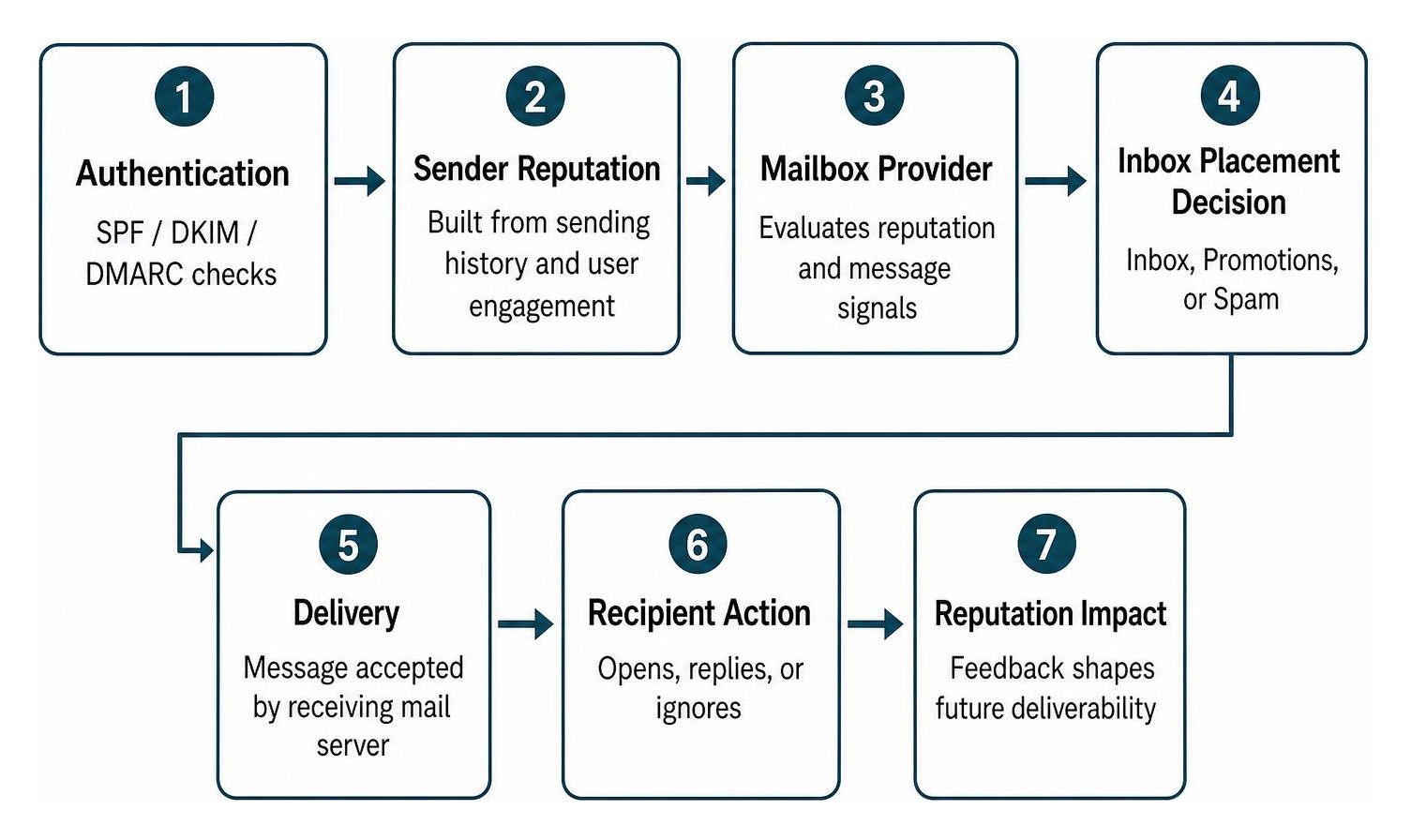
How AI tools for email deliverability in cold outreach differ from traditional methods
Traditional deliverability utilities rely on static rules. They use fixed warm-up ramp schedules (such as adding five emails per day regardless of engagement) and manual blacklist checks that require user intervention after a problem occurs.
Modern AI-driven deliverability tools utilize adaptive pacing. Instead of following rigid schedules, machine learning models analyze real-time reputation signals, bounce responses, and provider feedback. If a mailbox provider shows signs of throttling, the AI automatically reduces sending velocity, pauses active sequences, and diagnoses configuration errors before domain reputation suffers lasting damage.
Core features to evaluate
When selecting software to safeguard your cold campaigns, evaluate whether the platform includes these essential capabilities:
- Automated Mailbox Warm-Up: Simulates realistic peer-to-peer engagement across real inboxes to build trust gradually.
- Pre-Send Inbox Placement Tests: Samples seed lists across major providers (Google Workspace, Microsoft 365, Yahoo) to show where your email will land before launching a campaign.
- Spam Trigger and Copy Analysis: Analyzes your text, layout, and links to spot phrasing patterns that trigger spam filters. You can discover relevant ways to avoid spam filters to refine your copy before hitting send.
- Automated DNS and Authentication Diagnostics: Continuously verifies SPF, DKIM, DMARC, and custom tracking domain alignments.
- Real-Time List Verification: Validates recipient addresses, catches syntax errors, and filters out risky catch-all inboxes.
- Bounce and Unsubscribe Suppression: Automatically updates global suppression lists across all connected accounts.
- Smart Volume Controls: Distributes outbound volume smoothly across multiple inboxes using smart rotation.
Best AI Tools for Email Deliverability for Cold Outreach: How to Compare Your Options
The market for email deliverability software spans several distinct categories. Understanding the differences helps you choose the right setup without overpaying for redundant software:
- Deliverability-First Platforms: Specialized tools such as Warmy and DeliverIQ focus entirely on mailbox warming, inbox placement testing, and reputation diagnostics underneath your existing sending stack.
- Outreach Engines with Built-In Safeguards: Platforms like AutoMail and Mailgo combine warm-up, inbox rotation, and copy checks directly within their campaign sequencers.
- All-in-One Data and Sequencing Suites: Enterprise platforms like Apollo provide comprehensive contact databases alongside built-in verification, authentication guardrails, and mailbox health tracking.
- Specialist Warm-Up and Placement Networks: Tools highlighted in industry reviews of the top AI tools to boost B2B email deliverability specialize in running large peer-to-peer inbox networks across Google Workspace and Microsoft 365 accounts.
| Tool Category | Automated Warm-Up | Placement Testing | Reputation Monitoring | DNS / Auth Checks | List Verification | Best-Fit Team |
|---|---|---|---|---|---|---|
| Deliverability Specialist | Yes (Adaptive) | Deep Seed Testing | Real-Time Alerts | Automated Scans | Add-on or Integrated | SDR teams with existing sequencers |
| Outreach + Deliverability | Built-in | Basic Pre-Send | Domain Health Score | Setup Assistance | Integrated | Small-to-mid teams wanting an all-in-one setup |
| Data + Sales Engagement | Built-in | Sequence Tracking | Team-Wide Guardrails | Automated Verification | Native Database Verification | High-volume sales teams needing prospecting data |
| Standalone Diagnostic | Optional / Seed | One-Off / Continuous | Blacklist Tracking | Manual & Automated | External API | Agencies managing client infrastructure |
Which AI tools for email deliverability in cold outreach fit your team?
Selecting the right tool depends on your team structure, technical expertise, and existing sales stack.
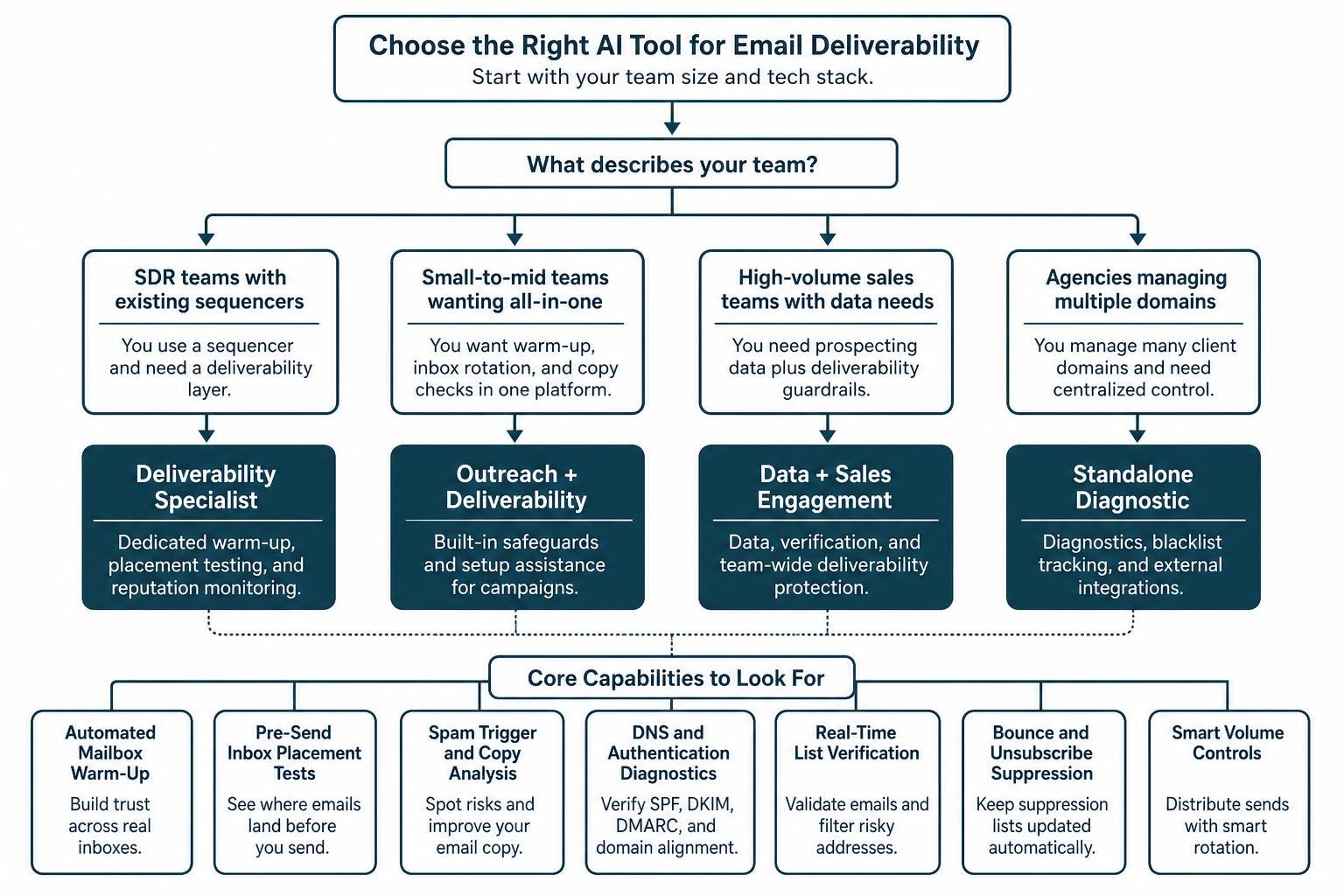
- New Sending Domains: If you are launching fresh domains, prioritize platforms with conservative, adaptive warm-up algorithms and automated DNS setup to establish initial domain trust safely.
- Established Sales Pods: Teams with existing sequencers benefit most from dedicated deliverability layers that run continuous background health checks and alert managers if a mailbox dips in reputation.
- Outreach Agencies: Agencies managing dozens of client domains require unified dashboards with centralized mailbox rotation, automated bounce pauses, and multi-tenant reporting.
- High-Volume Outbound Programs: Programs sending large volumes should prioritize tools with smart inbox rotation, catch-all email verification, and automatic sequence pausing to keep complaint rates well below provider thresholds.
How to Set Up and Protect Cold Email Deliverability
Maintaining healthy deliverability requires structured setup and ongoing discipline. Never send cold outreach from your primary corporate domain; a sudden wave of spam complaints can disrupt daily business communication. Instead, configure secondary domains dedicated solely to outbound sales.

Proper domain configuration also requires adhering to industry standards like the Google email sender guidelines and Yahoo sender best practices. When deploying secondary domains, implement the following steps:
- Configure Dedicated Infrastructure: Register secondary domains that reflect your brand name and set up dedicated inboxes across reliable business email providers.
- Align Authentication Records: Set up SPF (Sender Policy Framework), DKIM (DomainKeys Identified Mail), and DMARC (Domain-based Message Authentication, Reporting, and Conformance) records. Ensure SPF and DKIM signatures pass alignment checks.
- Establish Custom Tracking Domains: If tracking clicks or opens, set up custom tracking subdomains aligned with your sending domain to prevent shared-domain reputation penalties.
- Implement Gradual Warm-Up: Connect new mailboxes to an AI warm-up network for at least two to four weeks before launching outreach campaigns.
- Verify All Prospect Lists: Run every lead list through an email verification engine to remove invalid, inactive, and high-risk catch-all addresses.
- Pace Sending Volumes: Limit daily sending volume to 20–40 cold emails per mailbox per day, distributing larger campaigns across multiple rotated inboxes.
- Enable One-Click Unsubscribe: Include clean opt-out headers and clear unsubscribe mechanisms to respect recipient choices and comply with mailbox provider requirements.
How warm-up works and how long it takes
Email warm-up is the process of establishing sender reputation for a new domain or mailbox by gradually increasing outbound volume and generating authentic engagement. In an AI warm-up network, your connected mailbox exchanges messages with other real accounts. The AI opens these messages, marks them as important, removes them from spam if necessary, and sends natural replies.
For a new mailbox, plan for an initial warm-up period of at least two to three weeks before sending cold prospect emails. Start outreach at a conservative volume (10–15 messages daily) while keeping background warm-up active. Deliverability tools help maintain this baseline, but warm-up alone cannot guarantee inbox placement if your prospect list contains invalid addresses or your messaging triggers recipient complaints.
How authentication and sending controls reduce risk
Major mailbox providers strictly enforce technical sender requirements. Since May 2025, Microsoft rejects non-compliant high-volume mail outright with a 550 5.7.15 error, while Google requires bulk senders to keep user-reported spam complaints below 0.30% (ideally under 0.10%).
AI deliverability tools protect against these thresholds by monitoring live complaint signals and automatically throttling or pausing campaigns if metrics spike. Adopting proven cold outreach practices that avoid spam ensures your campaigns stay well within provider boundaries.
Common mistakes and how AI can help prevent them
Even experienced outbound teams make procedural errors that hurt inbox placement. Here is how modern deliverability systems help mitigate common issues:
- Blasting Unverified Contact Lists: Sending to outdated lists causes hard bounces that damage reputation. AI verification filters out invalid emails before they enter a sequence.
- Sudden Sending Volume Surges: Quadrupling volume overnight flags spam filters. Smart scheduling tools enforce daily ramp limits and distribute sending evenly across business hours.
- Sending Repetitive, Identical Templates: Sending thousands of identical messages triggers pattern-matching filters. AI tools assist by generating dynamic message variants and contextual copy. However, teams should understand the limitations of current AI email tools to ensure messaging remains natural and human-reviewed.
- Ignoring Bounce and Complaint Warnings: Continuing to send after a delivery drop can lead to domain blacklisting. Deliverability platforms trigger automated sequence pauses when bounce rates exceed 2%.
Frequently Asked Questions About AI Tools for Cold Email Deliverability
Can warm-up guarantee inbox placement?
No software can guarantee 100% inbox placement. While warm-up establishes positive sender history, mailbox providers evaluate every incoming message using real-time factors: recipient engagement history, domain authentication alignment, message content, link safety, and current complaint rates. Warm-up provides the foundation, but list hygiene and relevant copy determine sustained inbox success.
How many cold emails can one mailbox send per day?
A safe operating guideline for cold outreach is 30 to 50 cold emails per day per mailbox. For new accounts, start around 15 to 20 emails daily and ramp gradually over several weeks. If your campaign requires sending 500 emails per day, distribute that volume across 10 to 15 individually warmed mailboxes using inbox rotation rather than overloading a single account.
What should I do if a domain is blacklisted or emails enter spam?
If your domain lands on a blacklist or inbox placement drops suddenly:
- Pause Active Campaigns: Immediately pause all outbound sequences on the affected domain to prevent further reputation decline.
- Verify DNS Authentication: Check your SPF, DKIM, and DMARC records for misconfigurations or alignment errors.
- Run List Diagnostics: Review recent bounce logs to identify problematic data sources or invalid lead segments.
- Check Blacklist Severity: Use diagnostic tools to see which blocklist flagged your domain or IP (some list providers offer self-service delisting after resolving underlying issues).
- Resume at Low Volume: Once technical fixes are complete, resume sending at minimal volume (10 emails per day per inbox) while maintaining active warm-up to rebuild provider trust.
Conclusion
Sustaining high cold email deliverability requires combining the right technical infrastructure, continuous monitoring, and sound sending habits. AI deliverability tools streamline the complex work of warm-up pacing, placement testing, DNS verification, and bounce protection, allowing sales teams to scale outreach safely without burning domains.
Always treat AI recommendations as an enhancement to—not a replacement for—human oversight, clean prospecting data, and relevant sales messaging. To discover more practical strategies, software evaluations, and step-by-step frameworks for modern outbound success, explore AIxorIA’s guides and reviews to optimize your sales workflow.