AI tools for mileage tracking for sales reps: what matters most
Scr0ll d0wn to D0VVNL0AD
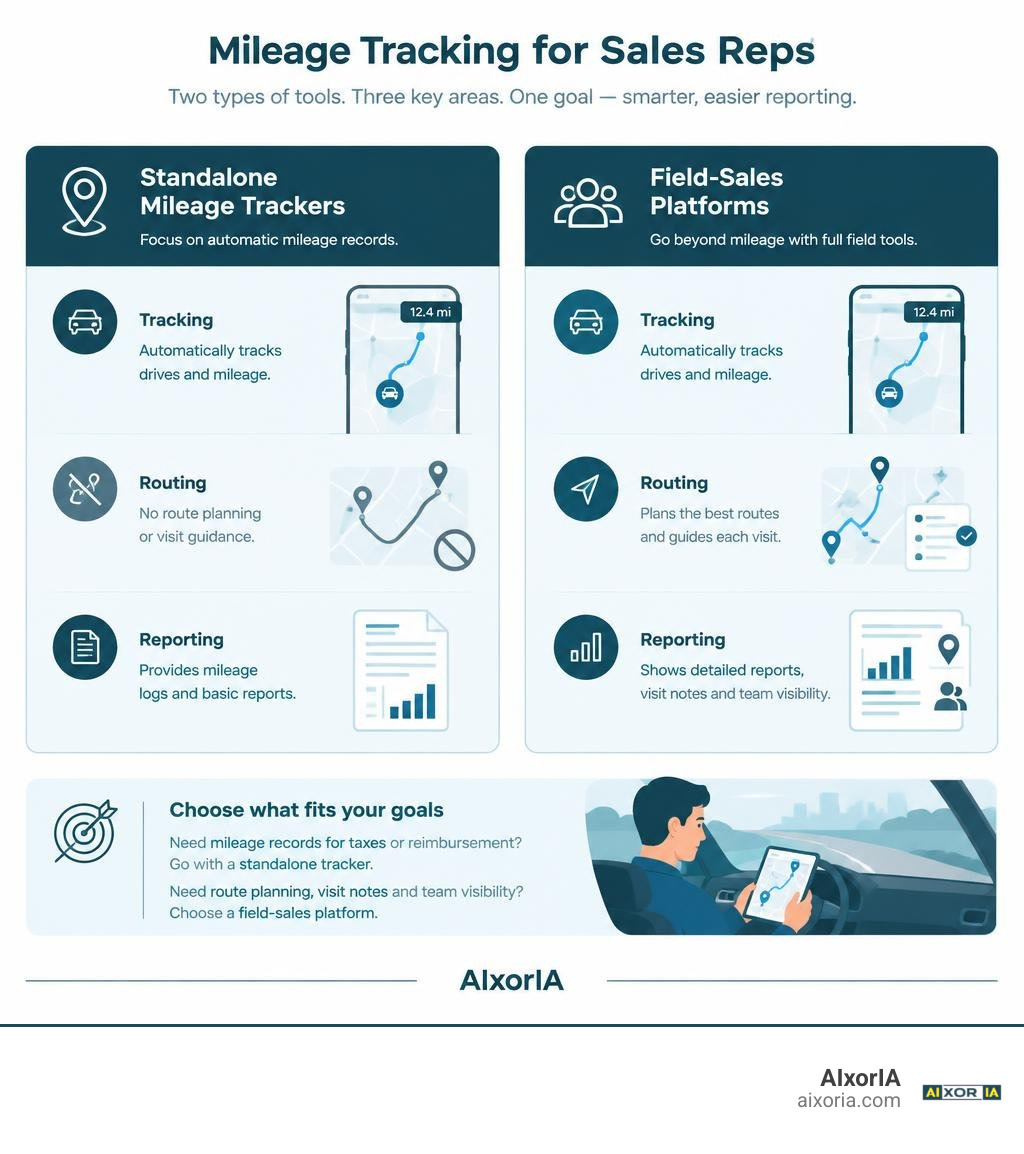
The best AI tools for mileage tracking for sales reps capture drives automatically, make business trips easy to review, and export clear reports. Choose a standalone tracker if you mainly need mileage records for taxes or reimbursement. Choose a field-sales platform if you also need route planning, visit notes, and team visibility.
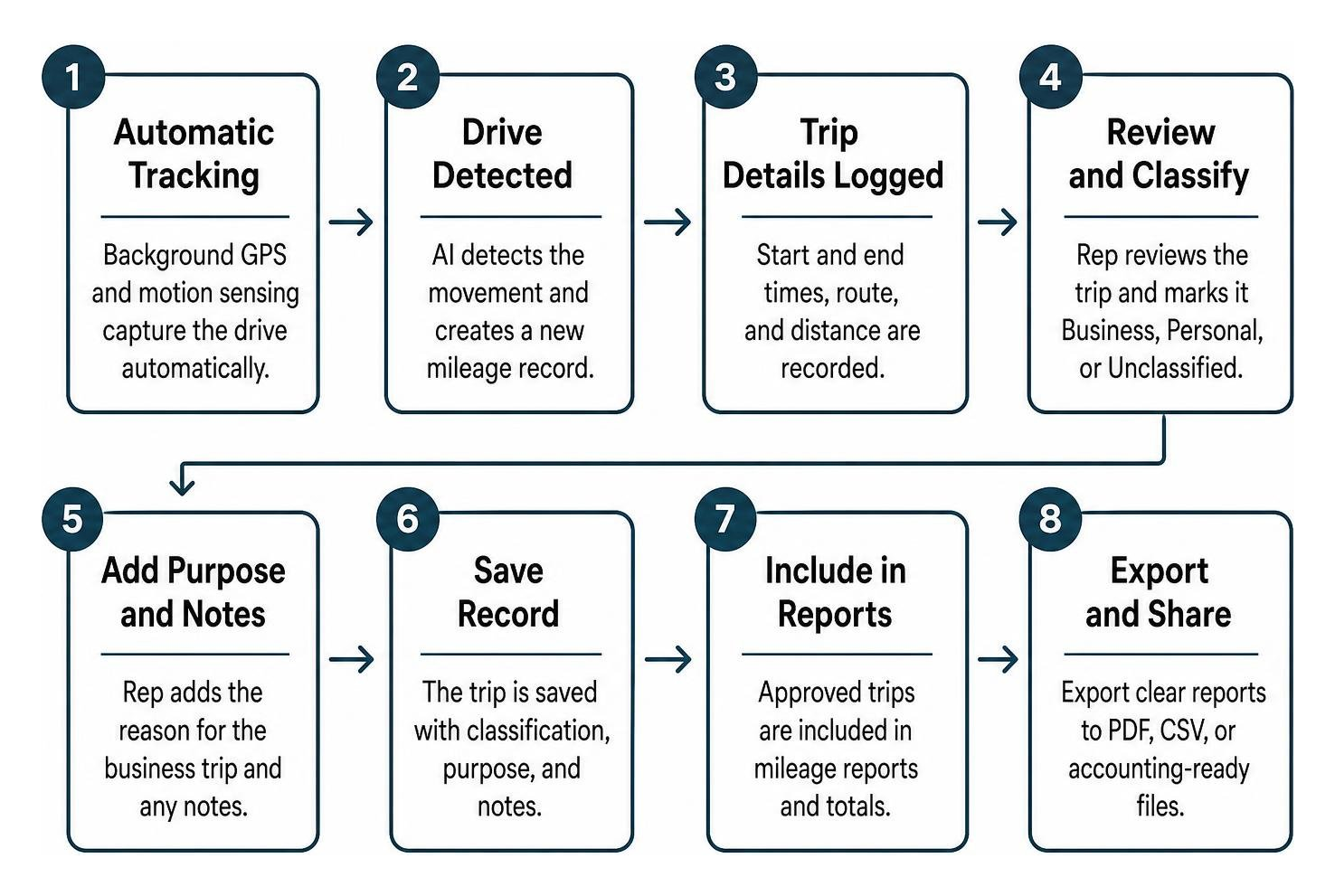
Automatic tracking can catch short drives between customer visits that are easy to forget. But no app should be treated as a perfect record: reps still need to check missed trips, mark personal drives, and add the reason for each business trip. This guide compares both types of tool, what their AI features actually do, and how to judge whether the cost is worth it.
Best AI tools for mileage tracking for sales reps in 2026
Modern tracking applications fall into distinct categories depending on whether a representative drives independently or operates within an expansive enterprise field force. AI tools for mileage tracking for sales reps eliminate the frantic scramble to reconstruct odometer readings at the end of every quarter.
| Tool Category | Core Automation | Route Optimization | Visit & Note Logging | Reporting & Approvals | Typical Pricing |
|---|---|---|---|---|---|
| Standalone Mileage Trackers | Background GPS, motion sensing, vehicle Bluetooth pairing | Basic navigation handoff | Lightweight trip notes and tags | Tax-compliant PDF, CSV, and accounting exports | $2.99–$10/month per user |
| Integrated Field Platforms | Geofence check-ins, automated drive logs, visit timers | Multi-stop AI sequence, appointment hard-stops | Voice-to-CRM transcription, visit summaries | Team dashboards, audit logs, CRM sync | $10–$99+/month per user |
| Reimbursement & Expense Platforms | Real-time GPS detection, policy-triggered tracking | Route validation, mileage padding flags | Expense receipt scanning, per-diem matching | One-click manager approval, payroll & ERP sync | Custom / enterprise tiers |
AI tools for mileage tracking for sales reps: automatic mileage trackers
Standalone applications prioritize effortless drive capture, high battery efficiency, and rigorous privacy controls. Modern trackers operate quietly in the background without requiring reps to press start and stop before pulling out of a customer’s parking lot.
Using dedicated iPhone motion chips and intelligent GPS sampling, tools like PocketMile offer lightweight on-device drive detection without creating centralized accounts. Reps can pair specific vehicles via Bluetooth or CarPlay, set active working modes, and swipe right or left to classify drives.
Similarly, solutions providing dedicated iPhone mileage logs and export options leverage on-device machine learning to suggest classifications while ensuring raw motion sensor data never leaves the handset. These tools let traveling reps verify rates with effective dates, assign clear business purposes, and export clean PDF, CSV, or accounting-ready files.
AI tools for mileage tracking for sales reps: route planning and field-sales platforms
For outside sales professionals managing dense territories, mileage tracking is just one component of field execution. Integrated platforms combine distance logging with intelligent scheduling, turn-by-turn multi-stop routing, and automated CRM record updates.
Solutions like FieldTrack AI introduce intelligent route sequencing that accommodates fixed appointment windows while cutting total drive time by up to 20%. Field reps can import stops from lead sheets via optical character recognition (OCR), preview building facades using street-level imagery, and speak hands-free voice debriefs that transcribe into structured summaries.
More comprehensive platforms like Map My Customers serve as a mobile execution layer alongside systems like Salesforce or HubSpot. These platforms log client dwell time, capture check-in signals, and give leadership high-level visibility into territory coverage and sales pipeline trends.
Reimbursement and mileage-validation platforms
When companies reimburse dozens or hundreds of mobile employees, finance departments require automated verification to prevent mileage inflation. Manual expense entry often introduces round-number estimates and duplicate submissions that drain operational budgets.
Dedicated corporate expense platforms such as DriveAnywhere address this friction by matching GPS-tracked paths against company travel policies. These systems validate travel routes, flag duplicate claims across overlapping dates, and synchronize approved expense totals directly with enterprise payroll systems, shortening reimbursement review cycles by up to 80%.
Pricing models and best-value fit
Pricing structures vary according to the depth of administrative oversight:
- Entry-Level & Privacy-First Trackers: Typically run $2.99 to $9.99 per month on flexible individual subscriptions or app store accounts, ideal for sole proprietors and independent 1099 contractors.
- Annual Pro Tiers: Run roughly $80 to $100 annually, offering advanced tax reporting, web portal access, and cloud backups.
- All-in-One Field Platforms: Range from $10 to $99+ per user per month billed annually, bundling territory mapping, team routing algorithms, lead discovery, and two-way CRM integrations.
- Enterprise Expense Systems: Quote per-seat or per-report licensing with dedicated onboarding and ERP connector fees.
How to choose AI tools for mileage tracking for sales reps
Selecting the right software requires balancing tracking accuracy with administrative efficiency and team adoption. For teams modernizing their go-to-market software, evaluating AI tools for sales GTM helps ensure field logging works smoothly alongside marketing and pipeline software.

Standalone mileage trackers vs. integrated field-sales platforms
Choosing between a standalone utility and an end-to-end sales platform depends on the core operational challenge your team faces.
| Selection Factor | Standalone Mileage Trackers | Integrated Field-Sales Platforms |
|---|---|---|
| Primary Focus | Tax deductions and mileage expense claims | Territory coverage, visit volume, and pipeline velocity |
| Setup & Onboarding | Minutes; download mobile app and set work hours | 2–4 weeks; territory mapping and CRM schema configuration |
| Manager Oversight | Exported mileage logs and monthly expense submissions | Live team maps, visit audit logs, and account cadence alerts |
| CRM Interaction | Manual note entry or basic accounting sync | Automatic two-way sync with Salesforce, HubSpot, or Dynamics |
| Best-Fit Audience | Solopreneurs, realtors, consultants, and independent reps | Mid-market and enterprise outside B2B sales teams |
AI features that reduce manual data entry
The most effective tools eliminate tedious administrative friction on the road. Intelligent platforms pair low-energy background motion detection with machine learning models that recognize frequently visited customer sites. When paired with advanced AI sales automation workflows, reps can speak unstructured voice notes while driving between stops, allowing the AI to summarize key account details and extract action items without manual typing.
Business and personal trip classification
To protect employee privacy and maintain IRS compliance, mileage apps must keep personal travel separate from company business. Leading tools handle this distinction using several automated filters:
- Configurable Work Schedules: Setting working hours ensures drives outside business windows default to personal classification.
- Named Geofenced Locations: Tagging client sites, warehouses, and headquarters allows apps to categorize recurring trips instantly.
- Hardware and Bluetooth Triggers: Pairing tracking exclusively with the company vehicle’s CarPlay system prevents tracking while driving a personal vehicle on weekends.
- Commute Exclusion Filters: Built-in rules automatically deduct ordinary commuting miles between a rep’s home and primary office before calculating reimbursable totals.
Tax deductions, reimbursement accuracy, and manager visibility
Maintaining contemporaneous driving records is essential whether filing taxes as an independent contractor or submitting travel logs for corporate reimbursement. Field activities must be documented accurately to align with labor compliance and commercial vehicle insurance considerations.

| Workflow Factor | Self-Employed Tax Deduction (Schedule C / 1040) | Employer Reimbursement (Accountable Plan) |
|---|---|---|
| Primary Beneficiary | 1099 contractors, solopreneurs, and business owners | W-2 mobile sales representatives and employees |
| Filing Requirement | Annual tax return supported by contemporaneous records | Periodic expense reports submitted to payroll/finance |
| Documentation Standard | Date, exact mileage, destination, and business purpose | Verified route, client purpose, and expense policy match |
| Tax Impact | Lowers net self-employment and taxable business income | Tax-free reimbursement to employee; business deduction |
IRS records and 2026 mileage-rate calculations
To withstand tax authority scrutiny, an audit-ready log must capture the date of each trip, origin and destination addresses, total mileage, and the explicit business purpose of the travel.
The IRS adjusted the standard mileage rate mid-year in 2026, establishing a split calculation requirement:
- January 1 to June 30, 2026: 72.5 cents per business mile
- July 1 to December 31, 2026: 76.0 cents per business mile
Consider an independent sales consultant who drives 10,000 business miles evenly throughout 2026 (5,000 miles in each half of the year):
- First Half Deduction: 5,000 miles × $0.725 = $3,625
- Second Half Deduction: 5,000 miles × $0.760 = $3,800
- Total Annual Mileage Deduction: $3,625 + $3,800 = $7,425
A $7,425 tax deduction reduces your total taxable income by that amount—it does not mean a direct cash refund of $7,425. Independent reps should always verify final deductions with a qualified tax professional.
Audit-ready logs and reimbursement controls
When managing mobile workforces, leadership must track travel accurately alongside broader operational workflows. Connecting driving logs with timesheet and field-work reporting helps businesses verify customer site visits against hourly payroll data.
Automated route validation stops common expense errors before they reach accounting. AI systems flag suspicious claims, overlapping submissions, and off-route deviations, helping finance departments enforce accountable reimbursement plans.
How managers use mileage data to coach
Mileage and location data provide valuable operational visibility when used constructively:
- Balancing Territory Workloads: Analyzing drive-time patterns helps managers reassign accounts so reps spend more time meeting prospects and less time behind the wheel.
- Identifying High-Value Routines: Correlating face-to-face visits with pipeline milestones reveals the daily activity cadences that top performers use to win deals.
- Protecting Privacy: Modern platforms let managers review verified arrival times and account check-ins without tracking employees outside working hours.
Implementation, privacy, and common questions
Rolling out tracking technology requires clear operational guidelines and proper technical setup. Companies should pair their tracking rollout with clear vehicle safety policies and appropriate small-business vehicle insurance planning to protect mobile workers.
How should a sales team roll out automatic mileage tracking?
Successful adoption follows a structured, phased rollout:
- Define Clear Reimbursement Policies: Establish reimbursable driving criteria, commute exclusion rules, and submission deadlines.
- Launch a Focused Pilot Group: Test the mobile app with three to five trusted field reps to refine geofencing and battery settings.
- Provide Setup Guidance: Train reps on phone location settings, Bluetooth triggers, and one-tap trip classification.
- Establish a Review Schedule: Encourage reps to review and classify their drives weekly while trip details remain fresh.
- Audit Expense Workflows: Verify that mobile records sync cleanly with CRM, accounting, and payroll platforms before rolling the tool out to the full team.
Can automatic tracking miss trips or use extra battery?
Background tracking apps balance location precision with battery preservation by using smartphone accelerometer and motion sensors to detect vehicle movement, only activating GPS when traveling at driving speeds.
However, aggressive operating system battery-saver modes, weak cellular signals, or disabled Background App Refresh can cause occasional missed trips. Reps should review their trip logs periodically to verify unclassified routes, correct missing details, and confirm distances before submitting final reports.
How should teams balance visibility with rep privacy?
Field tracking should foster accountability without feeling invasive. Employers can protect rep trust by selecting software with built-in privacy boundaries:
- Work-Hours Restrictions: Restrict automated tracking strictly to business schedules.
- Local Processing: Choose tools that process raw motion sensor data directly on the device.
- Transparent Permissions: Ensure reps understand when location tracking is active and how visit records are used for expense reimbursement.
Frequently Asked Questions about AI mileage tracking for sales reps
Can mileage apps automatically tell business trips from personal trips?
Yes. Modern applications use automated rules, working-hour schedules, paired Bluetooth connections, and saved geofenced locations to classify drives. For example, trips between regular customer accounts during work hours are automatically marked as business, while weekend drives remain private. Reps can adjust classifications with a simple swipe.
Which tools combine mileage tracking with route planning and field sales management?
Platforms such as Map My Customers, FieldTrack AI, and SPOTIO blend mileage tracking with advanced route planning, territory management, voice note dictation, and two-way CRM synchronization. These solutions are built specifically for outside sales teams that require daily itinerary optimization alongside verified visit logging.
What should a sales team compare before choosing a pricing plan?
Teams should assess the total cost of ownership by weighing monthly per-user licensing fees against expected productivity gains and reimbursement savings. Consider whether the plan includes CRM integration, multi-stop route optimization, automated expense approvals, and team management dashboards, or if those capabilities require higher-tier subscriptions.
Conclusion
Automating mileage tracking saves field sales representatives hundreds of administrative hours while capturing valuable tax deductions and legitimate reimbursement expenses. Choosing between a privacy-focused standalone tracker and a full-featured field-sales platform depends on your operational priorities—whether you simply need clean mileage logs or require comprehensive route planning and CRM integration.
Explore AIxorIA’s practical AI and business productivity guides for up-to-date tool roundups, software evaluations, and implementation frameworks designed to help modern teams work smarter on the road.