The best landing page prompt starts with your audience and goal
Scr0ll d0wn to D0VVNL0AD
Copy this prompt to get started:
Create a mobile-friendly landing page for my product. First, ask me who it serves, what problem it solves, what action visitors should take, and what brand colors, fonts, and tone to use. Ask for real testimonials or results; do not invent them. Then write the page in this order: hero with one clear call to action, proof, benefits, how it works, pricing if relevant, FAQs, and a final call to action.
That first draft is a starting point, not a finished page. Refine the headline and proof one section at a time, then test the form and mobile layout before launch.
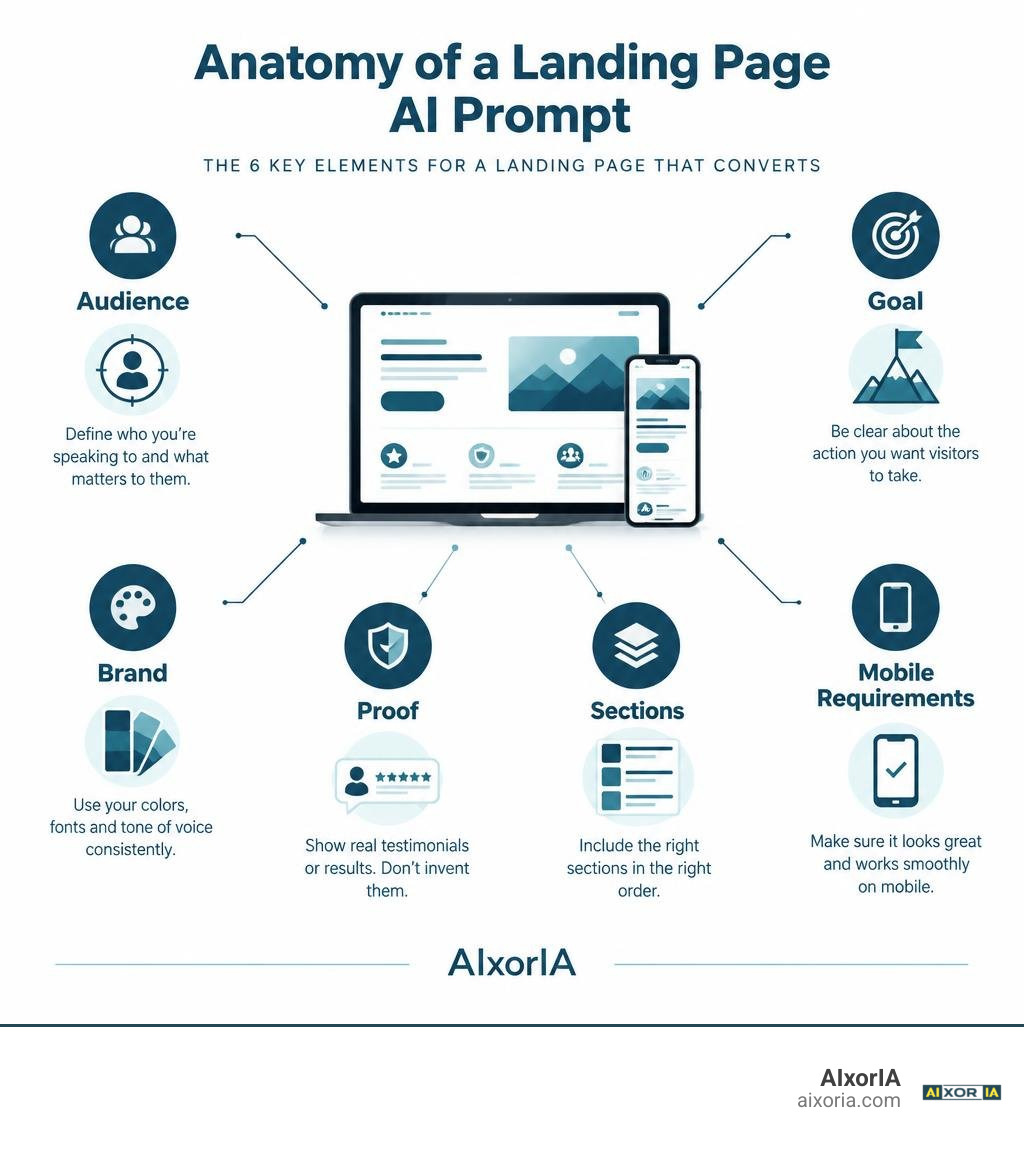
What Is the Best AI Prompt for Creating a Landing Page?
When founders ask us, “What is the best AI prompt for creating a landing page?”, they often expect a magic single sentence that spits out a million-dollar website. In practice, the best prompt is a comprehensive blueprint. It combines your exact customer profile, your core value proposition, an intentional sequence of sections, and strict design constraints.
A vague prompt like “write a landing page for my SaaS” produces generic copy, confusing layouts, and generic text that could belong to any company in the world. Research shows that landing pages built with specific audience targeting convert at 2.5x the rate of generic pages. To reach high performance, you must provide your AI model with structural boundaries, design tokens, and a conversion argument before it writes a single line of code or copy.
By exploring conversion-focused landing page prompts alongside the top AI tools for sales and marketing in 2026, you can turn generative models into tireless conversion rate optimization specialists.
Core Ingredients of High-Converting Prompts
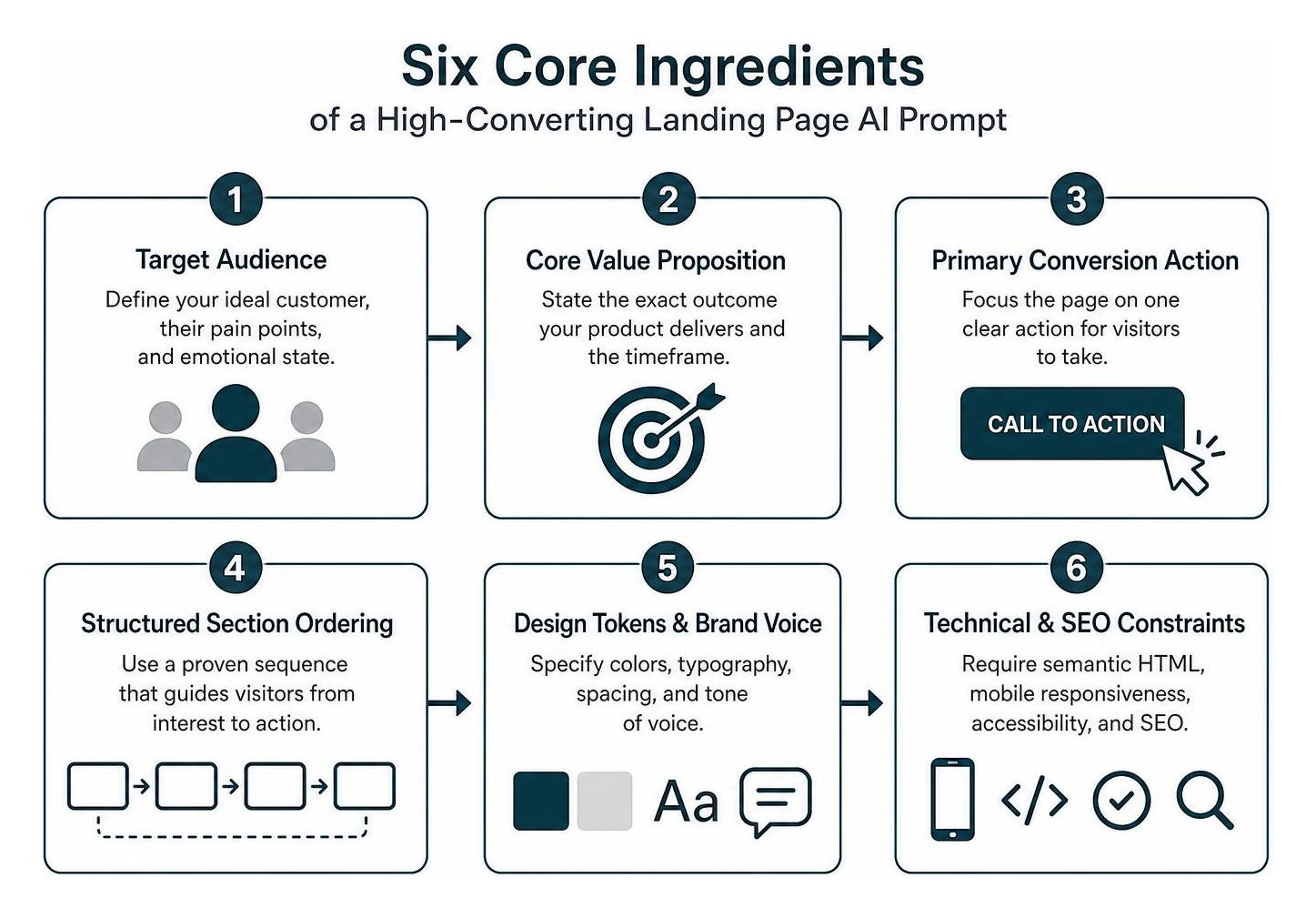
Every high-performing landing page prompt contains six fundamental ingredients:
- Target Audience Definition: Clearly name your ideal customer profile (ICP), their acute pain points, and their current emotional state.
- Core Value Proposition: State the exact outcome your product delivers and the timeframe in which it delivers it.
- Primary Conversion Action: Focus the page on a single conversion goal (e.g., “Start free trial”, “Book a demo”, or “Join waitlist”).
- Structured Section Ordering: Enforce a proven flow (Hero, Social Proof, Problem/Solution, Features, Testimonials, Pricing, FAQ, Final CTA, Footer).
- Design Tokens & Brand Voice: Dictate specific hex codes, typography limits (maximum 2 font sizes for body text: 16px and 14px), generous whitespace padding, and tone of voice.
- Technical & SEO Constraints: Demand semantic HTML, mobile responsiveness, accessible tap targets, meta tags, and structured schema markup.
The Master One-Shot Landing Page Prompt Template
If you want to generate a complete layout in one go using tools like Claude, ChatGPT, or generative UI platforms, use this master prompt template. It adapts proven patterns from open-source Claude design prompt templates for maximum conversion power:
Act as an elite conversion rate optimization (CRO) copywriter and senior frontend engineer. Build a responsive, high-converting landing page for FlowPulse.
Context & Audience:
- Target Audience: B2B operations managers struggling with fragmented analytics and slow team reporting
- Primary Value Proposition: Automate cross-platform reporting to save 10 hours every week
- Conversion Goal: Start free trial
Brand & Visual Style:
- Aesthetic: Clean, modern, accessible, with generous whitespace
- Palette: Primary #10B981, Secondary #1E293B, Background #0F172A, Text #F8FAFC
- Typography: Sans-serif, hero headline 48-64px, body text 16px/14px
Required Ordered Sections (Include 6-8 key sections):
- Header/Nav: Minimalist, logo slot on left, primary CTA button on right.
- Hero Section: Pain-focused headline (48-64px), benefit-driven subheadline, primary CTA button with risk-reversal microcopy (‘No credit card required’), and above-the-fold social proof indicator.
- Social Proof Bar: Logos of recognizable brands or user metrics badge.
- Problem vs. Solution: Contrast the user’s painful current state with the effortless future state using FlowPulse.
- Feature Breakdown: 3 core benefit-first feature blocks with device mockup containers.
- Social Proof / Testimonials: 2-3 authentic customer quotes with names, roles, and concrete metric gains.
- Transparent Pricing: 3 clear tiers, highlight ‘Most Popular’, show monthly/annual toggle, and avoid hidden pricing.
- FAQ Section: 4-5 accordion items addressing top objections (cancellation, setup time, security).
- Final CTA Section: High-contrast banner repeating primary hero CTA and final reassurance.
- Footer: Minimal copyright, privacy, and terms links.
Technical Constraints: Generate clean, mobile-first semantic HTML with Tailwind CSS. Ensure touch targets are at least 44x44px. Do not use generic filler buzzwords. Include realistic draft copy tailored to the niche.
Step-by-Step Guide to Layering AI Prompts for Maximum Conversions
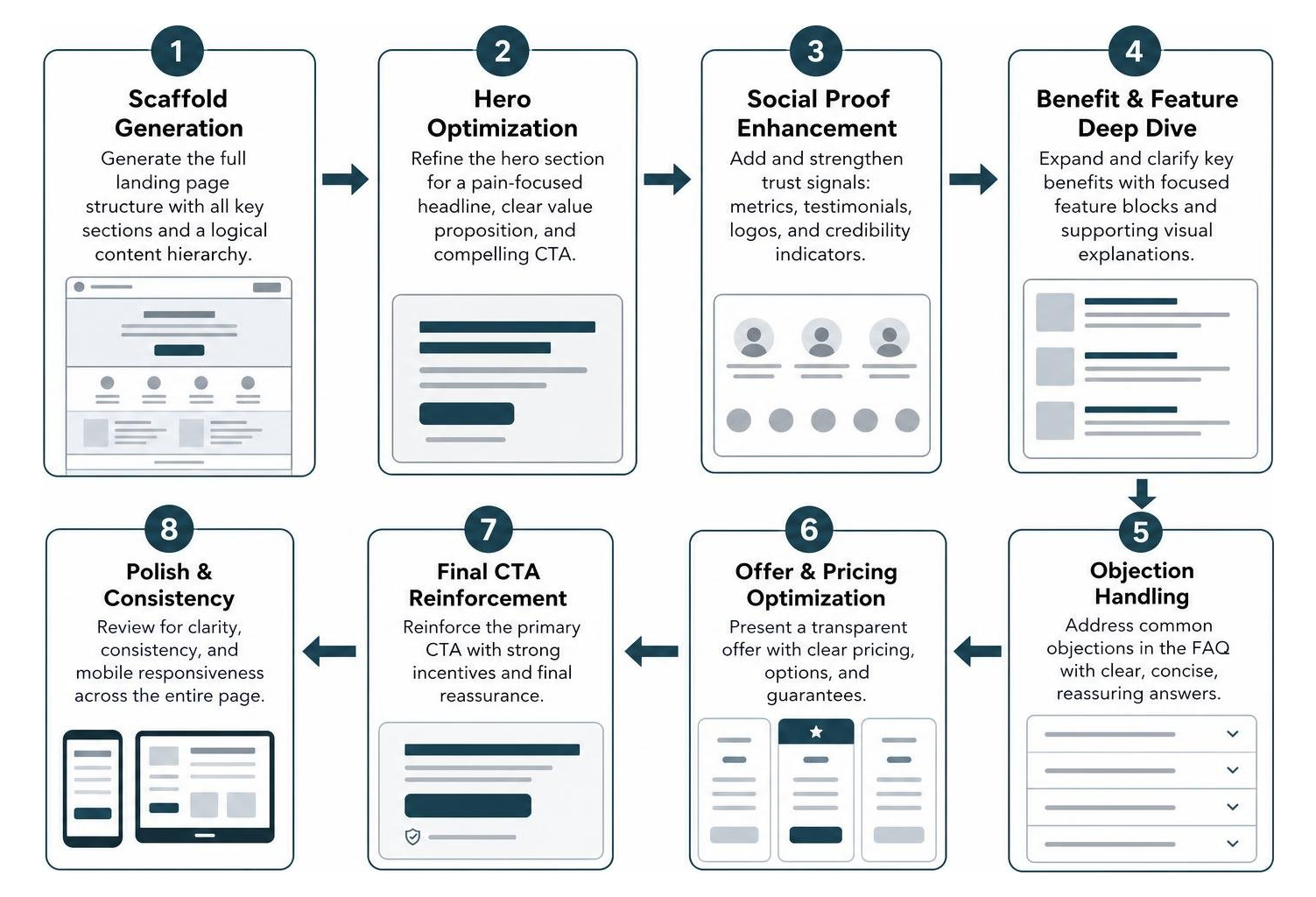
While a master scaffold prompt gives you a solid structure, one-shot prompts often yield generic copy or slightly crowded layouts. The real secret to beating conversion benchmarks is layered prompting—generating the initial structure, then executing dedicated passes to refine individual high-impact conversion levers.
Understanding AI content writing in a modern workflow means treating the AI as an iterative collaborator rather than an automated vending machine.
What Is the Best AI Prompt for Creating a Landing Page Hero Section?
Your hero section determines whether visitors explore your product or bounce immediately. The headline alone is seen by 100% of visitors, and testing a specific, outcome-focused headline can lift conversions by 30% to 80%.
Use this targeted prompt to dial in your hero section:
Refine the hero section of this landing page to maximize conversion rates.
Objectives:
- Write 5 distinct headline variations addressing operations leaders’ primary pain points. Focus on tangible outcomes, not product features (e.g., ‘FlowPulse helps operations teams eliminate 10 hours of manual reporting every week’).
- Craft a clear 2-sentence subheadline expanding on how the product works without technical jargon.
- Optimize the primary CTA button text. Test action-oriented copy like ‘Start free trial’ or ‘Claim your access’ against generic terms.
- Add a high-trust microcopy note right below the button (e.g., ‘Free 14-day trial – No credit card required – 2-minute setup’).
- Add an above-the-fold trust signal (e.g., ‘Loved by 4,000+ teams’ with star rating).
- Present the output as clean semantic HTML and Tailwind CSS.
Crafting High-Impact Social Proof and Feature Grids
Social proof placed within the first two scroll depths increases trust signals by up to 30%, while adding client logos or a testimonial badge above the fold typically lifts conversions 10% to 25%.

When prompting feature grids, structure them around outcomes rather than tool specifications. Use this prompt template:
Rewrite the feature grid section.
Requirements:
- Create a 3-column layout highlighting the top 3 product benefits.
- For each feature, write a benefit-first header followed by a short explanation focusing on time saved or revenue gained.
- Replace technical descriptions with outcome statements (e.g., instead of ‘Automated Data Sync’, write ‘Eliminate 5 hours of weekly manual data entry’).
- Include mockup frames for visual product screenshots inside modern browser containers.
- Add an objection-handling callout below the grid resolving user concerns about onboarding friction.
Generating Transparent Pricing and Friction-Free CTAs
Hiding pricing behind a mandatory “Contact Us” form frequently tanks conversions for SMB and SaaS traffic; showing clear prices typically lifts conversions by over 20%. Furthermore, action-focused CTA buttons like “Start free trial” beat generic “Submit” or “Sign up” buttons by 15% to 30%, while risk-reversal microcopy (“Cancel anytime”) adds another 5% to 15% lift.
Use this pricing and CTA refinement prompt:
Refine the pricing and final CTA sections for maximum conversion clarity.
Pricing Requirements:
- Present 3 tiers (Starter, Professional, Enterprise) with clear monthly pricing and annual discount indicators.
- Visually highlight the ‘Professional’ tier with a ‘Most Popular’ badge and high-contrast border.
- List 4-5 specific feature inclusions per tier, using checkmarks.
- Ensure no pricing details are hidden. Include an explicit money-back guarantee badge.
Final CTA Requirements:
- Create an urgent, friction-free closing section.
- Headline should restate the core transformation.
- Use the primary CTA button with risk-reversal subtext (‘Join over 5,000 creators – 30-day money-back guarantee’).
Best AI Tools and Workflows for Building Landing Pages in 2026
The AI landscape offers specialized tools tailored to different technical skill sets and deployment goals. Whether you want pure code generation or visual layout editors, matching your prompt strategy to the right tool is critical.
| AI Tool | Prompt Style | Tech Stack Output | Hosting & Deployment | Best Use Case |
|---|---|---|---|---|
| v0 by Vercel | Component & Section Prompts | React, Next.js, Tailwind CSS, shadcn/ui | Direct Vercel deployment | Developers & modern SaaS teams wanting clean code |
| Lovable | Full-App & Visual Vibe Prompts | React, Vite, Tailwind CSS | Direct hosting & GitHub sync | Non-technical founders wanting visual editing and rapid prototypes |
| Bolt.new | Full-Stack Context Prompts | Node, React, full stack in browser | Netlify, Cloudflare, WebContainers | Teams needing rapid full-stack sandboxes |
| Claude / ChatGPT | Scaffold & Markdown / HTML Prompts | Semantic HTML, Tailwind CSS, Vanilla JS | Cloudflare Pages, GitHub Pages | Static landing pages, fast vibe coding, direct copy export |
Selecting the best affordable landing page builders depends heavily on whether your team prefers working inside a visual canvas or deploying static code.
Tool Capabilities and Prompting Differences
Different AI engines respond to different prompt structures:
- v0: Excels when given modular, component-level instructions using shadcn/ui design tokens. It generates crisp React components ready for Next.js apps.
- Lovable: Performs best when given conversational product requirements and full-page wireframe outlines, integrating design, backend, and hosting in one interface.
- Claude & Gemini: Produce superior long-form conversion copywriting, semantic HTML, and deeply researched structural arguments.
- Bolt: Thrives when building interactive UI components that require client-side state, form validation, and connected mock APIs.
If you are just starting out, you can explore the best free landing page builder tool in 2026 to test these prompting techniques without financial overhead.
Injecting Custom Brand Context and Design Tokens
To prevent the dreaded “AI template look” (where every page defaults to purple gradients and generic geometric cards), inject an explicit brand block into your prompt:
Brand Identity System:
- Company: FlowPulse
- Industry: B2B Operational Analytics
- Brand Voice: Direct, authoritative, calm, developer-friendly (no fluff, no corporate jargon)
- Color System: Background: #0F172A (Slate 900), Surface: #1E293B (Slate 800), Primary Accent: #10B981 (Emerald 500), Text: #F8FAFC (Slate 50)
- Visual Reference: Linear.app and Vercel (monochrome layouts with subtle high-contrast accents, crisp borders, and generous whitespace)
Over 60% of SaaS traffic comes from mobile devices, and a broken mobile layout will quietly destroy half your conversions. Always end your design prompts with an explicit mobile responsiveness constraint: “Ensure navigation collapses gracefully, font sizes scale down on mobile viewports, and buttons maintain full-width tap targets on screens under 640px.”
Post-Generation Workflow: Copy, Images, Analytics, and A/B Testing
Generating the initial page is only half the battle. To transform raw AI output into a live, revenue-generating asset, follow this production checklist:
- Update Sample Data: Swap out draft stats with verifiable data. Never fabricate metrics or logos.
- Inject Real Visuals: Replace wireframe boxes with real software screenshots or clear mockups.
- Wire Form Backends: Connect your email inputs to services like Formspree, Resend, ConvertKit, or HubSpot.
- Embed Tracking: Add your analytics tags (Google Analytics 4, Plausible, or PostHog) to track scroll depth and CTA clicks.
- Optimize Performance: Run the page through PageSpeed Insights to ensure mobile load times stay under 2 seconds.
As outlined in breakdowns of modern vibe coding workflows, solo creators and small teams using the best AI tools for entrepreneurs in 2026 can take a page from concept to live deployment in under an hour.
What Is the Best AI Prompt for Creating a Landing Page Post-Launch Iteration?
Once your page is live and driving traffic, use real performance metrics to guide your follow-up prompts. Feed your analytics directly into the AI to pinpoint conversion leaks.
Act as a conversion optimization specialist. Analyze our current landing page performance metrics and recommend targeted copy and layout changes.
Current Performance Data:
- Page Views: 3,200 / month
- Mobile Traffic: 64%
- Hero CTA Click-Through Rate: 1.8% (Target: 4.5%)
- Mobile Bounce Rate: 71%
- Pricing Page Engagement: 0.9%
Task:
- Diagnose why visitors are dropping off before scrolling past the hero section.
- Generate 3 sharper headline variations designed to reduce mobile bounce rate.
- Provide a revised mobile CTA container featuring sticky positioning at the bottom of the viewport.
- Suggest a friction-reduction test for our pricing cards.
Real Costs and Time Investment: AI vs. Traditional Web Design
Building landing pages with AI radically lowers both financial and time costs without sacrificing conversion performance.
| Method | Upfront Cost | Build Time | Maintenance & Hosting |
|---|---|---|---|
| Traditional Agency / Freelancer | $1,500 – $5,000+ | 2 – 4 Weeks | $50 – $200 / month |
| Legacy No-Code Builder | $30 – $150 / month | 2 – 5 Days | Builder platform lock-in |
| AI Prompting + Static Hosting | ~$10 / year (Domain only) | 30 Mins – 2 Hours | Free (Cloudflare Pages / Vercel) |
A difference between a 1% and a 5% conversion rate is the difference between a failing side project and a profitable business. With AI-assisted development, you can test five distinct landing page angles in a single weekend for the cost of a domain name.
Frequently Asked Questions About Landing Page AI Prompts
How long does it take to generate and launch a landing page with AI?
Using a structured master prompt, generating the initial layout takes under 2 minutes. Iterating through high-converting hero headlines, wiring the form backend, and deploying to a global CDN like Cloudflare Pages typically takes between 30 minutes and 2 hours total.
Can AI-generated landing pages match human conversion rates?
Yes, provided you do not rely on generic one-sentence prompts. When you supply audience pain points, social proof, and risk reversal, AI-generated landing pages routinely achieve 3% to 8% conversion rates, rivaling or exceeding hand-coded agency pages.
Where can you host an AI-generated landing page for free in 2026?
Cloudflare Pages provides free static web hosting that permits commercial use with unlimited bandwidth, custom domains, and automatic SSL. Vercel and Netlify also offer generous free tiers for hobby and prototype deployments.
Conclusion
Creating a landing page that reliably turns clicks into customers is no longer a multi-week engineering project. By moving past shallow instructions and adopting structured, layered prompt workflows, you can build landing pages with clear positioning, mobile responsiveness, and high conversion rates in an afternoon.
At AIxorIA, we curate expert-vetted AI tools, prompt templates, and productivity guides to help you deploy smarter technology and scale your business faster. Take your product value proposition, run it through our master prompt sequence, and launch your next high-converting page today.