Why Free Accounting Software for Personal Use Matters More Than Ever in 2026

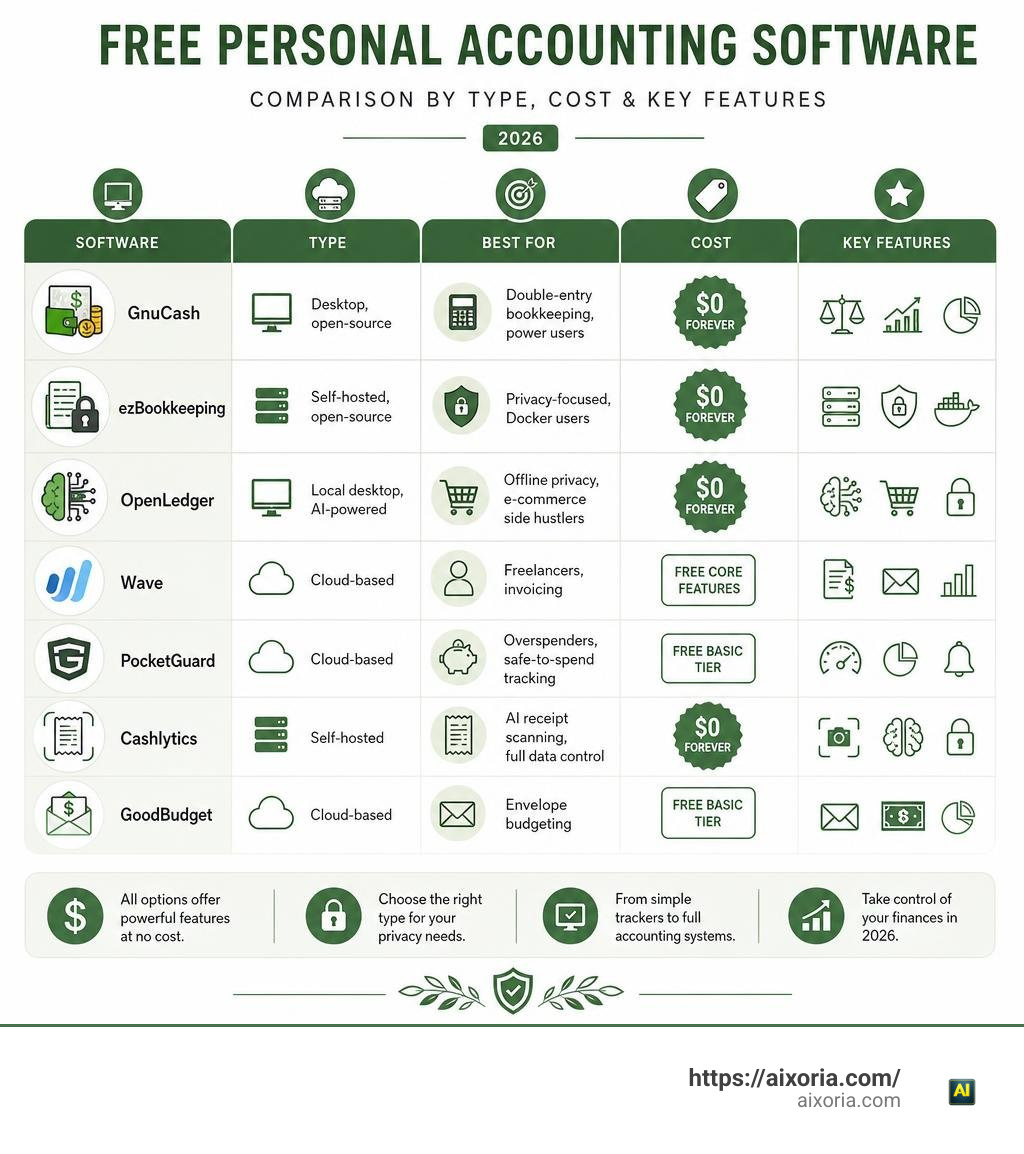
The best free accounting software for personal use in 2026 includes options for every type of user — from simple cloud apps to powerful self-hosted tools. Here’s a quick overview:
| Software | Type | Best For | Cost |
|---|---|---|---|
| GnuCash | Desktop, open-source | Double-entry bookkeeping, power users | $0 forever |
| ezBookkeeping | Self-hosted, open-source | Privacy-focused, Docker users | $0 forever |
| OpenLedger | Local desktop, AI-powered | Offline privacy, e-commerce side hustlers | $0 forever |
| Wave | Cloud-based | Freelancers, invoicing | Free core features |
| PocketGuard | Cloud-based | Overspenders, safe-to-spend tracking | Free basic tier |
| Cashlytics | Self-hosted | AI receipt scanning, full data control | $0 forever |
| GoodBudget | Cloud-based | Envelope budgeting | Free basic tier |
Here’s a number that should stop you cold: only about one in three Americans reviewed their budget in the last 30 days. Yet 83% of Americans use at least one financial app. That gap — between having the tool and actually using it — is where most personal finance plans fall apart.
The good news? The barrier to getting started has never been lower.
You no longer need to pay $119/year for Quicken or $180/year for QuickBooks to get serious accounting features. In 2026, genuinely capable free tools exist across every category — cloud apps, desktop software, self-hosted servers, and even local AI-powered platforms.
But “free” doesn’t always mean the same thing. Some tools are free because they monetize your data. Others are free because they’re open-source and community-maintained. A few are free forever with no strings attached. Knowing the difference matters before you hand over access to your bank accounts.
This guide compares the top options so you can find the right fit — whether you want a simple spending tracker or a full double-entry accounting system running privately on your own machine.
Understanding Free Accounting Software for Personal Use: Features and Trade-Offs

When evaluating free accounting software for personal use, it is vital to look beneath the surface. Software development costs real time and money. When a company or project offers a full accounting suite for zero cost, they are utilizing one of four primary models:
- Freemium Cloud Apps: Core tracking features are free, but premium capabilities like direct bank synchronization, advanced custom reporting, or receipts parsing require a monthly subscription.
- Ad-Supported and Data-Monetized Platforms: Software is completely free to use, but the provider targets you with financial product offers, credit card recommendations, or anonymized market research.
- Open-Source Software: Developed and translated by global volunteer communities or open core maintainers. The software source code is published freely under licenses like the GNU GPL, allowing anyone to install and run it locally without recurring fees.
- Local-First & On-Device Applications: Tools designed to run straight on your personal operating system, executing data storage and processing locally without reliance on central cloud databases.
Understanding these models helps you determine what trade-offs you are comfortable making regarding security, ease of use, and convenience.
Defining True Cost and Data Ownership
While paid alternatives like Monarch ($99/year), Quicken ($119/year), and QuickBooks ($180/year) charge recurring fees to keep your accounts synchronized in the cloud, free personal accounting platforms manage data in distinctly different ways.
If you select a web-based free application, your personal transactions, account balances, and merchant records reside on company servers. Many web platforms implement robust 256-bit TLS encryption and PCI Level-1 compliance to keep data safe from bad actors. However, if that provider changes its business model, restricts free tiers, or shuts down operations—as happened when legacy tools merged or dissolved—you risk losing access to years of historical records unless you export them routinely.
On the flip side, desktop applications and self-hosted tools store financial records straight on your local hard drive or home server. Software like OpenLedger, GnuCash, and self-hosted Docker apps put full data ownership in your hands. You can export transaction registers into universal formats such as CSV, QIF, and OFX whenever you choose, making your record-keeping completely immune to price hikes, corporate shut-downs, or subscription lock-in.
Single-Entry vs Double-Entry Systems
Another critical technical distinction when choosing personal money management software is whether the tool uses single-entry or double-entry bookkeeping.
- Single-Entry Systems: Function much like a standard checkbook register or personal cash log. Every transaction is logged once as either incoming revenue or outgoing spending. Single-entry software is easy to understand, requires zero accounting training, and works well for basic monthly budget tracking and everyday expense monitoring.
- Double-Entry Systems: Require every transaction to be recorded in at least two separate ledgers—a debit to one account and an equal credit to another. The fundamental accounting identity (
Assets = Liabilities + Equity) stays strictly balanced at all times.
While double-entry accounting carries a slight learning curve, it offers unparalleled financial accuracy. It eliminates phantom balance errors, keeps detailed track of complex asset categories (such as stock portfolios, investment accounts, and property values), and allows you to generate formal balance sheets and income statements directly from your personal records.
Top Cloud and Open-Source Accounting Software Options in 2026
To help you navigate the landscape of free financial tools, we have categorized the standout solutions available in 2026 across two main categories: desktop open-source tools and privacy-first local AI applications.
Open-Source Free Accounting Software for Personal Use
Open-source accounting software is the gold standard for individuals who want zero cost forever, complete code transparency, and absolute data control.
1. GnuCash
For users who require uncompromising double-entry bookkeeping without subscription fees, GnuCash remains one of the most capable tools available. Available across Microsoft Windows, Apple macOS, and Linux, it serves as a powerful zero-cost alternative to legacy desktop applications.
You can learn more directly at Free Accounting Software | GnuCash or review specific desktop platform details on GnuCash — Free Accounting Software for Windows 2026 .
GnuCash implements strict double-entry principles while maintaining an accessible checkbook-style register user interface. It provides comprehensive support for tracking personal checking accounts, credit card balances, investment holdings (stocks, bonds, and mutual funds), and scheduled recurring payments. Because it is released under the GNU GPL and maintained by an international volunteer community, it is free in both price and source code availability.
- Key Highlights:
- Full double-entry accounting ledger balance sheets.
- Multi-currency management and online stock quote fetching.
- Standard file format imports including QIF, OFX, and HBCI.
- Works entirely offline on desktop platforms without cloud requirements.
2. ezBookkeeping
If you prefer a clean web user interface accessible across all your home network devices, mayswind/ezbookkeeping is a standout lightweight open-source choice. Garnering over 5,000 stars and 560+ forks on GitHub, this self-hosted software is engineered specifically for personal finance and personal bookkeeping.
ezBookkeeping can be deployed in minutes via Docker (docker run -p8080:8080 mayswind/ezbookkeeping) or run as a light binary on low-resource hardware like a Raspberry Pi or micro-server. It supports Progressive Web App (PWA) installation, allowing you to save the platform directly to your iOS or Android home screen for a fast native app feel.
- Key Highlights:
- Multi-user support with PIN locking and 2FA authentication.
- Multi-currency support with dynamic foreign exchange rate conversion.
- Data import compatibility for CSV, OFX, QFX, QIF, GnuCash, and Firefly III formats.
- Translated into over 20 languages by active open-source contributors.
Local AI and Privacy-First Personal Finance Solutions
A fresh generation of software blends privacy-first local storage with modern artificial intelligence, offering full financial automation without sending sensitive transaction records to third-party cloud engines.
1. OpenLedger
For individuals who want smart budget insights without paying $99 to $180 per year for commercial cloud tools, OpenLedger — Free Personal Finance Software with AI offers a complete solution at $0 cost forever.
OpenLedger runs 100% locally on your computer (supporting Windows, macOS, and Linux). Instead of uploading your bank transactions to external servers, OpenLedger executes lightweight machine learning (XGBoost ML) and on-device Large Language Models (LLMs) straight on your hardware. It automatically learns your categorization preferences and vendor details locally.
Furthermore, if you run a side hustle, sell items online, or manage e-commerce stores, OpenLedger includes settlement tracking for platforms like Amazon, Etsy, Shopify, eBay, Walmart, and TikTok Shop, mapping platform fees against gross income to calculate exact net profit alongside your household spending.
- Key Highlights:
- 100% private local storage with zero cloud subscription fees.
- On-device machine learning for smart transaction auto-categorization.
- Schedule C tax category mapping and net worth tracking.
- Direct optional bank connectivity via SimpleFIN, plus manual CSV/OFX/QBO/PDF imports.
2. Cashlytics
If you are looking for a self-hosted cloud app with modern web frameworks and receipt management, check out Cashlytics: Free Self-Hosted Personal Finance App .
Built on Next.js 16, React 19, and PostgreSQL, Cashlytics is deployed on your private server or home NAS using simple Docker Compose scripts. It features a built-in AI assistant capable of processing unstructured receipt photos to extract date, merchant, total amount, and line-item categories automatically.
- Key Highlights:
- Automated AI receipt image parsing and line-item scanning.
- Smart CSV reconciliation with duplicate transaction detection.
- Integrated plain-language AI assistant for financial querying.
- Single-user privacy mode that bypasses login prompts for zero-friction tracking.
3. Open Accountant
For tech-savvy users, privacy advocates, and developers who prefer a command-line interface (CLI) workflow, Open Accountant — AI Bookkeeper That Runs on Your Machine delivers a local-first platform powered by the “Wilson” CLI tool.
Open Accountant processes bank files and vendor receipts on your machine without transmitting data externally. It features an open skills marketplace with over 45 individual financial skills covering tax intelligence, debt payoff planning, and cash flow forecasting, making it a flexible open platform for complex financial workflows.
Essential Features to Look For in Personal Accounting Software

Choosing the best free accounting software for personal use requires evaluating your specific technical comfort level, hardware setup, and daily tracking routines. Here are the core features you should prioritize during your selection process.
Automated Categorization and AI Capabilities
Manual transaction logging is the number one reason people abandon personal budget plans. Software equipped with automated categorization or local AI intelligence dramatically reduces manual data entry.
Modern local AI engines learn from your historical edits. When you import a monthly bank statement CSV or QIF file, machine learning models analyze transaction descriptions, merchant codes, and dollar amounts, matching them against your preset category trees. High-end tools can even parse PDF store receipts or mobile photo uploads, saving you hours of tedious manual bookkeeping during end-of-month reviews.
Bank Sync, Multi-Currency, and Offline Access
To maintain an accurate, comprehensive financial picture, your software must support flexible data ingestion methods:
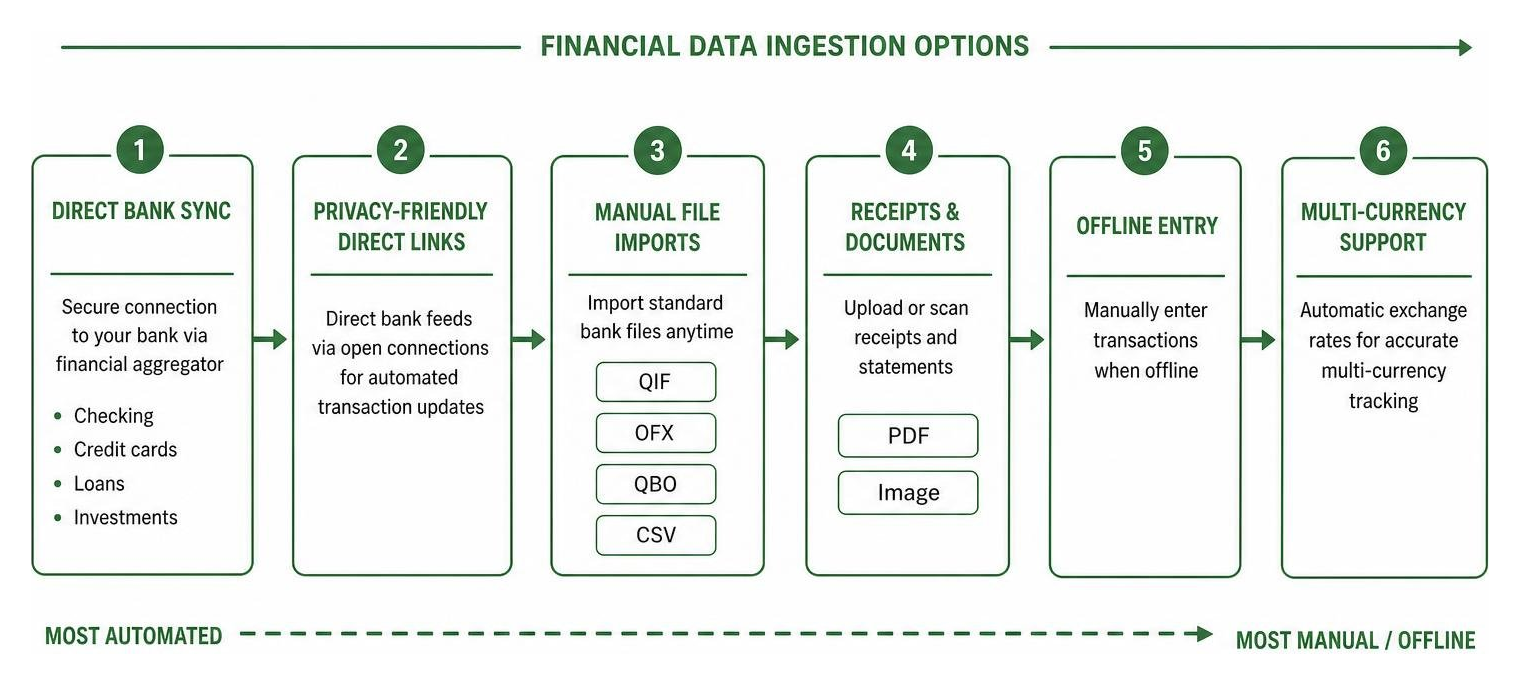
- Direct Account Aggregation: Cloud platforms often connect with financial aggregation services supporting over 17,000+ financial institutions, letting you refresh balances across checking accounts, credit cards, mortgages, and investment accounts in a single dashboard.
- Privacy-Friendly Direct Links: Local applications like OpenLedger use open direct bridges like SimpleFIN, enabling automated transaction feeds without subjecting your personal details to central cloud marketing databases.
- Manual Data File Imports: For absolute offline security, verify that your software easily imports standard bank file formats—specifically QIF, OFX, QBO, and structured CSV files.
- Multi-Currency Support: If you travel frequently, hold foreign accounts, or manage multi-currency transactions, choose platforms (such as GnuCash or ezBookkeeping) that pull daily exchange rates automatically to calculate true net worth across all asset types.
How to Use Free Accounting Software to Build Sustainable Money Habits
Having software installed on your machine is only the first step. Building sustainable, long-term financial health requires transforming your application into an active feedback loop.
Maximizing Free Accounting Software for Personal Use and Goal Tracking
To build lasting money habits, pair your software routine with habit stacking—attaching your budget review to an existing daily or weekly ritual. For instance, schedule a quick 10-minute spending review every Sunday morning while drinking your coffee.
Follow this simple weekly rhythm to maintain financial momentum:
- Import and Reconcile: Download latest bank files or run your auto-sync tool to bring in recent transactions.
- Review Uncategorized Items: Assign broad spending categories (e.g., Housing, Groceries, Transportation) before diving into granular sub-categories.
- Check Spending Benchmarks: Compare your current monthly spending against classic budgeting frameworks like the 50/30/20 rule (allocating 50% of net income to essential needs, 30% to wants, and 20% toward savings and debt payoff).
- Set Up Alerts: Configure low-balance notifications or target category threshold alerts to flag overspending before it impacts your long-term plans.
Tracking Net Worth and Emergency Savings Goals
Beyond simple monthly expense tracking, modern accounting tools allow you to calculate overall net worth (Total Assets minus Total Liabilities).
By setting up dedicated asset ledgers for emergency savings accounts, retirement funds, and property values alongside liability entries for student loans or mortgages, you gain an accurate, real-time look at your true financial trajectory. Watching your net worth line trend upward over time provides far greater motivation than simply monitoring monthly checking account cash flows.
Frequently Asked Questions About Free Personal Accounting Software
What does free personal accounting software cost in terms of privacy?
It depends entirely on the hosting model. Completely free cloud platforms frequently display targeted credit card or loan offers and may analyze aggregate spending trends for marketing insights. Conversely, open-source desktop software (like GnuCash) and local AI applications (like OpenLedger) store all financial data directly on your local device or self-hosted server, ensuring zero data harvesting or third-party tracking.
How do open-source tools compare to web-based platforms?
Web-based platforms offer seamless cross-device synchronization and effortless browser access without setup friction, but depend on central cloud uptime and third-party servers. Open-source desktop and self-hosted applications require manual installation (or Docker container management), but offer superior data privacy, complete freedom from monthly subscription fees, and long-term record stability.
Can self-hosted accounting apps be used on mobile devices?
Yes! Many modern self-hosted platforms (including ezBookkeeping and Cashlytics) feature mobile-optimized web interfaces and Progressive Web App (PWA) support. By running the container on a home server or private virtual server, you can add the app directly to your smartphone home screen for a native, private mobile tracking experience.
Conclusion
Managing your household finances shouldn’t require paying $100 to $180 every year in recurring software fees. Whether you need a robust, formal double-entry desktop system like GnuCash, a lightweight self-hosted container like ezBookkeeping, or a privacy-first local AI engine like OpenLedger, free personal accounting software has reached unprecedented levels of performance and accessibility in 2026.
Choosing the right platform comes down to your personal workflow: select cloud tools for instant setup, open-source software for double-entry precision, or self-hosted local AI engines for absolute data privacy.
To explore how intelligent automation can streamline your digital workflows and keep you organized across every project, check out our guide on the best AI productivity tools in 2026. By taking control of your financial record-keeping today, you lay the foundation for long-term clarity, smarter spending habits, and lasting financial freedom.