Why the Best Free Personal Finance Software Matters More Than Ever
The best free personal finance software can completely change how you manage your money — without spending a single dollar on subscriptions.
Here is a quick look at the top free options by use case:
| Use Case | Best Free Tool |
|---|---|
| Envelope budgeting | Goodbudget (free tier: 20 envelopes) |
| Double-entry accounting | GnuCash |
| Investment tracking | Empower |
| Privacy-first desktop budgeting | Money Manager Ex |
| Self-hosted / open-source | Firefly III or Financial Freedom |
| Subscription management | Rocket Money |
| Multi-currency + advanced reporting | Money Manager Ex (MMEX) |
Most people know they should track their spending. But between paid apps charging $10–$15 per month and the old Mint app shutting down and moving to Credit Karma, it is harder than ever to know where to start.
The good news? Free tools have caught up fast.
Some are cloud-based and sync to over 17,000 financial institutions automatically. Others store everything locally on your computer with military-grade encryption. A few are fully open-source — meaning you own every byte of your data.
The catch is that not every free tool is right for every person. A beginner needs something very different from a small business owner or an investor tracking a stock portfolio.
This guide cuts through the noise and gives you a clear, honest comparison of the best options available in 2026.
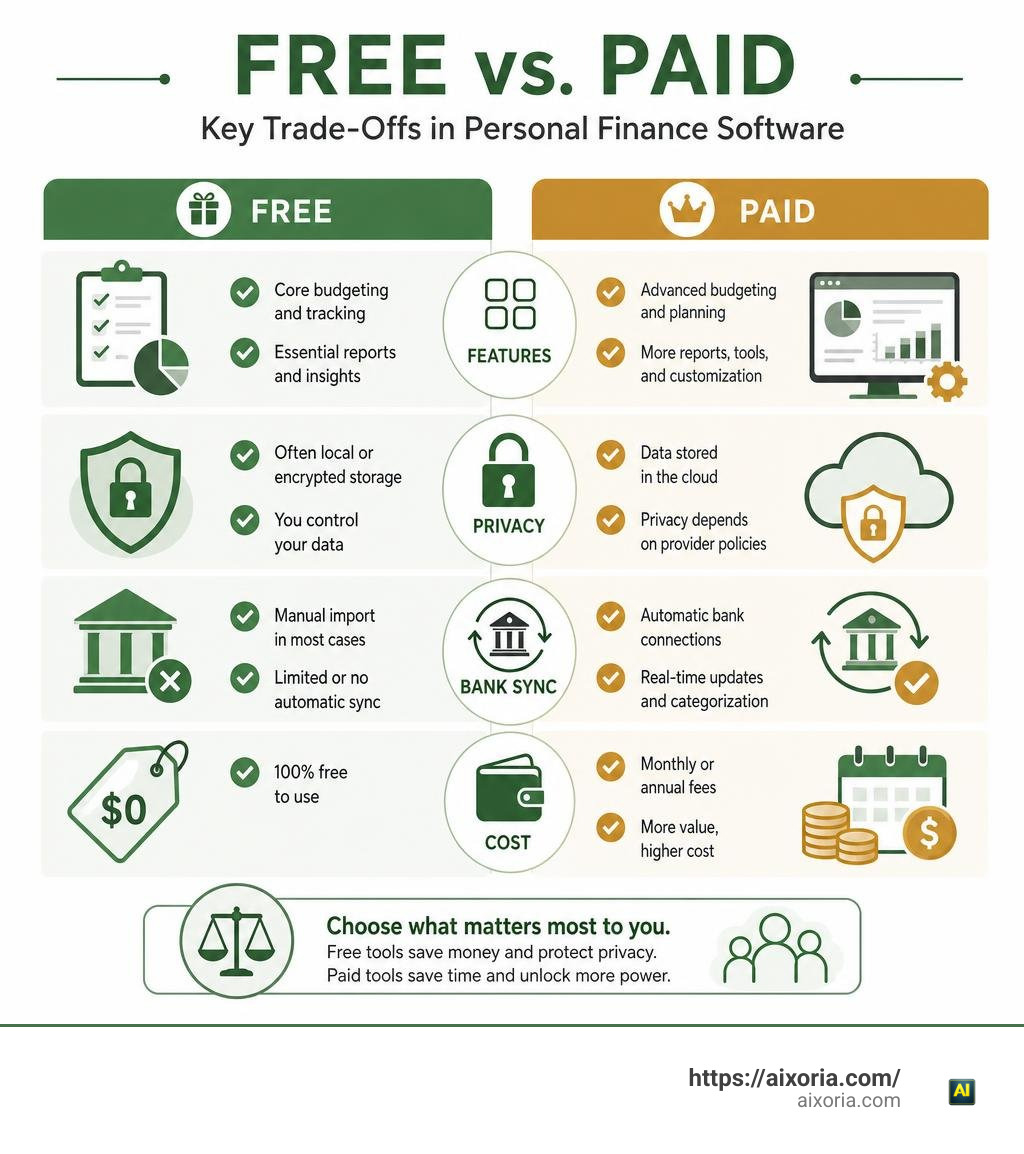
Free vs. Paid Financial Apps: Limitations and Capabilities

When we evaluate software to manage household finances, we immediately face a trade-off: pay a monthly subscription fee or accept the limitations of zero-cost software. Popular commercial platforms like You Need a Budget (YNAB), Monarch Money, and Copilot charge anywhere from $10 to $15 per month (with YNAB costing $109 annually or $14.99 per month after a 34-day trial). Over several years, these subscription costs accumulate into hundreds of dollars spent just to manage the money we already have.
What are we actually paying for when we subscribe to premium money apps? Primarily, paid tools offer automated, real-time bank aggregation, push notifications, polished cross-device cloud sync, and dedicated customer success teams. However, paying a subscription fee does not automatically guarantee flawless execution. Industry benchmark data reveals that standard cloud-based aggregators used by paid tools miscategorize up to 31% of transactions. Monarch’s auto-categorization accuracy hovers around 70%, while Copilot manages roughly 90%.
By contrast, choosing the best free personal finance software means accepting specific design choices:
- Free Cloud Tiers: Platforms offering free cloud services often restrict higher-end features. For instance, Goodbudget offers a generous free tier, but limits users to 20 total virtual envelopes across two devices. Premium plans ($10/month or $80/year) unlock unlimited envelopes and account sync.
- Service Monoculture and Upsells: Apps like Rocket Money provide free subscription tracking and basic budgeting, but monetize via optional bill negotiation services that collect 35% to 60% of your first year’s negotiated savings. Other free cloud portals offset operational costs by recommending credit cards or insurance products.
- Local and Open-Source Applications: Software that runs entirely on your local machine — such as GnuCash or Money Manager Ex — costs absolutely nothing to maintain because there are no centralized servers to host. The trade-off is that you take charge of data backups, software updates, and setup.
Manual Entry vs. Automated Bank Synchronization
One of the central choices when choosing the best free personal finance software is deciding how transaction data enters your register.
Automated bank synchronization connects your credit cards, checking accounts, and mortgage portals directly through intermediary aggregators like Plaid or Teller using mutual TLS (mTLS) encryption connections. Bank sync saves significant amounts of time: transactions import automatically in the background, categorized and ready for review.
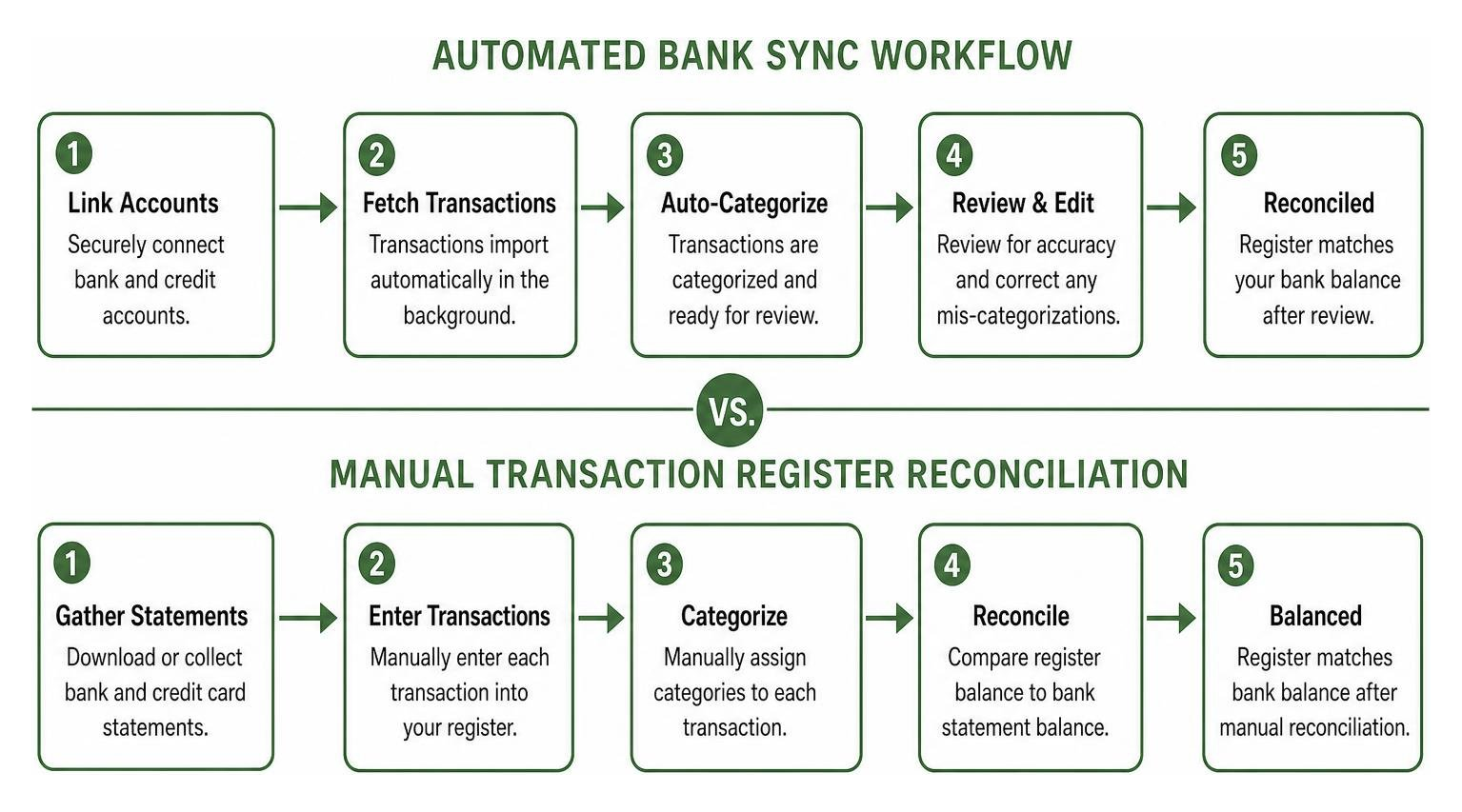
However, automated sync can occasionally introduce friction:
- Sync Delays and Pending Items: Pending debit entries can take up to two or three business days to finalize, leading to short-term discrepancies between your app’s projected register and your actual available balance.
- Categorization Errors: When auto-categorization mislabels a payment, you still have to manually reassign categories.
- Connection Drops: OAuth bank links can drop whenever financial institutions update security protocols, requiring periodic account re-authentication.
Manual entry, on the other hand, forces deliberate interaction with every single transaction. Whether you use a desktop checkbook register or import monthly bank CSV statements into an offline database, manually assigning expenses builds acute spending discipline. You notice every impulse buy because you have to type it in yourself. For millions of users who find automated sync overwhelming or unreliable, offline manual reconciliation remains the gold standard for financial mindfulness.
Cloud-Based Apps vs. Locally Installed Desktop Software
Where your financial data lives is a major factor in choosing personal finance software. Modern apps fall broadly into two architectures: cloud-hosted web apps and locally installed desktop software.
Cloud-based apps store your transaction history, account numbers, and budget targets on remote servers. This grants access from any browser or smartphone, but it also creates potential security targets. If a centralized cloud database suffers a security incident, sensitive metadata across thousands of user profiles could be exposed.
Locally installed desktop software completely removes third-party cloud infrastructure from the security equation. Your financial ledger resides exclusively on your device’s hard drive inside an encrypted file format. Desktop programs utilize native platform security models, such as Data Protection API (DPAPI) encryption on Windows or macOS Keychain integration on Apple hardware. Privacy-focused desktop applications showcase how modern offline platforms maintain complete privacy by locking your financial database locally on your machine while delivering clear spending insights and high categorization accuracy.
Cheat Sheet: Best Free Personal Finance Software Categories
To simplify your choice, we have organized the top contenders by their primary strength, architectural model, and ideal user base:
| Software | Primary Category | Operating Model | Platform | Standout Feature |
|---|---|---|---|---|
| Goodbudget | Envelope Budgeting | Cloud (Freemium) | Web, iOS, Android | Multi-device household cash allocation |
| GnuCash | Double-Entry Accounting | Desktop Open-Source | Windows, Mac, Linux | Enterprise-grade general ledger balancing |
| Empower | Wealth & Portfolio Tracking | Cloud Free Tier | Web, iOS, Android | Consolidated net worth & fee analysis |
| Buddi | Privacy Budgeting | Desktop Open-Source | Windows, Mac, Linux | Offline encrypted local database |
| Money Manager Ex | Cash Flow & Accounting | Desktop Open-Source | Windows, Mac, Linux, Mobile | Custom fields, multi-currency & subcategory nesting |
| Firefly III | Double-Entry Manager | Self-Hosted Web App | Docker Server / Localhost | Custom rule engine & REST API integration |
| Financial Freedom | Open-Source Budgeting | Self-Hosted Web App | Docker / Raspberry Pi | Privacy-centric alternative to commercial tools |
Envelope Budgeting vs. Double-Entry Accounting Tools
Understanding the underlying philosophy of your financial tool prevents frustration down the road. The two most common methodologies in financial software are virtual envelope budgeting and double-entry bookkeeping.
Envelope budgeting digitizes the traditional cash envelope strategy. When your paycheck arrives, you distribute every available dollar into virtual envelopes marked for specific recurring costs (e.g., Rent, Groceries, Dining Out, Emergency Savings). When an envelope runs dry, you must either pause spending in that category or intentionally shift funds from another envelope. Goodbudget excels at this paradigm by displaying running balances across spending buckets on both desktop web browsers and mobile devices, helping households anticipate cash shortages before transactions post.
In contrast, double-entry accounting operates under strict accounting guidelines. Every transaction requires both a debit and a credit across two distinct accounts. For example, when you purchase $50 worth of groceries using a credit card, your Groceries Expense Account increases by $50 (debit), while your Credit Card Liability Account increases by $50 (credit).
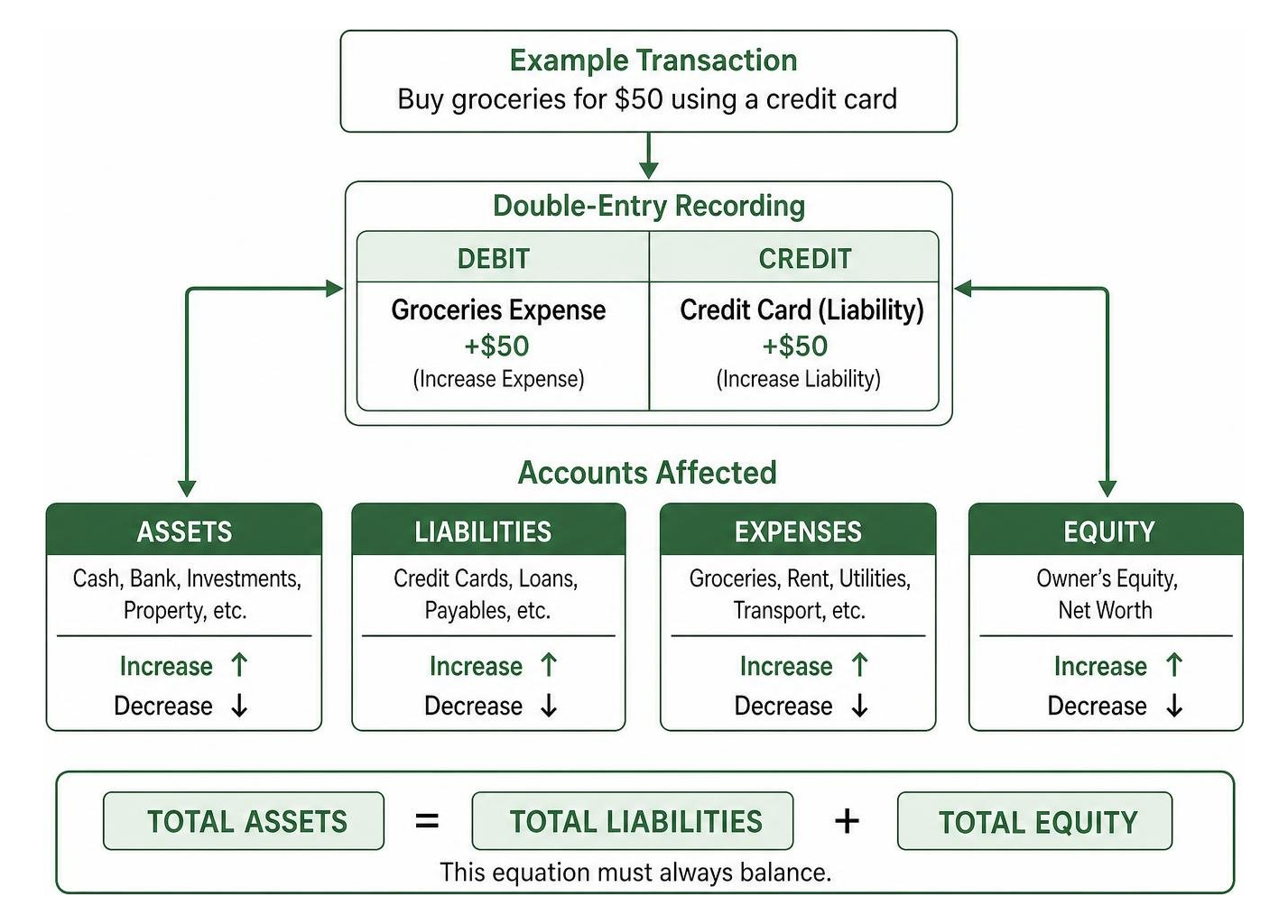
This structure ensures that your total assets always equal your total liabilities plus your equity. Applications built around these rules, such as GnuCash Open Source Accounting, prevent balance discrepancies, track accounts payable and receivable, and construct true financial balance sheets. While double-entry accounting presents a steeper learning curve for beginners, it provides unmatched precision for complex personal finances or home businesses.
Portfolio Management and Investment Tracking Solutions
If your main goal is monitoring retirement accounts, employer-sponsored plans, mutual funds, and stock portfolios, general spending apps often fall short. Dedicated investment tracking solutions aggregate holding positions, display asset allocations, and calculate total net worth across multiple brokerage accounts.
Free tools in this category connect directly to investment institutions to download current security quantities and cost bases. They leverage automated market price feeds to recalculate account valuations in real time, giving you a clear view of your portfolio performance without manual stock lookup. For example, Empower serves over 18 million customers, offering wealth management dashboards that track fee structures across index funds, compute real-time asset allocations, and project future cash flows toward retirement goals.
When evaluating investment tracking capabilities inside the best free personal finance software, look for:
- Automated price updates for equities, bonds, ETFs, and mutual funds.
- Consolidated net worth dashboards balancing liquid checking accounts against investment portfolios and real estate liabilities.
- Fee analyzer tools that detect hidden expense ratios drag on your long-term compound growth.
Choosing the Best Free Personal Finance Software for Your Needs

Selecting the ideal software depends on your current financial priorities and technical comfort level. Matching your specific workflow requirements to the right feature set saves hours of manual re-configuration later.
Evaluating Best Free Personal Finance Software for Beginners vs Power Users
Beginners and power users operate on opposite ends of the functional spectrum:
Beginner Requirements
If you are setting up your first budget, software complexity can hinder consistency. Beginners need:
- Clean, uncluttered user interfaces that emphasize basic income vs. expense visual gauges.
- Simple, flexible category boundaries rather than strict accounting rules.
- Fast onboarding workflows that do not require complex initial account balances.
- Clear subscription detection to highlight recurring bills that can be safely trimmed.
Power User & Side-Gig Requirements
If you run a small business, manage freelance projects, or oversee complex investment portfolios, basic spending charts are insufficient. Power users need:
- Full double-entry bookkeeping systems with double-entry checkbook registers.
- Invoicing engines capable of managing vendor profiles, accounts payable, accounts receivable, and tax schedules.
- Custom transaction tagging engines and multi-level subcategories (e.g., Housing to Utilities to Water).
- Complete data export capabilities (CSV, QIF, OFX, XML) to export clean ledgers directly to tax preparation platforms.
Managing Multi-Currency, Custom Reports, and Bank Sync Features
For households with international assets or unique reporting needs, specialized feature support is essential.
Multi-currency functionality allows software to handle foreign transactions seamlessly. If you live in the United States but hold a savings account in Europe in Euros, single-currency software will miscalculate your net worth. Software with true multi-currency support establishes a designated Base Currency while pulling historical or live exchange rates to automatically convert foreign transaction values.
Custom reporting capabilities allow you to construct deep financial insights beyond default pie charts. High-end open-source software lets you filter expenses by custom tags, search payees across multi-year timeframes, and generate precise cash flow reports.
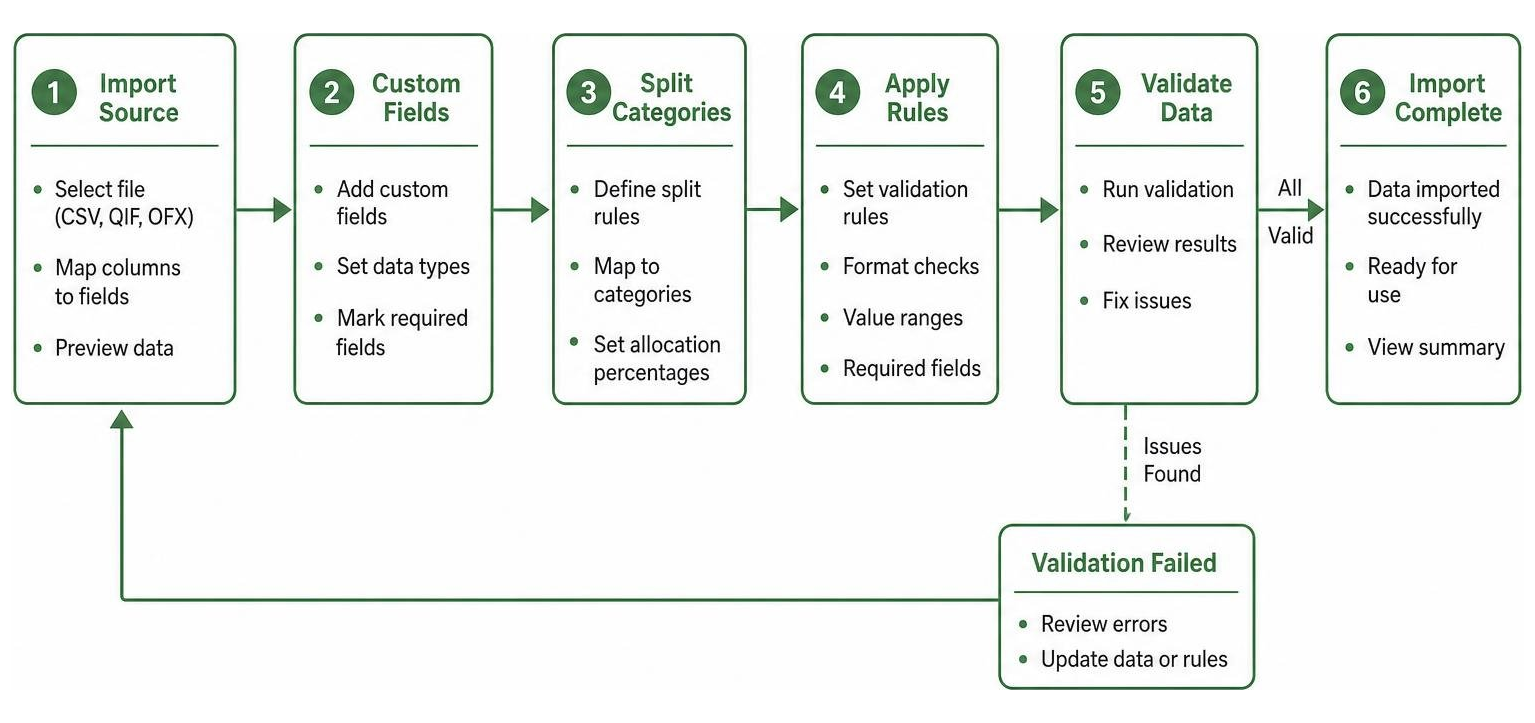
For a detailed walkthrough on setting up custom database fields, split categories, and encrypted file formats for desktop accounting, check out the comprehensive Money Manager Ex User Guide.
Self-Hosted and Open-Source Budgeting Solutions
For technology enthusiasts, privacy advocates, and open-source supporters, self-hosted budgeting software provides complete independence from corporate service changes. By self-hosting your software on personal hardware, you ensure that no commercial entity can sunset your platform, alter subscription terms, or monetization policies.
Top Open-Source and AI-Driven Best Free Personal Finance Software
The open-source ecosystem offers powerful options for managing household finances:
- Firefly III: Built around double-entry bookkeeping principles, Firefly III provides a self-hosted financial framework. It features a dedicated Data Importer tool to ingest messy bank CSV files, a customizable rule engine that standardizes transaction names, and an expansive JSON REST API allowing developers to attach custom mobile interfaces or automation routines.
- Financial Freedom: Designed as a privacy-focused alternative to commercial budgeting tools, Financial Freedom allows users to host their own secure web application using Docker containers on cloud hosting or a Raspberry Pi.
- GnuCash: Developed under the GNU General Public License (GPL) by a global volunteer community, GnuCash provides professional accounting features without paywalls, recurring fees, or ad placements.
To inspect the source code or deploy these solutions yourself, explore the Financial Freedom GitHub Repository, learn more about the Firefly III Personal Finance Manager, or grab the latest desktop build directly from the GnuCash Official Desktop Download.
Desktop vs. Mobile Experience: Finding the Right Balance
When evaluating personal finance tools, deciding between desktop platforms and mobile applications plays a critical role in long-term adoption:
- Desktop Applications:
- Strengths: Superior data-entry speed via physical keyboards, multi-window financial analytics, powerful batch transaction editing, advanced SQL custom reporting, and native offline access.
- Weaknesses: Restricted to your home office desk; manual transaction recording cannot occur at the point of sale.
- Mobile Companion Apps:
- Strengths: Immediate expense logging at retail checkout counters, instant push alerts for over-budget category warnings, and quick check-ins on available balance envelopes.
- Weaknesses: Smaller screen real estate makes deep multi-year trend analysis, complex split transaction setups, and portfolio auditing difficult.
- Cross-Device Cloud Syncing:
- Strengths: Bridges desktop analytical depth with mobile data logging, syncing transaction records across all household member devices in real time.
- Weaknesses: Requires centralized remote cloud infrastructure, introducing potential privacy trade-offs and ongoing maintenance requirements.
Frequently Asked Questions About Personal Finance Software
Are free personal finance software tools safe for linking bank accounts?
Reputable free financial platforms use security protocols identical to major commercial banks. When linking bank accounts, apps typically utilize read-only API integrations through security providers like Plaid or Teller using mTLS encryption connections.
Read-only tokenization means that even if an unauthorized party intercepted the connection, they could only view transaction history and balance totals — they cannot transfer money or modify bank settings. Furthermore, offline local software stores login keys inside local encrypted vaults (such as DPAPI on Windows or macOS Keychain) rather than centralized cloud databases. Always verify that any web-connected application supports 256-bit encryption standards before linking sensitive financial credentials.
What are the main limitations of using free budgeting software?
While free budgeting software provides great financial tracking value, common trade-offs include:
- Envelope and Category Limits: Freemium cloud applications frequently cap the number of active budget categories or envelopes (e.g., Goodbudget’s 20-envelope ceiling on free plans).
- Manual CSV Imports: Open-source desktop applications often require downloading CSV or QIF statement files from your online bank portal manually rather than pulling automatic background API feeds.
- Community-Driven Support: Free and open-source products rely primarily on public forum discussions, GitHub documentation, and user wikis rather than providing 24/7 direct phone or chat customer service.
Can free personal finance apps track multi-currency accounts?
Yes, several free tools handle multi-currency accounting natively. Applications like Money Manager Ex (MMEX), Firefly III, and GnuCash support global currency tracking.
These platforms let you establish a unified Base Currency for consolidated balance sheet reporting while running individual checking, savings, or investment registers in foreign currencies. You can set conversion rates manually or configure automated exchange rate updates to evaluate foreign asset values in your home currency.
Conclusion
Finding the best free personal finance software comes down to matching your personal financial goals with the software design that best supports your daily habits. Whether you prefer the structure of virtual envelope budgeting, the privacy of encrypted local desktop databases, or the transparency of self-hosted open-source software, exceptional free tools exist to help you take full control of your money.
By reducing subscription overhead and using smart budgeting systems, you streamline your day-to-day administrative tasks. Combining effective financial tools with modern digital productivity workflows gives you a clear, stress-free view of your financial health. To learn more about how intelligent tools can simplify your daily routines, check out our insights on the best AI for productivity in 2026.