Why Choosing the Right Testing Tools Can Make or Break Your Release

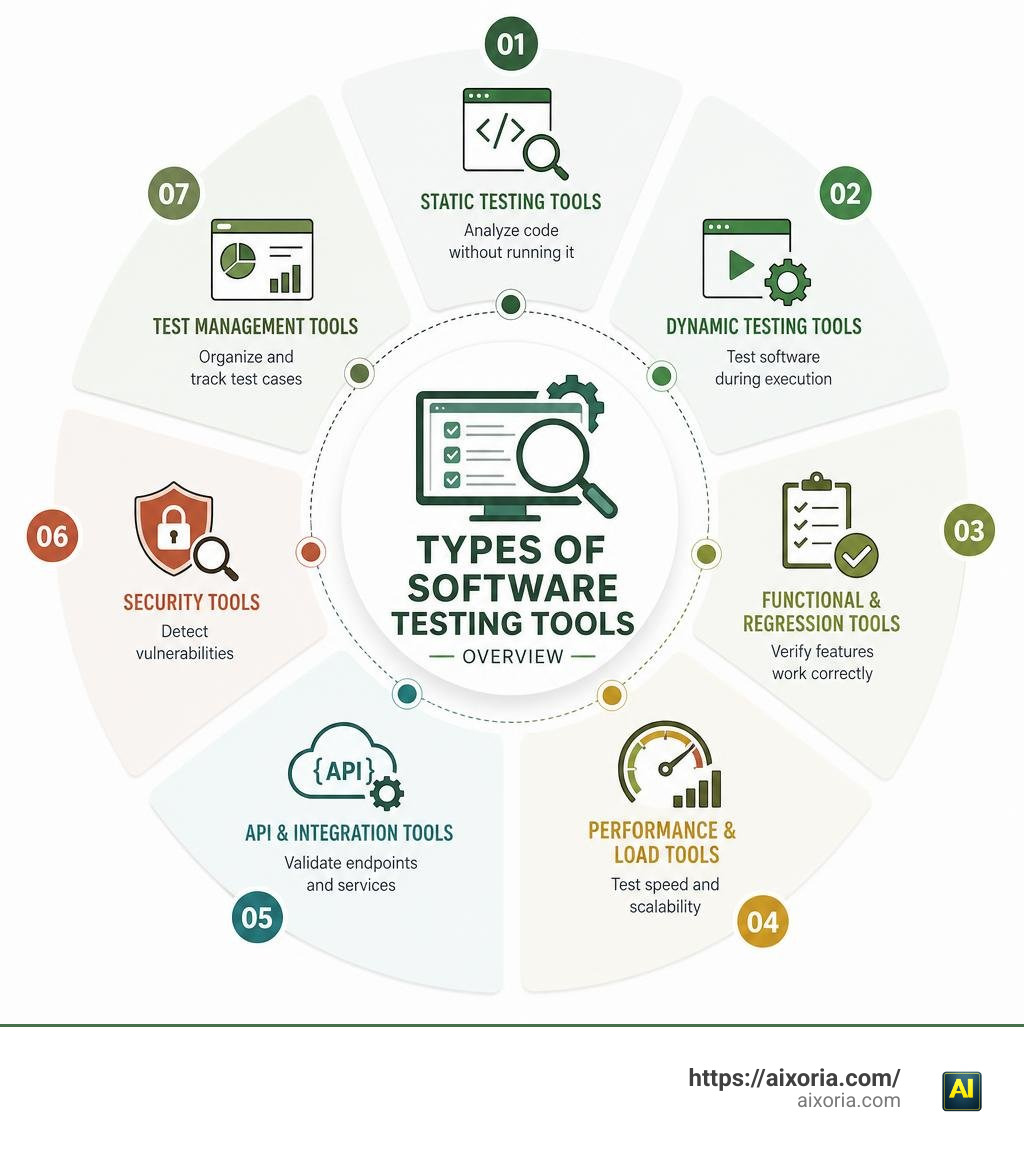
What are the different types of testing tools? Here’s a quick answer:
| Category | Purpose | Examples |
|---|---|---|
| Static Testing Tools | Analyze code without running it | SonarQube, ESLint |
| Dynamic Testing Tools | Test software during execution | Selenium, Appium |
| Functional & Regression Tools | Verify features work correctly | Cypress, Playwright |
| Performance & Load Tools | Test speed and scalability | JMeter, k6 |
| API & Integration Tools | Validate endpoints and services | Postman, REST Assured |
| Security Tools | Detect vulnerabilities | Snyk, OWASP ZAP |
| Test Management Tools | Organize and track test cases | TestRail, Jira |
| AI-Powered & Codeless Tools | Automate without heavy coding | Natural language platforms |
There are a lot of testing tools out there. And picking the wrong one costs real time and real money.
Most teams don’t struggle with a lack of options. They struggle with too many. A typical mid-sized enterprise runs 10 to 15 tools across 6 categories — each with its own dashboard, its own credentials, and its own quirks.
The testing tools market was valued at around $60 billion in 2025 and is expected to double by 2033. That growth means more choices, not fewer.
This guide cuts through the noise. We compare the main types of testing tools — what each one does, when to use it, and how to decide what fits your team.
What Are the Different Types of Testing Tools?
To truly master software quality, we first need to look at how these tools operate at a fundamental level. Software testing tools are specialized applications designed to evaluate the functionality, performance, and security of other software systems. They are generally split into two primary methodologies: static testing and dynamic testing.
Understanding this division is key to building a balanced QA pipeline. Here is a direct comparison of how they differ in purpose, execution, and impact on code quality:
| Feature | Static Testing Tools | Dynamic Testing Tools |
|---|---|---|
| Execution Status | Code is at rest (not running) | Code is executed in a runtime environment |
| Primary Focus | Structure, syntax, design, and logic flaws | Behavioral compliance, speed, and functional correctness |
| When It Runs | Early stages (requirements, design, coding) | Later stages (integration, system testing, staging) |
| Key Benefit | Catches bugs early when they cost 1x to fix | Validates real-world user workflows and integration points |
| Typical Outputs | Warnings, linting errors, vulnerability flags | Pass/fail test logs, performance metrics, bug reports |
By using both types of tools, we cover all bases. Static tools keep our codebase clean and secure before deployment, while dynamic tools verify that the system actually functions under pressure. For a deeper dive into these core classifications, check out this comprehensive Guide to software testing tools.
Static Testing Tools
Static testing tools analyze our software without executing it. Think of them as high-powered spelling and grammar checkers for code. They scan source files, configuration files, and even database schemas to find structural anomalies, logical flaws, and security vulnerabilities before the software ever runs.
By catching errors early, static tools save enormous amounts of development time. It is well-documented in QA research that finding a bug during the coding phase is roughly 100 times cheaper than fixing that same defect after the product has shipped to customers.
Common examples of static testing tools include:
- ESLint: A highly customizable linter for JavaScript and TypeScript that flags syntax errors and enforces consistent coding styles.
- SonarQube: An enterprise-grade static analysis platform that inspects code quality, calculates technical debt, and identifies security vulnerabilities across dozens of programming languages.
- Pylint & SonarLint: Developer-focused plugins that run directly in IDEs, providing real-time feedback as developers write code.
Dynamic Testing Tools
Dynamic testing tools, on the other hand, require the software to be running. These tools operate by feeding inputs into the system, monitoring its runtime behavior, and validating the output against expected results.
Dynamic testing is essential because some defects only emerge during execution—such as memory leaks, race conditions, integration failures, and network bottleneck issues. Dynamic tools help us perform functional validation, cross-browser testing, and end-to-end user journey checks.
Well-known dynamic testing tools include:
- Selenium: The industry-standard open-source framework for automating web browsers across different operating systems.
- Appium: A dynamic automation framework designed specifically for testing native, hybrid, and mobile web applications on iOS and Android.
- Cypress & Playwright: Modern, fast execution engines that run directly inside browser runtimes to provide real-time debugging and reliable functional testing.
Core Categories of Software Testing Tools
As applications grow from simple scripts to complex microservices architectures, our testing requirements multiply. This complexity often leads to “tool sprawl,” where different departments adopt isolated testing tools. To keep our workflows organized, we group these applications into distinct functional categories.
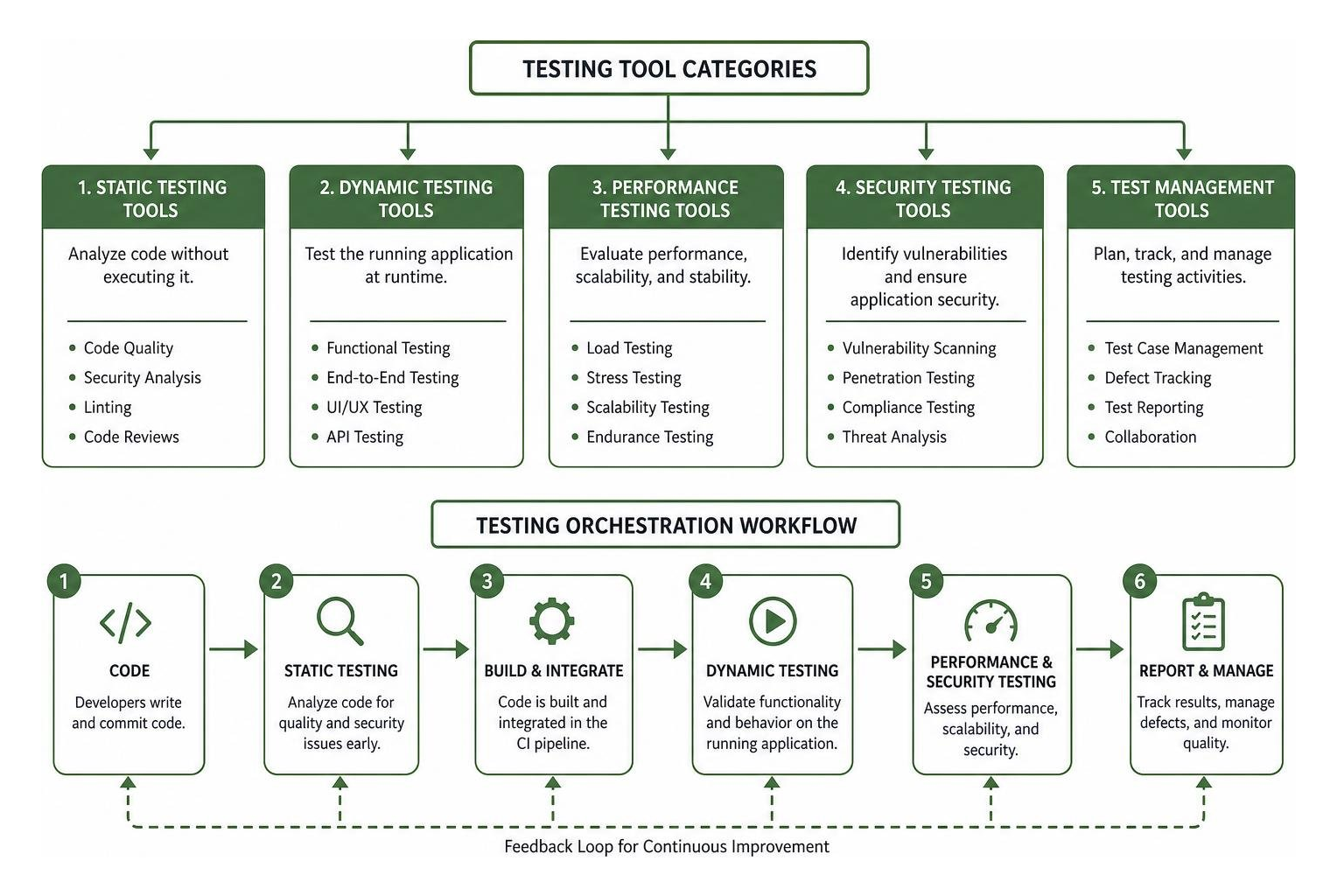
For a detailed breakdown of how these categories map to modern QA workflows, see this Complete guide to testing tool types. Let’s look at the five primary categories that form a complete testing suite.
Functional and Regression Testing Tools
Functional testing tools verify that our application does exactly what it is designed to do. They simulate real user interactions—like clicking buttons, filling out forms, and navigating pages—to confirm that features work as intended.
Regression testing tools focus on ensuring that new code commits do not break existing functionality. Because manually testing every legacy feature with every update is impossible, automated regression suites are critical. In fact, over 74% of modern software companies rely on automated testing for at least half of their QA workflows to keep release cycles moving quickly.
- Selenium: Best for complex, multi-browser legacy applications requiring deep customization.
- Playwright: A modern favorite for fast, parallel execution across Chromium, Firefox, and WebKit.
- Cypress: Known for its developer-friendly setup and real-time debugging capabilities during local development.
Performance and Load Testing Tools
An application that works perfectly for one user might crash when hit with thousands of concurrent requests. Performance and load testing tools help us evaluate system speed, responsiveness, and stability under heavy stress.
These tools simulate massive user traffic to find bottlenecks, database locks, and server limitations. Running these tests is crucial before major events, such as seasonal sales or product launches, to avoid costly downtime.
- Apache JMeter: A highly popular, open-source desktop application designed to load test functional behavior and measure system performance.
- k6: A developer-centric, open-source tool written in Go that makes load testing easy to integrate into CI/CD pipelines using JavaScript.
- Gatling: An enterprise load-testing tool optimized for high-performance testing with excellent real-time reporting.
API and Integration Testing Tools
Modern software relies heavily on APIs to connect services and share data. API testing tools validate the communication layer of our applications, verifying that endpoints return the correct status codes, payloads, and performance response times.
Because APIs don’t have graphical user interfaces, these tests run incredibly fast and are highly stable. They allow us to catch integration issues early, well before the UI is even built. If you are working with complex data pipelines alongside your APIs, utilizing the Best AI tools for data integration can help streamline how your backend services connect and share information.
- Postman: The go-to platform for building, testing, and managing APIs with an intuitive graphical interface.
- REST Assured: A Java-based library that simplifies the testing of RESTful web services, making it easy to validate complex JSON responses.
- SoapUI: A specialized tool built for testing both SOAP and REST APIs, offering advanced security and compliance validation.
Security and Compliance Testing Tools
With cybersecurity threats rising globally, security testing is the fastest-growing segment in QA, expanding at nearly 15% annually. Security testing tools scan applications for vulnerabilities, misconfigurations, and compliance risks (such as GDPR, HIPAA, or SOC 2 violations).
These tools look for common attack vectors like those highlighted in the OWASP Top 10 (including SQL injection and cross-site scripting). Integrating security testing directly into our development pipeline ensures we don’t ship vulnerable code to production.
- Snyk: A developer-first security tool that scans open-source dependencies, container images, and infrastructure-as-code for known vulnerabilities.
- OWASP ZAP (Zed Attack Proxy): A widely-used, free security tool that helps find vulnerabilities in web applications during runtime.
- SonarQube: Also acts as a static application security testing (SAST) tool by flagging dangerous code patterns before they are compiled.
Test Management and Reporting Tools
With dozens of tools running thousands of tests, keeping track of results can quickly become chaotic. Test management tools act as our single source of truth. They organize test cases, track manual and automated execution history, and provide clear reporting dashboards for stakeholders.
These systems also maintain audit trails, ensuring we can prove test coverage for regulatory compliance. To make the reporting phase even smoother, teams frequently combine these platforms with the Best AI tools for project reports to automatically summarize QA metrics into polished decks for executive reviews.
- Jira: Often paired with plugins like Xray or Zephyr to connect test cases directly to user stories and bug tickets.
- TestRail: A dedicated test case management tool that offers real-time dashboards, easy integration with automation frameworks, and robust history tracking.
How to Choose the Right Testing Tools for Your Team

Choosing the right testing tools is not about finding the option with the most features. It is about alignment. The best tool is the one that fits your application architecture, matches your team’s technical skills, and respects your budget. To build a highly effective QA strategy, we must evaluate our specific needs. For a structured look at mapping testing types to risk profiles, check out this Taxonomy of software testing.
Open-Source vs. Commercial Testing Tools
One of the first decisions we face is choosing between open-source and commercial platforms. Each path comes with distinct trade-offs:
- Open-Source Tools: Tools like Selenium, Playwright, and k6 have zero licensing costs and are backed by massive global communities. They offer ultimate customization because we have complete access to the code. However, they require significant engineering resources to set up, maintain, and scale. The “free” price tag often shifts to high labor costs.
- Commercial Tools: Commercial platforms charge licensing fees but offer immediate, out-of-the-box value. They provide dedicated customer support, built-in cloud execution grids, and advanced reporting dashboards. For teams without large platform engineering departments, commercial tools can drastically accelerate time-to-market.
Evaluating What Are the Different Types of Testing Tools for CI/CD Integration
In modern DevOps environments, testing cannot live in a silo. When evaluating What are the different types of testing tools?, we must prioritize how well they integrate with our CI/CD pipelines (using systems like Jenkins, GitHub Actions, or GitLab CI).
Continuous testing ensures that every code commit is automatically built, deployed, and tested. To achieve this smoothly, look for tools that support:
- Containerization: Tools that can run inside Docker containers ensure that tests run in identical environments, eliminating “it works on my machine” bugs.
- Command-Line Interfaces (CLIs): Tools must support headless execution via CLI to run seamlessly on remote build servers without needing a graphical user interface.
- Parallel Execution: Running tests in parallel across multiple virtual machines drastically reduces testing time, allowing us to accelerate our release cycles.
Comparing AI-Powered and Codeless Tools to Traditional Frameworks
The testing landscape is undergoing a massive shift with the rise of AI-powered and codeless testing tools. Traditional frameworks like Selenium require deep programming knowledge and constant maintenance. If a developer changes a button’s CSS class, selector-based tests often break, creating a heavy maintenance burden.
AI-powered and codeless platforms solve this by using natural language processing and self-healing algorithms. Instead of writing code, we can describe a test case in plain English.
Furthermore, AI tools can automatically update test scripts when the UI changes, reducing maintenance overhead by up to 60%. These platforms open up testing to non-technical team members. If you want to see how these advancements fit into broader business workflows, you can explore the Best AI tools for business analysts, who often bridge the gap between business requirements and QA.
Frequently Asked Questions about Testing Tools
What are the different types of testing tools used in agile development?
Agile development relies on rapid iterations, continuous feedback, and “shift-left” testing—moving testing activities as early in the development lifecycle as possible. To support this fast pace, agile teams use:
- In-Sprint Automation Tools: Codeless or low-code tools that allow testers to write automation scripts in parallel with development, rather than waiting for a feature to be completely finished.
- Unit Testing Frameworks: Tools like JUnit, Jest, and PyTest that developers run locally on every code commit to catch logic bugs immediately.
- Continuous Integration Plugins: Tools that trigger smoke tests automatically the moment new code is pushed to a shared branch.
For a deeper look at how testing changes during agile sprints, see the Tricentis software testing types guide.
What is the probe effect in software testing?
The probe effect refers to a situation where the tool used to measure or monitor a software system slightly alters the behavior of that system. This is especially common in performance testing, debugging, and security scanning.
For example, when we attach a heavy debugger or dynamic analysis tool to a running application, it consumes system memory and CPU cycles. This can slow down transaction times or even cause timing-dependent bugs (often called “Heisenbugs”) to temporarily disappear while we are actively trying to measure them. Being aware of the probe effect helps us design more accurate test environments that mimic production as closely as possible.
Can open-source testing tools handle enterprise-level loads?
Yes, absolutely. Open-source testing tools like Apache JMeter, k6, and Gatling are fully capable of executing massive, enterprise-level load tests. However, the key challenge lies in scaling the infrastructure.
To simulate hundreds of thousands of concurrent users, a single local machine is not enough. We must set up distributed testing environments—such as running Selenium Grid or k6 instances across Kubernetes clusters. While open-source tools can handle the load, enterprise teams must weigh the engineering effort required to build and maintain these scaling grids against the convenience of commercial cloud-testing platforms.
Conclusion
Building a high-performing software product in 2026 requires a smart, multi-layered approach to testing. No single tool can cover every risk. Instead, the most successful engineering teams combine static analysis to keep code clean, dynamic automation to verify user journeys, and robust performance and security tools to protect their infrastructure.
By understanding What are the different types of testing tools? and selecting the ones that align with your team’s skills and project goals, you can accelerate your release cycles and deliver software with complete confidence.
Ready to explore how the latest technology can optimize your workflows? Explore AI Tools at Aixoria to find cutting-edge solutions designed to streamline your business and development processes.