Why the AI Impact on Coding Matters More Than You Think
Scr0ll d0wn to D0VVNL0AD
The AI impact on coding is one of the most hotly debated topics in tech right now — and for good reason. AI coding tools are changing how developers work, learn, and grow their careers at a pace that’s hard to ignore.
Here’s a quick summary of what the research shows:
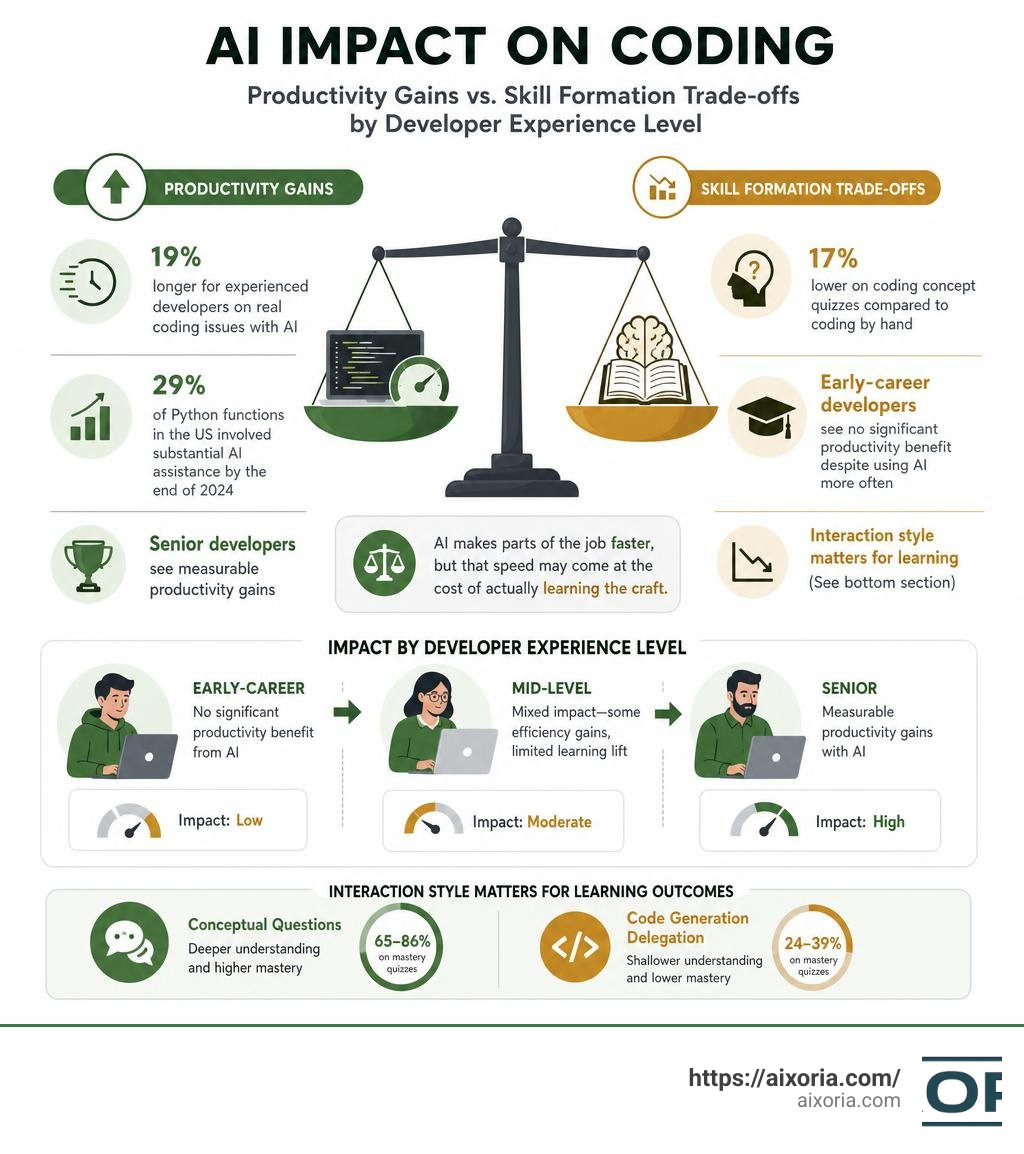
- Productivity: AI tools can speed up some familiar tasks, but a randomized controlled trial found experienced developers took 19% longer to complete real coding issues when using AI
- Skill formation: Developers who used AI scored 17% lower on coding concept quizzes than those who coded by hand — nearly two letter grades
- Who benefits: Senior developers see measurable productivity gains; early-career developers see no significant benefit despite using AI more often
- Adoption: By the end of 2024, roughly 29% of Python functions written in the US involved substantial AI assistance
- Interaction style matters: Developers who asked AI conceptual questions scored 65–86% on mastery quizzes; those who delegated code generation scored as low as 24–39%
The core tension is simple: AI makes parts of the job faster, but that speed may come at the cost of actually learning the craft. And that trade-off hits junior developers the hardest.
This article breaks down the research, the real-world data, and what it all means for developers and the companies that hire them.
The Dual Nature of AI Impact on Coding: Productivity vs. Skill Formation
As we navigate the landscape of July 2026, it is clear that generative AI has permanently altered the software engineering profession. We are witnessing a massive, global shift in how code is written, maintained, and understood. Yet, this transition is not a simple story of pure optimization. Instead, the ai impact on coding reveals a deeply dual nature: a constant tension between short-term productivity gains and long-term skill formation.
At the heart of this tension lies the concept of “cognitive offloading.” When we offload the mental heavy lifting of writing syntax, resolving compiler errors, or looking up documentation to an AI assistant, we free up immediate cognitive bandwidth. But what happens to the muscles we aren’t using anymore? Just as relying entirely on GPS can weaken our natural sense of direction, over-relying on AI can lead to skill atrophy.
According to Scientific research on global AI diffusion, the spread of generative AI coding tools has been rapid and global. By the end of 2024, an estimated 29% of Python functions in the US were produced with substantial AI support, with Germany (24%) and France (23%) following closely behind. This rapid diffusion means that a significant portion of the world’s codebase is now mediated by algorithms.

To understand this dual nature, we can compare traditional manual coding with AI-assisted workflows:
| Dimension | Manual Coding | AI-Assisted Coding |
|---|---|---|
| Primary Cognitive Task | Synthesis, recall, syntax construction | Evaluation, verification, context engineering |
| Learning Mechanism | Trial-and-error, deep documentation reading | Prompting, code reading, rapid prototyping |
| Speed (Familiar Tasks) | Moderate | High (often automated via tab-completion) |
| Speed (Complex Debugging) | Slow (requires deep tracing) | Variable (prone to rabbit holes and hallucination loops) |
| Retention of Concepts | High (strengthened by cognitive friction) | Lower (risk of superficial understanding) |
While AI allows us to bypass the tedious parts of coding, the “friction” of manual work is often exactly where learning happens. Getting stuck, reading stack traces, and wrestling with language specifications are not bugs in the learning process—they are the features that build deep mastery.
How AI Impact on Coding Varies by Developer Seniority
One of the most striking findings in recent empirical research is that the ai impact on coding is highly unequal. It does not lift all boats equally. Instead, the benefits are heavily concentrated among senior-level developers, while early-career developers are left running in place.
Data shows that generative AI adoption is associated with a 3.6% boost in quarterly commit rates overall. However, when we look closer, we find that senior developers enjoy a 6.2% productivity increase at current adoption levels and successfully expand into entirely new technical domains. They use AI to experiment with 2.7% more new library combinations, leveraging their deep foundational knowledge to direct the AI into unfamiliar territory safely.
In contrast, early-career developers show no significant productivity benefits from using generative AI, despite using these tools much more frequently. In fact, early-career developers use generative AI for roughly 37% of their code, compared to 27% for highly experienced engineers.
Why this disparity? Senior developers possess the mental models required to immediately spot hallucinations, evaluate architectural trade-offs, and debug AI-generated code. They can use the best AI tools for generating code as a force multiplier because they already know how the code should work. Early-career developers, lacking these deep mental models, often spend their time copy-pasting code they do not fully understand, leading to integration struggles and no net time savings.
The Cognitive Trade-offs and AI Impact on Coding Mastery
When we look at how AI assistance affects the actual mastery of coding concepts, the data is sobering. Controlled studies have shown that using AI assistance leads to a statistically significant 17% decrease in mastery on quizzes covering recently used programming concepts. This is equivalent to dropping nearly two full letter grades (Cohen’s d=0.738, p=0.01).
The performance gap is not uniform across all skills. While developers using AI can often write basic syntax quickly, their debugging skills, code reading, and conceptual understanding suffer the most. When the AI does the writing, the developer misses out on the micro-decisions that build deep comprehension.
When we do not write the code ourselves, we struggle to explain how it works or how to fix it when it breaks. To combat this, developers are increasingly turning to specialized tools. For example, using 9 free AI tools to understand code can help bridge the gap by generating documentation and explaining complex, AI-generated codebases to ensure we aren’t completely left in the dark.
Reconciling the Productivity Paradox: RCTs vs. Observational Studies
If you ask any developer on the street, they will likely tell you that AI makes them twice as fast. Anecdotal reports and observational studies are filled with claims of 50% to 80% speedups. Yet, when we look at rigorous randomized controlled trials (RCTs), a very different picture emerges. This is the “productivity paradox” of AI coding.
To understand where we are headed, we must look at the rate of progress. An analysis of the coding singularity reveals that AI coding capabilities on public benchmarks have skyrocketed. For instance, scores on benchmarks like SWE-Bench have gone from single digits to over 90% in less than three years. However, these benchmarks often use clean, isolated, and easily scorable tasks. Real-world engineering is messy, and that is where the disconnect lies.
The 19% Slowdown Phenomenon in Real-World Tasks
In realistic, multi-hour coding trials where experienced open-source developers work on their own familiar codebases, a surprising trend has emerged: developers using AI tools actually took 19% longer to complete issues than those working without AI assistance.
This slowdown occurs because real-world software development involves strict quality standards, style guides, comprehensive testing, and documentation. While an AI can instantly generate a 50-line function, it often introduces subtle bugs, architectural mismatches, or unnecessary dependencies. The developer must then spend valuable time debugging, refactoring, and cleaning up the generated code.
To manage this overhead, teams are relying on top rated AI refactoring tools to clean up legacy code and align AI outputs with enterprise standards, but the manual verification step remains a significant bottleneck.
The Illusion of Speed: Perceived vs. Actual Efficiency
Perhaps the most fascinating aspect of this productivity paradox is the psychological illusion of speed. In these trials, developers expected AI to speed them up by 24% before they began. Even after experiencing the actual 19% slowdown, they still walked away believing that the AI had sped them up by 20%.
Why are we so bad at estimating our own efficiency with AI?
- Typing feels like progress: Watching an AI generate blocks of code feels highly productive, even if we spend the next hour debugging it.
- Cognitive ease: Prompting an AI is mentally easier than writing code from scratch. We confuse a lack of cognitive effort with actual speed.
- Selective memory: We easily remember the moments when the AI “one-shotted” a difficult regex, but we forget the twenty minutes we spent correcting its subtle API hallucinations.
This mismatch between perception and reality is a critical warning sign for engineering leaders who make tooling decisions based solely on developer self-reports.
Interaction Patterns: How Developers Engage with AI Coding Assistants
Not all AI usage is created equal. The ai impact on coding depends heavily on how a developer chooses to interact with their AI assistant. We can categorize these interactions into distinct patterns, each yielding dramatically different learning and productivity outcomes.

High-Engagement vs. Low-Engagement Interaction Modes
The way we prompt matters. Research shows a stark contrast in learning outcomes between high-engagement and low-engagement interaction modes:
- Full Delegation (Low Engagement): The developer copies a prompt, asks the AI to write the entire block of code, and pastes it directly into the editor. This pattern requires minimal cognitive effort and results in the lowest quiz scores (averaging between 24% and 39% on conceptual mastery tests).
- Conceptual Inquiry (High Engagement): The developer treats the AI as a highly knowledgeable tutor. Instead of asking for code, they ask conceptual questions (e.g., “How does this library handle memory allocation?”) and resolve errors independently. This pattern preserves the learning process, leading to quiz scores between 65% and 86%—comparable to or even exceeding traditional hand-coding.
- Hybrid Queries (Medium Engagement): The developer asks the AI to generate a small, specific code snippet but immediately follows up by asking for an explanation of the underlying logic.
To support these varied styles, developers use the 8 best AI coding assistant tools to customize their workflows, choosing when to delegate and when to use the AI as a conversational sounding board.
Proactive Agents and the Evaluation of Insight Policies
We are also moving beyond simple chat interfaces. AI coding agents are shifting from reactive assistants to proactive engines that continuously absorb context, run background tests, and suggest optimizations before we even ask.
Evaluating these proactive agents requires looking at what researchers call an “insight policy.” As highlighted in Google research on proactive agents, an agent’s success is not just about writing code, but deciding when to interrupt a developer with an insight and when to stay silent. This research shows that increasing an agent’s “exploration budget”—allowing it to run more background cycles to verify its ideas—dramatically improves the accuracy and relevance of the insights it surfaces, helping developers avoid distraction while catching bugs early.
Long-Term Implications for Junior Developers and Career Growth
As we look to the future, the structural changes in the software engineering labor market raise serious questions about career progression. Historically, junior developers learned the ropes by doing the “grunt work”: writing boilerplate code, fixing minor bugs, and writing basic unit tests. Today, these are precisely the tasks being automated.
If the entry-level tasks are completely handled by AI, how do junior developers gain the experience needed to become senior developers? How do they develop the deep oversight capabilities required to review and validate AI-generated code?
As discussed in the Indeed blog on becoming builders, the very definition of a software engineer is shifting. We must stop thinking of ourselves as “coders” who type syntax and start thinking of ourselves as “builders” who decompose complex problems, design systems, and direct AI agents to execute the details.
The Decline of Entry-Level Software Engineering Roles
This structural shift is already showing up in the economic data. Since 2024, junior software engineering job postings have dropped by 40% to 50%. We are seeing an “age-inverted” hiring pattern: employment for the 22–25 age cohort in tech has dropped by 6%, while employment for the 35–49 cohort has increased by 9%.
Furthermore, computer science graduate unemployment has ticked up to 6.1%, and computer engineering is at 7.5%—rates higher than many other professional fields. This is because companies are leveraging senior developers equipped with AI rather than hiring large teams of juniors.
To understand how this level of automation is possible, we have to look at the underlying technology. Understanding which AI capability enables autonomy reveals that advanced reasoning, planning, and tool-use capabilities are what allow modern AI agents to operate independently, executing multi-step tasks that used to require a junior developer’s full attention.
Shifting Identity from Coders to Builders
To survive and thrive in this new era, developers must evolve. This means mastering a new set of high-level skills:
- Work Decomposition: The ability to break down a massive, complex project into small, logical, single-context pieces that an AI agent can build and test reliably.
- Context Engineering: Curating the exact codebase context, documentation, and system specifications that the AI needs to generate accurate, high-quality code.
- Spec-Driven Development: Writing precise, unambiguous specifications and automated test suites before letting the AI generate any implementation code.
- Rapid Code Review: Developing the sharp analytical skills needed to quickly read, evaluate, and spot subtle flaws in hundreds of lines of AI-generated code.
Strategies and Policy Recommendations for Balanced AI Integration
To prevent widespread skill atrophy while still capturing the incredible benefits of modern technology, we need intentional strategies. Toolmakers, enterprise leaders, and individual developers must work together to build a balanced approach to AI integration.
Best Practices for Developers to Maintain Skill Formation
As individual developers, we can take control of our own skill development by adopting a few key habits:
- Embrace Cognitive Friction: Do not run to the AI the moment you hit a compiler error. Spend 5 to 10 minutes trying to debug it yourself. The struggle is where your brain builds lasting pathways.
- Use “Explain” Prompts: When you do use AI to generate code, make it a rule to never copy-paste it until you have asked the AI to explain why it chose that specific implementation.
- Write Tests First: Practice true test-driven development. Write your own unit tests by hand, and then let the AI write the code to pass those tests. This ensures you maintain control of the logic and system design.
To find the right balance, developers can explore the 20 best AI software development tools to select platforms that offer interactive learning modes or customizable assistance levels.
Enterprise Guidelines for AI Tool Deployment
For engineering organizations, the goal should be maximizing productivity without creating a fragile engineering culture.
As detailed in the VentureBeat report on AI coding wars, enterprise AI spending has surged, with average enterprise spend rising from $2.5 million to $7 million in a single year. With such massive investments, companies must establish clear guidelines:
- Measure What Matters: Do not evaluate developers based on pure line count or commit frequency, as AI can easily inflate these metrics. Focus on system reliability, architectural consistency, and peer review quality.
- Invest in Training: Train developers not just on how to prompt, but on “context engineering” and code validation.
- Establish Sandbox Environments: Allow junior developers dedicated space to build projects entirely by hand to ensure they are still developing the foundational muscle memory of coding.
Frequently Asked Questions about AI Impact on Coding
Does using AI coding tools lead to a measurable decrease in coding mastery?
Yes. Rigorous empirical research shows that developers who rely on AI coding assistants experience a 17% decrease in conceptual mastery on quizzes covering recently written code. This drop is primarily driven by “cognitive offloading”—when the AI does the heavy lifting of syntax generation and error resolution, the developer’s brain does not engage deeply enough to retain the concepts. This effect is especially pronounced in debugging and code-reading skills.
How do productivity gains from AI on familiar tasks compare to acquiring new skills?
AI tools are highly effective at speeding up routine, familiar tasks where the developer can easily verify the output. However, when it comes to acquiring entirely new skills or exploring unfamiliar domains, the benefits are highly unequal. Senior developers can successfully use AI to expand into new domains because their strong foundations allow them to spot errors. Early-career developers, however, often experience no net productivity gains in unfamiliar domains, as they struggle to debug and integrate the AI’s suggestions.
Will AI replace human programmers in the near future?
No. While AI is automating routine syntax generation, boilerplate code, and basic debugging, the need for human software engineers remains critical. The role is simply shifting from “coder” to “builder.” Humans are uniquely required to handle complex system architecture, align software with business goals, manage security protocols, and provide critical oversight. The future belongs to developers who can partner with AI as a collaborator while maintaining deep technical judgment.
Conclusion
The ai impact on coding is not a simple story of human replacement; it is a profound refactoring of the software engineering profession itself. While the temptation to offload all cognitive effort to AI is strong, doing so risks eroding the very skills that make us valuable engineers.
By understanding the cognitive trade-offs, choosing high-engagement interaction patterns, and focusing on our transition from coders to builders, we can harness the incredible power of AI without losing our technical edge.
To stay ahead of the curve and master the latest techniques in human-AI collaboration, explore our comprehensive AI Tutorials and join us at Aixoria as we build the future of software development together.
1 thought on “AI Impact on Coding in 2026: How AI Is Changing Software Development”