Why Choosing the Right Flowchart Software Can Make or Break Your Design Workflow
Scr0ll d0wn to D0VVNL0AD
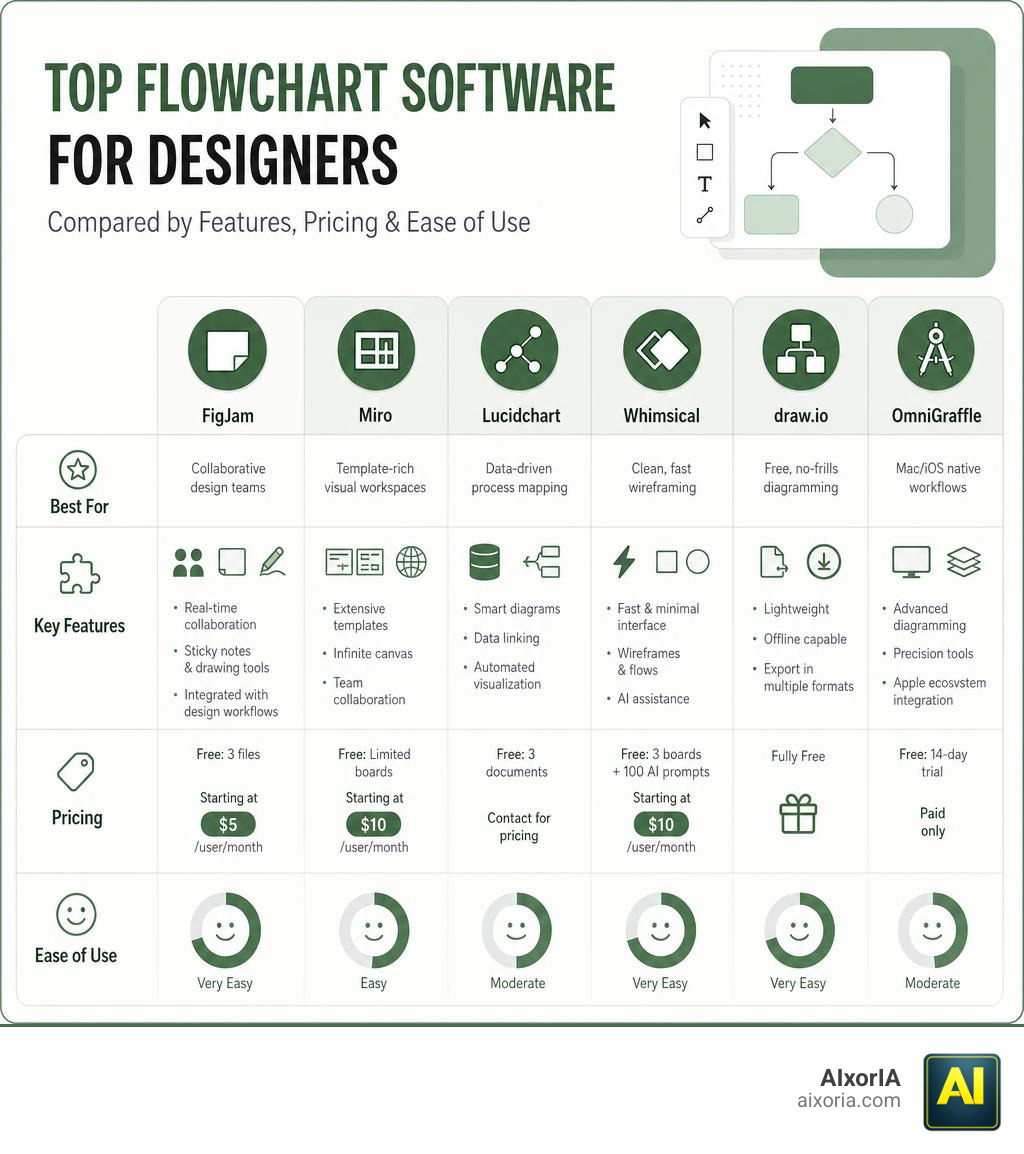
The best flowchart software for designers in 2026 comes down to a handful of standout tools — here’s a quick look at the top picks:
| Tool | Best For | Free Tier | Starting Price |
|---|---|---|---|
| FigJam | Collaborative design teams | 3 files | $5/user/month |
| Miro | Template-rich visual workspaces | Limited boards | $10/user/month |
| Lucidchart | Data-driven process mapping | 3 documents | Contact for pricing |
| Whimsical | Clean, fast wireframing | 3 boards + 100 AI prompts | $10/user/month |
| draw.io | Free, no-frills diagramming | Fully free | Free |
| OmniGraffle | Mac/iOS native workflows | 14-day trial | Paid only |
When one writer was first told to use a flowchart for brainstorming, they laughed it off — it sounded like drafting a novel in a spreadsheet. But once you see a complex process laid out visually, something clicks. Suddenly, everyone on the team is on the same page without a single hour-long meeting.
For designers especially, the right tool matters. You’re not just mapping steps — you’re communicating ideas visually, building user flows, and collaborating with developers, clients, and stakeholders in real time.
The problem? There are dozens of flowchart tools out there. Some are built for engineers. Some are bloated with features you’ll never use. And some charge enterprise prices for what should be a simple task.
This guide cuts through the noise. Whether you’re a solo designer or running a small team, you’ll find the right tool for your workflow and budget — without needing a tech background to get started.
Key Features of the Best Flowchart Software for Designers
Before we jump into the tools, we need to talk about what actually makes a flowchart tool “good” for a designer. If you are a visual thinker, you cannot just use any old diagramming tool designed for database administrators in the early 2000s. You need software that respects your aesthetic sensibilities and enhances your workflow.
Here are the key features we recommend looking for:
- Real-Time Collaboration: Designing is rarely a solo sport. You need multiplayer editing, live cursors, in-app comments, and even quick voice or video calls so you can brainstorm with clients and developers on the fly.
- Vector Graphics & Export Quality: If you cannot scale your diagrams or export them as clean SVG, PDF, or high-res PNG files, the tool will quickly become a bottleneck.
- Infinite Canvas: A rigid, page-constrained grid is the enemy of visual thinking. An infinite canvas lets your ideas expand naturally.
- AI-Assisted Diagramming: Modern tools use AI to turn text prompts into fully structured flowcharts in seconds, saving you hours of manual shape-dragging.
- Deep Integrations: Your flowchart software should play nice with your existing tech stack, whether that is Figma, Adobe Creative Cloud, Slack, or project management tools.
For a fast, intuitive experience that balances these features beautifully, tools like Whimsical Diagrams, Flowcharts, and Mind Maps have set a high standard by offering built-in AI prompts and exceptionally clean layout aesthetics.
Top Flowchart Tools for Visual and UI/UX Designers
When we look at design workflows, user experience mapping, and rapid prototyping, we need tools that bridge the gap between abstract planning and high-fidelity design. The following platforms represent the absolute best options available in May 2026.
FigJam: The Best Flowchart Software for Designers in Collaborative Teams
If your primary design environment is Figma, FigJam is an absolute no-brainer. It is built directly into the Figma ecosystem, meaning you can copy and paste vector assets seamlessly between your design files and your whiteboards.
- Why Designers Love It: It feels like a natural extension of Figma. You get access to a playful, interactive space with sticky notes, stamps, markers, and built-in timers for workshops.
- AI Features: FigJam’s built-in AI helps you generate custom diagram templates and mind maps instantly from simple text prompts.
- Pricing: FigJam offers a generous free tier for up to 3 collaborative files. The Professional plan is highly affordable at just $5/user/month, making it an incredibly budget-friendly addition to your design toolkit.
Miro: Best Flowchart Software for Designers Needing Extensive Templates
Miro is the giant of visual collaboration workspaces, and for good reason. It is designed for cross-functional teams who need to run brainstorming sessions, map user journeys, and manage agile sprints all in one place.
- Template Library: Miro offers over 3,000 templates for visual collaboration, process mapping, and user story mapping.
- Asynchronous Communication: One of Miro’s standout features is “Talktrack,” which allows you to record a video walkthrough of your flowchart directly inside the board. Your teammates can watch it and interact with the canvas asynchronously.
- Integrations: With over 250 app integrations, Miro connects to almost everything in your product management and design pipeline.
- Pricing: Free basic plan; paid plans start at $10/user/month, with more robust business tiers scaling up to $20/user/month.
Lucidchart: Best for Data-Driven Process Mapping
If you are a UX researcher or a systems designer working on highly complex, technical structures, Lucidchart is the industry standard. It is less of a playful sketching board and more of a precision diagramming powerhouse.
- Data Import: Lucidchart is famous for its live data-to-diagram connection. You can import data from spreadsheets, and the flowchart will update automatically based on conditional formatting.
- Enterprise Features: It supports advanced technical standards like BPMN 2.0 and UML 2.5, making it the perfect tool for mapping out backend architectures alongside your frontend designs.
- Pricing: Free tier includes up to 3 documents; paid individual plans start around $7.95/month.
Whimsical: Best for Rapid Wireframing and Clean Layouts
Whimsical is built on a simple philosophy: visual design tools should be fast and opinionated so you do not waste time adjusting pixels. It is arguably the fastest tool on this list for laying out a user flow.
- Predictive Layouts: As you drag connectors, Whimsical automatically aligns your shapes and adjusts spacing, keeping your diagrams perfectly neat without manual intervention.
- Claude AI Integration: Whimsical AI uses Anthropic’s Claude to generate smart suggestions, automated mind maps, and instant flowchart drafts.
- Docs Integration: Whimsical allows you to write rich text documents right alongside your flowcharts on the same canvas, which is fantastic for design documentation.
- Pricing: Free for up to 3 boards and 100 AI prompts; Pro plans start at $10/user/month.
OmniGraffle: Best for Native macOS and iOS Design Workflows
For Apple-ecosystem purists who prefer desktop-native software over web apps, OmniGraffle remains a legendary choice.
- Pro-Level Design Tools: It offers robust vector drawing tools, precise positioning, and alignment controls that feel closer to Adobe Illustrator than a typical flowchart maker.
- Rapid Prototyping: You can use OmniGraffle to build interactive wireframes and high-fidelity vector diagrams that scale beautifully across Mac, iPad, and iPhone.
- No Subscription Required: For teams tired of SaaS fatigue, OmniGraffle offers traditional perpetual licenses alongside subscription options.
- To explore its professional vector capabilities, check out Visual Communication Software To Make Pro Diagrams – OmniGraffle – The Omni Group.
Comparing the Top Flowchart Software Options
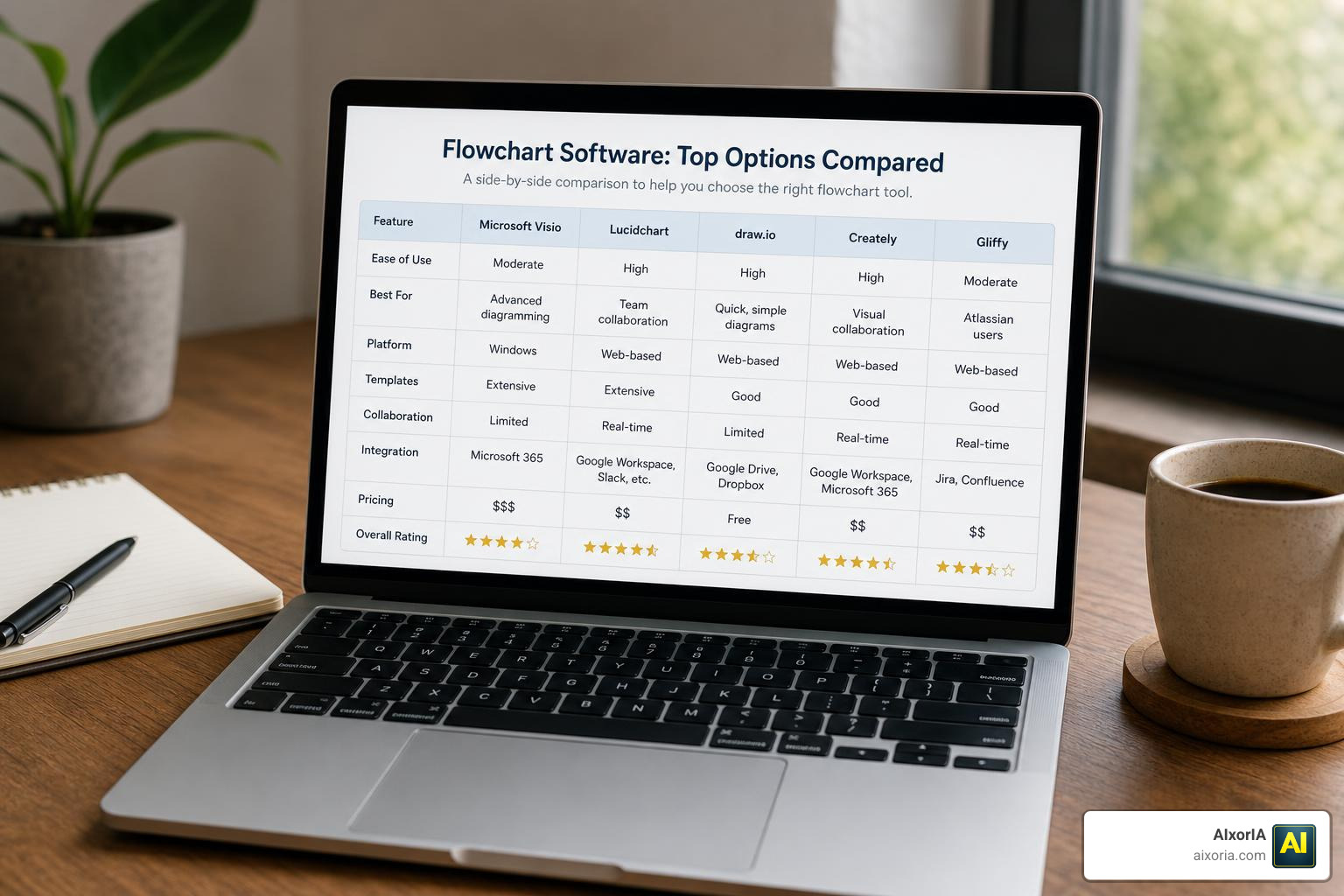
Choosing the best flowchart software for designers depends heavily on your team’s size, budget, and specific workflow needs.
If you are looking for alternatives that emphasize brand consistency and beautiful presentation graphics over raw technical diagramming, you might also consider an Online Flowchart Maker | Generate Stunning Flowchart Designs to quickly create highly styled, client-facing charts. Alternatively, for teams searching for an ultra-simple, modern web-native whiteboard, you can try a Free online flowchart maker | Built for every team.
Here is a quick look at how the leading platforms stack up against each other:
| Feature | FigJam | Miro | Lucidchart | Whimsical | OmniGraffle |
|---|---|---|---|---|---|
| Ease of Use | Exceptional | High | Moderate | Exceptional | Moderate (High Curve) |
| Best For | UI/UX Teams | Visual Brainstorms | Enterprise Systems | Fast Wireframing | Apple Power Users |
| AI Capabilities | Yes | Yes | Yes | Yes | No |
| Integrations | Figma Native | 250+ Apps | MS Office, Google | Slack, Notion | macOS Scripting |
Frequently Asked Questions about Flowchart Software
What is the best free flowchart software for designers?
If you are operating on a tight budget, the best fully free option is draw.io (also known as diagrams.net). It is open-source, requires no account to use, and integrates directly with Google Drive and GitHub.
For visual designers, Canva’s free flowchart maker is another fantastic choice, trusted by over 75 million users worldwide for its beautiful, consumer-friendly templates. Finally, FigJam and Whimsical both offer highly functional free tiers that are perfect for solo designers working on a few active projects.
How do flowchart tools integrate with design platforms like Figma or Adobe?
Modern flowchart tools integrate in two primary ways:
- Native Ecosystems: FigJam is built directly into Figma, allowing you to copy/paste components and design assets back and forth with zero friction.
- Plugin & Vector Exports: Tools like Miro and Whimsical offer dedicated plugins for Figma and Adobe Creative Cloud. This allows you to import high-fidelity wireframes into your flowcharts or export your flowcharts as fully editable SVG vectors to refine in Illustrator.
Can AI tools automatically generate flowcharts for designers?
Yes! AI-assisted diagramming is one of the fastest-growing trends in design productivity. Platforms like Whimsical, Miro, and Vani allow you to type a simple prompt (e.g., “Create a user registration flow with email verification and password reset options”) and generate a complete, editable flowchart draft in seconds.
Additionally, specialized tools like Napkin can parse raw text documents and automatically extract visual diagrams from them, giving you a massive head start on your documentation.
Conclusion

Finding the best flowchart software for designers comes down to finding the perfect balance between visual freedom and structured efficiency. If you are deeply embedded in UI/UX design, FigJam offers unparalleled integration. If you need massive template variety for client workshops, Miro is your best bet. For fast, beautiful layouts with zero layout clutter, Whimsical shines.
At AIxorIA, we know that keeping up with the latest digital tools and AI integrations can feel overwhelming. That is why we specialize in providing custom AI solutions, tool training workshops, hands-on tutorials, and performance audits designed to streamline your business workflows. We explain complex technical concepts in simple, accessible language, offering affordable services and incredibly fast customer support.
Ready to optimize your team’s design and documentation workflow? Let us help you integrate the perfect AI-powered visual tools into your business. Visit AIxorIA today to learn more!
1 thought on “Best Flowchart Software for Designers in 2026”