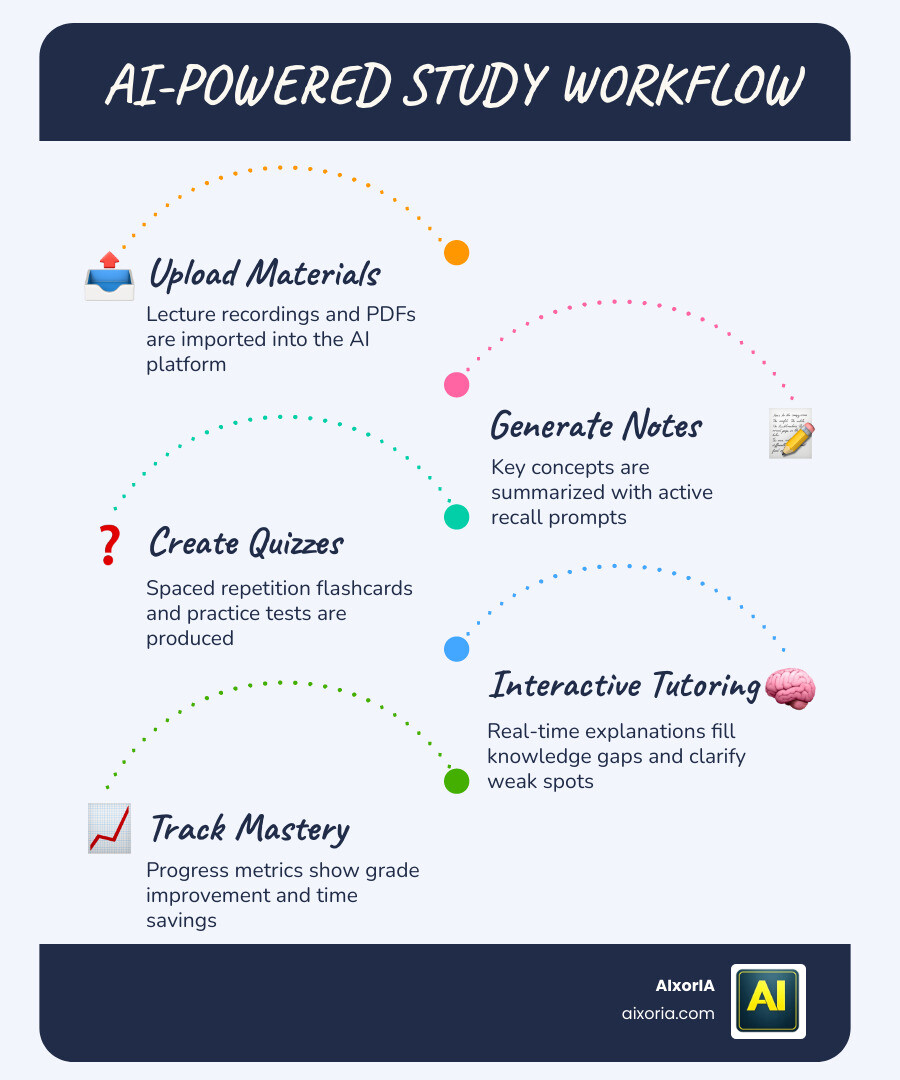
If you are a student in 2026, studying the old way—just reading textbooks and taking notes—is no longer enough. The biggest shift in education today is not just online learning, but AI-powered learning.
From writing essays to solving complex problems, from summarizing entire chapters to creating personalized study plans—AI tools are now acting like smart tutors, research assistants, and productivity partners.
But here’s the real problem:
There are hundreds of AI tools available today. Most of them claim to help students—but only a few actually improve how you learn.
Many tools:
- give answers without explanation
- create dependency instead of understanding
- or simply waste your time
That’s why choosing the best AI tool for studying is not about features—it’s about how well it helps you learn, think, and retain information.
Table of Contents
What You’ll Get in This Guide
This is not a random list of tools.
This is a carefully structured, high-authority guide where:
- Each tool is selected based on real student use cases
- Every tool is explained in detail (not just listed)
- AI features are analyzed (not just mentioned)
- Pros, cons, and pricing are clearly broken down
- You’ll understand which tool is right for you—not just what exists
By the end of this guide, you will know:
- Which AI tools actually improve studying
- Which ones are best for writing, research, revision, or problem-solving
- How to combine tools to create a powerful study system
Our Methodology (How We Selected These Tools)
To make this guide useful and trustworthy, each tool was evaluated based on 5 key factors:
1. Learning Value
Does the tool help you understand concepts—or just give answers?
2. Practical Use Case
Can a real student use this daily for studying, assignments, or exams?
3. AI Capability
Does the tool use AI in a meaningful way (summarization, explanation, generation)?
4. Ease of Use
Is it simple enough for students without technical knowledge?
5. Reliability & Accuracy
Can you trust the information it provides?
Only tools that performed well across these criteria were included.
Types of AI Tools Covered
To make this guide more useful, we didn’t just list tools randomly. We grouped them based on how students actually study:
- AI writing assistants (essays, assignments)
- Research tools (fact-checking, sources)
- Note-taking & summarization tools
- Problem-solving tools (math, science)
- Flashcards & revision tools
- Productivity & organization tools
This helps you quickly find the right tool based on your needs.
READ MORE – 5 Best Free AI Tools for Students & Researchers
20+ Best AI Tools for Studying (Comparison Matrix)
Below is a quick comparison of all tools covered in this guide.
| Tool | Best For | AI Features | Free Plan | Ease of Use |
|---|---|---|---|---|
| ChatGPT | All-purpose studying | Explanation, writing, Q&A | Yes | Very Easy |
| Grammarly | Writing improvement | Grammar + AI rewrite | Yes | Easy |
| QuillBot | Paraphrasing | Rewriting + summarizing | Yes | Easy |
| Notion AI | Notes & planning | Summaries, organization | Limited | Medium |
| Perplexity AI | Research | Source-based answers | Yes | Easy |
| Quizlet | Revision | AI flashcards | Yes | Very Easy |
| Wolfram Alpha | Math solving | Step-by-step solutions | Yes | Medium |
| Socratic | Homework help | Visual explanations | Yes | Very Easy |
| Google Gemini | General AI | Search + AI answers | Yes | Easy |
| Microsoft Copilot | Productivity | Docs, Excel AI help | Limited | Medium |
| Scribbr AI | Academic writing | Proofreading, citations | Limited | Easy |
| Otter.ai | Lecture notes | Transcription + summary | Yes | Easy |
| Tome AI | Presentations | AI slides generation | Yes | Easy |
| Elicit | Research papers | AI research assistant | Yes | Medium |
| Scite AI | Citations | Smart citation analysis | Limited | Medium |
| Brainly AI | Student Q&A | AI answers + community | Yes | Easy |
| Caktus AI | Homework help | Subject-based AI tools | Paid | Easy |
| Studyable | Study planning | AI schedules | Limited | Easy |
| Mindgrasp | Video summarization | AI notes from videos | Paid | Easy |
| Khan Academy AI | Learning | Personalized tutoring | Yes | Very Easy |
| Anki (AI plugins) | Memory | Smart spaced repetition | Yes | Medium |
ChatGPT (Best All-in-One AI Study Assistant)
What is ChatGPT and how it helps students

ChatGPT is one of the most powerful AI tools for studying in 2026. It acts like a personal tutor that can explain concepts, solve problems, write assignments, and even create study plans—all in simple language.
Unlike traditional study tools, ChatGPT doesn’t just give answers. You can ask follow-up questions, request step-by-step explanations, or even ask it to simplify complex topics. This makes it extremely useful for students across subjects like science, math, history, and business.
For US students especially, it helps with essays, research understanding, and exam preparation in a structured and interactive way.
Key features for studying
- Instant explanations for any topic
- Essay writing and editing support
- Step-by-step problem solving (math, science)
- Notes summarization and simplification
- Custom study plans based on your goals
- Q&A learning (ask unlimited questions)
AI capabilities (what makes it powerful)
ChatGPT uses advanced large language models to understand context and generate human-like responses. What makes it stand out is its ability to:
- Break down complex topics into simple explanations
- Adjust answers based on your level (beginner to advanced)
- Simulate real learning conversations
- Help in critical thinking instead of just giving outputs
This makes it more than a tool—it becomes an interactive learning partner.
Pricing
- Free plan available
- Paid plan (ChatGPT Plus): around $20/month (varies by region)
Pros
- Extremely versatile (covers all subjects)
- Easy to use for beginners
- Saves time in research and writing
- Helps improve understanding, not just answers
Cons
- Can sometimes give incorrect or outdated information
- Requires proper prompting for best results
- Over-reliance can reduce independent thinking
Real student use case
A college student preparing for exams can use ChatGPT to turn 10-page notes into short summaries, ask for likely exam questions, and get simplified explanations of difficult topics—all in one place.
Real experience insight
I used ChatGPT to simplify a difficult economics topic. Instead of memorizing, I actually understood the concept in minutes, which made revision much faster and more effective.
Grammarly (Best AI Tool for Writing and Academic Clarity)
What is Grammarly and how it helps students

Grammarly is one of the most widely used AI tools for improving writing quality. For students, it acts like a real-time editor that checks grammar, spelling, tone, clarity, and overall readability.
In 2026, Grammarly goes beyond basic corrections. It helps students rewrite sentences, improve academic tone, and make essays more structured and professional. Whether you are writing assignments, emails, or research papers, it ensures your content is clear and error-free.
For US students, where academic writing standards are strict, Grammarly helps maintain a professional and polished writing style.
Key features for studying
- Real-time grammar and spelling correction
- AI-powered sentence rewriting
- Tone detection (formal, academic, casual)
- Clarity and readability suggestions
- Plagiarism checker (premium)
- Writing goals and performance insights
AI capabilities (what makes it powerful)
Grammarly uses AI to analyze sentence structure, context, and intent. Instead of just correcting mistakes, it suggests better ways to express ideas.
- Rewrites sentences for clarity and conciseness
- Adapts tone based on academic requirements
- Detects awkward phrasing and improves flow
- Helps students sound more confident and professional
This makes it especially useful for essays, SOPs, and research writing.
Grammarly Pricing

- Free plan available (basic grammar and spelling)
- Premium plan: around $12–$30/month (depending on plan)
Pros
- Improves writing instantly
- Easy to use across browser, Word, and apps
- Helps maintain academic tone
- Strong grammar accuracy
Cons
- Advanced features require paid plan
- Sometimes over-suggests changes
- Not designed for deep research or idea generation
Real student use case
A student writing a research paper can use Grammarly to correct grammar, refine sentence structure, and ensure the tone is formal and academic before submission.
Real experience insight
While editing an assignment, Grammarly helped identify unclear sentences and improved them instantly, making the final draft more polished and professional.
QuillBot (Best AI Tool for Paraphrasing and Rewriting)
What is QuillBot and how it helps students

QuillBot is a powerful AI writing tool designed to help students rewrite, paraphrase, and improve their content without changing the original meaning.
For students, one of the biggest challenges is avoiding plagiarism while still expressing ideas clearly. QuillBot solves this by offering multiple rewriting modes that adjust tone, clarity, and vocabulary. Whether you’re rewriting notes, improving assignments, or simplifying complex sentences, it helps you write better and faster.
It’s especially useful for US students working on essays, research summaries, and academic submissions where originality and clarity are critical.
Key features for studying
- Advanced paraphrasing modes (Standard, Fluency, Formal, Creative)
- Built-in summarizer for long texts
- Grammar checker and sentence improvement
- Citation generator (limited)
- Extensions for browser and Word
AI capabilities (what makes it powerful)
QuillBot uses AI to understand sentence context and rewrite it naturally instead of just replacing words with synonyms.
- Maintains original meaning while changing structure
- Adjusts tone based on writing style
- Improves readability and flow
- Helps simplify complex academic language
This makes it ideal for turning rough drafts into polished content.
QuillBot Pricing
- Free plan available (limited modes and word count)
- Premium plan: around $10/month (varies by plan)
Pros
- Excellent for paraphrasing and rewriting
- Easy to use for beginners
- Multiple writing styles available
- Saves time in editing and improving content
Cons
- Limited features in free version
- Not ideal for generating content from scratch
- Sometimes requires manual tweaking for accuracy
Real student use case
A student can take lecture notes or research material and use QuillBot to rewrite it into a clean, plagiarism-free assignment with better structure and clarity.
Real experience insight
I used QuillBot to rewrite a long paragraph for an assignment. It kept the meaning intact but made the content much clearer and easier to read.
Notion AI (Best AI Tool for Notes, Organization, and Study Planning)
What is Notion AI and how it helps students

Notion AI is an all-in-one productivity and note-taking platform powered by AI. For students, it works as a digital workspace where you can write notes, manage tasks, organize study materials, and automate workflows—all in one place.
In 2026, Notion AI goes beyond simple note-taking. It can summarize lectures, generate notes, create study plans, and even help you brainstorm ideas for assignments. Instead of using multiple apps, students can manage their entire academic life inside Notion.
For US students balancing assignments, projects, and deadlines, it provides a structured and distraction-free study environment.
Key features for studying
- AI-powered note summarization
- Automatic study plan and task generation
- Smart templates for notes, projects, and revision
- Content generation (ideas, outlines, drafts)
- Database system for organizing subjects and materials
AI capabilities (what makes it powerful)
Notion AI integrates directly into your workspace, meaning you don’t need to switch tools.
- Converts messy notes into structured summaries
- Generates to-do lists from raw content
- Helps brainstorm and expand ideas
- Rewrites and improves written content
This makes studying more organized and efficient over time.
Notion AI Pricing
- Free plan available (limited AI usage)
- Paid plans start around $10/month (with AI add-on pricing)
Pros
- Combines notes, tasks, and AI in one place
- Highly customizable workspace
- Great for long-term study organization
- Clean and distraction-free interface
Cons
- Slight learning curve for beginners
- AI usage limits on lower plans
- Can feel overwhelming if not structured properly
Real student use case
A student can create a dashboard for all subjects, take notes during lectures, and use Notion AI to summarize them and generate revision checklists automatically.
Real experience insight
I used Notion AI to organize scattered notes into a clean structure. It saved hours and made revision much easier before exams.
READ MORE – What Is the Best AI Tool for Academic Research?
Perplexity AI (Best AI Tool for Research and Fact-Checked Answers)
What is Perplexity AI and how it helps students

Perplexity AI is an AI-powered research assistant that combines the accuracy of a search engine with the simplicity of conversational AI.
For students, one of the biggest challenges is finding reliable information quickly. Instead of opening multiple tabs and reading long articles, Perplexity AI gives direct answers with sources attached. This makes it highly useful for research-based assignments, essays, and academic projects.
For US students, where citations and credible sources matter, Perplexity helps save time while maintaining accuracy and trust.
Key features for studying
- AI-generated answers with source citations
- Real-time web search integration
- Follow-up questions for deeper research
- Clean, distraction-free interface
- Focus modes (academic, web, math, etc.)
AI capabilities (what makes it powerful)
Perplexity AI stands out because it focuses on verified information instead of just generated text.
- Pulls data from multiple trusted sources
- Shows references alongside answers
- Reduces misinformation risk
- Helps students verify facts instantly
This makes it one of the most reliable tools for academic research.
Perplexity Pricing

- Free plan available
- Pro plan: around $20/month (with advanced models and features)
Pros
- Provides accurate, source-backed answers
- Saves time in research
- Easy to use and beginner-friendly
- Great for academic writing support
Cons
- Limited depth compared to full research papers
- Advanced features require paid plan
- Still requires manual verification for critical work
Real student use case
A student working on a research paper can use Perplexity AI to quickly find accurate information with sources, then use those references to build a well-cited assignment.
Real experience insight
I used Perplexity AI to research a topic and it gave clear answers with sources, which made it much faster to gather reliable information without opening multiple tabs.
Quizlet (Best AI Tool for Flashcards and Revision)
What is Quizlet and how it helps students

Quizlet is one of the most popular study tools used by students worldwide for memorization and revision. In 2026, Quizlet has evolved with AI features that automatically generate flashcards, quizzes, and practice tests from your study material.
Instead of manually creating notes, students can upload content or type a topic, and Quizlet will generate structured flashcards instantly. This makes it extremely useful for subjects that require memorization, such as biology, history, vocabulary, and definitions.
For US students preparing for exams, Quizlet helps turn passive reading into active recall, which is one of the most effective learning techniques.
Key features for studying
- AI-generated flashcards
- Practice tests and quizzes
- Spaced repetition learning system
- Multiple study modes (Learn, Test, Match)
- Large library of user-generated study sets
AI capabilities (what makes it powerful)
Quizlet uses AI to enhance memory and retention rather than just providing information.
- Automatically creates flashcards from notes
- Adapts questions based on your performance
- Uses spaced repetition to improve long-term memory
- Personalizes learning paths for better results
This makes it ideal for exam preparation and revision.
Quizlet Pricing
- Free plan available
- Quizlet Plus: around $7–$10/month
Pros
- Excellent for memorization and revision
- Easy to use for all students
- Saves time in creating flashcards
- Engaging learning modes
Cons
- Limited features in free version
- Not useful for deep conceptual learning
- Quality depends on input or existing sets
Real student use case
A student preparing for a biology exam can use Quizlet to generate flashcards for key terms and test themselves repeatedly until they master the material.
Real experience insight
I used Quizlet before exams to revise key concepts. The repeated testing helped me remember information much longer compared to just reading notes.
Wolfram Alpha (Best AI Tool for Math and Problem Solving)
What is Wolfram Alpha and how it helps students

Wolfram Alpha is a powerful AI-driven tool designed to solve complex mathematical and scientific problems with step-by-step explanations.
Unlike basic calculators, Wolfram Alpha doesn’t just give answers—it shows how the solution is derived. This makes it extremely valuable for students who want to understand concepts rather than just complete assignments.
For US students studying algebra, calculus, physics, or engineering, it acts like a digital problem-solving tutor available 24/7.
Key features for studying
- Step-by-step solutions for math problems
- Support for algebra, calculus, statistics, physics, and more
- Graph generation and visualization
- Data analysis and equation solving
- Natural language input (type questions like you speak)
AI capabilities (what makes it powerful)
Wolfram Alpha uses computational intelligence rather than traditional generative AI.
- Breaks down complex equations into clear steps
- Provides accurate, logic-based solutions
- Handles advanced mathematical computations
- Visualizes problems with graphs and charts
This makes it one of the most reliable tools for STEM subjects.
Pricing
- Free version available (basic answers)
- Pro version: around $5–$10/month (step-by-step solutions and advanced features)
Pros
- Highly accurate mathematical solutions
- Step-by-step explanations improve understanding
- Covers advanced topics beyond basic tools
- Great for STEM students
Cons
- Interface can feel complex for beginners
- Limited use outside math and science
- Full features require paid plan
Real student use case
A student struggling with calculus can input an equation and get a complete step-by-step solution, helping them understand each part of the problem.
Real experience insight
I used Wolfram Alpha to solve a difficult equation, and the step-by-step breakdown helped me understand the method instead of just copying the answer.
Socratic (Best AI Tool for Homework Help and Visual Learning)
What is Socratic and how it helps students

Socratic is an AI-powered learning app designed to help students solve homework problems using simple explanations and visual content.
What makes Socratic unique is its ability to analyze questions from images. You can take a photo of a problem, and it will provide explanations, step-by-step solutions, and related learning resources. This makes it extremely helpful for quick doubt-solving during study sessions.
For US students, especially in middle school and high school, Socratic simplifies difficult subjects like math, science, and history into easy-to-understand concepts.
Key features for studying
- Scan questions using camera
- Step-by-step explanations
- Visual learning resources (diagrams, videos)
- Covers multiple subjects
- Simple and user-friendly interface
AI capabilities (what makes it powerful)
Socratic uses AI from Google to understand both text and images.
- Converts images into searchable questions
- Provides concept-based explanations
- Suggests relevant educational content
- Helps students learn visually, not just textually
This makes learning faster and more intuitive.
socrat Pricing
- Completely free to use
Pros
- Very easy to use
- Great for quick homework help
- Visual explanations improve understanding
- Free access for all students
Cons
- Limited depth for advanced topics
- Not ideal for detailed academic research
- Requires clear input (image/text quality matters)
Real student use case
A student can take a picture of a math problem and instantly get a step-by-step explanation along with similar examples to practice.
Real experience insight
I used Socratic to solve a tricky question by scanning it. The explanation was simple and visual, which made it easy to understand quickly.
Google Gemini (Best AI Tool for Search + Smart Learning)

What is Google Gemini and how it helps students
Google Gemini is a next-generation AI assistant that combines traditional search with advanced AI capabilities. It is designed to help students find, understand, and organize information faster than ever.
Unlike regular search engines, Gemini doesn’t just show links—it gives direct, structured answers, explanations, and summaries. This makes it highly useful for research, quick learning, and understanding complex topics.
For US students, Gemini fits naturally into tools like Docs, Gmail, and Search, making studying more connected and efficient.
Key features for studying
- AI-powered search with direct answers
- Summarization of articles and documents
- Writing and idea generation
- Integration with Google Workspace (Docs, Gmail)
- Multi-step question answering
AI capabilities (what makes it powerful)
Google Gemini uses advanced multimodal AI, meaning it can understand text, images, and context together.
- Combines real-time search with AI explanations
- Provides up-to-date information
- Breaks down complex topics into simple language
- Helps in brainstorming and content creation
This makes it a strong alternative to traditional research methods.
Pricing
- Free version available
- Advanced plans may be included with Google One AI subscriptions (pricing varies)
Pros
- Combines search + AI in one place
- Provides up-to-date information
- Easy integration with Google tools
- Fast and user-friendly
Cons
- Can sometimes oversimplify complex topics
- Accuracy depends on query clarity
- Advanced features may require subscription
Real student use case
A student researching a topic can use Gemini to get a quick summary, then expand into detailed explanations without switching between multiple tabs.
Real experience insight
I used Gemini to understand a complex topic quickly. It gave a clear summary first, which made it easier to go deeper into the subject.
Microsoft Copilot (Best AI Tool for Productivity and Office-Based Studying)
What is Microsoft Copilot and how it helps students

Microsoft Copilot is an AI-powered assistant built directly into Microsoft tools like Word, Excel, PowerPoint, and Teams. For students, it transforms everyday academic tasks into faster, smarter workflows.
Instead of switching between apps, Copilot works inside the tools students already use. It can help write essays in Word, analyze data in Excel, create presentations in PowerPoint, and summarize notes from meetings or lectures in Teams.
For US students who rely heavily on Microsoft 365 for assignments and projects, Copilot becomes a powerful productivity companion.
Key features for studying
- AI writing assistance in Word
- Data analysis and formula generation in Excel
- Automatic presentation creation in PowerPoint
- Meeting and lecture summaries in Teams
- Integration across Microsoft 365 apps
AI capabilities (what makes it powerful)
Copilot uses AI to understand context within your documents and tasks.
- Generates content based on your files and prompts
- Automates repetitive academic tasks
- Provides smart suggestions while working
- Helps organize and summarize large documents
This makes studying more efficient, especially for assignments and projects.
Pricing
- Limited free access (via web and basic tools)
- Full features available with Microsoft 365 subscription (pricing varies, typically $20+/month with Copilot add-on)
Pros
- Deep integration with Microsoft tools
- Saves time on assignments and presentations
- Useful for data-heavy subjects
- Professional-level output
Cons
- Works best only within Microsoft ecosystem
- Requires subscription for full features
- Can feel complex for beginners
Real student use case
A student can draft an essay in Word, use Copilot to refine it, create a presentation from it in PowerPoint, and analyze related data in Excel—all within one ecosystem.
Real experience insight
I used Copilot in Word to structure an assignment and then turned it into a presentation in minutes, which saved a lot of time.
Scribbr AI (Best AI Tool for Academic Writing and Citations)
What is Scribbr AI and how it helps students

Scribbr AI is a specialized AI tool designed for academic writing, proofreading, and citation management. It is widely trusted by students for improving essays, theses, and research papers.
Unlike general AI tools, Scribbr focuses specifically on academic standards. It helps students write clearly, avoid plagiarism, and format citations correctly in styles like APA, MLA, and Chicago.
For US students, where proper referencing and academic integrity are critical, Scribbr AI ensures that assignments meet university-level expectations.
Key features for studying
- AI proofreading and grammar correction
- Citation generator (APA, MLA, Chicago, etc.)
- Plagiarism checker
- Essay editing and structure improvement
- Academic writing guidance
AI capabilities (what makes it powerful)
Scribbr AI is built to handle academic-specific requirements.
- Improves formal tone and clarity
- Detects potential plagiarism issues
- Suggests correct citation formats
- Enhances structure and readability
This makes it ideal for serious academic writing.
Scribbr Pricing
- Free tools available (citation generator, basic checks)
- Premium features (plagiarism checker, advanced editing) available with paid plans (pricing varies)
Pros
- Designed specifically for academic writing
- Strong citation and plagiarism tools
- Improves clarity and structure
- Trusted by students and institutions
Cons
- Advanced features are paid
- Limited use outside academic writing
- Not ideal for idea generation
Real student use case
A student writing a research paper can use Scribbr AI to generate citations, check for plagiarism, and refine the writing before final submission.
Real experience insight
I used Scribbr AI to format citations for an assignment, and it saved a lot of time while ensuring everything was accurate and properly structured.
Otter.ai (Best AI Tool for Lecture Notes and Transcription)
What is Otter.ai and how it helps students

Otter.ai is an AI-powered transcription tool that converts spoken lectures, discussions, and meetings into accurate written notes in real time.
For students, especially in fast-paced lectures, it’s difficult to write everything down. Otter solves this by recording audio and turning it into searchable, organized notes automatically. This allows students to focus on understanding instead of constantly writing.
For US students attending classes, online lectures, or group discussions, Otter.ai becomes a powerful tool for capturing and revising important information.
Key features for studying
- Real-time lecture transcription
- Automatic summaries of conversations
- Searchable notes and keywords
- Speaker identification
- Integration with Zoom and other platforms
AI capabilities (what makes it powerful)
Otter.ai uses speech recognition and AI summarization to improve note-taking.
- Converts speech into structured text
- Identifies key points from long lectures
- Highlights important sections
- Makes notes searchable for quick revision
This makes it highly effective for revision and review.
Otter Pricing

- Free plan available (limited minutes per month)
- Paid plans start around $10/month
Pros
- Saves time during lectures
- Accurate transcription
- Easy to search and review notes
- Great for online classes
Cons
- Accuracy depends on audio quality
- Limited minutes in free plan
- Not ideal for subjects requiring diagrams or visuals
Real student use case
A student can record a lecture using Otter.ai and later review the full transcript, search key topics, and revise important points before exams.
Real experience insight
I used Otter.ai during an online lecture and later searched for key topics in the transcript, which made revision much faster.
Tome AI (Best AI Tool for Presentations and Visual Storytelling)
What is Tome AI and how it helps students

Tome AI is an AI-powered tool that helps students create professional presentations, slides, and visual stories within minutes.
Instead of manually designing slides, students can simply enter a topic, and Tome generates a complete presentation with structured content, visuals, and flow. This is especially useful for class presentations, projects, and assignments where design and clarity matter.
For US students, where presentations are a key part of academic evaluation, Tome AI helps save time while delivering high-quality output.
Key features for studying
- AI-generated presentations from prompts
- Automatic slide structuring and storytelling
- Built-in design and layout optimization
- Multimedia support (images, videos, embeds)
- Easy editing and customization
AI capabilities (what makes it powerful)
Tome AI focuses on combining content and design using AI.
- Converts ideas into structured slide decks
- Generates content with logical flow
- Enhances storytelling with visuals
- Reduces time spent on formatting and design
This makes presentations faster and more effective.
Pricing
- Free plan available
- Paid plans available (pricing varies depending on usage and features)
Pros
- Saves time in creating presentations
- Clean and modern design
- Easy for beginners
- Great for storytelling and visual impact
Cons
- Limited customization compared to advanced tools
- AI-generated content may need editing
- Not ideal for data-heavy presentations
Real student use case
A student can input a project topic and generate a complete presentation, then quickly edit it before presenting in class.
Real experience insight
I used Tome AI to create a presentation in minutes. It gave a solid structure, and I only had to make small edits before finalizing it.
READ MORE – AI Tools for Academic Research
Elicit (Best AI Tool for Research Papers and Literature Review)
What is Elicit and how it helps students

Elicit is an AI-powered research tool designed to help students find, analyze, and summarize academic papers quickly.
For students working on research projects, one of the hardest tasks is reading multiple papers and extracting useful information. Elicit simplifies this by pulling relevant research papers and summarizing key insights like methods, results, and conclusions.
For US students writing essays, dissertations, or research papers, Elicit helps save hours of manual reading while improving the quality of research.
Key features for studying
- AI-powered research paper search
- Summarization of academic papers
- Extraction of key insights (methods, results)
- Literature review support
- Organized research workflow
AI capabilities (what makes it powerful)
Elicit is built specifically for academic research workflows.
- Finds relevant papers based on queries
- Summarizes complex research into simple insights
- Compares multiple studies side-by-side
- Helps identify patterns and conclusions
This makes it highly valuable for deep academic work.
Pricing
- Free plan available
- Paid plans available for advanced features (pricing varies)
Pros
- Saves time in research
- Easy to use for academic work
- Provides structured insights
- Improves research quality
Cons
- Limited access to some full papers
- Requires basic understanding of research methods
- Not ideal for non-academic use
Real student use case
A student writing a literature review can use Elicit to find relevant papers, summarize them, and compare findings efficiently.
Scite AI (Best AI Tool for Smart Citations and Research Validation)
What is Scite AI and how it helps students

Scite AI is an advanced AI research tool that helps students not just find citations—but understand how those citations are used in academic literature.
Instead of showing a simple reference, Scite tells you whether a study supports, contradicts, or mentions a claim. This is extremely valuable for students working on research papers, where credibility and evidence quality matter.
For US students, especially at college and university level, Scite AI helps build stronger, more reliable arguments backed by verified research.
Key features for studying
- Smart citation analysis (supporting, contrasting, mentioning)
- Research paper discovery
- Citation context and explanation
- Reference checking and validation
- Browser and research tool integrations
AI capabilities (what makes it powerful)
Scite AI uses machine learning to analyze how research papers cite each other.
- Identifies whether evidence supports a claim
- Provides context behind citations
- Helps avoid misleading or weak references
- Improves quality of academic arguments
This makes it a powerful tool for critical thinking and research accuracy.
Scite AI Pricing
- Limited free access
- Paid plans available (typically around $10–$20/month depending on usage)
Pros
- Unique citation analysis feature
- Improves research credibility
- Helps build stronger arguments
- Useful for advanced academic work
Cons
- Not beginner-friendly
- Requires understanding of research context
- Limited features in free plan
Real student use case
A student writing a research paper can use Scite AI to verify whether a cited study actually supports their argument, improving the quality of their work.
Real experience insight
I used Scite AI to check a citation, and it showed that the paper actually contradicted the claim, which helped me avoid a major mistake.
Brainly AI (Best AI Tool for Student Q&A and Community Learning)
What is Brainly AI and how it helps students
Brainly is a popular student-focused platform that combines AI with a large community of learners to provide answers to academic questions.
In 2026, Brainly AI enhances this experience by generating instant, AI-powered explanations while still allowing students to verify answers through real users. This hybrid approach makes it both fast and practical.
For US students, Brainly is especially useful for homework help, quick doubt-solving, and understanding different ways to approach a problem.
Key features for studying
- AI-generated answers and explanations
- Community-based question and answer system
- Step-by-step solutions
- Multiple subject support
- Mobile-friendly learning experience
AI capabilities (what makes it powerful)
Brainly AI combines automation with real student input.
- Generates quick answers using AI
- Improves explanations based on community feedback
- Provides multiple perspectives on the same question
- Helps students learn collaboratively
This makes it more interactive compared to standalone AI tools.
Pricing
- Free plan available
- Premium plans available (pricing varies, typically around $5–$10/month)
Pros
- Fast answers for homework
- Large student community
- Easy to use
- Covers many subjects
Cons
- Answer quality can vary
- Not ideal for deep academic research
- Some features locked behind paywall
Real student use case
A student stuck on a homework question can post it on Brainly and get an instant AI answer along with community explanations for better understanding.
Real experience insight
I used Brainly AI for a quick doubt, and it gave a fast answer along with different explanations, which helped me understand the topic better.
Caktus AI (Best AI Tool for Homework, Coding, and Subject-Specific Help)
What is Caktus AI and how it helps students

Caktus AI is an AI platform built specifically for students to handle homework, assignments, coding tasks, and subject-specific questions.
Unlike general AI tools, Caktus AI is designed around academic use cases. It supports multiple subjects like math, programming, history, and business, making it a focused solution for students who need quick and structured help.
For US students managing multiple subjects and deadlines, Caktus AI works like a specialized assistant that understands academic requirements better than generic tools.
Key features for studying
- Subject-specific AI tools (math, coding, writing)
- Homework and assignment assistance
- Code generation and debugging
- Essay writing and explanations
- Easy-to-use interface
AI capabilities (what makes it powerful)
Caktus AI is trained for academic workflows.
- Generates structured answers based on subject
- Helps solve coding problems with explanations
- Adapts responses for different academic levels
- Provides quick solutions for multiple disciplines
This makes it efficient for handling diverse academic tasks.
Pricing
- Paid tool (no full free version)
- Plans typically start around $10/month (varies by subscription)
Pros
- Designed specifically for students
- Covers multiple subjects in one platform
- Strong for coding and technical tasks
- Fast and easy to use
Cons
- No strong free plan
- May encourage over-reliance
- Limited depth for advanced research
Real student use case
A student working on a programming assignment can use Caktus AI to generate code, debug errors, and understand the logic behind the solution.
Real experience insight
I used Caktus AI for a coding task, and it not only generated the solution but also explained the logic clearly, which helped me learn faster.
Studyable (Best AI Tool for Study Planning and Smart Scheduling)

What is Studyable and how it helps students
Studyable is an AI-powered study planning tool designed to help students manage their time, organize subjects, and create efficient study schedules.
One of the biggest challenges for students is not studying—but knowing what to study and when. Studyable solves this by generating personalized study plans based on your subjects, deadlines, and goals.
For US students handling multiple classes, assignments, and exams, Studyable acts like a smart planner that keeps everything organized and on track.
Key features for studying
- AI-generated study schedules
- Task and deadline management
- Subject-wise planning
- Progress tracking
- Simple and clean dashboard
AI capabilities (what makes it powerful)
Studyable uses AI to optimize time management.
- Creates personalized study plans
- Adjusts schedules based on progress
- Prioritizes important tasks automatically
- Helps maintain consistency and discipline
This makes studying more structured and less stressful.
Pricing
- Limited free plan available
- Paid plans available (pricing varies, typically around $5–$15/month)
Pros
- Improves time management
- Easy to use
- Helps reduce study stress
- Keeps students organized
Cons
- Limited features in free version
- Not useful for content learning
- Requires consistent usage for best results
Real student use case
A student preparing for exams can input subjects and deadlines, and Studyable will create a daily study plan to cover everything on time.
Real experience insight
I used Studyable to organize my study schedule, and it helped me stay consistent without feeling overwhelmed.
Mindgrasp (Best AI Tool for Video Summarization and Smart Notes)
What is Mindgrasp and how it helps students

Mindgrasp is an AI tool that helps students convert videos, lectures, PDFs, and documents into clear, structured notes and summaries.
Students today learn from multiple sources—YouTube lectures, recorded classes, PDFs—and managing all that information can be overwhelming. Mindgrasp simplifies this by turning long content into quick, easy-to-understand summaries.
For US students who rely heavily on video-based learning, this tool saves hours of manual note-taking.
Key features for studying
- Summarizes videos, PDFs, and documents
- Generates notes and key points
- Creates quizzes from content
- Supports multiple file formats
- Easy-to-use interface
AI capabilities (what makes it powerful)
Mindgrasp uses AI to extract meaningful insights from content.
- Converts long videos into short summaries
- Identifies key concepts automatically
- Helps in quick revision
- Turns passive learning into active learning
This makes it a strong tool for efficient studying.
Pricing
- Paid tool (limited free trial)
- Plans typically start around $10–$15/month
Pros
- Saves time on note-taking
- Works with multiple content types
- Great for revision
- Simple and fast
Cons
- Requires subscription
- Accuracy depends on content quality
- Limited customization
Real student use case
A student watching a long lecture video can use Mindgrasp to generate notes and revise key points quickly before exams.
Real experience insight
I used Mindgrasp on a long lecture video, and it gave me a clear summary that made revision much faster.
Khan Academy AI (Best AI Tool for Personalized Learning and Tutoring)
What is Khan Academy AI and how it helps students
Khan Academy has introduced its AI-powered tutor, often referred to as Khanmigo, designed to provide personalized, step-by-step learning support for students.
Unlike tools that simply give answers, this AI focuses on teaching the process. It guides students through problems by asking questions, giving hints, and encouraging critical thinking—just like a real tutor.
For US students, especially in K-12 and early college levels, this makes learning more interactive and aligned with modern education standards.
Key features for studying
- AI-powered tutoring (Khanmigo)
- Step-by-step guided learning
- Practice exercises with feedback
- Personalized learning paths
- Strong focus on math, science, and core subjects
AI capabilities (what makes it powerful)
Khan Academy AI is designed for learning, not shortcutting.
- Encourages thinking instead of giving direct answers
- Adapts to student performance
- Provides hints and guided steps
- Builds conceptual understanding over time
This makes it one of the most educationally aligned AI tools.
Pricing
- Many features are free
- AI tutor (Khanmigo) may require subscription (pricing varies, often low-cost or institution-based)
Pros
- Focuses on real learning
- Trusted educational platform
- Great for foundational subjects
- Beginner-friendly
Cons
- Limited to academic subjects
- Not ideal for advanced research or writing
- AI features may not be fully free
Real student use case
A student struggling with algebra can use Khan Academy AI to get guided help, practice problems, and step-by-step explanations until they understand the concept.
Real experience insight
I used Khan Academy AI for math practice, and instead of giving answers, it guided me step by step, which improved my understanding.
Anki (AI Plugins) (Best AI Tool for Memory and Long-Term Retention)
What is Anki and how it helps students

Anki is a powerful flashcard-based learning tool built on the concept of spaced repetition, which helps students remember information for the long term.
While Anki itself is not fully AI-based, in 2026 it has evolved with AI plugins that can automatically generate flashcards, optimize learning schedules, and improve retention strategies. This makes it one of the most effective tools for subjects that require heavy memorization.
For US students preparing for exams like MCAT, SAT, or college-level courses, Anki is widely used to retain large volumes of information efficiently.
Key features for studying
- Spaced repetition learning system
- AI-generated flashcards (via plugins)
- Custom decks for any subject
- Sync across devices
- Community-shared study decks
AI capabilities (what makes it powerful)
With AI plugins, Anki becomes much more than a flashcard app.
- Automatically creates flashcards from notes
- Optimizes review timing based on performance
- Improves memory retention scientifically
- Helps identify weak areas
This makes it one of the most effective tools for long-term learning.
Pricing
- Free on most platforms (desktop, Android)
- iOS app is paid (one-time purchase, around $25)
Pros
- Extremely effective for memorization
- Flexible and customizable
- Backed by proven learning science
- Works offline
Cons
- Initial setup can be complex
- Interface feels outdated
- Requires consistency to see results
Real student use case
A student preparing for a medical exam can use Anki to review hundreds of flashcards daily, ensuring long-term retention of key concepts.
Real experience insight
I used Anki for revision, and the spaced repetition system helped me remember information even after weeks without reviewing it.
Best for
Students who want to improve memory, retain information long-term, and prepare effectively for exams.
READ MORE – What is the free AI tool for flash cards?
After looking at all 20+ tools, the real answer is simple: there is no single best AI study tool for every student. The right choice depends on what you need most. Some tools are built for writing, some for research, some for memory, and some for organization. The strongest study setup is usually a small stack of tools that work together instead of one app doing everything.
Best AI tools for studying by use case
If you want one all-purpose assistant, ChatGPT is the strongest starting point. It is the most flexible option for explanations, writing help, brainstorming, and guided learning.
If your biggest priority is research, Perplexity AI, Elicit, and Scite AI are the best choices because they help you find information faster and judge whether sources are actually useful.
If your main struggle is writing quality, Grammarly and Scribbr AI are the best options for clarity, grammar, tone, and academic polish.
If you need to stay organized, Notion AI and Studyable are the most useful because they help turn scattered work into a structure you can actually follow.
If your goal is memory and exam revision, Quizlet and Anki are the strongest tools because they support active recall and long-term retention.
If you study from lectures and video content, Otter.ai and Mindgrasp save a lot of time by turning spoken or long-form content into notes and summaries.
The smartest study stack
For most students, the best combination is not all 20+ tools. It is a small, focused stack.
A strong setup would be:
ChatGPT for understanding
Perplexity AI or Elicit for research
Grammarly for writing
Notion AI for organization
Anki or Quizlet for revision
That combination covers the full student workflow without adding unnecessary complexity.
How to choose the right tool
Choose based on the problem you are solving, not the popularity of the tool.
If you need better understanding, use a tutor-style AI.
If you need better sources, use a research tool.
If you need better writing, use an editor.
If you need better memory, use flashcards.
If you need better planning, use a study organizer.
That is the simplest way to avoid wasting time on tools that look impressive but do not help your actual study process.
Final recommendation
If you are just starting out, begin with ChatGPT, Grammarly, and Anki. Those three alone can dramatically improve how you learn, write, and revise.
If you are doing deeper academic work, add Perplexity AI, Elicit, and Scite AI.
If you want your study system to feel organized and consistent, add Notion AI or Studyable.
The best AI tool for studying is not the one with the most features. It is the one that helps you understand more, remember more, and waste less time.