How to choose AI appointment reminder tools for orthodontists
Scr0ll d0wn to D0VVNL0AD
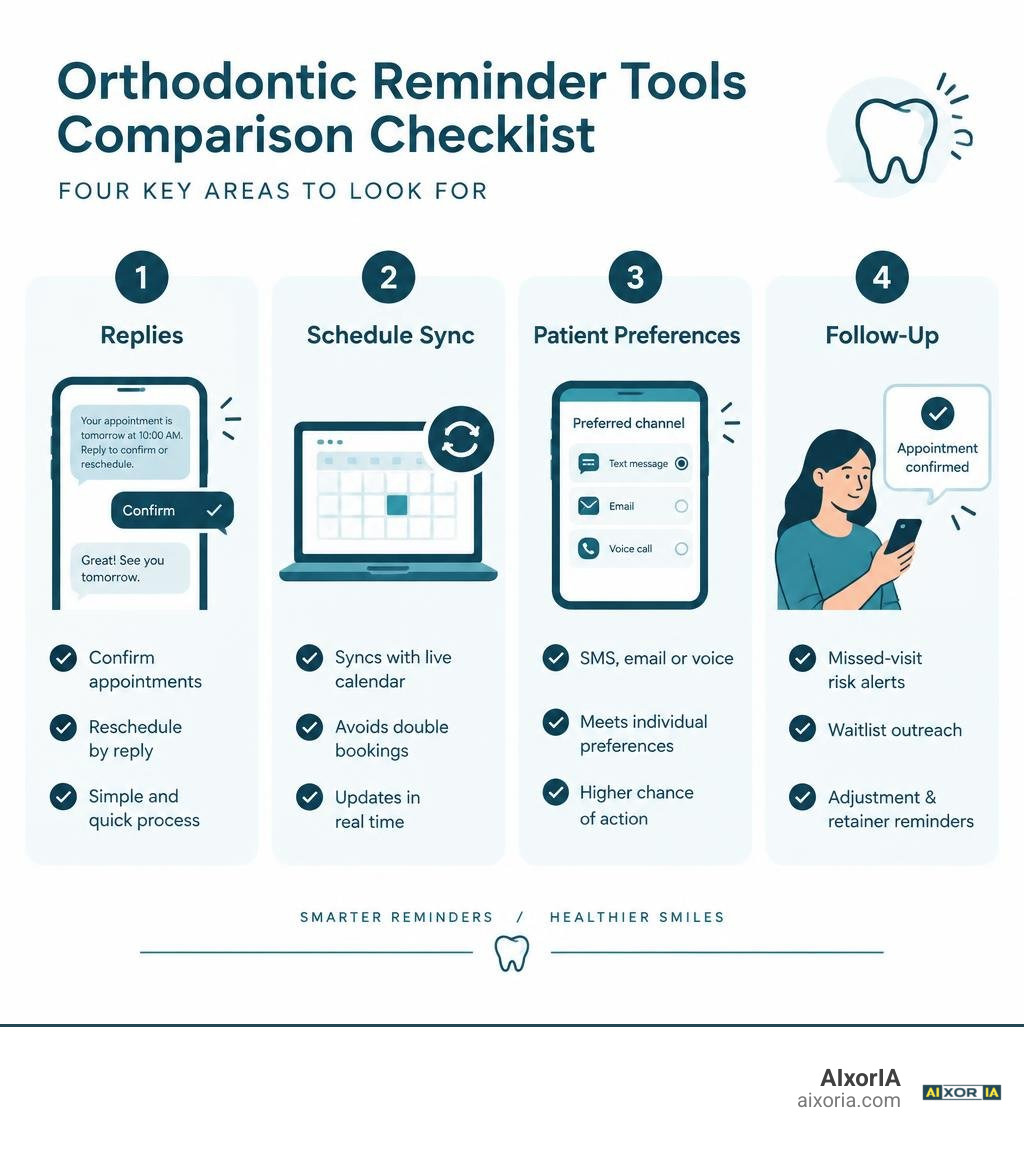
To compare AI tools for appointment reminders for orthodontists, start with three checks: Can patients confirm or reschedule by reply? Does the tool sync with your live schedule? Can it send reminders through the channels patients prefer? Then look for features your practice will use, such as missed-visit risk alerts, waitlist outreach, and reminders for adjustment or retainer visits.
A reminder that reaches a patient is useful. A reminder that helps them act before an appointment is missed is better. This guide compares tool types and shows what to test before you pay for one.
AI tools for appointment reminders for orthodontists: how they work
Reminder systems can send scheduled SMS, email, or voice messages using appointment data from a practice-management system (PMS). More advanced tools may use AI to respond to patient replies, help find another appointment time, or identify patterns associated with missed visits.
For example, a patient could receive a text before an adjustment appointment and reply to confirm or request a change. If the system can access the live calendar, it may offer an available time and update the booking after the patient chooses. Practices can set different workflows for consultations, adjustments, and retainer checks.
A platform that combines scheduling and messaging can help coordinate these steps. Review how its patient communication workflows connect reminders with appointment data, and verify that its features meet your practice’s needs before adopting it.
How AI tools for appointment reminders for orthodontists can reduce no-shows
A reminder can reduce forgetfulness, but AI may also help a practice respond earlier to signs of attendance risk. Depending on the system, it might use previous missed visits, late confirmations, or message response patterns to flag appointments for extra follow-up. Treat these flags as prompts for staff, not proof that a patient will miss an appointment.
A practical workflow could include:
- Send an initial reminder with a clear way to confirm or request a change.
- Send a follow-up closer to the visit if the patient has not responded.
- Offer a rescheduling option rather than leaving the patient to call during office hours.
- If an opening results, contact patients on a waitlist to fill the slot.
A 48-hour reminder gives families time to rearrange plans; a two-hour reminder can help with day-of logistics. These are starting points, not universal rules. Test timing against your appointment types, patient preferences, and response data, and avoid sending so many messages that patients tune them out.
How AI tools for appointment reminders for orthodontists support treatment compliance
Orthodontic care depends on regular visits over an extended period. Reminders can help patients keep adjustment appointments, attend retention checks, and stay connected with the practice. Some patient communication apps also send aligner-wear prompts or oral-hygiene guidance. These are different from appointment reminders, so check that the tool supports the workflows you actually want.
AI can help organize routine communication, but it should not make clinical decisions. A clinician should review concerns about pain, appliance problems, or treatment progress and decide what guidance is appropriate. Research on AI-driven orthodontic care describes chatbots and mobile tools as ways to support engagement, alongside clinical oversight and attention to privacy and validation. (Guo & Shao, 2025)
How AI chatbots and virtual assistants support scheduling
A chatbot or virtual assistant can respond to common scheduling questions outside office hours, collect a patient’s preferred times, and route a booking or rescheduling request to the right workflow. It may also answer practice-approved questions about office hours or what to bring to an appointment.
Before using one, define what it can do without staff involvement. Clinical questions, urgent appliance issues, and requests it cannot confidently handle should be transferred to a person. You can review examples of orthodontic-specific front-desk capabilities when deciding what questions and scheduling tasks your own system must support.
AI reminder tool types and how to compare them
“AI reminder tool” can refer to several different products. Some focus on messages, while others combine scheduling, recalls, or virtual patient support. Compare what each type does with the information already in your practice systems.
| Tool type | Common channels | Scheduling support | Typical automation |
|---|---|---|---|
| PMS reminder module | SMS, email, or voice, depending on the system | Uses the practice calendar | Appointment confirmations and routine reminders |
| AI receptionist | Often voice and messaging | May handle booking and rescheduling | Answers routine questions and routes requests |
| Patient engagement platform | Often multiple channels | May connect to online scheduling | Reminders, follow-ups, and recall campaigns |
| Remote-monitoring app | Usually app notifications or messages | May flag a need for a clinical review | Progress check-ins and treatment-related prompts |
| Scheduling automation | Usually messaging linked to calendar availability | Focuses on booking and open slots | Rescheduling and waitlist outreach |
Product descriptions and performance claims come from vendors and may not be independently verified. Ask for a demonstration using realistic orthodontic workflows, and request clear information about integration, data handling, pricing, and what happens when automation fails.
Compare reminders, scheduling, and recall workflows
A system that sends a basic reminder may not handle the broader appointment journey. Check whether it supports:
- New-patient consultations and records appointments
- Recurring adjustment visits
- Retainer checks and post-treatment follow-up
- Observation recall for patients who are not yet ready to begin treatment
- Patient-requested cancellations and rescheduling
- Waitlist outreach when a slot becomes available
Orthodontic schedules involve different appointment types and visit lengths. Test whether the tool can follow your rules rather than simply offering the next open time.
Review reported outcomes carefully
The research provided for this guide includes reported figures of up to 30% fewer missed appointments and a 15% improvement in patient retention associated with automated reminders and communication. It also describes a remote-monitoring study reporting 82% accuracy in predicting aligner displacement and 28% fewer unscheduled follow-up visits. Another case study reports 20% shorter average visits.
These figures come from different settings and measure different outcomes. They are not a guarantee that a reminder tool alone will produce the same result. Ask how an outcome was measured, what other changes were made, and whether the result applies to your practice.
Features, integrations, and personalization to evaluate
Prioritize features that make it easier for patients to respond and easier for your team to manage the schedule.
| Practice need | Feature to look for |
|---|---|
| Patients need a simple way to respond | Two-way messaging with confirmation and rescheduling options |
| Families use different communication channels | SMS, email, and voice support, with patient preferences recorded |
| Appointments have different purposes | Templates and rules by appointment type |
| Patients speak different languages | Supported languages and a way to check message quality |
| Staff need to spot workflow problems | Reporting on delivery, responses, cancellations, and missed visits |
| The practice needs to control exceptions | Human review and escalation settings |
Connect reminders to orthodontic practice-management software
A reliable connection to your PMS can prevent outdated reminders and calendar conflicts. Ask whether the tool uses a native integration or API, whether schedule changes sync back in both directions, and how quickly updates appear.
Test the connection with real appointment types, providers, and chair or column rules. Confirm how the system handles moved or cancelled visits, duplicate records, family appointments, and failed updates. Run a small pilot and compare the tool’s schedule with the PMS before relying on automated booking.
Personalize messages and predict missed appointments
Personalization should be useful, not intrusive. A practice might adjust message timing by appointment lead time, use a patient’s preferred channel and language, or address reminders to a caregiver when appropriate. Treatment-stage messages can distinguish an adjustment from a retainer check without sharing unnecessary details.
Some AI systems use engagement history or previous attendance to flag appointments that may need a human follow-up. Ask what data informs a risk score and whether staff can understand why an appointment was flagged. Keep messages accessible, concise, and easy to act on. For more context on evaluating automation across business workflows, see our guide to AI tools for business productivity.
Implement reminders responsibly and measure results
Start by reviewing how reminders work today. Identify which appointments are most often missed, how rescheduling is handled, and where staff spend time on repeated calls or messages. Then pilot one workflow, such as adjustment reminders, before expanding to recall or other appointment types.
Create approved message templates, train staff on the new workflow, and decide who handles replies the system cannot resolve. Set up clear patient consent and preference processes, including a way to opt out of nonessential messages.
For privacy, choose a vendor that can explain how it protects patient information, limits access, stores data, and handles service providers. If the vendor handles protected health information on the practice’s behalf, confirm whether a business associate agreement is required and available. HIPAA obligations depend on the relationship and how information is used; a vendor’s compliance claim alone does not establish that your practice’s workflow is compliant. For text and voice outreach, review applicable consent, opt-out, and communications requirements, including TCPA considerations, with qualified counsel.
Measure operational and patient benefits
Record a baseline before launching the pilot so you can compare results fairly. Useful measures include:
- No-show rate by appointment type
- Confirmation and response rates
- Time from a cancellation to a successful reschedule
- Staff hours spent on reminder and recall work
- Schedule utilization and appointments recovered from the waitlist
- Patient feedback and satisfaction
- Cost per recovered appointment
Review the data regularly and adjust the workflow if reminders are ignored, patients report too many messages, or staff still need to correct frequent scheduling errors. Our guide to business productivity tools also covers ways to assess whether automation is saving time in practice.
Frequently Asked Questions about AI appointment reminders for orthodontists
Can AI reminders work with existing orthodontic practice-management software?
Often, but compatibility depends on the specific PMS, product, and software version. Check whether the integration is native or API-based, what information it reads and writes, and whether updates appear in real time. Ask the vendor to demonstrate a booking, cancellation, and rescheduling workflow using your appointment types. Confirm how the system behaves if the connection is interrupted.
Which reminder timing and channels should a practice use?
Start with a schedule that gives patients time to respond, such as a reminder roughly 48 hours before an appointment and a shorter reminder closer to the visit. Then adjust based on appointment type and your own response data. Offer SMS, email, or voice where supported, and record each patient’s preferences. Keep messages limited to what is useful, with an easy way to confirm, request a change, or opt out where applicable.
Do AI appointment reminders replace front-desk staff?
No. They can take on routine reminders, confirmations, and some rescheduling tasks, but people still need to manage unusual requests, sensitive conversations, clinical questions, and exceptions. Staff should oversee message templates, review performance, and step in when the system cannot resolve a request.
Conclusion
The best reminder system is the one that fits your practice’s workflows, connects reliably to your schedule, protects patient information, and makes it easy for patients to respond. Start with a focused pilot, measure real outcomes, and keep human support available for anything automation should not handle.
At AIxorIA, we help businesses and professionals make informed choices through curated AI tools, practical guides, and in-depth reviews. To explore more resources, browse our AI tools and guides.
Guo X, Shao Y. “AI-driven dynamic orthodontic treatment management: personalized progress tracking and adjustments-a narrative review..” Frontiers in dental medicine, 2025. PMCID PMC12354369.