- cHow to Choose AI Tools for Interview Scheduling for Hiring Managers
Scr0ll d0wn to D0VVNL0AD
The best AI tools for interview scheduling for hiring managers fit the interviews you actually run. For occasional one-on-one calls, look for easy self-scheduling and calendar sync. For panels or hiring across time zones, check whether a tool can find a time for every interviewer, respect availability rules, and handle reschedules.
Before you pay, test the candidate booking experience on a phone. Then check whether the tool updates your calendar and hiring system when plans change. A fast booking link helps, but it may still leave you to coordinate the hard parts.
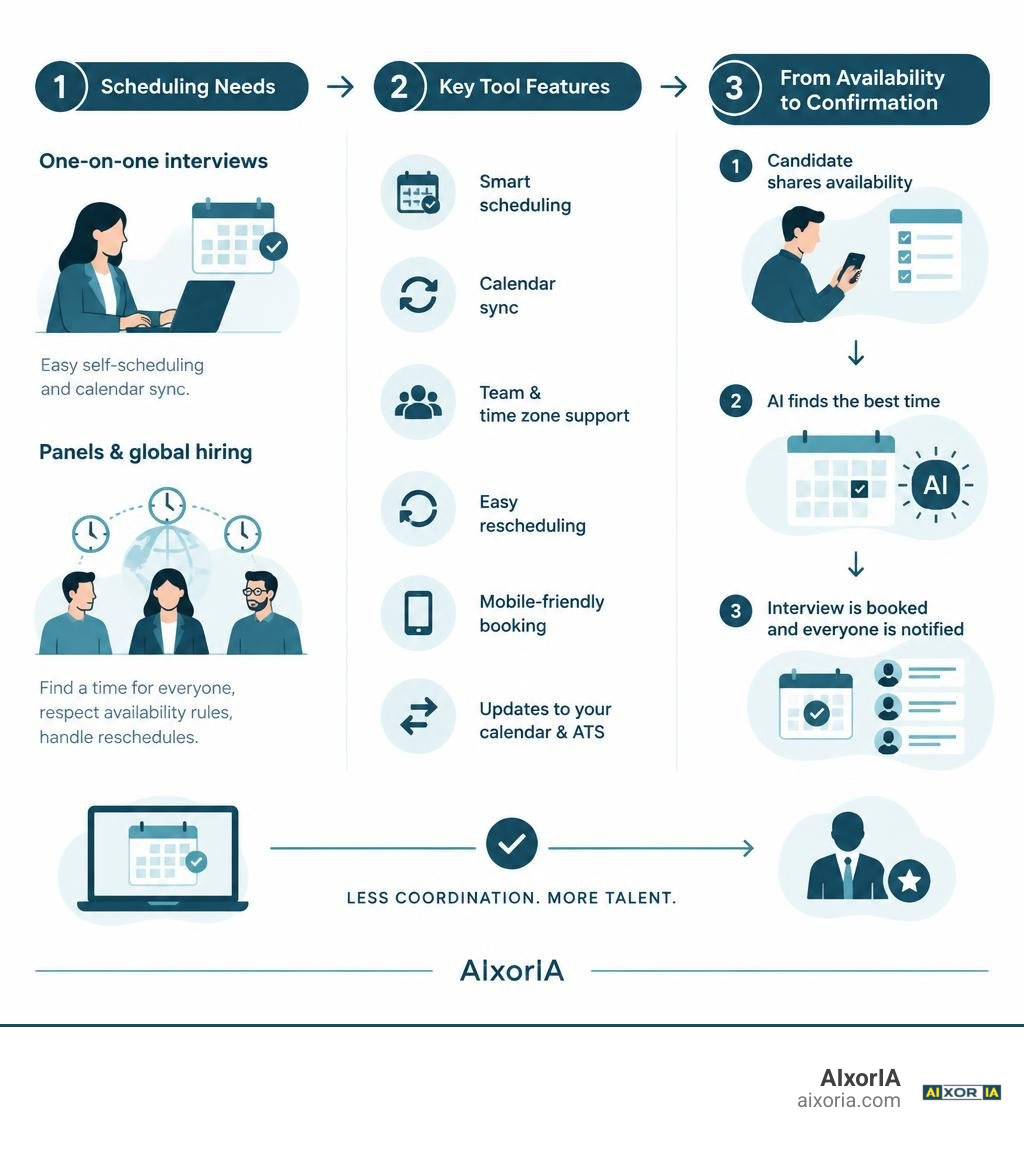
Scheduling delays represent a silent bottleneck in talent acquisition. Industry research shows recruiters spend roughly 38% of their working hours on scheduling logistics alone. When candidates wait days for an open slot, top talent drops out. In fact, up to 42% of job seekers withdraw from hiring pipelines simply because scheduling takes too long. Implementing smart scheduling technology keeps candidates engaged and allows hiring managers to focus on evaluating talent rather than playing calendar Tetris.
What AI Interview Scheduling Does—and How It Differs From Traditional Tools
Traditional scheduling software relies on static booking links. A coordinator sets fixed working hours, sends a link to an applicant, and hopes the candidate finds a workable slot. This basic model works fine for simple 1:1 phone chats, but it quickly breaks down when applied to real-world hiring workflows with multiple interviewers, differing time zones, and changing priorities.
Modern AI interview scheduling software moves beyond simple calendar availability. Instead of acting as an open calendar book, an autonomous AI scheduling agent acts like a digital recruiting coordinator. It understands context, evaluates complex constraints, applies structured business rules, and updates calendars dynamically.
These platforms read calendar metadata—such as internal holds, focus blocks, and meeting patterns—to surface optimal time windows. They orchestrate end-to-end communication, trigger workflows directly from candidate applications, and maintain human oversight so hiring teams remain in complete control.
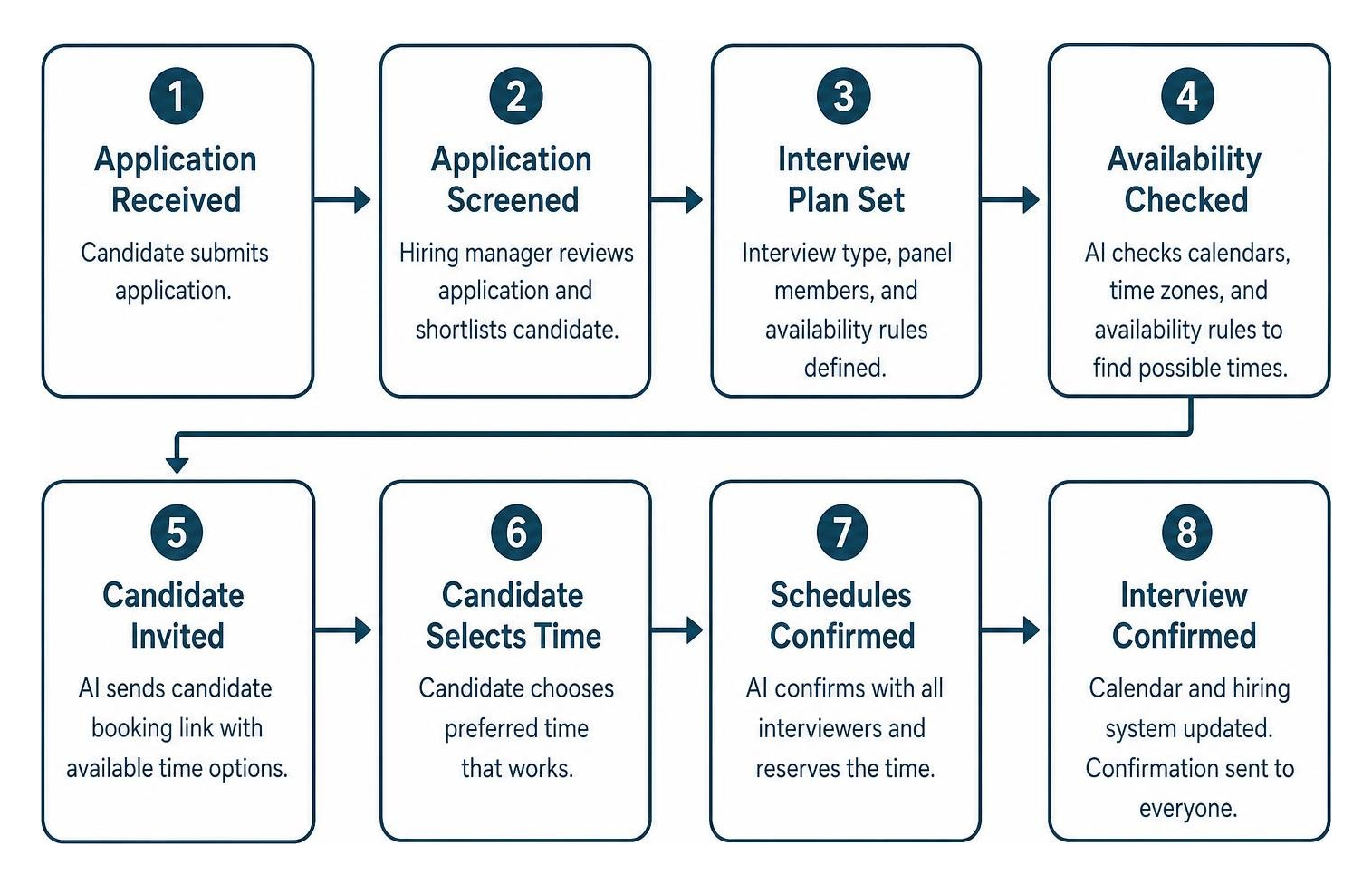
Connecting intelligent automation directly into your recruiting process is essential because modern ai tools support recruiter productivity across every hiring stage. When properly configured, AI systems eliminate manual coordination while keeping human evaluation at the center.
How AI tools for interview scheduling for hiring managers handle panels and time zones
Panel interviews are where basic scheduling tools fail. Coordinating three to five interviewers across multiple departments creates hundreds of potential calendar combinations. If interviewers reside across varying global time zones, manual coordination can easily take days.
Specialized platforms solve this by evaluating thousands of potential slot combinations in seconds. These platforms handle:
- Panel and Loop Matching: Analyzing availability across multiple interviewers simultaneously to find overlapping windows without manual cross-referencing.
- Sequencing and Logic: Ensuring sequential interviews occur in the exact required order (e.g., technical screen before hiring manager debrief) even across multi-day loops.
- Automatic Time Zone Normalization: Converting meeting slots to the candidate’s local time zone automatically across web portals, SMS, and calendar invites.
- Interviewer Load Balancing: Distributing interviews fairly across an approved pool of trained evaluators to prevent burnout on specific engineers or department leads.
- Buffer Times and Guardrails: Automatically enforcing mandatory rest periods between sessions and respecting daily interview caps per team member.
What happens when an interviewer cancels or a candidate reschedules?
Cancellations and reschedules normally trigger a frustrating chain reaction. A single panelist declining a meeting often forces a recruiting coordinator to spend 45 minutes emailing attendees, cancelling holds, and starting the booking cycle from scratch.
AI scheduling platforms handle conflicts proactively through real-time calendar monitoring:
- Instant Conflict Detection: The system detects when an interviewer books over an existing slot or clicks “Decline” on an invite.
- Autonomous Replacement: Using preset rules, the platform searches the qualified interviewer pool and automatically substitutes an available, trained peer without moving the candidate’s scheduled time.
- Smart Rescheduling: If an entire panel must move, the AI generates a dedicated rescheduling link showing alternative multi-interviewer windows. A task that takes a human 45 minutes can be resolved in under 15 seconds.
- Automated Stakeholder Notifications: Calendar invites, video conference links, and interview rooms update automatically across Google Workspace, Microsoft 365, and applicant tracking systems (ATS).
- Intelligent Escalation: When a conflict cannot be resolved automatically according to company rules, the system immediately flags the issue for recruiter review.
Comparing AI Interview Scheduling Tool Types
Not every hiring team requires the same level of automation. Different operational needs require different software architectures.
| Tool Category | Core Architecture | Automation Depth | Panel & Loop Support | Typical Integrations | Best-Fit Team |
|---|---|---|---|---|---|
| Enterprise AI Scheduling Agents | Dedicated autonomous scheduling engines | End-to-end: screening handoff, panel booking, auto-rescheduling, load balancing | Advanced multi-day loops, sequential interviews, replacement rules | Bidirectional sync with Workday, Greenhouse, iCIMS, Ashby | High-volume enterprises and complex corporate hiring |
| Conversational AI Assistants | Chat, SMS, and WhatsApp conversational bots | High: 24/7 candidate chat screening, instant text-to-schedule | Standard panels, group sessions, location routing | Major ATS platforms, job boards, SMS gateways | High-volume hourly, retail, hospitality, and campus recruiting |
| Inbox & Email-Native Coordinators | Natural language email assistants | High: operates entirely via email threads without logins | Multi-person cross-timezone panels, physical room booking | Outlook, Google Workspace, Teams, Zoom | Growing companies seeking zero-change-management setup |
| ATS-Native Schedulers | Built-in module inside ATS platforms | Moderate: candidate self-booking links within workflow | Basic multi-interviewer panels and 1:1 sessions | Native ATS database, Google/Outlook calendars | Teams wanting an all-in-one platform without extra software |
| Lightweight Self-Schedulers | Booking links with calendar synchronization | Basic: calendar availability display and self-selection | 1:1 meetings, round-robin screening | Google Calendar, Microsoft Outlook, Zapier | Small teams, early-stage startups, low-volume hiring |
AI tools for interview scheduling for hiring managers by team size
When selecting ai tools for interview scheduling for hiring managers, team size and monthly interview volume determine the right investment:
- Small Teams & Occasional Hiring: If your company hires fewer than 10 people per year, standalone booking links or built-in calendar scheduling tools provide sufficient functionality without enterprise software overhead.
- Growing Mid-Market Teams: When coordination bottlenecks begin slowing down hiring managers, email-native scheduling assistants can help by delegating calendar coordination directly to an automated assistant.
- Enterprise & High-Volume Organizations: Organizations conducting hundreds of monthly interviews across technical loops, executive panels, and global locations require robust enterprise scheduling systems. These tools deliver the orchestration necessary to maintain pipeline velocity without adding administrative headcount.
What each tool type can automate
Different architectures support varying depths of the hiring workflow:
- End-to-End Coordination: Booking candidates the moment they pass initial screening, matching interviewers by skill domain, and maintaining calendar holds across multiple participants.
- Omnichannel Communications: Sending personalized booking links and reminders across SMS, email, and WhatsApp to slash candidate drop-off.
- Interviewer Experience & Feedback: Dispatching automated scorecard reminders immediately following interviews, providing structured competency guides, and tracking interviewer responsiveness.
- Room and Video Logistics: Automatically provisioning unique Microsoft Teams, Zoom, or Google Meet links while tentatively booking physical conference rooms sized to the interview format.
How to Choose and Measure an AI Scheduling Tool
Selecting an interview scheduling platform requires assessing technical compatibility alongside measurable business impact. Evaluating core functionality against the 8 essential scheduling software features 2026 ensures your organization avoids costly software mismatches.

Choosing AI tools for interview scheduling for hiring managers
To find the right system for your organization’s workflow, evaluate software vendors across these key operational criteria:
- Bidirectional ATS Integration: Ensure the platform synchronizes candidate data, interview stages, and feedback scorecards directly with your system of record (such as Greenhouse, Workday, SAP SuccessFactors, or Ashby). Reviewing our guide on how to integrate ai recruiting tools with ats in 2026 will help you structure this technical implementation.
- Unified Interview Intelligence: Advanced platforms unite automated booking with structured evaluation guides. Look for tools that build competency-based scorecards directly from job requirements, ensuring interviewers assess candidates consistently.
- Data Security and AI Governance: Verify enterprise-grade certifications, including SOC 2 Type II, ISO 27001, and ISO 42001 for responsible artificial intelligence. Confirm that candidate personally identifiable information (PII) is anonymized and compliant with GDPR and CCPA regulations.
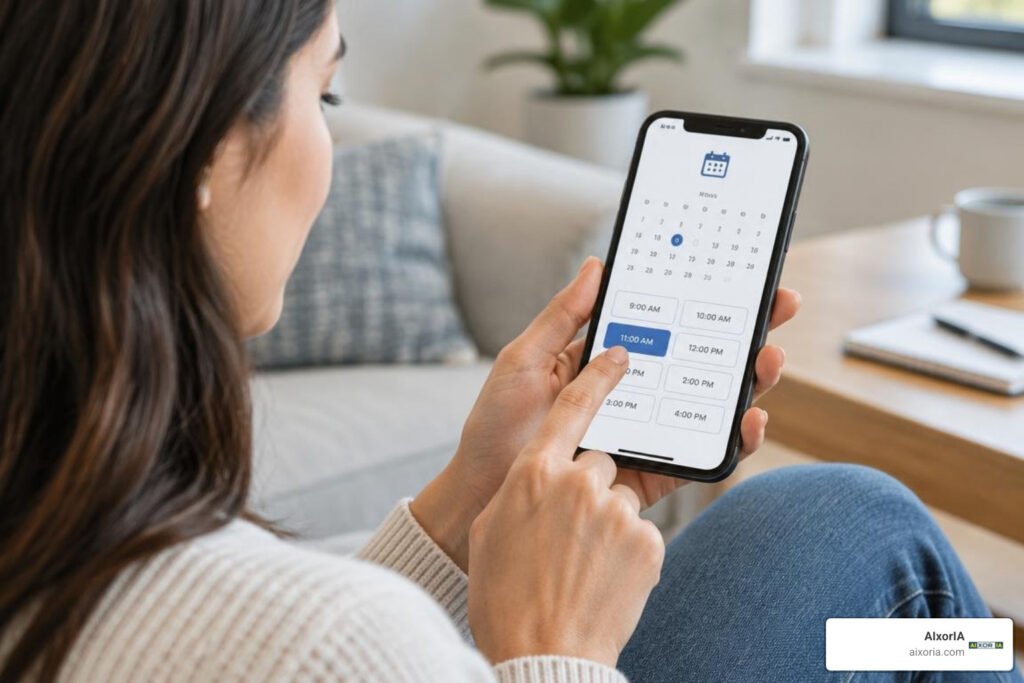
- Mobile Candidate Experience: Over 75% of job seekers use mobile devices during their job search. Always test the candidate booking workflow on iOS and Android to ensure frictionless self-scheduling.
Benefits, time savings, and ROI to track
Organizations adopting dedicated AI interview scheduling software experience dramatic improvements across hiring velocity and operational costs.
Before rolling out a solution across your entire company, audit your baseline metrics: track average hours spent scheduling per week, time from screening to first interview, and monthly reschedule rates.
After implementation, measure these critical performance indicators:
- Time-to-Interview Reduction: Teams using automated scheduling frequently reduce time-to-first-interview from several business days to under 24 hours.
- Decreased Coordination Overhead: Automation eliminates 70% to 90% of manual scheduling tasks, saving recruiting teams 10+ hours per week per coordinator.
- Lower No-Show Rates: Automated SMS and email reminders reduce interview no-show rates from the industry average of 20–30% down to under 5%.
- Accelerated Time-to-Fill: By eliminating scheduling drag, enterprises shorten overall hiring cycles by 15% to 25%, filling critical positions up to two weeks faster.
To discover more platforms transforming talent operations, explore our curated breakdown of the best ai recruiting tools in 2026 tested ranked and our review of 5 best free ai tools for recruiters 2026 automate hiring.
Frequently Asked Questions About AI Interview Scheduling
Can AI schedule complex panels across multiple time zones?
Yes. Enterprise AI scheduling software connects directly to interviewer calendars, normalizes all time zones, and evaluates availability rules in parallel. The software accounts for custom constraints, working hours, required interview sequencing, and physical room requirements, presenting candidates with only viable multi-participant options.
How do candidates self-schedule, and what happens when plans change?
Candidates receive a branded self-scheduling portal via email, text message, or conversational chat immediately upon clearing application screening. If a candidate or interviewer needs to reschedule, the candidate can select a new time slot directly from their portal or message thread. The AI automatically updates all participant calendars, video conferencing links, and ATS records in real time.
Are AI scheduling tools suitable for small businesses?
Yes, but small businesses with simple 1:1 hiring workflows usually do not need complex enterprise orchestration engines. Growing teams can leverage lightweight self-scheduling tools, calendar integrations, or built-in ATS features. Organizations should upgrade to dedicated AI scheduling tools when hiring volume increases, multi-interviewer panels become standard, or scheduling delays begin hurting candidate conversion.
Conclusion
Interview scheduling should move your business forward, not create hiring roadblocks. Choosing the right AI scheduling software depends on your operational reality: lightweight booking links satisfy simple 1:1 screening calls, while enterprise AI agents are indispensable for orchestrating multi-stage panel loops across global time zones.
Before deploying software across your entire department, run a two-week pilot program with a single high-volume hiring manager. Track time savings, measure candidate feedback, and maintain clear human oversight throughout the transition.
At AIxorIA, we provide practical, up-to-date guidance and detailed software evaluations to help modern businesses leverage artificial intelligence effectively. To discover more actionable workplace productivity strategies, visit AIxorIA to explore our comprehensive library of AI tools, implementation tutorials, and software reviews.