What Is In-House Payroll Software for Small Business and How Does It Work?

In-
Scr0ll d0wn to D0VVNL0AD
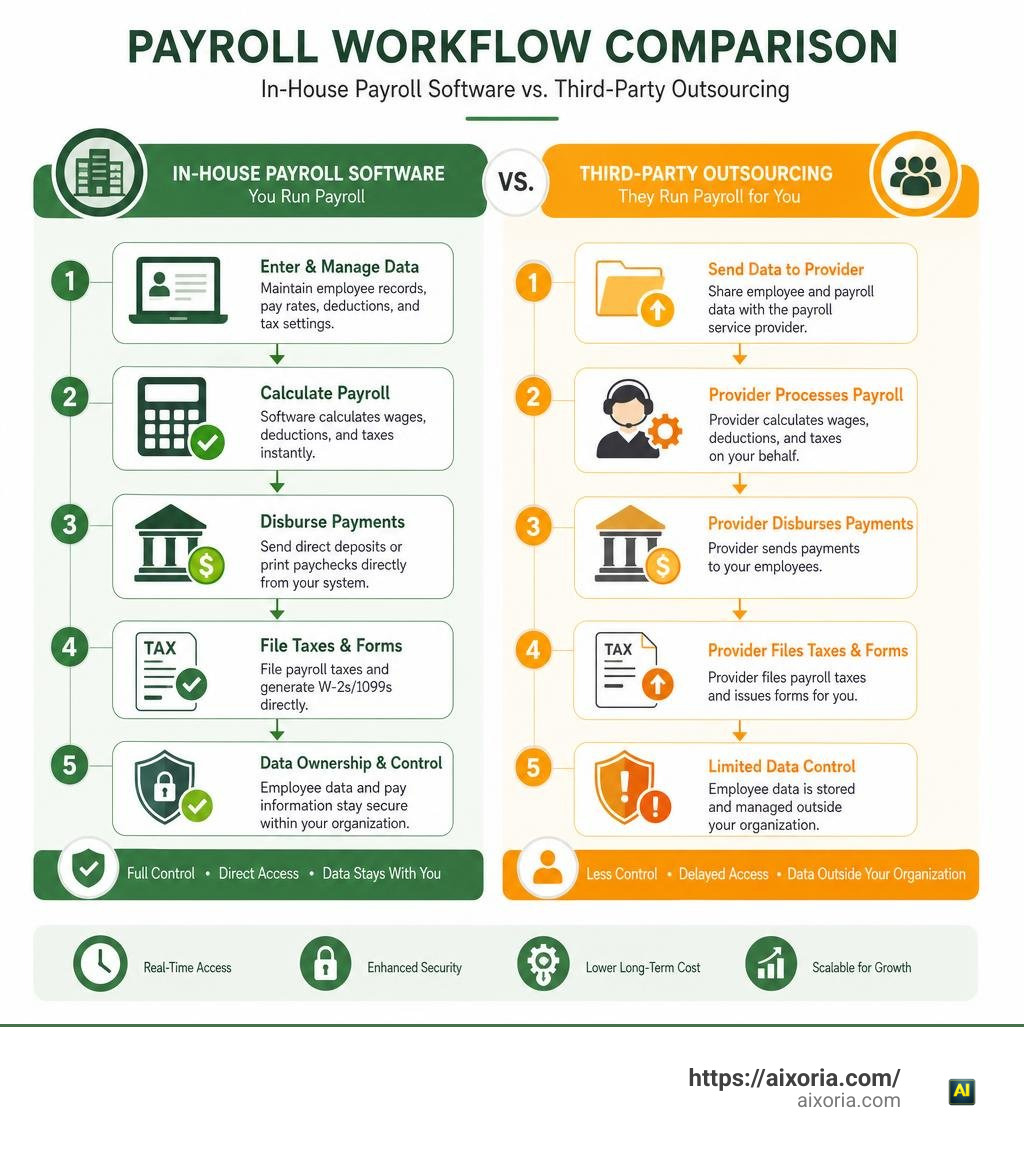
house payroll software for small business is an on-premise or self-managed cloud tool that lets you calculate wages, withhold taxes, disburse payments, and generate tax forms internally without outsourcing to a third-party agency.
Instead of handing off control and paying recurring bureau markups, you manage the pay cycle directly using automated calculation engines:
- Wage and deduction calculation: Automatically computes gross pay, federal/state/local withholdings, FICA, and benefits.
- Payment disbursement: Generates direct deposit ACH files or prints physical paychecks with MICR encoding.
- Tax and form filing: Auto-populates and files quarterly Forms 941/940, state unemployment reports, and year-end W-2s or 1099s.
- Data ownership: Keeps sensitive employee personal identifiable information (PII) and banking records entirely under your company’s direct control.
Managing payroll manually on spreadsheets wastes roughly five to seven hours per pay period and creates severe compliance risks. In-house payroll software gives you complete autonomy over your cash flow, lets you make instant last-minute pay adjustments, and eliminates costly administrative outsourcing fees.
Understanding In-House Payroll Systems and Architecture
At its core, in-house payroll software serves as a centralized calculation and disbursement engine. When you run payroll internally, the system takes basic employee records—such as hourly wage rates, annual salaries, pre-tax deductions, and tax allowances—and runs them through updated federal, state, and local tax tables.
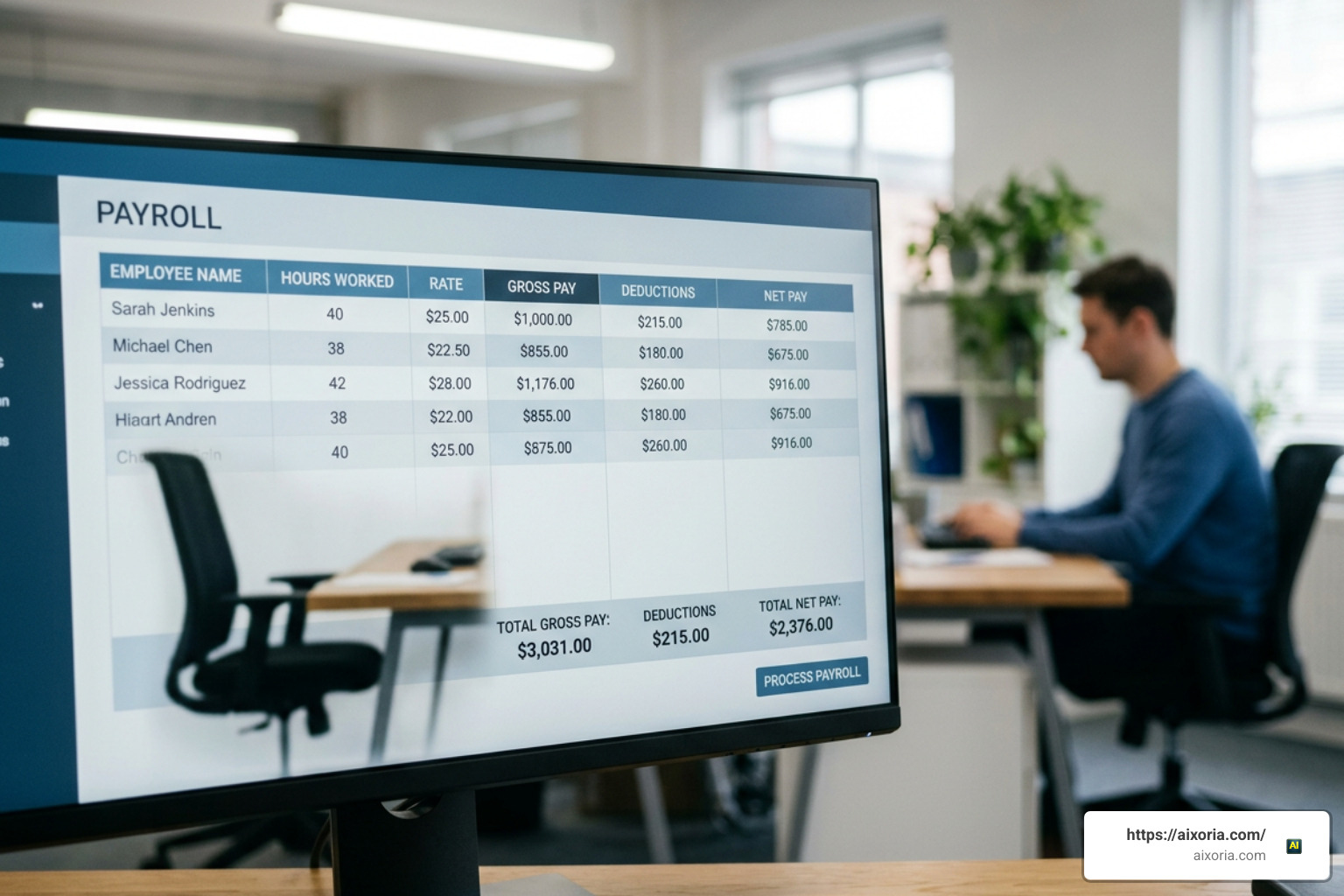
The underlying architecture handles complex mathematical operations behind the scenes:
- Gross-to-Net Pay Computation: The platform tracks total hours worked, applies overtime thresholds, incorporates bonuses or commissions, and calculates gross earnings. It then computes mandatory statutory withholdings (Social Security, Medicare, Federal Income Tax, State Income Tax, and Local Taxes) alongside voluntary deductions (such as health insurance premiums and 401(k) contributions) to determine the exact net pay.
- Disbursement Pipelines: Once net wages are confirmed, the software creates standard NACHA-formatted ACH files for direct deposit distribution through your commercial bank. Alternatively, it coordinates physical check printing on blank check stock with MICR toner encoding.
- Automated Recordkeeping: Every pay cycle is recorded in an auditable ledger, tracking cumulative year-to-date withholdings, employer-side matching contributions, and paid time off (PTO) balances.
By housing these workflows internally, your business retains full ownership of its operational data while eliminating third-party communication lags.
Evaluating Desktop vs Cloud In-House Payroll Software for Small Business
Choosing how to host your in-house system generally comes down to two models: locally installed desktop applications or self-managed cloud-based platforms. Evaluating the right software approach requires weighing your operational preferences regarding data storage, ongoing costs, and remote access.
Desktop-based payroll software operates entirely on your local machine or internal office network. These applications often come with a flat annual licensing model (for example, ranging from $100 to $300 per year) without per-employee monthly surcharges. This approach gives you absolute physical custody over sensitive data, operates without continuous internet access, and provides fixed overhead budgeting. However, desktop platforms require you to perform manual software patches, maintain routine database backups, and manage local network security.
Cloud-based payroll software runs inside a web browser and is hosted on secured cloud servers. Cloud systems use monthly subscription structures—typically a base fee between $30 and $50 per month plus $5 to $8 per worker. In exchange, cloud platforms automatically update tax tables across all jurisdictions, offer intuitive employee self-service portals, and allow administrators to process payroll from anywhere.
Essential Features in Modern In-House Payroll Software for Small Business
To maintain accuracy and keep administrative burdens low, modern solutions provide specialized tools that streamline routine tasks. When assessing potential solutions, prioritize the following essential features:
- Automated Error Detection: Modern systems monitor timecards, deductions, and wage inputs to proactively flag anomalies—such as missing time punches, duplicate entries, or irregular overtime spikes—before you finalize a pay run.
- Time and Attendance Synchronization: Direct digital timecard syncing pulls employee work hours straight into the payroll run, eliminating manual spreadsheet calculations and dual data entry.
- General Ledger Mapping: Built-in accounting integrations automatically convert payroll summaries and liabilities into balanced journal entries within your general ledger.
- Employee Self-Service (ESS): Digital portals give workers direct access to download historical pay stubs, view annual W-2 forms, and update their personal tax withholdings (Form W-4) or banking details.
- Multi-State Tax Compliance: Automated tax table updates adjust withholding rates across multiple state and municipal borders, ensuring distributed teams stay compliant.
Why Choose In-House Payroll Software for Small Business Over Outsourcing
Many business owners assume outsourcing payroll to an external bureau or agency is the only way to avoid compliance headaches. However, outsourcing often introduces rigid processing deadlines, high recurring administrative fees, and delays whenever simple corrections are needed.
Managing your payroll in-house using modern software provides greater operational agility, cost savings, and direct visibility into your labor expenses.
| Feature / Capability | In-House Payroll Software | Outsourced Payroll Agency |
|---|---|---|
| Direct Cost Model | Flat annual license or predictable monthly SaaS fee | High monthly base fees + per-check charges + filing markups |
| Processing Flexibility | Run payroll anytime; instant adjustments before disbursement | Strict cutoff times (2–3 days prior); fees for off-cycle runs |
| Data Privacy & Control | Employee PII and banking data remain internal | Data stored and managed by third-party vendor staff |
| Correction Speed | Instant pre-distribution corrections within the platform | Multi-day turnaround requiring customer service support tickets |
| System Integrations | Real-time direct sync with internal accounting and time clocks | Often relies on periodic manual batch uploads and CSV imports |
Cost Analysis and Return on Investment
The financial upside of keeping payroll in-house becomes clear when analyzing total operational expenses. External agencies and full-service outsourcing bureaus charge for every payroll cycle, tax filing, direct deposit transaction, and year-end form. Over a year, these fees can easily total several thousand dollars for a growing small business.
By contrast, using in-house payroll software involves fixed costs—either a low monthly subscription or a flat annual license. A small team processing payroll internally can complete a pay run in 15 minutes or less, saving an average of 4 hours per month compared to manual spreadsheet calculations.
Furthermore, automated calculation engines help prevent costly IRS penalties. Late or inaccurate federal tax deposits carry mandatory tiered fines:
- 1 to 5 days late: 2% penalty on the unpaid deposit amount
- 6 to 15 days late: 5% penalty
- 16+ days late: 10% penalty
- More than 10 days after the first IRS bill: 15% penalty, plus 3% to 6% interest
Automating calculations and deposit schedules through internal software eliminates these compliance risks while keeping processing costs low.
Data Security and Compliance Control
Managing sensitive employee records internally provides distinct security benefits. Handing off Social Security numbers, dates of birth, home addresses, and bank routing numbers to an outside agency expands your company’s digital attack surface.
When using in-house payroll software, your data remains secured behind your own internal administrative controls. Desktop deployments allow you to isolate personal identifiable information (PII) entirely within encrypted local networks, while modern cloud setups leverage strict role-based permissions, multi-factor authentication, and comprehensive audit trails that log every change made to employee compensation records.
Step-by-Step Implementation and Tax Compliance Guide
Setting up your internal payroll system requires a structured implementation process to ensure every pay cycle runs smoothly and stays fully compliant with federal and state regulations.
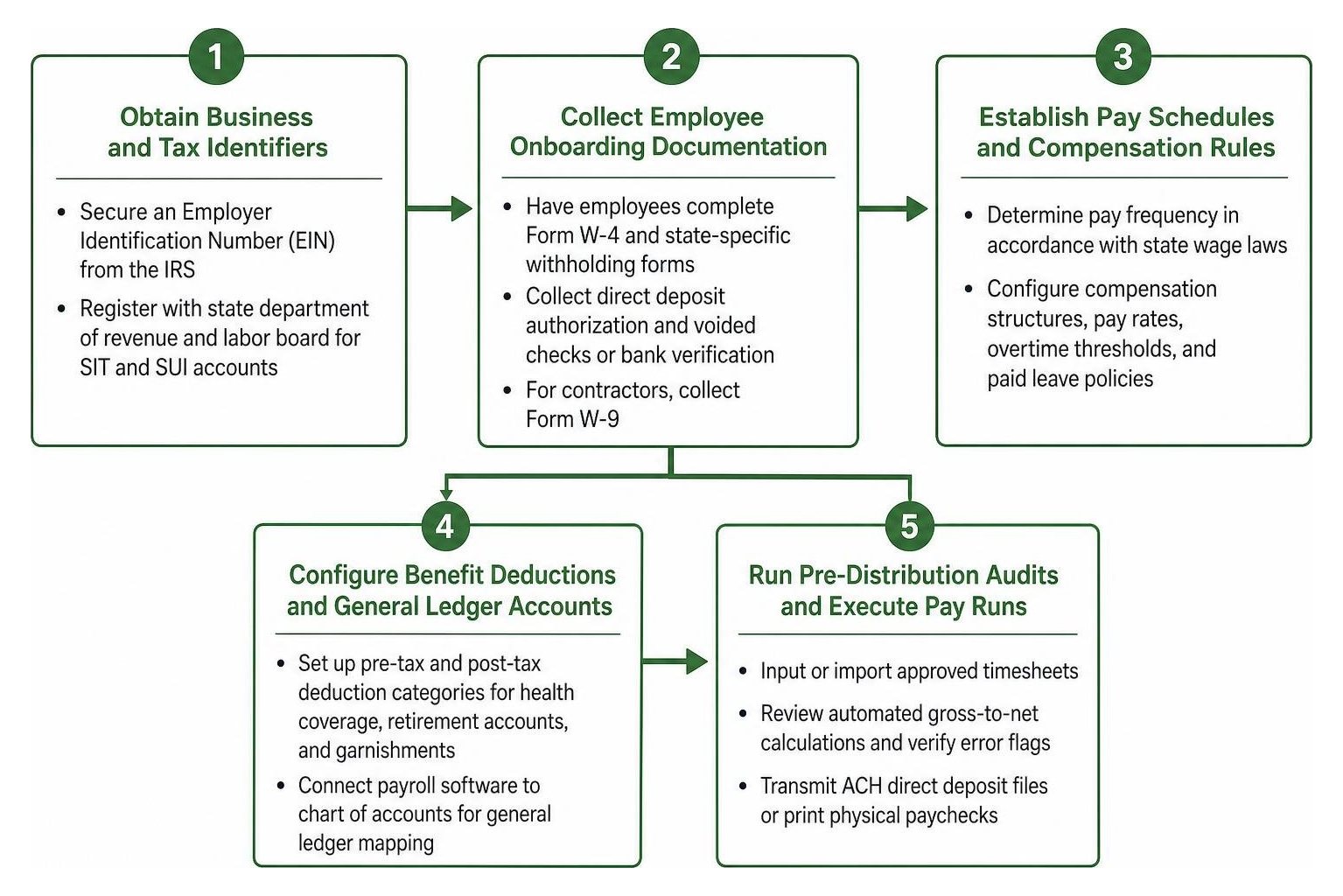
- Obtain Business and Tax Identifiers: Secure an Employer Identification Number (EIN) from the Internal Revenue Service (IRS) and register with your state’s department of revenue and labor board for state income tax (SIT) and state unemployment insurance (SUI) accounts.
- Collect Employee Onboarding Documentation: Have all employees complete Form W-4 (Employee’s Withholding Certificate) and collect state-specific withholding forms. Obtain direct deposit authorization agreements along with voided checks or bank verification letters. For independent contractors, collect Form W-9.
- Establish Pay Schedules and Compensation Rules: Determine your regular pay frequency (e.g., weekly, bi-weekly, semi-monthly, or monthly) in accordance with state wage laws. Configure compensation structures, pay rates, overtime thresholds, and paid leave policies in the software.
- Configure Benefit Deductions and General Ledger Accounts: Set up pre-tax and post-tax deduction categories for health coverage, retirement accounts, and garnishments. Connect your payroll software to your chart of accounts for seamless general ledger mapping.
- Run Pre-Distribution Audits and Execute Pay Runs: Input or import approved timesheets, review automated gross-to-net calculations, verify error flags, and transmit ACH direct deposit files or print physical paychecks.
Navigating Federal, State, and Local Tax Filings
Running payroll in-house means your software handles statutory calculations while keeping you in charge of filing obligations:
- Quarterly Federal Returns (Form 941): Reports federal income taxes withheld along with employer and employee Social Security and Medicare taxes (FICA). Most businesses file Form 941 quarterly, while very small employers with annual liabilities under $1,000 may use annual Form 944.
- Annual Federal Unemployment Tax (Form 940): Calculates and reports annual Federal Unemployment Tax Act (FUTA) obligations.
- State Unemployment Insurance (SUI): Requires quarterly reporting of total employee wages and remittance of state-specific unemployment taxes based on your assigned experience rate.
- Year-End Reporting (Forms W-2 and 1099-NEC): Compiles annual compensation summaries, statutory withholdings, and benefit values. Software auto-generates Form W-2 for employees and Form 1099-NEC for non-employee contractors, facilitating direct electronic distribution or IRS e-filing.
Integrating Accounting, Time Tracking, and Benefits
An in-house payroll system works best when connected with the rest of your business tools. Modern software connects directly with time clocks to import verified hours, eliminating the errors that come with manual re-entry.
Once payroll is approved, built-in integrations automatically update your financial books, categorizing wage expenses, employer tax liabilities, and accrued benefits accurately. For sole proprietors or micro-teams transitioning into hiring their first staff, reviewing best accounting software for small business with no employees helps illustrate how core bookkeeping software expands when payroll modules are added.
Furthermore, integrating 401(k) deductions, health benefits, and pay-as-you-go workers’ compensation policies ensures premium calculations adjust automatically with every payroll run.
Frequently Asked Questions About In-House Payroll
Is in-house payroll software more cost-effective than outsourcing for a micro-business?
Yes. Micro-businesses with 1 to 10 employees often face disproportionately high fees from full-service outsourcing bureaus. In-house payroll software—especially flat-rate desktop platforms or straightforward self-managed cloud tools—significantly lowers processing expenses. It automates calculations and document preparation without recurring agency surcharges.
How does in-house payroll software handle changing multi-state tax laws?
Cloud-based in-house software updates its digital tax tables automatically whenever federal, state, or municipal tax rates change. For desktop-based installations, developers release regular software updates and tax table patches throughout the year to ensure all statutory deductions remain accurate across every jurisdiction where your team works.
What technical expertise is required to run payroll software internally?
You do not need an advanced accounting degree or specialized IT background to operate modern in-house software. Most platforms feature intuitive setup wizards, step-by-step payroll workflows, automated error-checking alerts, and direct customer support to assist with initial onboarding and ongoing pay cycles.
Conclusion
Managing your payroll in-house is an effective way to lower administrative overhead, protect sensitive financial records, and take full control over your business’s cash flow. With automated calculation engines, real-time error detection, and streamlined tax form preparation, modern software makes processing payroll internally fast, secure, and reliable.
To explore more ways modern technology and automated workflows can streamline your everyday operations, discover what is the best AI for productivity in 2026 to enhance your business efficiency.
Clear and useful tips here. One Wan 3.0 studio I use is WanVideoGen: . WanVideoGen