Which CRM Is Beginner Friendly for First-Time Users?
Scr0ll d0wn to D0VVNL0AD

Which CRM is beginner friendly? For most small business owners, the best starting choices are HubSpot CRM for a capable free plan, Less Annoying CRM for the simplest paid experience, and Bigin by Zoho CRM for a lightweight tool built for very small teams.
A beginner-friendly CRM should let you add contacts, track deals, and remember follow-ups without a long setup project, technical help, or a screen full of features you will never use.
| Best fit | Beginner-friendly CRM type | Why it is easy to start |
|---|---|---|
| Free starting point | HubSpot CRM | Clear dashboard, contact import, visual deals, and free core tools |
| Simplicity over feature depth | Less Annoying CRM | One straightforward plan and a small-business-focused interface |
| Solopreneurs and small teams | Bigin by Zoho CRM | Simple pipelines, mobile access, and a short setup process |
| Visual sales process | Pipedrive | Drag-and-drop deal stages make progress easy to see |
The right choice is not the CRM with the longest feature list. It is the one your team will actually open every day. Moving from spreadsheets, sticky notes, and scattered inboxes into one shared system can make customer information easier to find and follow-ups far less likely to slip away.
This guide explains what makes a CRM easy to learn, which low-cost options are worth considering, and how to choose one that fits your daily work.
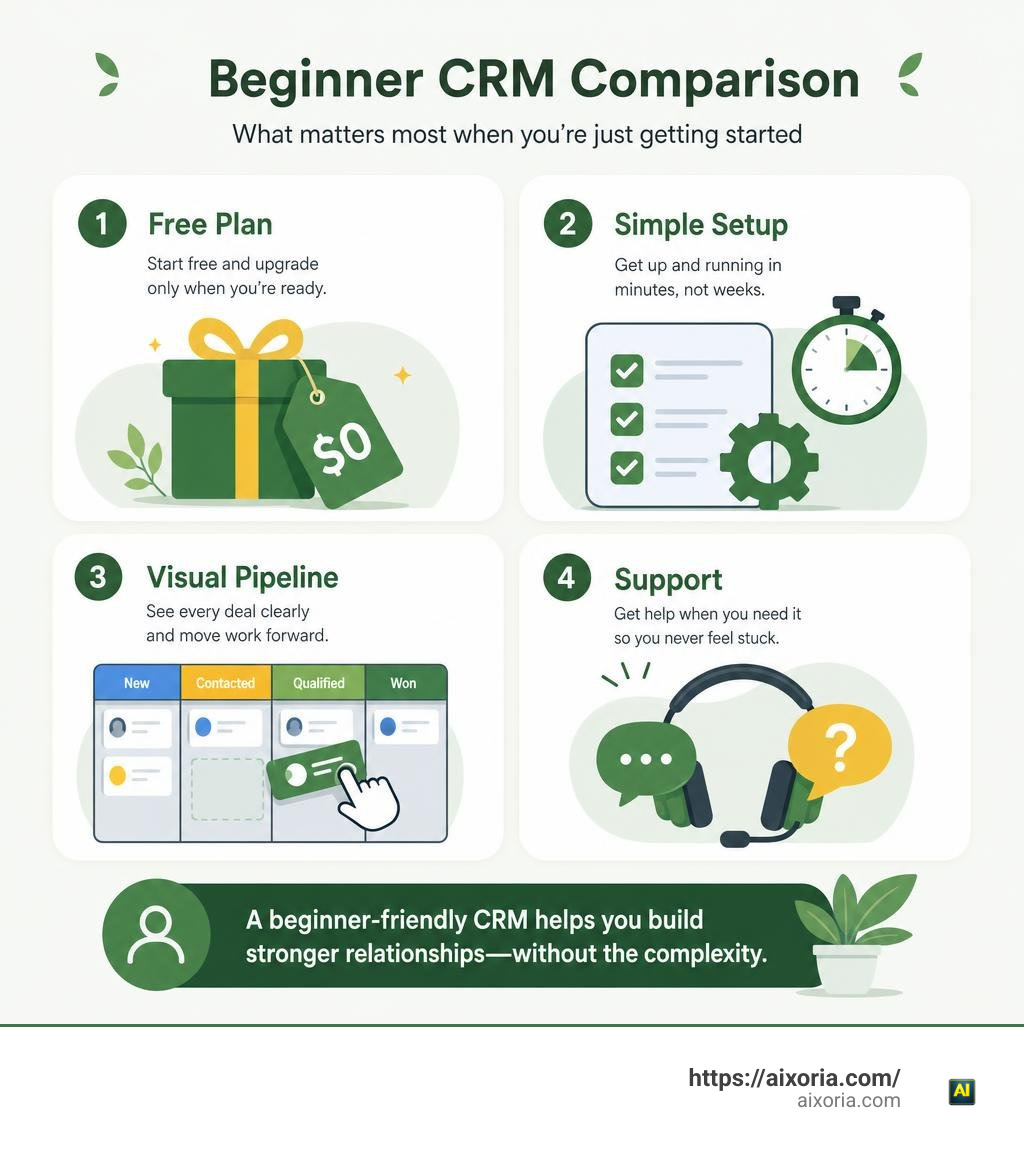
Which CRM Is Beginner Friendly? Core Evaluation Criteria

When we evaluate software for first-time users, we look far beyond flashy marketing claims. Asking which CRM is beginner friendly requires analyzing how fast a total novice can go from logging in to actively managing relationships.
A truly accessible Customer Relationship Management (CRM) platform prioritizes zero-admin setup, visual clarity, and direct usability. When you log into a well-designed system, you shouldn’t need a developer or an expensive onboarding consultant. You should immediately see your schedule for the day, your active sales conversations, and your primary contacts.
To measure ease of use, we weigh several core evaluation factors:
- Setup Speed: Can you import your contacts from a spreadsheet and start organizing leads in under thirty minutes?
- Interface Clarity: Is the dashboard clean and uncluttered, or is it covered in complex enterprise tools you will never use?
- Navigation Mechanics: Does the platform rely on intuitive drag-and-drop mechanics for moving leads through pipeline stages?
- Self-Service Learning Resources: Are there bite-sized video walkthroughs, clear knowledge bases, and responsive customer support when you get stuck?
When team members feel overwhelmed by software, adoption drops to zero. That is why the best beginner platforms focus entirely on core daily tasks rather than complex administrative settings.
Essential Features Every Beginner Needs
When starting out, it is easy to fall into the trap of choosing software based on features you might need five years down the road. For now, focus on the fundamental tools that solve your immediate daily communication problems:
- Centralized Contact Database: Every interaction, meeting note, phone call, and document should sit in a single 360-degree contact record. No more digging through inbox folders or hunting down old notebooks.
- Visual Sales Pipelines: Managing deals using drag-and-drop columns (such as Lead, Qualified, Proposal Sent, and Closed Won) gives you an instant snapshot of your revenue pipeline.
- Two-Way Email and Calendar Sync: Automatically syncing your Google Workspace or Microsoft Outlook accounts ensures that client emails log automatically against their contact records without manual copy-pasting.
- Task Management and Follow-Up Reminders: Built-in task tracking creates a daily agenda so you never forget to send a promised proposal or follow up with a warm prospect.
- Mobile Application Access: Modern business happens on the go. Mobile access lets you log call notes, scan business cards, or review deal histories directly from your smartphone.
Avoiding Common Pitfalls of Overly Complex Platforms
Software abandonment is the silent killer of digital transformation in small companies. We frequently see business owners purchase enterprise-grade platforms only to stop using them six weeks later. Why does this happen?
First, traditional enterprise tools suffer from severe feature bloat. When an application forces you to configure thirty custom fields, navigate nested administrative menus, and attend mandatory multi-week onboarding seminars, daily usage feels like a chore.
Second, beware of hidden financial surprises. Many platforms lure users in with low initial monthly rates, only to restrict mandatory features like basic automated lead routing or contact storage behind expensive tier upgrades. Others lock you into annual enterprise contracts or charge thousands of dollars in required setup fees.
Finally, user adoption determines your return on investment. If a tool takes weeks to master, your sales team will quietly revert to local spreadsheets and sticky notes. Choosing a streamlined platform guarantees fast team adoption, keeping admin friction low so you can focus on building authentic relationships.
Top Low-Cost and Simple CRM Categories for First-Time Users
Finding the right system means matching the platform to your team size and operational model. Here is how top beginner-friendly choices compare across essential parameters:
| CRM Platform | Best Suited For | Starting Price Tier | Setup Time | Standout Beginner Feature |
|---|---|---|---|---|
| Less Annoying CRM | Solopreneurs & Micro Teams | $15 / user / month | Under 10 minutes | Zero tiered upgrades, simple flat rate, and dedicated telephone support |
| Bigin by Zoho CRM | Micro Businesses (1–20 staff) | Free plan available; Paid from ~$7–$9 / user / month | ~30 minutes | Micro-business focus with multi-channel messaging options |
| HubSpot CRM | Startups wanting free core tools | Free base plan; Paid tiers scale up | ~15 to 30 minutes | Generous free tools, marketing integrations, and built-in AI writing help |
| OnePageCRM | Action-oriented sales reps | ~21-day free trial; Affordable paid plans | Under 5 minutes | “Next Action” workflow that turns contact lists into daily action agendas |
| Salesforce Starter Suite | Small teams wanting enterprise growth | ~$25 / user / month | Under 30 minutes | Turnkey suite combining sales, marketing, and service with zero code |
Which CRM Is Beginner Friendly for Solopreneurs?
If you run a solo business, your primary bottleneck is time. You do not need complex team permissions or multi-department reporting. You need a fast, streamlined micro-CRM that functions as an personal assistant.
For independent operators transitioning off spreadsheets, platforms offering flat pricing and minimal configuration shine. Tools built around simple contact management for small businesses eliminate the noise of enterprise software by giving you a clear calendar, a straightforward contact list, and an easy pipeline view for $15 per month without unexpected tier upgrades.
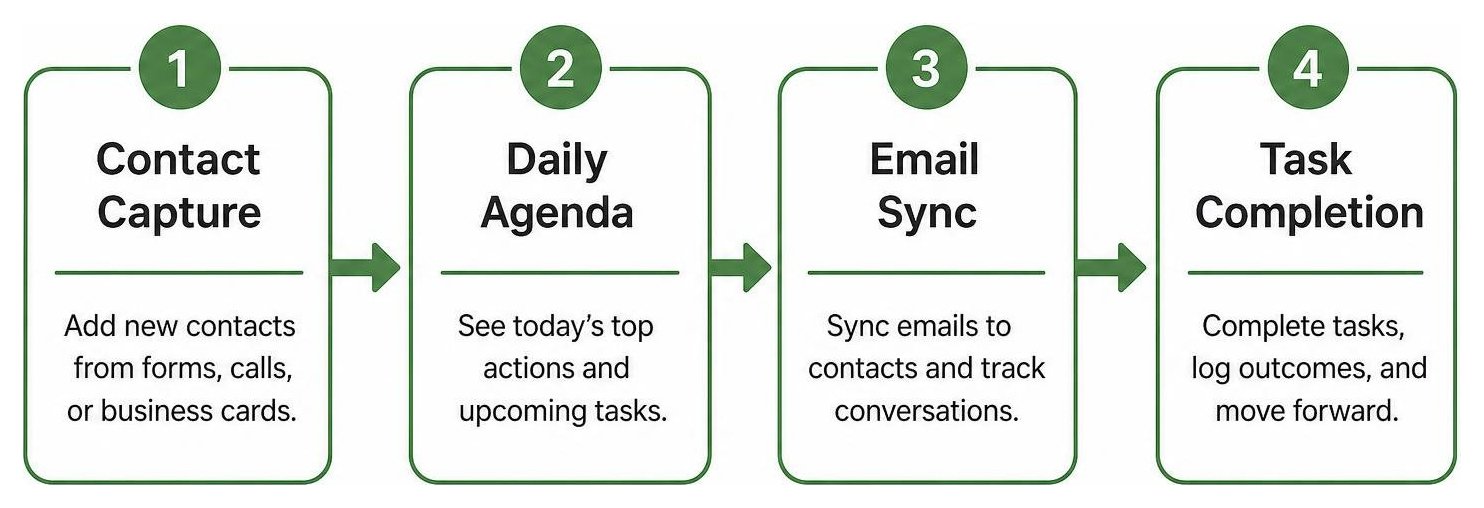
Another popular approach for solopreneurs is an action-driven framework. Rather than focusing solely on static deal stages, action-focused CRM tools automatically prompt you with a specific “Next Action” for every lead in your database. This keeps your sales activities momentum-driven and prevents active leads from growing cold.
Which CRM Is Beginner Friendly for Small Teams?
As soon as you hire your first employees or sales representatives, collaboration becomes your primary requirement. You need visibility into who contacted which client, who owns upcoming tasks, and how deals are progressing across shared sales stages.
For small teams of 1 to 20 employees, choosing lightweight business CRM solutions gives you dedicated multi-pipeline tracking without enterprise bloat. You can set up separate pipelines for sales deals, client onboarding, and post-sale customer support in under 30 minutes.
If your team foresees rapid scaling and wants access to robust sales, marketing, and customer service automation in a single package, turnkey small business sales tools offer simplified, out-of-the-box configurations starting around $25 per user monthly. These entry points provide guided setup checklists and pre-configured dashboards, letting small teams leverage enterprise-grade security and unified data without needing an in-house IT department.
Modern AI Innovations Simplifying CRM Setup and Workflows

As we navigate 2026, artificial intelligence has fundamentally transformed how beginners interact with CRM software. In the past, setting up a database required manual data entry, complex field mapping, and tedious administrative upkeep. Modern AI tools eliminate these manual barriers entirely.
Today’s beginner-friendly platforms embed intelligent assistants natively into daily user workflows. Built-in AI can now automatically analyze lengthy email threads or recorded sales calls, generating succinct lead summaries and drafting contextual follow-up emails in your brand voice. This reduces manual typing and speeds up daily administrative chores significantly.
Furthermore, artificial intelligence has revolutionized custom application development. Business owners are no longer forced to adapt their business operations to rigid off-the-shelf software structures.
Using natural language prompts, you can build personalized workflows from scratch. For example, by watching a no-code custom AI CRM build tutorial, you can learn how non-technical founders generate tailored databases, custom user permission roles, and automated deal notifications in as little as 10 minutes.
How to Successfully Integrate a CRM into Your Daily Workflow
Selecting software is only half the battle; building the daily habit of using it is where real productivity gains happen. Transitioning your business operations smoothly requires a step-by-step implementation strategy.

Follow this proven framework to integrate your software seamlessly:
- Clean Your Spreadsheet Data Before Importing: Before uploading contact files, remove duplicate records, fix formatting errors, and archive obsolete leads. Importing clean data prevents clutter from day one.
- Synchronize Email and Calendar Tools: Connect your primary inbox (Google Workspace, Microsoft 365, or IMAP) and digital calendars immediately. This ensures all incoming messages, outgoing proposals, and client meetings log automatically against contact timelines.
- Map Your Pipeline to Match Reality: Align your CRM deal stages with how your business actually makes sales. Avoid adding unnecessary stages; keep your process simple with 4 to 6 clear steps.
- Establish Daily Operating Routines: Make your software the primary open tab on your browser every morning. Start your workday by checking your daily task agenda, reviewing scheduled meetings, and updating deal statuses before checking social media or personal messaging.
- Monitor Team Performance Metrics: Track simple operational metrics—such as weekly follow-up activities, deal movement, and conversion rates—to ensure everyone maintains data integrity.
Frequently Asked Questions About Beginner-Friendly CRMs
What is the easiest CRM for someone with no prior experience?
The easiest platform depends on your preferred working style. If you want a completely standard, traditional contact management layout with zero learning curve, Less Annoying CRM is widely recognized as the most straightforward paid tool. If you prefer a visual, visual-first pipeline interface that is free to start, HubSpot CRM or Bigin by Zoho CRM allow you to import spreadsheet contacts and launch active deal boards within minutes without technical expertise.
Are free CRM plans sufficient for growing small businesses?
Free CRM plans are an excellent entry point for solopreneurs, early-stage startups, and micro teams testing digital lead management. Free tiers often include essential tools like contact databases, visual pipelines, and mobile access. However, keep in mind that free tiers usually place caps on user seats (often restricted to 1–3 users), active contact records (ranging from 500 to 1,000 contacts), or advanced automation capabilities. As your customer base expands, upgrading to a low-cost paid tier ensures unrestricted database scaling.
How long does it take to set up a basic CRM system?
For modern lightweight systems, basic operational setup takes between 5 to 30 minutes. Modern platforms feature built-in CSV spreadsheet upload wizards that import your customer lists instantly. By pairing native email integration with simple pre-built pipeline templates, you can begin organizing deals, logging interactions, and setting follow-up tasks on your very first day.”https://www.mediafire.com/file/72cxfonb2daabqx/Fragments_of_the_Overworld_BY_MCMPDL%252CCOM.mcaddon/file“;
Conclusion
Choosing the right software does not have to be an overwhelming or intimidating project. When answering which CRM is beginner friendly, the best system is always the one that removes daily administrative chaos rather than adding to it. By prioritizing ease of setup, clean interface design, and visual pipeline management, you give your business a reliable foundation for long-term customer relationships.
As your team adopts digital tools, expanding your overall technical fluency can unlocked dramatic productivity gains. To continue modernizing your business workflows and mastering cutting-edge software tools, explore expert guides and learn AI productivity skills with Aixoria tutorials today.