Invoicing is one of the most critical workflows for any small business—because it directly impacts cash flow. The faster and more accurately you invoice, the faster you get paid.
But in 2026, invoicing software is no longer just about sending bills. The best tools now combine automation, payment processing, reporting, and AI-powered workflows into one system. For U.S. small businesses, the right solution should reduce manual work, improve accuracy, and scale as your business grows.
This guide answers a simple question in depth:
What is the best invoicing software for small business?
If you want one tool that balances invoicing, accounting, automation, and scalability—the answer is clear.
Table of Contents
The Best Invoicing Software for Small Business
QuickBooks Online
QuickBooks Online is the best invoicing software for small businesses in 2026 because it combines professional invoicing, full accounting, automation, and scalability in one platform.
Unlike simple invoicing tools, QuickBooks is built as a complete financial system—so you don’t outgrow it as your business expands.
Why QuickBooks Online Is the Best Choice
Small businesses don’t just need invoices—they need a system that handles:
- Creating and sending invoices
- Tracking payments and cash flow
- Managing expenses and taxes
- Automating reminders and recurring billing
QuickBooks does all of this in one place.
It allows you to generate professional invoices, automate payment reminders, and even accept online payments directly from the invoice. This reduces late payments, which is a major issue for small businesses in the U.S.
More importantly, it connects invoicing with your full financial data—so every invoice automatically updates your reports, taxes, and cash flow insights.
Core Features That Matter for Small Businesses
1. Professional Invoicing + Payment Collection
QuickBooks lets you:
- Create branded invoices
- Accept credit cards, ACH, and online payments
- Set payment terms and due dates
- Add automatic late fees
This means you don’t just send invoices—you actually get paid faster.
2. Automation That Saves Time
Manual invoicing wastes hours every month. Modern invoicing tools can save up to 3–4 hours monthly through automation.
QuickBooks includes:
- Recurring invoices
- Automatic payment reminders
- Bank syncing
- Expense categorization
This reduces manual work and human error.
3. Full Accounting Integration
Most invoicing tools are limited. QuickBooks goes further:
- Profit & loss reports
- Tax calculations
- Expense tracking
- Payroll integration
This makes it a long-term solution—not just a short-term tool.
4. Real-Time Financial Visibility
Instead of guessing your finances, you get:
- Live dashboards
- Cash flow tracking
- Payment status updates
This is critical for decision-making, especially for growing businesses.
AI Capabilities in QuickBooks (2026)
AI is becoming a major differentiator in invoicing software.
QuickBooks has started integrating AI-driven features that go beyond basic automation:
- Smart categorization of expenses
- Automated transaction matching
- Predictive cash flow insights
- Intelligent reminders based on payment behavior
These AI capabilities reduce manual accounting work and help business owners focus on growth rather than admin tasks.
AI also improves accuracy. Instead of manually entering data, the system learns patterns and reduces errors over time—making it more reliable as your business scales.
Pricing (U.S.)
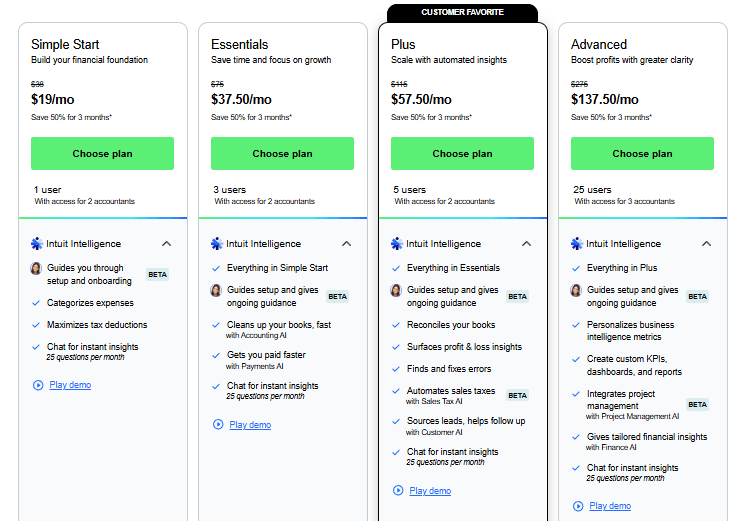
QuickBooks Online pricing typically starts around:
- Simple Start: ~$30–$38/month
- Essentials: ~$55/month
- Plus: ~$85/month
Pricing varies based on features and promotions, but it’s positioned as a premium solution compared to basic invoicing tools.
Pros and Cons
Pros
- All-in-one invoicing + accounting system
- Strong automation and payment features
- Scales with business growth
- Widely used and trusted in the U.S.
- Integrates with many business tools
Cons
- Higher cost than simple invoicing tools
- Slight learning curve for beginners
- May feel overpowered for very small freelancers
Who Should Use QuickBooks Online?
QuickBooks is best for:
- Small businesses planning to grow
- Service-based businesses and agencies
- Businesses that need both invoicing and accounting
- U.S.-based companies handling taxes and compliance
It may not be ideal if you only need basic invoicing—but for most businesses, it prevents the need to switch tools later.
What Makes It Better Than Other Invoicing Tools?
Many invoicing tools focus on simplicity. But that comes with limitations.
QuickBooks stands out because:
- It combines invoicing + accounting in one system
- It scales from small teams to growing businesses
- It reduces the need for multiple tools
- It provides deeper financial insights
While tools like FreshBooks or Zoho Invoice are good for specific use cases, QuickBooks offers a complete business financial ecosystem, which is why it consistently ranks as a top choice.
READ MORE – 7 Best Invoicing Software in 2026?
Final Answer
If you’re asking:
“What is the best invoicing software for small business?”
The most practical and scalable answer is:
It’s not just an invoicing tool—it’s a complete financial system that helps you:
- Send invoices faster
- Get paid on time
- Track finances accurately
- Scale your business without switching platforms
For most U.S. small businesses in 2026, that combination makes it the best long-term choice.