Dictation software has evolved from basic voice typing into AI-powered writing systems that can understand context, fix grammar, and produce clean, ready-to-use text. In 2026, the best tools don’t just transcribe—they think with you, structure your ideas, and reduce editing time dramatically.
If you’re searching for what is the best dictation software, the answer depends on three critical factors:
- Accuracy and speed (real-time, near-human transcription)
- AI-powered formatting and cleanup (punctuation, tone, structure)
- Cross-platform usability (works everywhere you write)
After analyzing current tools, features, and real-world usage, one software consistently stands out as the best overall choice in 2026.
Table of Contents
The Best Dictation Software in 2026 (Quick Answer)
Wispr Flow

Wispr Flow is the best dictation software in 2026 for most users, especially in the US, because it combines speed, accuracy, AI editing, and true cross-platform support into a single workflow.
Unlike traditional dictation tools that only convert speech into raw text, Wispr Flow transforms spoken language into clean, structured, and context-aware writing—often requiring little to no editing.
Why Wispr Flow Is the Best Dictation Software
Modern dictation tools are judged not just by transcription, but by how well they reduce the effort of writing. Wispr Flow excels because it goes beyond speech-to-text and acts as a complete AI writing layer.
1. Real-Time, High-Accuracy Dictation
Wispr Flow delivers near-instant transcription with high accuracy, often matching natural speech patterns without requiring users to speak in a robotic or structured way.
It can recognize context, names, and even technical vocabulary, making it suitable for professionals, creators, and developers.
2. AI-Powered Text Cleanup (Game Changer)
This is where most dictation tools fail—and where Wispr Flow stands out.
Instead of giving raw transcripts, it:
- Automatically adds punctuation
- Removes filler words like “um” and “uh”
- Corrects grammar in real time
- Structures sentences naturally
This significantly reduces editing time and allows users to produce polished content directly from speech.
3. Works Across Every App and Platform
One of the biggest limitations of older dictation tools was that they only worked in specific apps.
Wispr Flow works:
- In emails (Gmail, Outlook)
- In documents (Google Docs, Notion)
- In messaging apps (Slack, WhatsApp)
- In browsers and code editors
It essentially becomes a universal voice input layer, which is a major advantage for productivity.
4. Smart Personalization and Context Awareness
Wispr Flow learns how you write.
Over time, it:
- Adapts to your tone and style
- Recognizes custom vocabulary
- Supports shortcuts and reusable phrases
It even understands structured inputs like lists and technical formats, which is rare in dictation tools.
5. Built for AI-First Workflows
In 2026, dictation software is closely tied to AI ecosystems.
Wispr Flow integrates well with:
- Productivity tools
- Writing platforms
- AI-assisted workflows
This makes it ideal for users who rely on modern AI tools for writing, coding, or content creation.
AI in Dictation Software (Why It Matters in 2026)
AI has completely changed dictation.
Earlier tools simply converted speech into text. Now, AI-powered dictation tools:
- Understand context and meaning
- Format sentences automatically
- Improve clarity and tone
- Reduce editing workload
Modern systems use advanced speech recognition models and language models to produce clean, human-like writing instead of raw transcripts.
This is why tools like Wispr Flow outperform traditional dictation software—they don’t just listen, they interpret and refine.
Pricing
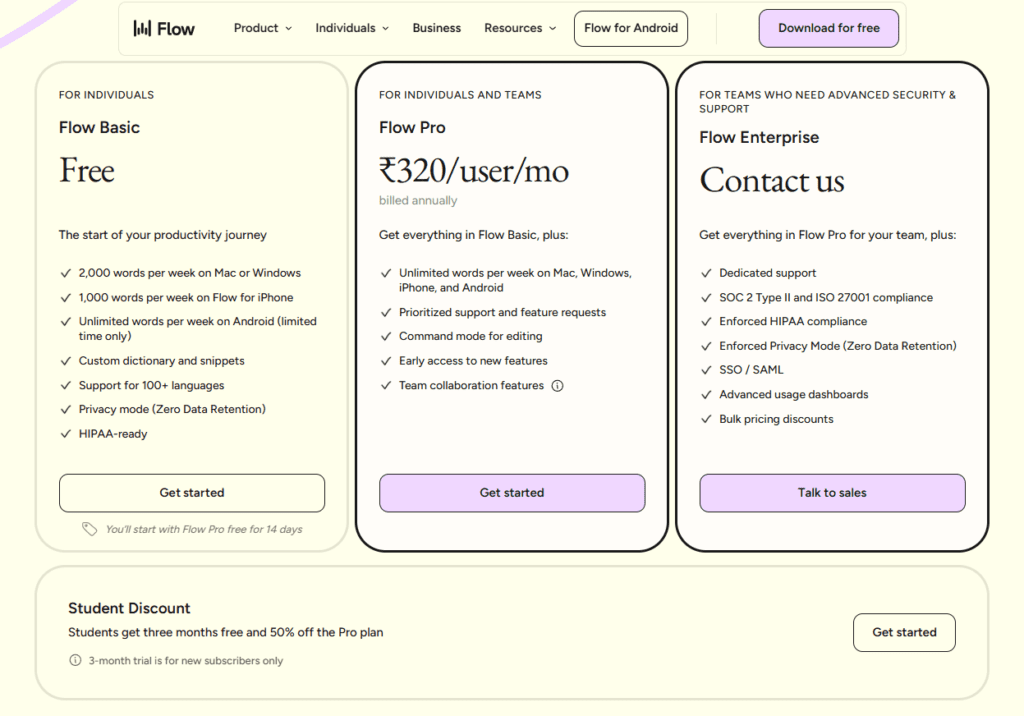
Wispr Flow offers a flexible pricing model:
- Free plan: Limited usage (basic dictation)
- Pro plan: Around $12–$15/month for full features and higher usage
This makes it accessible for both individuals and professionals.
Pros and Cons
Pros
- High accuracy with natural speech
- AI-powered formatting and cleanup
- Works across all apps and platforms
- Learns user writing style
- Fast and efficient for long-form writing
Cons
- Requires internet connection for full functionality
- Free plan is limited
- Not ideal for offline or privacy-sensitive workflows
Who Should Use Wispr Flow?
Wispr Flow is best for:
- Writers and content creators
- Professionals handling emails and documents
- Developers using voice input in coding environments
- Anyone who wants to write faster than typing
It may not be ideal for:
- Users needing full offline dictation
- Highly privacy-sensitive environments requiring local processing
Final Verdict
If you’re asking what is the best dictation software in 2026, the answer is clear for most users:
Wispr Flow offers the best balance of accuracy, AI-powered writing, speed, and usability.
It represents the shift from traditional dictation tools to AI-assisted writing systems—where speaking is not just converted into text, but transformed into structured, high-quality content.
For anyone looking to replace typing with voice in a practical, real-world workflow, it is currently the most complete solution available.
4 thoughts on “What Is the Best Dictation Software in 2026?”