Otter vs Fireflies vs Granola: Which Meeting Notes Tool Fits?
Scr0ll d0wn to D0VVNL0AD
If you’re weighing otter vs fireflies vs granola for meeting notes, start with what you need after the call. Choose Otter for live, shared transcripts. Choose Fireflies for sales calls that need CRM follow-up. Choose Granola for editable personal notes without a bot joining the meeting.
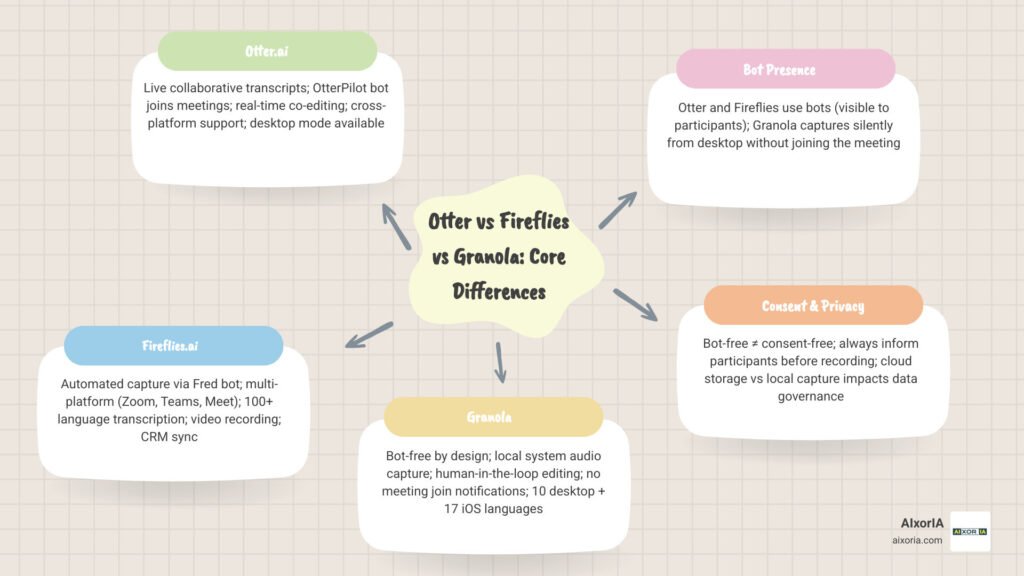
The biggest difference is how they capture calls: Otter and Fireflies commonly use meeting bots, though both offer bot-free desktop options. Granola is bot-free by design. That matters when a visible bot could distract a client or slow down a sensitive meeting. Bot-free does not mean consent-free, so tell participants before capturing a call.
At AIxorIA, we spend our days testing and curating productivity systems so you can make confident software choices. Meeting fatigue is at an all-time high, and reading through raw, unedited 45-minute transcripts rarely solves the problem. The real question is how these platforms fit into your daily workflow, protect your sensitive conversations, and turn spoken words into clear, actionable next steps.
Otter vs Fireflies vs Granola for Meeting Notes: Core Architecture and Capture Methods
How an application listens to your conversation defines its entire user experience. In the meeting-assistant ecosystem, software generally falls into two distinct camps: bot-based systems that join video calls as visible participants, and local, system-audio capture tools that run quietly in the background.
Visible bots (like Otter’s “OtterPilot” or Fireflies’ “Fred”) join video conference lobbies on Zoom, Google Meet, or Microsoft Teams. While convenient for hands-off recording, these bots introduce modern friction. Major platforms like Google Meet flag third-party bots as potential external risks, requiring meeting hosts to manually admit them. In sensitive interviews or executive discussions, an unannounced bot can derail rapport.
On the other hand, exploring best AI note takers that don’t join Zoom meetings highlights how local audio capture avoids awkward lobby interruptions altogether. Here is a breakdown of how their core capture methods compare:
| Feature / Dimension | Otter.ai | Fireflies.ai | Granola |
|---|---|---|---|
| Default Capture Method | Meeting Bot (OtterPilot) | Meeting Bot (Fred) | Local System Audio (Bot-Free) |
| Bot-Free Mode Available? | Yes (Desktop App) | Yes (Desktop App) | Native by Design |
| Lobby Admission Required? | Yes (when bot joins) | Yes (when bot joins) | No |
| Video Recording | Enterprise plans only | Paid plans (when bot joins) | No video saved |
| Audio Retention Policy | Stored on cloud servers | Stored on cloud servers | No raw audio stored |
| Platform Compatibility | Web, iOS, Android, Desktop | Web, iOS, Android, Desktop | macOS, Windows, iOS, Android |
Otter.ai: The Collaborative Meeting Recorder
Otter.ai built its reputation as a powerhouse for live, synchronized transcription. When OtterPilot enters your call, it generates a real-time, streaming text feed that all authorized participants can view and highlight simultaneously.
Beyond its web-based meeting bot, Otter offers cross-platform support across mobile and desktop. Its standout strength remains live co-editing: team members can tag colleagues, leave inline comments, and drop screenshots directly into the live transcript while the meeting is happening.
Fireflies.ai: The Automated Meeting Bot
Fireflies.ai functions as an automated transcription engine built for multi-platform teams. Once connected to your calendar, its “Fred” bot automatically dials into scheduled meetings across Zoom, Google Meet, Microsoft Teams, Webex, and more.
Fireflies supports over 100 languages and captures full video recordings on paid tiers when its bot is present. It acts as an archive, aggregating team-wide conversations into a single, searchable knowledge repository.
Granola: The Bot-Free Human-in-the-Loop Notebook
Granola takes a fundamentally different path by operating as a personal, Mac- and Windows-friendly notebook that captures audio directly from your device’s sound card. It never sends a bot into your meeting lobby.
Instead of passive transcription, Granola uses a human-in-the-loop workflow: you jot down brief, casual bullet points during the conversation, and Granola’s AI merges your typed cues with its background transcript to generate structured notes. It supports 10 languages on desktop and 17 on iOS. For a closer look at device-level recording, read this hands-on review of bot-free AI tools.
Transcription Accuracy, Summaries, and Note Quality Compared

Transcription quality involves more than just raw word recognition; it requires structured, reliable post-meeting artifacts. While evaluating audio to text transcription software, you will find that clean English audio typically yields high baseline accuracy, but complex vocabulary, overlapping speech, and action-item extraction reveal clear differences.
| Benchmark Metric | Otter.ai | Fireflies.ai | Granola |
|---|---|---|---|
| Average Mistakes (5 Meetings) | ~18 mistakes | ~28 mistakes | ~6 mistakes |
| Researcher Note Coverage | 77% | 69% | 77% |
| Action Item Hallucination Rate | Moderate | High (~33% unassigned/phantom) | Low (anchored to user cues) |
| Language Coverage | ~4 major languages | 100+ languages | 10 Desktop / 17 iOS |
| Post-Meeting Processing Time | Near-instant | 2 to 5 minutes | Under 30 seconds |
Benchmarking Otter vs Fireflies vs Granola for Meeting Notes: Mistake Rates and Coverage
Independent benchmark evaluations using the public AMI Meeting Corpus highlight meaningful differences in error rates. Across five standardized test meetings:
- Granola produced approximately 6 mistakes, achieving 77% coverage of essential meeting notes.
- Otter.ai produced approximately 18 mistakes, also achieving 77% coverage.
- Fireflies.ai logged approximately 28 mistakes, with a lower 69% coverage rate.
A notable challenge for automated bots is action-item hallucination. In benchmark testing, roughly one-third of the mistakes logged by Fireflies were action items that nobody in the meeting had actually agreed to undertake. Because Granola pairs its transcription with your manual bullet points, it keeps AI summaries grounded in your stated priorities.
Post-Meeting Workflows: Summaries, Action Items, and Email Drafts
What happens after your call ends determines the real time savings of these tools. If you use the best AI notes apps for productivity, you know that sharing clean takeaways quickly is what counts.
Otter organizes transcripts into clear paragraphs with auto-generated chapter summaries and assigned action items, making it easy to review long recordings. Fireflies provides customizable AI summary templates and automated follow-up emails, though it defaults to emailing the recap to everyone on the calendar invite. You will want to adjust those sharing settings if you prefer private drafts.
Granola focuses on rapid post-meeting polish. Because it doesn’t process heavy cloud video files, notes are ready in seconds. You can transform your rough notes into executive summaries, customer feedback briefs, or follow-up email drafts with a single click. For more testing details across these tools, check out this tested comparison of meeting assistants.
Workflow Integration, CRM Sync, and Enterprise Governance
Connecting meeting data to customer records and project trackers turns individual notes into broader business assets. For client-facing teams evaluating AI tools for sales and marketing, choosing between native CRM connectors and lightweight exports is a major decision point.
| Commercial & Governance Spec | Otter.ai | Fireflies.ai | Granola |
|---|---|---|---|
| Free Tier Limit | 300 min/mo (30-min call cap) | 800 min lifetime storage | 30-day note history |
| Entry Paid Tier (Annual) | $8.33 / user / month | $10.00 / user / month | $14.00 / user / month |
| Native CRM Integrations | Salesforce, HubSpot | Salesforce, HubSpot, Pipedrive | Native HubSpot, Zapier for others |
| Model Training Policy | Trains on de-identified data | Never trains on customer data | Anonymized training (opt-out available) |
| Compliance Certifications | SOC 2 Type II | SOC 2 Type II, GDPR, HIPAA | SOC 2 Type II |
Pricing and Free Plan Limits: Otter vs Fireflies vs Granola for Meeting Notes
Each platform handles its free and entry tiers differently:
- Otter.ai: The free tier provides 300 transcription minutes per month, but caps individual conversations at 30 minutes. Otter Pro runs $8.33 per user per month (billed annually) or $16.99 monthly, raising your allowance to 1,200 minutes.
- Fireflies.ai: The free tier provides an 800-minute cumulative lifetime storage limit rather than a monthly refresh. Fireflies Pro costs $10 per user per month (annual) or $18 monthly, unlocking unlimited transcription and AI search filters.
- Granola: The Basic plan is free forever with full capture capabilities, but limits your search and archive access to the last 30 days of notes. Granola Business is $14 per user per month, offering unlimited historical search, shared workspaces, and team templates.
Sales CRMs, Security Compliance, and Data Privacy Training
Security and privacy policies vary significantly across these services. Before rolling out AI productivity tools for enterprise, review how each platform handles customer data:
- Fireflies.ai maintains a clear privacy stance: user data is never used to train its AI models. It holds SOC 2 Type II and GDPR compliance, and offers signed BAAs for HIPAA support on enterprise tiers.
- Granola takes a privacy-first architectural approach by discarding raw audio and video once processing finishes. It achieved SOC 2 Type II compliance rapidly. By default, it uses anonymized note text for model optimization, but users can turn this off in their workspace settings.
- Otter.ai trains its internal language models on de-identified user audio and transcripts on standard tiers. Enterprise accounts can request model training exemptions, customized retention windows, and dedicated administrative controls.
Frequently Asked Questions About Otter, Fireflies, and Granola
Which tool is best for sales teams needing CRM integration?
Fireflies.ai is the most comprehensive choice for sales teams and revenue operations. It offers native, two-way synchronization with Salesforce, HubSpot, Pipedrive, and Zoho. Its conversation intelligence engine tracks custom keywords, pricing questions, competitor mentions, and sentiment across reps, logging call recaps directly to matching CRM deals.
How do Otter, Fireflies, and Granola differ in bot presence and recording privacy?
Granola captures system audio locally through your computer’s sound card and never deploys a bot to call lobbies. It does not store raw audio files on its servers. Otter and Fireflies use cloud-hosted meeting bots by default that sit in the participant list, though both offer companion desktop apps. In terms of AI model training, Fireflies commits to zero model training on your data, Granola allows you to opt out of anonymized training, and Otter uses de-identified data on standard plans.
What are the free plan limits across Otter, Fireflies, and Granola?
Otter provides 300 minutes per month with a 30-minute cap per call. Fireflies gives you 800 minutes of total lifetime storage across your account. Granola gives you unlimited real-time notes and transcription, but limits your archive access to the previous 30 days unless you upgrade to a paid plan.
Conclusion
Choosing the right meeting assistant comes down to your
primary goal for each conversation:
- Select Granola if you want clean, personal notes without a visible bot joining client meetings.
- Select Fireflies.ai if you manage a sales team that needs automated CRM syncing, deal tracking, and broad multilingual support.
- Select Otter.ai if you need low-cost, live collaborative transcription with real-time team editing.
To build an efficient technology stack tailored to your goals, explore AI productivity strategies and smart tool ecosystems curated by our team at AIxorIA.