Voice dictation software has evolved from simple speech-to-text tools into full AI-powered systems that can understand context, format text intelligently, and integrate seamlessly into professional workflows. In 2026, dictation is no longer just about converting speech into words—it’s about capturing ideas faster, reducing manual typing, and improving productivity across writing, business, and creative work.
For professionals, creators, and businesses in the US, the right dictation software must deliver accuracy, speed, AI intelligence, and real-world usability at scale. While there are many options available, one tool consistently stands out in terms of performance, innovation, and practical use.
This guide answers a simple but important question: what is the best voice dictation software in 2026, and why it leads the market.
Table of Contents
What Makes the Best Voice Dictation Software in 2026?
Before choosing any tool, it’s important to understand what actually matters in modern dictation software.
Accuracy and contextual understanding
Basic speech-to-text is no longer enough. The best tools use AI to understand accents, context, and sentence structure, delivering near-human-level transcription.
Real-time performance
There should be minimal delay between speaking and seeing the output. Real-time dictation is critical for productivity.
AI-powered formatting and editing
Modern tools don’t just transcribe—they format paragraphs, add punctuation, and even restructure sentences intelligently.
Cross-platform usability
The software should work across devices—desktop, browser, and mobile—without friction.
Workflow integration
Integration with writing tools, emails, documents, and apps is essential for real-world use.
READ MORE – Most Accurate Dictation Software in 2026 (Tested by Professionals)
The Best Voice Dictation Software in 2026
Wispr Flow

Wispr Flow is widely considered the best voice dictation software in 2026 due to its AI-first approach to speech, writing, and productivity. Unlike traditional dictation tools that simply convert speech into text, Wispr Flow is designed to act as an intelligent writing assistant that understands how people actually communicate.
It goes beyond transcription by interpreting intent, improving sentence clarity, and delivering structured, readable content in real time. This makes it particularly valuable for professionals who rely on speed without sacrificing quality.
Why Wispr Flow Stands Out
Wispr Flow is built for modern workflows where users need to think, speak, and produce content quickly without switching between tools or manually editing raw transcripts.
One of its biggest advantages is its natural language processing capability. Instead of producing robotic text, it generates output that feels written, not dictated. This reduces the need for heavy editing and makes it suitable for emails, documents, reports, and even long-form content.
The software also adapts to user behavior over time. As you use it more, it learns your tone, phrasing, and communication style, improving accuracy and personalization.
AI Capabilities and Intelligent Dictation
AI is the core reason Wispr Flow leads in 2026.
The platform uses advanced language models to:
- Understand context and intent, not just words
- Automatically add punctuation and structure
- Convert rough speech into polished sentences
- Summarize or expand ideas when needed
- Reduce filler words and improve clarity
For example, instead of outputting fragmented speech, Wispr Flow can transform a spoken idea into a clean, professional paragraph. This is especially useful for professionals who think faster than they type.
It also supports continuous dictation, meaning you can speak naturally without pausing for commands or formatting instructions. The AI handles the structure in the background.
Real-World Use Cases
Wispr Flow is not limited to one type of user. Its flexibility makes it useful across multiple industries.
Content creators and writers
Writers can draft articles, blogs, and scripts significantly faster. The AI ensures the output is readable and structured, reducing editing time.
Business professionals
Emails, reports, meeting notes, and documentation can be created through speech, saving hours of manual typing.
Students and researchers
Dictation helps capture ideas quickly, especially during brainstorming or note-taking sessions.
Accessibility and productivity
For users who prefer speaking over typing or need assistive technology, Wispr Flow provides a smooth and efficient experience.
User Experience and Performance
The interface is clean and focused, designed to minimize distractions. Users can start dictating immediately without complex setup.
Performance-wise, Wispr Flow delivers:
- High transcription accuracy across accents
- Fast response time with minimal lag
- Smooth continuous dictation
- Reliable performance for long-form content
It also works well across different environments, including browser-based workflows and desktop usage.
Pricing
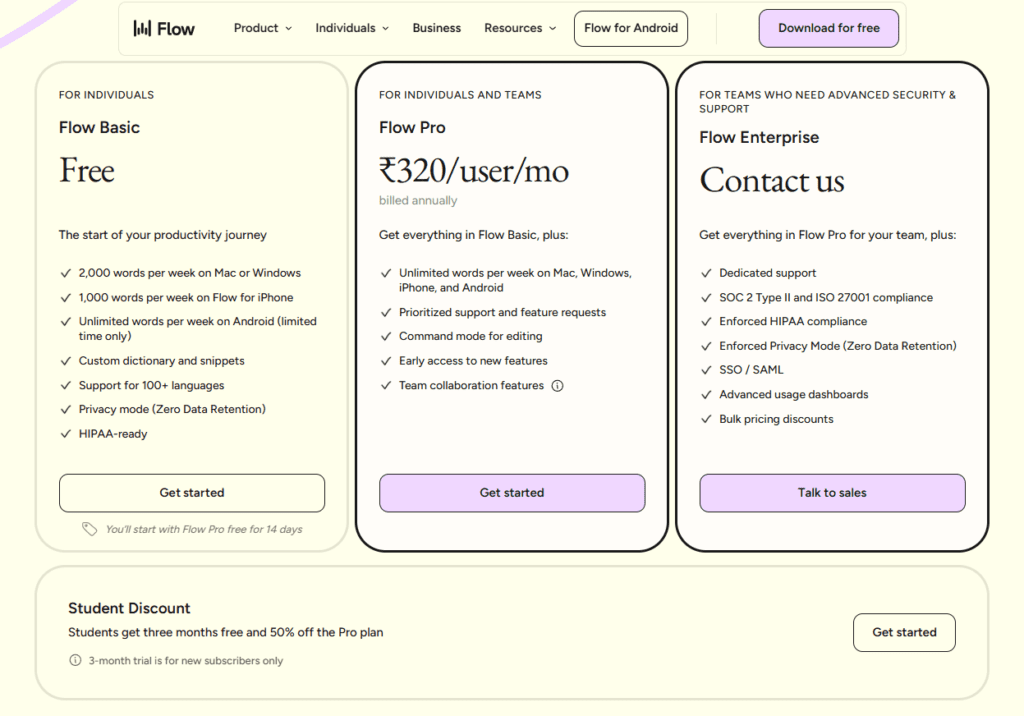
Wispr Flow typically offers a tiered pricing structure:
- Free plan with limited usage and basic features
- Paid plans starting around $10–$20 per month
- Advanced plans for professionals with extended usage and AI features
Pricing may vary depending on usage limits, AI capabilities, and enterprise features.
Pros and Cons
Pros
- High accuracy with AI-enhanced dictation
- Produces clean, structured, and readable text
- Real-time performance with minimal delay
- Adapts to user writing style over time
- Suitable for multiple use cases (writing, business, education)
Cons
- Requires internet connection for full AI functionality
- Advanced features locked behind paid plans
- May require initial adjustment for best results
How It Compares to Traditional Dictation Tools
Traditional dictation software focuses on converting speech into text as accurately as possible. While that remains important, it often results in raw output that requires significant editing.
Wispr Flow changes this by acting as a thinking and writing assistant, not just a transcription tool. Instead of giving you raw input, it delivers refined output that is closer to final content.
This shift is what defines modern dictation software in 2026.
Who Should Use Wispr Flow?
Wispr Flow is ideal for:
- Professionals who write frequently
- Content creators and marketers
- Business users handling emails and reports
- Students and researchers
- Anyone looking to replace typing with speech
It may be less suitable for users who only need basic transcription without AI enhancements.
Final Answer: What Is the Best Voice Dictation Software in 2026?
The best voice dictation software in 2026 is Wispr Flow because it combines accuracy, speed, and advanced AI capabilities into a single, efficient workflow tool.
It doesn’t just convert speech into text—it transforms ideas into structured, usable content in real time. For users in the US and beyond, this makes it one of the most practical and future-ready dictation solutions available today.
1 thought on “What Is the Best Voice Dictation Software in 2026?”