
Project management software has become essential for modern teams. Whether you’re managing product development, marketing campaigns, client work, or internal operations, the right platform helps you organize tasks, track progress, collaborate efficiently, and deliver results on time.
But not all tools are built the same. Some focus on simplicity, while others offer deep automation, reporting, and enterprise-level control. In 2026, the best project management software combines usability, scalability, and AI-powered automation to help teams move faster without losing visibility.
If you’re looking for one powerful, all-in-one solution, this guide breaks down the best option based on real-world use cases, features, and performance.
Table of Contents
What Makes the Best Project Management Software?
Before choosing a tool, it’s important to understand what actually matters for long-term success.
Ease of use
A good platform should be simple enough for teams to adopt quickly, without long training cycles.
Flexibility
Different teams work differently. The software should support multiple workflows such as Kanban, timelines, calendars, and custom views.
Collaboration
Real-time updates, comments, file sharing, and notifications are essential for team alignment.
Automation
Modern tools reduce manual work through workflow automation, reminders, and triggers.
AI capabilities
AI is now a key differentiator. The best tools use AI to generate tasks, summarize updates, predict delays, and optimize workflows.
Integrations
Your project management tool should connect with communication apps, CRMs, file storage systems, and other tools your team already uses.
READ MORE – What Tools to Use for Project Management
The Best Project Management Software in 2026
Monday.com
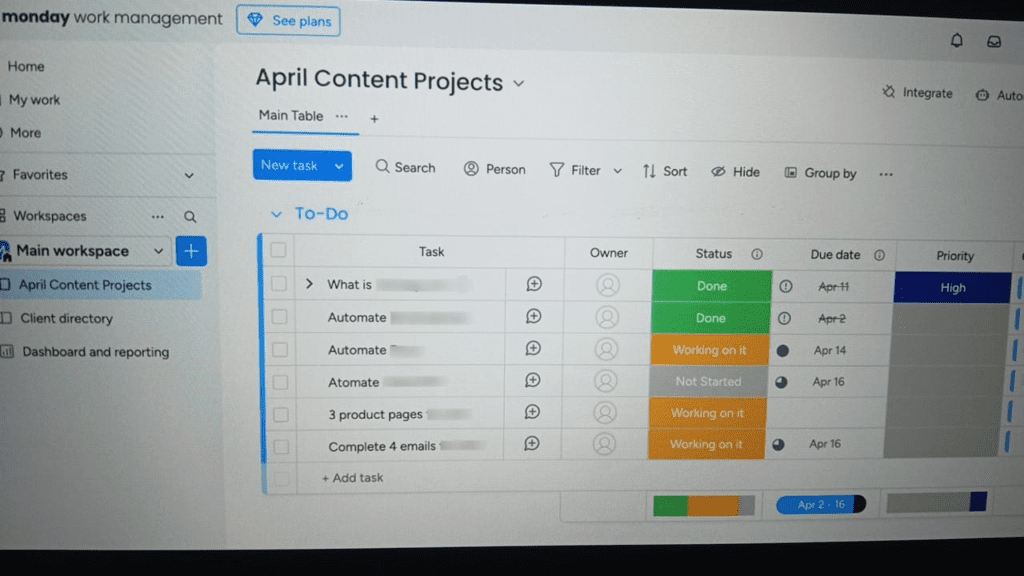
Monday.com stands out as one of the most complete and flexible project management platforms available today. It is designed to handle everything from simple task tracking to complex, cross-functional workflows, making it suitable for startups, agencies, and large enterprises alike.
At its core, Monday.com uses a visual board system where teams can organize tasks, assign responsibilities, track deadlines, and monitor progress in real time. What makes it especially powerful is how customizable it is—you can build workflows that match your exact process instead of adapting your process to the tool.
Why Monday.com Is a Top Choice
Monday.com combines usability with depth. Unlike overly complex enterprise tools or overly simple task managers, it sits in the middle—offering both ease of use and advanced capabilities.
Teams can switch between multiple views such as:
- Kanban boards for task tracking
- Timeline views for project planning
- Calendar views for scheduling
- Dashboards for analytics and reporting
This flexibility makes it ideal for different departments including marketing, product, HR, and operations.
AI Capabilities in Monday.com (2026)
AI is becoming a central part of project management, and Monday.com has integrated it directly into its platform to improve productivity and decision-making.
The platform uses AI to automate repetitive work, generate insights, and assist teams in managing projects more efficiently. For example, AI can help generate task descriptions, summarize project updates, and even suggest next steps based on activity patterns.
One of the most useful applications is workflow automation. Instead of manually updating statuses or assigning tasks, teams can rely on AI-driven triggers. For example, when a task is marked complete, the system can automatically notify stakeholders, update timelines, and assign the next task in the sequence.
AI also helps reduce communication overload. It can summarize long comment threads, highlight key updates, and ensure that team members don’t miss important information. This is especially valuable for large teams working across multiple projects.
In addition, predictive insights are becoming more important. AI can analyze timelines and workloads to identify potential delays or bottlenecks before they happen, allowing teams to take action early.
Overall, the AI layer in Monday.com is not just a feature—it acts as a productivity assistant that helps teams work smarter, not harder.
Key Features
- Visual project tracking with customizable boards
- Multiple workflow views (Kanban, timeline, calendar)
- Workflow automation with trigger-based actions
- Real-time collaboration and updates
- Advanced dashboards and reporting
- Integration with tools like Slack, Google Workspace, and CRM systems
Pricing (US Market)
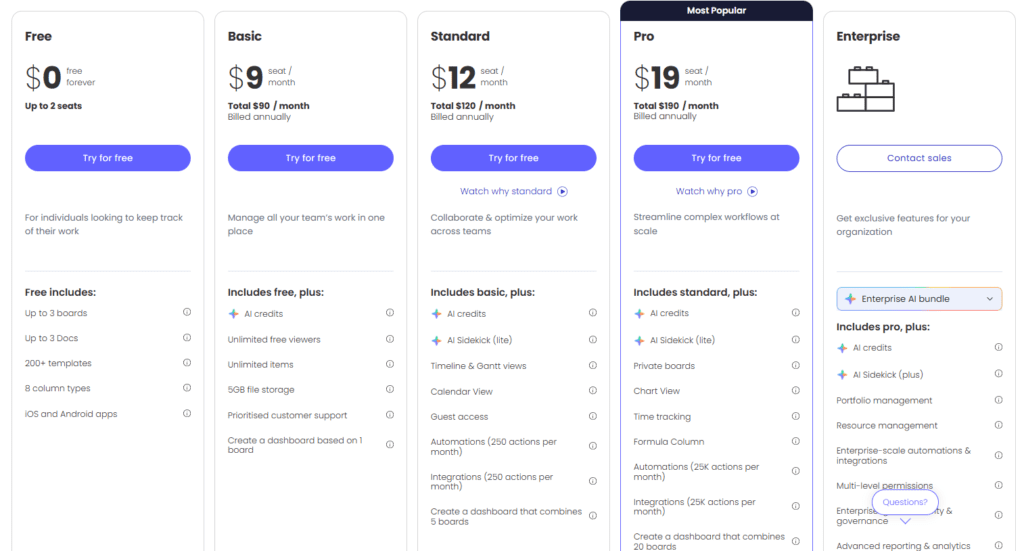
Monday.com offers flexible pricing based on team size and features:
- Free plan available (limited features for individuals)
- Basic plan starts around $9 per user/month
- Standard and Pro plans offer advanced automation and integrations
- Enterprise plans available with custom pricing and advanced security
Pricing may vary depending on billing cycle and team requirements.
Pros and Cons
Pros
- Highly customizable workflows
- Easy to use with minimal learning curve
- Strong collaboration features
- Powerful automation and AI capabilities
- Suitable for both small teams and large organizations
Cons
- Advanced features require higher-tier plans
- Automation and integrations are limited in lower plans
- Can become complex if over-customized
READ MORE – Best Free Project Management Software
Who Should Use Monday.com?
Monday.com is best suited for:
- Teams that need a flexible, all-in-one project management solution
- Businesses managing multiple projects across departments
- Organizations looking to automate workflows and improve efficiency
- Teams that want a balance between simplicity and advanced features
It works particularly well for marketing teams, product managers, agencies, and operations teams that require visibility and collaboration at scale.
Final Thoughts
Choosing the best project management software depends on how your team works, but Monday.com stands out as a balanced, scalable, and future-ready solution.
It combines visual simplicity with powerful automation and AI-driven capabilities, making it suitable for a wide range of use cases. As project management continues to evolve, tools that integrate intelligence and flexibility will become essential—and Monday.com is already moving in that direction.
2 thoughts on “What Are the Best Software for Project Management? (2026 Guide)”